Introduction
AI Self-Service Help Portals are intelligent platforms that allow customers and employees to access support information independently. They leverage AI to answer queries, guide workflows, provide knowledge articles, and resolve common issues without human intervention.
These portals are increasingly important as organizations scale customer support, reduce operational costs, and improve service availability. Advanced AI capabilities enable real-time problem resolution, multilingual support, and personalized experiences.
Real-world use cases
- Customer self-service: Automated answers for product or service questions.
- IT help desk portals: Support employees with troubleshooting guides and knowledge articles.
- Onboarding assistance: Guide new users or employees through structured tutorials.
- FAQ automation: Generate dynamic FAQs from support tickets and chat logs.
- Multichannel integration: Provide help across web, mobile apps, and chat interfaces.
- Incident triage: AI suggests relevant solutions or escalation pathways based on user input.
Evaluation Criteria for Buyers
- Query response accuracy
- Multimodal support: text, voice, chat
- Integration with CRM, ITSM, and ticketing systems
- Knowledge base auto-updates and versioning
- Customization and branding options
- User engagement and analytics reporting
- Security and privacy controls
- AI reliability and evaluation
- Guardrails and content moderation
- Scalability for enterprise or SMB usage
- Multilingual capabilities
- Observability: tracing, token/cost metrics
Best for: Enterprises, SMBs, SaaS companies, IT teams, and customer support organizations.
Not ideal for: Companies with minimal support queries or those relying entirely on manual support workflows.
What’s Changed in AI Self-Service Help Portals
- Agentic workflows streamline content updates and query handling.
- Tool-calling enables direct integration with CRM and ITSM platforms.
- Multimodal inputs allow text, voice, and document queries.
- Automated evaluation and testing reduce hallucinations and improve answer accuracy.
- Guardrails enforce safe content and prevent policy violations.
- Enterprise privacy ensures data residency, retention, and compliance.
- Cost and latency optimizations with BYO model support.
- Observability dashboards provide tracing, token, and latency metrics.
- Governance ensures auditability, versioning, and compliance adherence.
- AI analytics monitor user engagement and portal effectiveness.
- Personalized recommendations enhance self-service adoption.
Quick Buyer Checklist
- Data privacy & retention compliance
- Model choice: hosted, BYO, or open-source
- RAG/connectors for CRM or ITSM systems
- Evaluation & testing: prompt testing, regression, human review
- Guardrails & policy enforcement
- Latency & cost monitoring
- Auditability & admin controls
- Vendor lock-in risk assessment
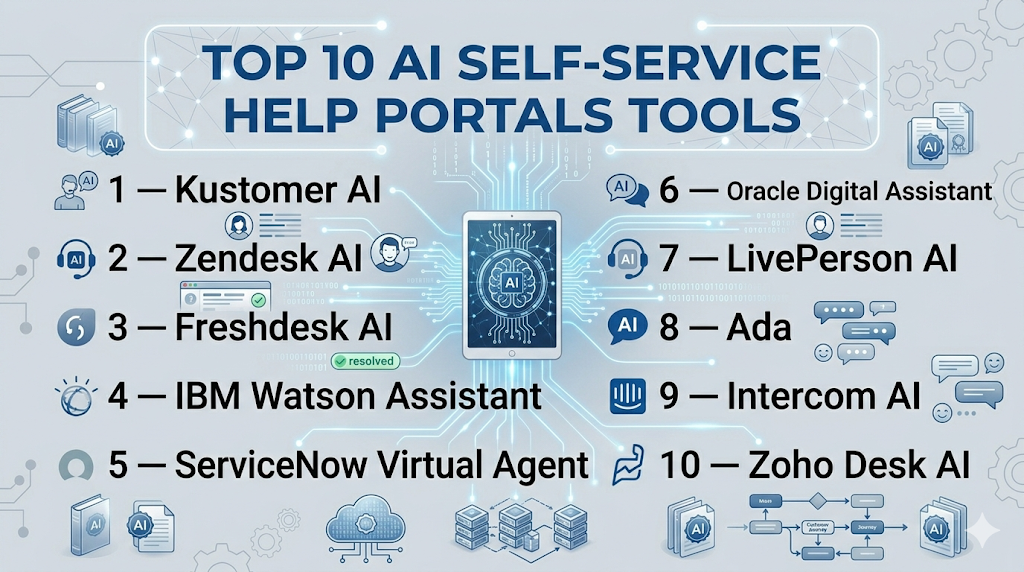
Top 10 AI Self-Service Help Portals Tools
1 — Kustomer AI
One-line verdict: Best for enterprises needing intelligent customer self-service with unified CRM integration.
Short description: Kustomer AI automates support queries, integrates CRM data, and provides knowledge-driven guidance for customers.
Standout Capabilities
- Intelligent query resolution
- Multichannel support (chat, email, web)
- Context-aware recommendations
- Knowledge base auto-updates
- Analytics dashboards
AI-Specific Depth
- Model support: Proprietary + BYO
- RAG / knowledge integration: CRM, ticketing systems
- Evaluation: Regression tests, human review
- Guardrails: Policy enforcement
- Observability: Token usage, latency metrics
Pros
- High-quality automated responses
- Reduces support costs
- CRM integrated insights
Cons
- Complex setup
- Expensive for SMBs
- Limited open-source options
Security & Compliance
SSO/SAML, RBAC, audit logs, encryption; Certifications: Not publicly stated
Deployment & Platforms
Web, Cloud
Integrations & Ecosystem
Salesforce, Zendesk, APIs, SDKs
Pricing Model
Tiered subscription
Best-Fit Scenarios
- Enterprise self-service portal
- Customer support automation
- Knowledge-driven query resolution
2 — Zendesk AI
One-line verdict: Suitable for SMBs and mid-market companies seeking automated FAQ and help desk capabilities.
Short description: Zendesk AI powers self-service help centers, ticket deflection, and dynamic FAQ generation for support teams.
Standout Capabilities
- AI-powered FAQ suggestions
- Ticket deflection automation
- Multichannel support (chat, web, email)
- Knowledge base integration
- Analytics for user interactions
AI-Specific Depth
- Model support: Proprietary
- RAG / knowledge integration: Zendesk Guide, internal KB
- Evaluation: A/B testing, human review
- Guardrails: Content moderation
- Observability: Latency and usage metrics
Pros
- Easy deployment
- Reduces ticket load
- Supports SMBs effectively
Cons
- Limited enterprise-scale features
- Proprietary model only
- Limited advanced analytics
Security & Compliance
SSO/SAML, audit logs; Certifications: Not publicly stated
Deployment & Platforms
Web, Cloud
Integrations & Ecosystem
Zendesk Suite, APIs, Slack, Salesforce
Pricing Model
Tiered subscription
Best-Fit Scenarios
- SMB support portals
- FAQ automation
- Ticket deflection
3 — Freshdesk AI
One-line verdict: Ideal for companies needing AI-driven multi-channel support with real-time analytics.
Short description: Freshdesk AI automates self-service, delivers contextual knowledge articles, and provides analytics to improve portal adoption.
Standout Capabilities
- Multi-channel AI support
- Context-aware knowledge suggestions
- Real-time analytics
- Ticket deflection
- Knowledge base auto-generation
AI-Specific Depth
- Model support: Proprietary + BYO
- RAG / knowledge integration: CRM, internal KB
- Evaluation: Continuous monitoring
- Guardrails: Policy enforcement, injection prevention
- Observability: Tracing, token/cost metrics
Pros
- Real-time AI insights
- Reduces support load
- Customizable workflows
Cons
- Complexity in enterprise deployment
- Some features require paid tiers
- BYO integration limited
Security & Compliance
SSO/SAML, RBAC, audit logs; Certifications: Not publicly stated
Deployment & Platforms
Web, Cloud
Integrations & Ecosystem
Slack, CRM, Freshdesk Suite, APIs
Pricing Model
Tiered subscription
Best-Fit Scenarios
- Multi-channel support portals
- Self-service automation
- Knowledge-driven insights
4 — IBM Watson Assistant
One-line verdict: Best for enterprises needing AI-powered self-service with advanced NLP and multi-language support.
Short description: Watson Assistant powers intelligent help portals, conversational AI, and contextual recommendations for customer and employee self-service.
Standout Capabilities
- Conversational AI
- Multi-language support
- Context-aware responses
- Knowledge base integration
- Analytics & insights
AI-Specific Depth
- Model support: Proprietary
- RAG / knowledge integration: CRM, internal KB
- Evaluation: Continuous QA, human review
- Guardrails: Policy enforcement
- Observability: Latency and usage metrics
Pros
- Enterprise-grade NLP
- Scalable AI help portals
- Advanced analytics
Cons
- High cost for SMBs
- Requires technical setup
- Proprietary model only
Security & Compliance
SSO/SAML, RBAC, audit logs; Certifications: Not publicly stated
Deployment & Platforms
Web, Cloud, Hybrid
Integrations & Ecosystem
IBM Cloud, Slack, CRM systems, APIs
Pricing Model
Tiered enterprise pricing
Best-Fit Scenarios
- Global enterprise help portals
- Multilingual self-service
- AI-driven support automation
5 — ServiceNow Virtual Agent
One-line verdict: Ideal for mid-market and enterprise IT support with AI-driven workflows.
Short description: Automates IT and employee helpdesk queries using AI, providing guided workflows and self-service knowledge articles.
Standout Capabilities
- AI-driven ticket resolution
- Guided workflows
- Multi-channel support
- Knowledge base integration
- Analytics dashboards
AI-Specific Depth
- Model support: Proprietary
- RAG / knowledge integration: ServiceNow KB
- Evaluation: Continuous QA
- Guardrails: Policy enforcement
- Observability: Token and latency metrics
Pros
- Reduces IT workload
- Multi-channel automation
- Enterprise workflow integration
Cons
- Expensive for small teams
- Requires technical knowledge
- Proprietary model
Security & Compliance
SSO/SAML, RBAC, audit logs; Certifications: Not publicly stated
Deployment & Platforms
Web, Cloud, Hybrid
Integrations & Ecosystem
ServiceNow apps, Slack, APIs, CRM connectors
Pricing Model
Tiered subscription
Best-Fit Scenarios
- IT helpdesk automation
- Employee self-service
- Workflow-guided support
6 — Oracle Digital Assistant
One-line verdict: Best for enterprises needing conversational AI integrated with ERP and support systems.
Short description: Provides AI-driven self-service portals with natural language understanding and contextual knowledge recommendations.
Standout Capabilities
- Conversational AI
- ERP and CRM integration
- Knowledge base access
- Analytics and reporting
- Multilingual support
AI-Specific Depth
- Model support: Proprietary
- RAG / knowledge integration: ERP, internal KB
- Evaluation: Human-in-the-loop QA
- Guardrails: Policy enforcement
- Observability: Usage and latency metrics
Pros
- ERP integrated AI
- Scalable for large organizations
- Advanced analytics
Cons
- High learning curve
- Expensive for SMBs
- Proprietary
Security & Compliance
SSO/SAML, RBAC, audit logs; Certifications: Not publicly stated
Deployment & Platforms
Web, Cloud
Integrations & Ecosystem
Oracle apps, Slack, APIs, CRM systems
Pricing Model
Tiered subscription
Best-Fit Scenarios
- Enterprise self-service
- ERP integrated support
- Knowledge-driven AI workflows
7 — LivePerson AI
One-line verdict: Suitable for customer engagement portals needing AI-driven messaging and self-service.
Short description: Automates chat and messaging-based self-service, providing knowledge articles, conversational guidance, and escalation when needed.
Standout Capabilities
- AI chat automation
- Messaging-based self-service
- Knowledge base integration
- Escalation workflows
- Real-time analytics
AI-Specific Depth
- Model support: Proprietary
- RAG / knowledge integration: CRM, KB
- Evaluation: Prompt testing, human review
- Guardrails: Policy enforcement
- Observability: Token/latency metrics
Pros
- Reduces agent workload
- Engages customers proactively
- Multi-channel support
Cons
- Proprietary
- Limited offline analytics
- Cost for small teams
Security & Compliance
SSO/SAML, RBAC; Certifications: Not publicly stated
Deployment & Platforms
Web, Cloud
Integrations & Ecosystem
Slack, CRM, APIs
Pricing Model
Tiered subscription
Best-Fit Scenarios
- Messaging-based self-service
- Customer engagement
- Chat automation
8 — Ada
One-line verdict: Best for SMBs and enterprises automating AI-driven support chat and self-service workflows.
Short description: Ada provides AI chatbots that deliver contextual guidance, automated responses, and dynamic knowledge articles.
Standout Capabilities
- AI chatbots
- Dynamic FAQ updates
- Multi-channel support
- Context-aware suggestions
- Analytics dashboards
AI-Specific Depth
- Model support: Proprietary + BYO
- RAG / knowledge integration: Internal KB, CRM
- Evaluation: Human review
- Guardrails: Policy enforcement
- Observability: Latency and token metrics
Pros
- Quick deployment
- Reduces manual support
- Analytics-ready
Cons
- Proprietary
- Limited integrations outside CRM
- Learning curve
Security & Compliance
SSO/SAML, audit logs; Certifications: Not publicly stated
Deployment & Platforms
Web, Cloud
Integrations & Ecosystem
Zendesk, Salesforce, Slack, APIs
Pricing Model
Tiered subscription
Best-Fit Scenarios
- Customer self-service
- Chatbot automation
- SMB support portals
9 — Intercom AI
One-line verdict: Ideal for SaaS companies needing AI chat and self-service integrated with customer lifecycle tools.
Short description: Intercom AI provides conversational self-service, dynamic FAQs, and contextual guidance across web, mobile, and email.
Standout Capabilities
- Conversational AI
- Dynamic FAQ updates
- Multi-channel integration
- Real-time analytics
- Escalation workflows
AI-Specific Depth
- Model support: Proprietary
- RAG / knowledge integration: CRM, internal KB
- Evaluation: Human review
- Guardrails: Policy enforcement
- Observability: Token & latency monitoring
Pros
- SaaS-focused
- Reduces support tickets
- Real-time guidance
Cons
- Proprietary
- Limited BYO options
- Cost scales with usage
Security & Compliance
SSO/SAML, audit logs; Certifications: Not publicly stated
Deployment & Platforms
Web, Cloud, iOS, Android
Integrations & Ecosystem
Salesforce, Slack, APIs, CRM
Pricing Model
Tiered subscription
Best-Fit Scenarios
- SaaS self-service
- Chat automation
- Knowledge-guided support
10 — Zoho Desk AI
One-line verdict: Suitable for SMBs and mid-market companies needing AI-assisted self-service and support automation.
Short description: Automates FAQs, provides contextual AI guidance, and integrates with Zoho CRM for complete self-service portals.
Standout Capabilities
- AI-driven FAQ automation
- Knowledge base suggestions
- Ticket deflection
- Multichannel support
- Analytics dashboards
AI-Specific Depth
- Model support: Proprietary
- RAG / knowledge integration: Zoho CRM, internal KB
- Evaluation: Human-in-the-loop QA
- Guardrails: Content policy enforcement
- Observability: Token and latency metrics
Pros
- SMB-friendly
- Reduces ticket load
- Integrated with Zoho ecosystem
Cons
- Limited enterprise features
- Proprietary model
- Fewer integrations outside Zoho
Security & Compliance
SSO/SAML, audit logs; Certifications: Not publicly stated
Deployment & Platforms
Web, Cloud
Integrations & Ecosystem
Zoho CRM, Slack, APIs
Pricing Model
Tiered subscription
Best-Fit Scenarios
- SMB self-service portals
- FAQ automation
- Ticket deflection
Comparison Table
| Tool Name | Best For | Deployment | Model Flexibility | Strength | Watch-Out | Public Rating |
|---|---|---|---|---|---|---|
| Kustomer AI | Enterprise self-service | Cloud | Proprietary/BYO | Unified CRM integration | Expensive for SMBs | N/A |
| Zendesk AI | SMB/mid-market support | Cloud | Proprietary | FAQ automation | Limited enterprise features | N/A |
| Freshdesk AI | Multi-channel support | Cloud | Proprietary + BYO | Context-aware articles | Complex enterprise deployment | N/A |
| IBM Watson Assistant | Enterprise multilingual | Cloud/Hybrid | Proprietary | Advanced NLP | High cost | N/A |
| ServiceNow Virtual Agent | IT helpdesk | Cloud/Hybrid | Proprietary | Workflow automation | Technical setup required | N/A |
| Oracle Digital Assistant | ERP-integrated support | Cloud | Proprietary | Contextual guidance | Steep learning curve | N/A |
| LivePerson AI | Customer engagement portals | Cloud | Proprietary | Messaging automation | Proprietary | N/A |
| Ada | SMB/enterprise chat | Cloud | Proprietary + BYO | Chatbot automation | Limited integrations | N/A |
| Intercom AI | SaaS self-service | Web/Cloud | Proprietary | Dynamic FAQs | Cost scales with usage | N/A |
| Zoho Desk AI | SMB self-service | Web/Cloud | Proprietary | Integrated support | Limited enterprise features | N/A |
Scoring & Evaluation (Transparent Rubric)
Scoring is comparative; each tool is evaluated across core features, AI reliability, guardrails, integrations, ease, performance/cost, security/admin, and support. Weighted total calculated (0–10).
| Tool | Core | Reliability/Eval | Guardrails | Integrations | Ease | Perf/Cost | Security/Admin | Support | Weighted Total |
|---|---|---|---|---|---|---|---|---|---|
| Kustomer AI | 9 | 8 | 8 | 8 | 7 | 7 | 8 | 7 | 8.0 |
| Zendesk AI | 8 | 7 | 7 | 7 | 8 | 8 | 7 | 7 | 7.4 |
| Freshdesk AI | 8 | 8 | 7 | 7 | 7 | 7 | 7 | 6 | 7.3 |
| IBM Watson Assistant | 9 | 8 | 8 | 8 | 6 | 6 | 8 | 6 | 7.6 |
| ServiceNow Virtual Agent | 8 | 7 | 8 | 7 | 6 | 7 | 7 | 6 | 7.1 |
| Oracle Digital Assistant | 8 | 8 | 7 | 7 | 6 | 6 | 7 | 6 | 6.9 |
| LivePerson AI | 7 | 7 | 7 | 6 | 7 | 7 | 7 | 6 | 6.7 |
| Ada | 7 | 7 | 7 | 6 | 8 | 7 | 7 | 6 | 6.8 |
| Intercom AI | 8 | 7 | 7 | 7 | 7 | 7 | 7 | 6 | 7.0 |
| Zoho Desk AI | 7 | 7 | 7 | 6 | 8 | 7 | 7 | 6 | 6.8 |
Top 3 for Enterprise: Kustomer AI, IBM Watson Assistant, ServiceNow Virtual Agent
Top 3 for SMB: Zendesk AI, Ada, Zoho Desk AI
Top 3 for Developers: Freshdesk AI, Intercom AI, Oracle Digital Assistant
Which AI Self-Service Help Portal Tool Is Right for You?
Solo / Freelancer
For individual consultants or small teams, Zoho Desk AI or Ada provide quick deployment and low-cost self-service capabilities. They allow easy configuration of FAQs and basic workflow automation without heavy IT involvement.
SMB
Zendesk AI, Ada, and Zoho Desk AI are optimal for SMBs looking to automate support and FAQ management. They reduce ticket volume, improve self-service efficiency, and provide multilingual support with minimal setup.
Mid-Market
Freshdesk AI and Intercom AI are suitable for mid-market companies that require multi-channel support and dynamic FAQ content. They support more complex workflows, analytics dashboards, and integration with internal CRMs or ticketing systems.
Enterprise
Kustomer AI, IBM Watson Assistant, and ServiceNow Virtual Agent scale for large organizations. They provide advanced NLP, AI-driven workflow automation, audit-ready versioning, and deep integration with enterprise CRMs and ITSM platforms.
Regulated industries (finance/healthcare/public sector)
ServiceNow Virtual Agent and IBM Watson Assistant offer audit trails, compliance checks, and guardrails for highly regulated industries.
Budget vs Premium
SMBs and startups may start with Zoho Desk AI or Ada for cost-effective deployment. Enterprises needing full-scale analytics, governance, and multi-department integration benefit from Kustomer AI or IBM Watson Assistant.
Build vs Buy
Technical teams with developer resources can use Freshdesk AI or Intercom AI with open-source connectors and BYO models. Enterprises typically adopt fully managed proprietary platforms for integrated workflows and security compliance.
Implementation Playbook (30 / 60 / 90 Days)
30 Days – Pilot Phase:
- Identify a small content subset for AI self-service deployment
- Define success metrics: resolution rate, adoption, and satisfaction
- Integrate AI with core systems (CRM, ITSM, ticketing)
- Validate content accuracy and quality
- Set up dashboards for observability, token usage, and latency
- Train pilot team on workflow usage and content review
60 Days – Expansion Phase:
- Expand content sources: FAQs, manuals, chat logs, support tickets
- Implement evaluation workflows: prompt testing, regression tests, human review
- Introduce guardrails and content policy enforcement
- Activate versioning and audit logging
- Integrate additional channels (mobile, web, chat apps)
- Extend team training and onboarding
90 Days – Scale Phase:
- Deploy AI self-service across all departments
- Monitor dashboards for performance, latency, and cost
- Optimize model routing and AI workflow efficiency
- Conduct regular human-in-the-loop review for critical content
- Enable multilingual and multimodal support
- Automate notifications and content updates for knowledge managers
- Audit compliance and security adherence
- Train employees on feedback collection and portal improvement
AI-specific tasks:
- Evaluation harness configuration
- Prompt/version control for content updates
- Red-teaming and testing guardrails
- Incident response workflow
- Content audit and reporting
Common Mistakes & How to Avoid Them
- Ignoring prompt injection risks
- No evaluation framework for AI outputs
- Unmanaged data retention and privacy
- Lack of observability dashboards
- Unexpected operational costs
- Over-automation without human review
- Vendor lock-in without abstraction
- Missing content audits
- Poor workflow integration
- Weak guardrails
- Ignoring multilingual/multimodal content
- Unsupported AI models
- Insufficient employee training
- Scaling without governance
FAQs
- How do AI self-service portals protect privacy? Most platforms implement SSO, RBAC, encryption, and retention controls to secure user and company data.
- Can I bring my own AI model? Some tools allow BYO models or open-source integrations, but integration capabilities vary.
- Are these portals suitable for small teams? Tools like Zoho Desk AI and Ada are SMB-friendly with easy deployment.
- How is content quality evaluated? Evaluation includes prompt tests, regression checks, human review, and continuous monitoring.
- Do guardrails prevent incorrect responses? Yes, AI guardrails enforce content policies and prevent prompt injection or unsafe outputs.
- Can these integrate with CRM or ITSM systems? Yes, platforms integrate with CRMs like Salesforce and ITSM tools like ServiceNow.
- How are latency and cost managed? Observability dashboards monitor token usage, latency, and AI execution costs; tiered plans help control budgets.
- Are self-hosted deployments available? Some tools support cloud, hybrid, or self-hosted options depending on vendor and organization requirements.
- Do they support multiple languages? Yes, many platforms provide multilingual support for global users.
- Can FAQs be generated automatically from tickets? Yes, AI can analyze tickets and generate dynamic FAQs for self-service.
- How scalable are these tools for enterprises? Enterprise-grade portals like Kustomer AI and Watson Assistant scale with audit-ready workflows.
- What pricing models are typical? Usually tiered subscriptions or usage-based plans; exact prices vary per vendor.
Conclusion
AI Self-Service Help Portals are critical in 2026 for organizations seeking efficient, accurate, and scalable support. Enterprises benefit from Kustomer AI, IBM Watson Assistant, and ServiceNow Virtual Agent for robust, multi-channel self-service and compliance-ready workflows. SMBs can leverage Zendesk AI, Ada, or Zoho Desk AI for cost-effective deployment and rapid FAQ automation. Mid-market teams can adopt Freshdesk AI or Intercom AI for multi-source knowledge integration and dynamic support content.
Next steps:
- Shortlist: Select 2–3 tools aligned with organizational size, workflow complexity, and compliance needs.
- Pilot: Test with a small content subset, measure adoption, accuracy, and latency.
- Verify & Scale: Validate guardrails, privacy, and observability; deploy across departments.
Great comparison of AI self-service support solutions for businesses and customer experience teams. The feature breakdowns were concise, clear, and highly practical.