Introduction
Document Ingestion & Chunking Pipelines are AI data processing workflows designed to collect, clean, transform, split, and prepare documents for modern artificial intelligence applications such as Retrieval-Augmented Generation (RAG), semantic search, AI assistants, and knowledge management systems.
Large Language Models (LLMs) cannot directly understand massive document collections. Document ingestion pipelines convert raw information into structured, searchable knowledge by processing files, extracting content, generating chunks, and preparing data for embedding and retrieval.
These pipelines help organizations process:
- PDFs
- Word documents
- Web pages
- Research papers
- Technical documentation
- Business records
- Knowledge base articles
- Database content
Document Ingestion & Chunking Pipelines are used by:
- AI engineers
- Data engineers
- MLOps teams
- Machine learning engineers
- Knowledge management teams
- Enterprise AI developers
Modern document processing platforms provide capabilities such as:
- Data connectors
- Document extraction
- OCR processing
- Text cleaning
- Intelligent chunking
- Metadata extraction
- Embedding preparation
- Pipeline automation
- Quality evaluation
- RAG integration
The goal of Document Ingestion & Chunking Pipelines is to transform unstructured information into high-quality AI-ready knowledge.
What Is Document Ingestion?
Document ingestion is the process of collecting, extracting, and preparing information from different sources so AI systems can process it.
A document ingestion pipeline performs tasks such as:
- Reading files
- Extracting text
- Cleaning content
- Preserving structure
- Adding metadata
- Preparing documents for indexing
Example:
A company has thousands of PDF manuals.
The ingestion pipeline:
- Uploads documents
- Extracts text
- Identifies sections
- Adds metadata
- Creates searchable content
What Is Document Chunking?
Document chunking is the process of dividing large documents into smaller sections called chunks.
LLMs have context limitations, so documents need to be broken into meaningful pieces.
Example:
Large document:
500-page technical manual
Chunking creates:
Chapter 1 - Installation
Chapter 2 - Configuration
Chapter 3 - Troubleshooting
Good chunking improves:
- Retrieval accuracy
- AI responses
- Search relevance
Why Organizations Need Document Ingestion & Chunking Pipelines
Modern AI applications depend on high-quality data.
Raw documents often contain:
- Unstructured text
- Tables
- Images
- Duplicate information
- Formatting issues
Without proper processing, AI systems may produce:
- Incorrect answers
- Missing context
- Poor retrieval results
Document ingestion pipelines help organizations:
- Prepare AI-ready data
- Improve RAG performance
- Build reliable knowledge systems
- Automate document processing
How Document Ingestion & Chunking Pipelines Work
Step 1: Data Collection
Sources include:
- Cloud storage
- Websites
- Databases
- File systems
- Enterprise applications
Step 2: Document Extraction
The system extracts:
- Text
- Tables
- Metadata
- Images
Step 3: Content Cleaning
Removes:
- Duplicate content
- Formatting errors
- Unnecessary information
Step 4: Document Chunking
Content is divided into:
- Paragraph chunks
- Semantic sections
- Token-based segments
Step 5: Metadata Enrichment
Adds:
- Document title
- Source
- Category
- Permissions
- Date
Step 6: Embedding Preparation
Documents are prepared for:
- Embedding generation
- Vector indexing
Types of Document Chunking Strategies
Fixed-Length Chunking
Splits documents by:
- Character count
- Token count
Advantages:
- Simple
- Fast
Limitations:
- May break context
Semantic Chunking
Splits content based on:
- Meaning
- Topics
- Sections
Advantages:
- Better retrieval quality
Limitations:
- Requires AI models
Recursive Chunking
Uses:
- Paragraphs
- Sentences
- Sections
Advantages:
- Maintains structure
Structure-Based Chunking
Uses:
- Headings
- Chapters
- Document hierarchy
Advantages:
- Preserves meaning
Key Components of Document Processing Pipelines
Data Connectors
Connect:
- Files
- Websites
- Databases
- Applications
Document Parsers
Extract:
- Text
- Tables
- Metadata
OCR Engines
Process:
- Scanned documents
- Images
Chunking Engines
Manage:
- Splitting strategies
- Context preservation
Metadata Systems
Store:
- Source information
- Permissions
- Attributes
Pipeline Orchestration
Handles:
- Automation
- Scheduling
- Monitoring
Key Features of Document Ingestion Platforms
Multi-Format Support
Supports:
- DOCX
- HTML
- CSV
- Markdown
Intelligent Extraction
Handles:
- Complex documents
- Tables
- Images
Advanced Chunking
Supports:
- Semantic splitting
- Context preservation
Metadata Management
Improves:
- Search filtering
- Access control
Automation
Provides:
- Scheduled ingestion
- Continuous updates
AI Integration
Connects with:
- LLMs
- Embedding models
- Vector databases
Common Use Cases
Enterprise Knowledge Assistants
Processing:
- Company documents
- Internal policies
Customer Support AI
Managing:
- Product documents
- Support articles
Legal AI
Processing:
- Contracts
- Regulations
- Case documents
Healthcare AI
Managing:
- Research papers
- Medical records
Education Platforms
Creating:
- Learning assistants
- Research tools
Software Documentation AI
Processing:
- API documentation
- Developer guides
Why Document Ingestion & Chunking Pipelines Matter
Better AI Accuracy
Clean data improves AI responses.
Improved Retrieval
Relevant chunks are easier to find.
Reduced Hallucinations
LLMs receive better context.
Faster AI Development
Automated processing reduces manual work.
Scalable Knowledge Management
Organizations can manage large document collections.
Evaluation Criteria for Buyers
Data Source Support
Evaluate:
- Connectors
- File formats
- APIs
Extraction Quality
Consider:
- Text accuracy
- Table handling
- OCR support
Chunking Quality
Evaluate:
- Context preservation
- Retrieval performance
Scalability
Consider:
- Document volume
- Processing speed
AI Integration
Check support for:
- RAG frameworks
- Vector databases
- LLM platforms
Security
Evaluate:
- Data privacy
- Access controls
Key Trends
AI-Powered Document Understanding
AI is improving extraction accuracy.
Multimodal Document Processing
Pipelines now support:
- Text
- Images
- Tables
- Charts
Intelligent Chunking
AI models are creating better context-aware chunks.
Automated Knowledge Creation
Documents are becoming structured AI knowledge.
Enterprise RAG Growth
Document pipelines are becoming essential infrastructure.
Real-Time Document Updates
Organizations need continuously refreshed AI knowledge.
Methodology
The following Document Ingestion & Chunking Pipelines were evaluated based on:
- Extraction capabilities
- Chunking quality
- AI integration
- Scalability
- Automation
- Developer experience
- Enterprise readiness
- Security
- Performance
- Value
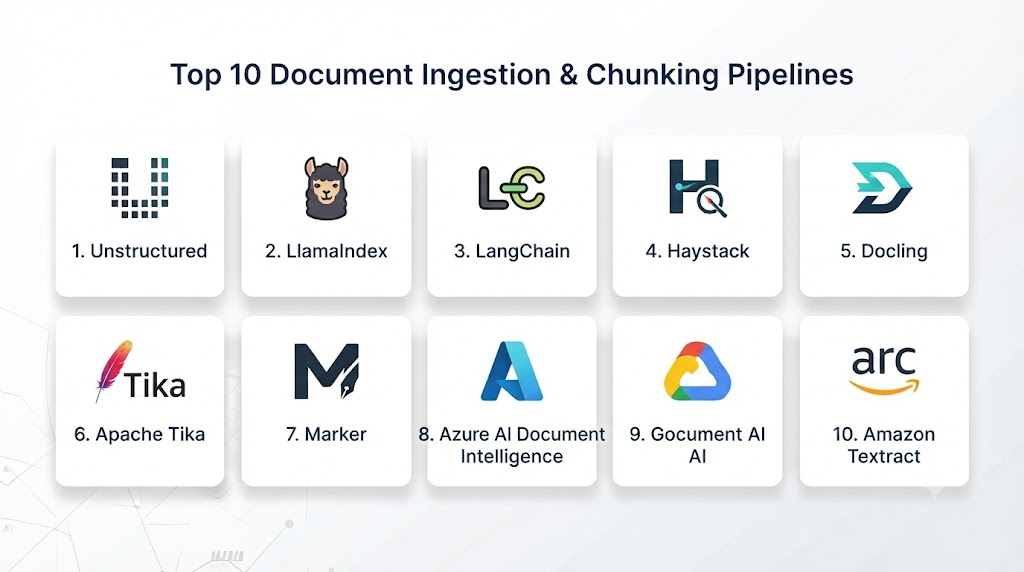
Top 10 Document Ingestion & Chunking Pipelines
1. LlamaIndex
LlamaIndex provides data frameworks for connecting documents with LLM applications.
Key Features
- Document loaders
- Data connectors
- Text splitting
- Metadata extraction
- Index creation
- Embedding preparation
- RAG pipelines
- Query optimization
- Vector database integration
- Evaluation support
Pros
- RAG focused
- Excellent data handling
- Flexible
- Large ecosystem
- Developer friendly
Cons
- Requires technical knowledge
- Advanced workflows need customization
2. LangChain
LangChain provides document processing workflows for AI applications.
Key Features
- Document loaders
- Text splitters
- Metadata handling
- Embedding integration
- Vector database support
- Retrieval chains
- LLM integration
- Agent workflows
- Pipeline development
- API support
Pros
- Large ecosystem
- Many integrations
- Flexible
- Strong community
Cons
- Can become complex
- Requires learning
3. Unstructured
Unstructured specializes in document extraction and preprocessing.
Key Features
- PDF extraction
- Document parsing
- OCR support
- Table extraction
- Document partitioning
- Metadata extraction
- AI pipeline integration
- Multiple formats
- Cleaning workflows
- Enterprise deployment
Pros
- Strong extraction
- Handles complex documents
- AI-ready processing
- Flexible
Cons
- Advanced features require paid plans
- Processing complexity
4. Haystack
Haystack provides open-source AI search and RAG pipelines.
Key Features
- Document processing
- Chunking pipelines
- Retrieval workflows
- Embedding support
- Vector integration
- Search pipelines
- Evaluation tools
- Deployment support
- Modular architecture
- API services
Pros
- Open source
- Enterprise friendly
- Flexible architecture
Cons
- Setup required
- Learning curve
5. Apache Tika
Apache Tika is a document extraction framework.
Key Features
- File parsing
- Metadata extraction
- Text extraction
- Multiple format support
- Enterprise document processing
- API access
- Java integration
- Content analysis
- Automation support
- Open-source framework
Pros
- Mature technology
- Supports many formats
- Free and open source
Cons
- Not AI-specific
- Requires additional AI components
6. Microsoft Azure AI Document Intelligence
Azure AI Document Intelligence provides cloud-based document processing.
Key Features
- Document extraction
- OCR
- Form processing
- Table extraction
- AI models
- Data analysis
- Cloud integration
- Security
- Automation
- Enterprise workflows
Pros
- Managed service
- Strong OCR
- Enterprise security
- Microsoft ecosystem
Cons
- Azure dependency
- Pricing complexity
7. Google Document AI
Google Document AI provides intelligent document processing.
Key Features
- OCR
- Document understanding
- Extraction models
- Classification
- Data processing
- AI integration
- Cloud scaling
- Enterprise security
- Workflow automation
- API access
Pros
- Strong AI capabilities
- Managed platform
- High extraction quality
Cons
- Google Cloud dependency
- Cost considerations
8. Amazon Textract
Amazon Textract provides automated document analysis.
Key Features
- OCR
- Text extraction
- Table detection
- Form analysis
- AWS integration
- Document workflows
- AI processing
- Security
- Scaling
- API access
Pros
- AWS integration
- Managed service
- Reliable extraction
Cons
- AWS dependency
- Limited customization
9. Databricks Mosaic AI
Databricks provides enterprise AI data preparation workflows.
Key Features
- Document processing
- Data pipelines
- AI workflows
- Vector preparation
- Governance
- Model integration
- Enterprise scaling
- Monitoring
- Data management
- RAG support
Pros
- Enterprise ready
- Strong data platform
- Governance support
Cons
- Premium pricing
- Platform complexity
10. Docling
Docling provides open-source document understanding capabilities.
Key Features
- Document conversion
- PDF processing
- Layout understanding
- Table extraction
- AI integration
- Structured output
- Document analysis
- Local deployment
- Developer tools
- Open-source framework
Pros
- Open source
- Modern document processing
- AI focused
- Flexible
Cons
- Growing ecosystem
- Requires technical setup
Comparison Table
| Tool Name | Best For | Platform(s) Supported | Deployment | Standout Feature | Public Rating |
|---|---|---|---|---|---|
| LlamaIndex | RAG pipelines | Cloud/Local | Flexible | Data framework | |
| LangChain | AI applications | Cloud/Local | Flexible | Integrations | |
| Unstructured | Document extraction | Cloud/Local | Flexible | Parsing quality | |
| Haystack | Search pipelines | Cloud/Local | Flexible | RAG workflows | |
| Apache Tika | File extraction | Local | Open source | Format support | |
| Azure Document Intelligence | Enterprise docs | Azure | Managed | OCR | |
| Google Document AI | AI extraction | GCP | Managed | Document understanding | |
| Amazon Textract | AWS processing | AWS | Managed | OCR workflows | |
| Mosaic AI | Enterprise AI | Cloud | Enterprise | Data governance | |
| Docling | Open-source processing | Local | Flexible | Document AI |
Which Document Ingestion Pipeline Is Right for You?
Choose LlamaIndex for RAG applications.
Choose LangChain for flexible AI workflows.
Choose Unstructured for advanced document extraction.
Choose Haystack for enterprise retrieval systems.
Choose Apache Tika for open-source parsing.
Choose Azure Document Intelligence for Microsoft environments.
Choose Google Document AI for Google Cloud.
Choose Amazon Textract for AWS workloads.
Choose Databricks Mosaic AI for enterprise AI platforms.
Choose Docling for open-source document AI.
Implementation Playbook
Phase 1: Collect Documents
- Identify data sources
- Connect storage systems
- Define permissions
Phase 2: Extract Content
- Parse documents
- Run OCR
- Clean information
Phase 3: Create Chunks
- Select chunking strategy
- Preserve context
- Add metadata
Phase 4: Prepare AI Retrieval
- Generate embeddings
- Store vectors
- Build indexes
Phase 5: Monitor Quality
- Test retrieval
- Improve chunks
- Update pipelines
Common Mistakes
- Poor chunk size selection
- Losing document context
- Ignoring metadata
- Weak extraction quality
- No document validation
- Manual processing
- Poor security controls
FAQs
1. What are Document Ingestion Pipelines?
They are workflows that collect and prepare documents for AI applications.
2. Why is document chunking important?
Chunking helps AI systems retrieve relevant information efficiently.
3. What is the best chunk size for RAG?
The ideal size depends on the document type and AI application.
4. Can document pipelines process PDFs?
Yes, most modern platforms support PDF processing.
5. Do these tools support OCR?
Many support OCR for scanned documents.
6. Are document pipelines used in RAG systems?
Yes, they prepare knowledge sources for retrieval.
7. Can pipelines process multiple formats?
Yes, many support documents, web pages, and databases.
8. How do chunking pipelines improve AI accuracy?
They provide better context to language models.
9. Are open-source document processing tools available?
Yes, LlamaIndex, LangChain, Apache Tika, and Docling provide open-source options.
10. What is the future of document ingestion?
AI-powered document understanding will become a key part of enterprise AI systems.
Conclusion
Document Ingestion & Chunking Pipelines are essential foundations for modern AI applications. They transform unstructured documents into high-quality, searchable knowledge that powers RAG systems, AI assistants, and enterprise search platforms.Tools such as LlamaIndex, LangChain, Unstructured, Haystack, Azure Document Intelligence, Google Document AI, and Amazon Textract help organizations build reliable AI data workflows.As Generative AI continues expanding, efficient document ingestion and intelligent chunking will become critical for creating accurate, scalable, and trustworthy AI applications.
The section on metadata enrichment caught my attention because metadata is sometimes overlooked during document processing. Information such as source, category, permissions, and date can improve filtering and access control during retrieval. This becomes especially important when building enterprise knowledge assistants with large document collections.