Introduction
Agent simulation and sandboxing tools are platforms designed to safely test, evaluate, and monitor AI agents before deploying them into real-world environments. In simple terms, they act like controlled “testing labs” where AI agents can interact with simulated systems, users, and workflows without risking real data, systems, or customers.
These tools have become essential as organizations move from simple chatbots to autonomous AI agents capable of executing tasks, calling APIs, and making decisions. With increased autonomy comes increased risk—hallucinations, prompt injection, unintended actions, and data leaks. Simulation and sandboxing tools help mitigate these risks by enabling controlled experimentation and continuous evaluation.
real world use cases include:
- Testing AI agents before production deployment
- Simulating user interactions and edge cases
- Evaluating agent reliability and hallucination rates
- Red-teaming for prompt injection and jailbreak attempts
- Validating workflows involving APIs and external tools
- Monitoring cost, latency, and performance in controlled environments
Key evaluation criteria buyers should consider:
- Simulation realism and flexibility
- Evaluation and testing frameworks
- Guardrails and safety mechanisms
- Observability and logging
- Model compatibility (multi-model/BYO)
- Integration with existing AI stacks
- Cost tracking and optimization
- Security and compliance features
- Deployment flexibility (cloud vs self-hosted)
- Ease of use and developer experience
Best for: AI engineers, ML teams, CTOs, and product teams building agent-based systems in startups, mid-market companies, and enterprises across SaaS, finance, healthcare, and e-commerce.
Not ideal for: Teams only using basic chatbots or static AI workflows. If you’re not deploying autonomous or semi-autonomous agents, simpler testing or monitoring tools may be sufficient.
What’s Changed in Agent Simulation & Sandboxing Tools
- Shift from prompt testing to full agent workflow simulation
- Built-in red-teaming for prompt injection and adversarial inputs
- Multimodal simulation (text, voice, images, APIs)
- Native support for agent tool-calling and function execution
- Continuous evaluation pipelines (not just one-time testing)
- Model routing and comparison inside simulations
- Stronger privacy controls (data isolation, retention policies)
- Integrated observability: traces, token usage, latency metrics
- Synthetic user generation for realistic testing scenarios
- Cost simulation before real-world deployment
- Governance layers for enterprise auditability
- Support for open-source and self-hosted LLMs
Quick Buyer Checklist (Scan-Friendly)
- Does it support multi-step agent workflows, not just prompts?
- Can you simulate real-world environments and APIs?
- Is there built-in evaluation (accuracy, hallucination, reliability)?
- Are guardrails included (prompt injection, jailbreak defense)?
- Does it offer observability (logs, traces, cost tracking)?
- Can you use your own models (BYO) or multiple models?
- Does it integrate with RAG systems or knowledge bases?
- Are there data privacy and retention controls?
- Does it support self-hosting or hybrid deployment?
- How easy is it to scale simulations and automate testing?
- Is there vendor lock-in risk, or can you export workflows?
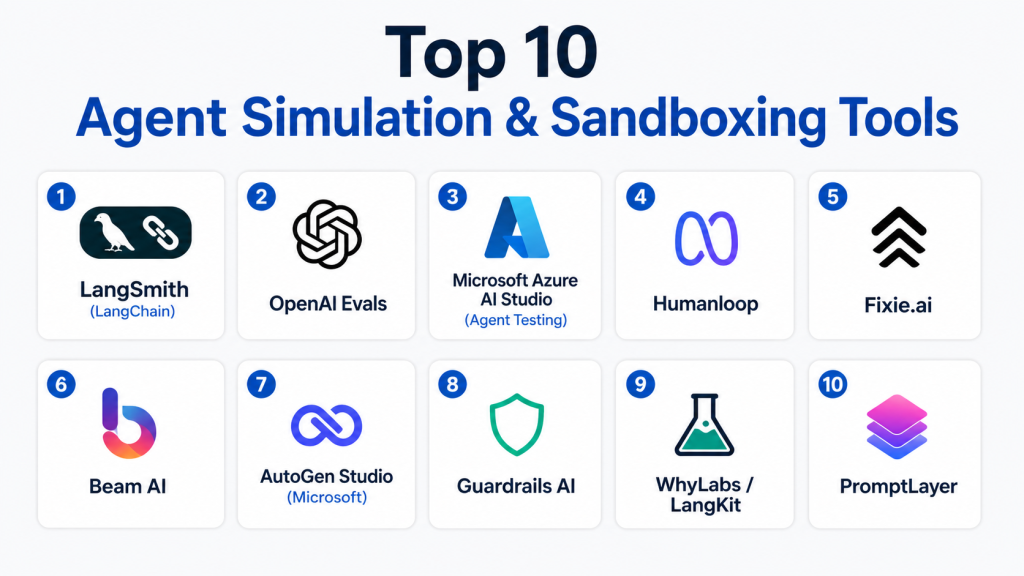
Top 10 Agent Simulation & Sandboxing Tools
1 — LangSmith (LangChain)
One-line verdict: Best for developers building and evaluating agent workflows with deep tracing and debugging.
Short description:
LangSmith is a developer-focused platform for debugging, testing, and evaluating LLM and agent applications. It’s widely used alongside LangChain for tracing and simulation.
Standout Capabilities
- End-to-end tracing of agent workflows
- Dataset-driven evaluation pipelines
- Prompt and agent version control
- Debugging complex chains and tool calls
- Integration with LangChain ecosystem
- Experiment tracking for iterative improvements
AI-Specific Depth
- Model support: Multi-model / BYO
- RAG / knowledge integration: Strong (via LangChain connectors)
- Evaluation: Yes (datasets, regression testing)
- Guardrails: Limited / via integrations
- Observability: Strong (traces, logs, metrics)
Pros
- Excellent developer experience
- Deep visibility into agent behavior
- Strong ecosystem support
Cons
- Requires familiarity with LangChain
- Limited built-in guardrails
- More developer-focused than enterprise-friendly
Security & Compliance
- Not publicly stated
Deployment & Platforms
- Web
- Cloud
Integrations & Ecosystem
Works seamlessly with LangChain and modern AI stacks.
- APIs and SDKs
- LangChain ecosystem
- Vector databases
- Custom model integrations
Pricing Model
- Usage-based / tiered
Best-Fit Scenarios
- Debugging complex agent workflows
- Evaluating LLM applications
- Rapid iteration during development
2 — OpenAI Evals
One-line verdict: Best for teams needing structured evaluation frameworks for LLM and agent performance.
Short description:
OpenAI Evals is a framework for benchmarking and testing AI systems using structured evaluation datasets.
Standout Capabilities
- Standardized evaluation benchmarks
- Custom eval creation
- Model comparison workflows
- Community-driven eval sets
- Integration with OpenAI models
AI-Specific Depth
- Model support: Primarily proprietary / limited BYO
- RAG / knowledge integration: N/A
- Evaluation: Strong
- Guardrails: N/A
- Observability: Limited
Pros
- Strong evaluation methodology
- Easy to extend
- Widely adopted
Cons
- Limited simulation capabilities
- Not a full sandbox environment
- Requires setup effort
Security & Compliance
- Not publicly stated
Deployment & Platforms
- Varies / N/A
Integrations & Ecosystem
- APIs
- OpenAI ecosystem
- Custom datasets
Pricing Model
- Not publicly stated
Best-Fit Scenarios
- Benchmarking models
- Evaluating prompt performance
- Regression testing
3 — Microsoft Azure AI Studio (Agent Testing)
One-line verdict: Best for enterprises needing integrated simulation, evaluation, and governance in one platform.
Short description:
Azure AI Studio provides tools for building, testing, and monitoring AI agents within a secure enterprise environment.
Standout Capabilities
- Built-in evaluation pipelines
- Enterprise-grade security controls
- Integration with Azure services
- Model comparison and routing
- Monitoring and observability
AI-Specific Depth
- Model support: Multi-model / BYO
- RAG / knowledge integration: Strong
- Evaluation: Strong
- Guardrails: Strong
- Observability: Strong
Pros
- Enterprise-ready
- Strong governance features
- Integrated ecosystem
Cons
- Complex setup
- Requires Azure expertise
- Cost management can be challenging
Security & Compliance
- Enterprise-grade controls (details vary)
Deployment & Platforms
- Cloud
Integrations & Ecosystem
- Azure services
- APIs and SDKs
- Data platforms
- Enterprise tools
Pricing Model
- Usage-based
Best-Fit Scenarios
- Enterprise AI deployments
- Regulated industries
- Large-scale agent systems
4 — Humanloop
One-line verdict: Best for teams combining human feedback with AI evaluation workflows.
Short description:
Humanloop focuses on human-in-the-loop evaluation and testing for AI systems.
Standout Capabilities
- Human feedback integration
- Prompt experimentation
- Evaluation dashboards
- Dataset management
- Iterative improvement workflows
AI-Specific Depth
- Model support: Multi-model
- RAG / knowledge integration: Limited
- Evaluation: Strong
- Guardrails: Limited
- Observability: Moderate
Pros
- Strong human feedback loops
- Easy experimentation
- Good UX
Cons
- Limited simulation depth
- Not focused on full agent sandboxing
- Smaller ecosystem
Security & Compliance
- Not publicly stated
Deployment & Platforms
- Web
- Cloud
Integrations & Ecosystem
- APIs
- Model providers
- Data tools
Pricing Model
- Tiered
Best-Fit Scenarios
- Human-in-the-loop evaluation
- Prompt tuning
- QA workflows
5 — Fixie.ai
One-line verdict: Best for building and testing tool-using AI agents with structured environments.
Short description:
Fixie provides infrastructure for creating and simulating agents that interact with APIs and tools.
Standout Capabilities
- Tool-using agent simulation
- Structured execution environments
- API interaction testing
- Developer-first workflows
- Agent orchestration
AI-Specific Depth
- Model support: Multi-model
- RAG / knowledge integration: N/A
- Evaluation: Moderate
- Guardrails: Limited
- Observability: Moderate
Pros
- Strong for tool-based agents
- Flexible architecture
- Developer-friendly
Cons
- Limited enterprise features
- Guardrails not robust
- Smaller ecosystem
Security & Compliance
- Not publicly stated
Deployment & Platforms
- Cloud
Integrations & Ecosystem
- APIs
- SDKs
- Tool integrations
Pricing Model
- Not publicly stated
Best-Fit Scenarios
- API-driven agents
- Developer experimentation
- Tool orchestration
6 — Beam AI
One-line verdict: Best for simulating business workflows with AI agents in enterprise contexts.
Short description:
Beam AI focuses on workflow automation and simulation using AI agents.
Standout Capabilities
- Workflow simulation
- Automation pipelines
- Business process modeling
- Enterprise integrations
AI-Specific Depth
- Model support: Multi-model
- RAG / knowledge integration: Moderate
- Evaluation: Limited
- Guardrails: Moderate
- Observability: Moderate
Pros
- Business-focused
- Good workflow modeling
- Enterprise integrations
Cons
- Limited deep evaluation
- Less developer control
- Not purely sandbox-focused
Security & Compliance
- Not publicly stated
Deployment & Platforms
- Cloud
Integrations & Ecosystem
- Enterprise tools
- APIs
- Workflow systems
Pricing Model
- Tiered
Best-Fit Scenarios
- Business process automation
- Workflow simulation
- Enterprise operations
7 — AutoGen Studio (Microsoft)
One-line verdict: Best for multi-agent simulation and experimentation in research and advanced workflows.
Short description:
AutoGen Studio enables simulation of multi-agent systems and interactions.
Standout Capabilities
- Multi-agent orchestration
- Conversation simulation
- Research-focused experimentation
- Flexible agent design
AI-Specific Depth
- Model support: Multi-model
- RAG / knowledge integration: Limited
- Evaluation: Moderate
- Guardrails: Limited
- Observability: Moderate
Pros
- Strong multi-agent capabilities
- Flexible experimentation
- Backed by Microsoft research
Cons
- Not production-focused
- Requires technical expertise
- Limited enterprise features
Security & Compliance
- Not publicly stated
Deployment & Platforms
- Varies / N/A
Integrations & Ecosystem
- APIs
- Research tools
- Model integrations
Pricing Model
- Not publicly stated
Best-Fit Scenarios
- Multi-agent research
- Experimentation
- Advanced AI systems
8 — Guardrails AI
One-line verdict: Best for enforcing safety constraints and validation during agent execution.
Short description:
Guardrails AI provides frameworks to validate and constrain AI outputs.
Standout Capabilities
- Output validation
- Policy enforcement
- Schema-based constraints
- Integration with LLM pipelines
AI-Specific Depth
- Model support: Multi-model
- RAG / knowledge integration: N/A
- Evaluation: Limited
- Guardrails: Strong
- Observability: Limited
Pros
- Strong safety focus
- Easy integration
- Flexible validation
Cons
- Not a full sandbox
- Limited simulation
- Requires setup
Security & Compliance
- Not publicly stated
Deployment & Platforms
- Varies / N/A
Integrations & Ecosystem
- APIs
- SDKs
- LLM frameworks
Pricing Model
- Open-source + enterprise
Best-Fit Scenarios
- Output validation
- Safety enforcement
- Guardrail implementation
9 — WhyLabs / LangKit
One-line verdict: Best for monitoring and observability of AI systems in production and testing.
Short description:
WhyLabs provides observability tools for AI systems, including monitoring drift and anomalies.
Standout Capabilities
- Data drift detection
- Monitoring pipelines
- Observability dashboards
- Integration with LangKit
AI-Specific Depth
- Model support: Multi-model
- RAG / knowledge integration: N/A
- Evaluation: Moderate
- Guardrails: Limited
- Observability: Strong
Pros
- Strong monitoring
- Good analytics
- Production-ready
Cons
- Not a full sandbox
- Limited simulation
- Requires integration
Security & Compliance
- Not publicly stated
Deployment & Platforms
- Cloud
Integrations & Ecosystem
- APIs
- ML pipelines
- Data tools
Pricing Model
- Tiered
Best-Fit Scenarios
- Production monitoring
- Observability
- Drift detection
10 — PromptLayer
One-line verdict: Best for tracking, logging, and managing prompt and agent interactions.
Short description:
PromptLayer helps teams track and manage prompts and agent interactions across applications.
Standout Capabilities
- Prompt logging
- Version control
- Analytics dashboards
- Debugging tools
AI-Specific Depth
- Model support: Multi-model
- RAG / knowledge integration: Limited
- Evaluation: Limited
- Guardrails: Limited
- Observability: Moderate
Pros
- Easy to use
- Good visibility
- Lightweight
Cons
- Limited simulation
- Not enterprise-grade
- Basic evaluation
Security & Compliance
- Not publicly stated
Deployment & Platforms
- Web
- Cloud
Integrations & Ecosystem
- APIs
- SDKs
- LLM tools
Pricing Model
- Tiered
Best-Fit Scenarios
- Prompt tracking
- Debugging
- Lightweight monitoring
Comparison Table
| Tool Name | Best For | Deployment | Model Flexibility | Strength | Watch-Out | Public Rating |
|---|---|---|---|---|---|---|
| LangSmith | Developers | Cloud | Multi-model | Deep tracing | Needs LangChain | N/A |
| OpenAI Evals | Evaluation | Varies | Limited | Benchmarking | Not full sandbox | N/A |
| Azure AI Studio | Enterprise | Cloud | Multi-model | Governance | Complexity | N/A |
| Humanloop | Feedback loops | Cloud | Multi-model | Human eval | Limited sandbox | N/A |
| Fixie.ai | Tool agents | Cloud | Multi-model | API simulation | Smaller ecosystem | N/A |
| Beam AI | Workflows | Cloud | Multi-model | Business focus | Limited eval | N/A |
| AutoGen Studio | Multi-agent | Varies | Multi-model | Research flexibility | Not production-ready | N/A |
| Guardrails AI | Safety | Varies | Multi-model | Strong guardrails | Not sandbox | N/A |
| WhyLabs | Monitoring | Cloud | Multi-model | Observability | Not simulation | N/A |
| PromptLayer | Tracking | Cloud | Multi-model | Prompt logging | Limited features | N/A |
Scoring & Evaluation (Transparent Rubric)
Scores are comparative based on capabilities, not absolute performance.
| Tool | Core | Reliability/Eval | Guardrails | Integrations | Ease | Perf/Cost | Security/Admin | Support | Weighted Total |
|---|---|---|---|---|---|---|---|---|---|
| LangSmith | 9 | 8 | 6 | 9 | 8 | 8 | 7 | 8 | 8.2 |
| OpenAI Evals | 7 | 9 | 5 | 7 | 7 | 7 | 6 | 7 | 7.2 |
| Azure AI Studio | 9 | 9 | 9 | 9 | 7 | 7 | 9 | 8 | 8.6 |
| Humanloop | 7 | 8 | 6 | 7 | 8 | 7 | 6 | 7 | 7.3 |
| Fixie.ai | 7 | 6 | 5 | 7 | 7 | 7 | 6 | 6 | 6.7 |
| Beam AI | 7 | 6 | 6 | 8 | 7 | 7 | 7 | 6 | 6.9 |
| AutoGen Studio | 8 | 7 | 5 | 7 | 6 | 7 | 6 | 6 | 6.9 |
| Guardrails AI | 7 | 6 | 9 | 7 | 7 | 7 | 7 | 7 | 7.3 |
| WhyLabs | 8 | 7 | 6 | 8 | 7 | 8 | 7 | 7 | 7.5 |
| PromptLayer | 6 | 6 | 5 | 7 | 8 | 7 | 6 | 6 | 6.6 |
Top 3 for Enterprise:
- Azure AI Studio
- LangSmith
- WhyLabs
Top 3 for SMB:
- Humanloop
- PromptLayer
- Guardrails AI
Top 3 for Developers:
- LangSmith
- AutoGen Studio
- Fixie.ai
Which Agent Simulation & Sandboxing Tool Is Right for You?
Solo / Freelancer
Use lightweight tools like PromptLayer or OpenAI Evals. Focus on cost and simplicity.
SMB
Humanloop and Guardrails AI provide a balance of usability and functionality.
Mid-Market
LangSmith and WhyLabs offer deeper capabilities without full enterprise complexity.
Enterprise
Azure AI Studio is the most comprehensive option for governance, security, and scale.
Regulated industries (finance/healthcare/public sector)
Prioritize Azure AI Studio or similar platforms with strong compliance and auditability.
Budget vs premium
- Budget: Open-source or lightweight tools
- Premium: Enterprise platforms with full lifecycle management
Build vs buy (when to DIY)
Build if you need custom workflows and have strong engineering resources.
Buy if you need speed, reliability, and support.
Implementation Playbook (30 / 60 / 90 Days)
30 Days:
- Define success metrics
- Build pilot simulations
- Create evaluation datasets
60 Days:
- Add guardrails and security controls
- Implement evaluation pipelines
- Begin rollout to teams
90 Days:
- Optimize cost and latency
- Add governance and audit logs
- Scale across organization
Common Mistakes & How to Avoid Them
- Ignoring prompt injection risks
- Skipping evaluation pipelines
- Poor data handling practices
- Lack of observability
- Unexpected costs
- Over-automation
- Vendor lock-in
- Weak guardrails
- No human oversight
- Poor version control
- Inadequate testing
- Lack of governance
FAQs
1. What is an agent sandbox?
A controlled environment where AI agents can safely operate and be tested without affecting real systems or users.
2. Do these tools prevent hallucinations?
They don’t fully prevent hallucinations but help detect, measure, and reduce them through structured evaluation and testing.
3. Can I use my own models?
Yes, many tools support BYO (Bring Your Own) models or allow multi-model setups depending on the platform.
4. Are these tools necessary for all AI projects?
No, they are mainly essential for projects involving autonomous or semi-autonomous AI agents. Simpler applications may not require them.
5. Do these tools support RAG (Retrieval-Augmented Generation)?
Some tools offer strong RAG integrations, while others may require external connectors or custom setups.
6. How do these tools handle data privacy?
It varies by vendor. Look for features like data isolation, retention controls, encryption, and access management.
7. Are these tools expensive?
Pricing depends on usage, scale, and features. Many follow usage-based or tiered pricing models.
8. Can I self-host these tools?
Some tools support self-hosting or hybrid deployments, but many are primarily cloud-based.
9. Do these tools include built-in guardrails?
Some platforms include guardrails, while others require integration with external safety tools.
10. How difficult is it to switch between tools?
Switching can be challenging if workflows are tightly coupled. Using abstraction layers can reduce vendor lock-in.
11. Are these tools beginner-friendly?
Some tools are easy to use, but many require technical knowledge, especially for advanced agent simulations.
12. What is the biggest benefit of using these tools?
They significantly reduce risks by allowing safe testing, evaluation, and optimization before real-world deployment.
Conclusion
Agent simulation and sandboxing tools play a critical role in building safe, reliable, and scalable AI systems. The right choice depends on your use case, team expertise, and risk tolerance—so focus on testing a few options, validating their evaluation and guardrail capabilities, and scaling only after you’re confident in performance and safety.
Great content for AI engineers and DevOps teams! The blog highlights why sandboxing is critical for ensuring safe execution of autonomous agents before they interact with real systems or customers.