Introduction
Active learning data selection tools help AI teams choose the most useful data to label, review, retrain, or evaluate. Instead of labeling every image, document, prompt, conversation, or data sample, these tools identify the examples most likely to improve model quality. In plain English, they help teams spend labeling and review budgets where they matter most.
Active learning matters because modern AI systems deal with massive multimodal datasets, fast-changing user behavior, noisy training data, and expensive human review cycles. Teams building computer vision systems, LLM applications, RAG products, AI agents, and domain-specific models need smarter ways to select uncertain, diverse, rare, risky, or high-value examples.
Real-World Use Cases
- Selecting uncertain samples for human labeling.
- Finding edge cases where the model performs poorly.
- Reducing labeling cost by avoiding repetitive data.
- Building better evaluation datasets for LLMs and RAG systems.
- Detecting mislabeled, low-quality, or duplicate training samples.
- Prioritizing rare classes, safety-sensitive examples, and domain-specific cases.
- Improving computer vision, NLP, document AI, and multimodal model training.
Evaluation Criteria for Buyers
- Data selection strategy and active learning support.
- Dataset quality scoring and error detection.
- Support for images, text, documents, audio, video, and multimodal data.
- Model uncertainty, diversity sampling, and outlier detection.
- Human review and annotation workflow integration.
- Evaluation dataset creation and regression testing support.
- Data privacy, retention, access controls, and auditability.
- Deployment flexibility such as cloud, self-hosted, or hybrid.
- Integration with labeling tools, storage systems, notebooks, and ML pipelines.
- Cost reduction features such as deduplication and sampling.
- Observability for data quality, model performance, and dataset drift.
- Exportability and vendor lock-in risk.
Best for: ML engineers, data scientists, AI product teams, computer vision teams, LLM evaluation teams, MLOps teams, data labeling operations, and enterprises that want to improve model quality while reducing labeling waste.
Not ideal for: very small datasets, one-time manual labeling projects, teams without model feedback loops, or organizations that do not yet have enough data volume to justify active learning workflows.
What’s Changed in Active Learning Data Selection Tools
- Active learning is moving beyond classic ML. Teams now use data selection for LLM evaluation, RAG testing, AI agent review, and multimodal workflows.
- Dataset quality is becoming a model performance lever. Teams are realizing that better selected data can outperform larger but noisy datasets.
- Human review is more targeted. Instead of reviewing random samples, teams prioritize uncertain, high-risk, rare, or business-critical examples.
- Multimodal data selection is becoming essential. AI teams need to select examples across images, video, documents, text, audio, and structured metadata.
- Label error detection is now a core feature. Tools increasingly help identify mislabeled, ambiguous, duplicate, or low-confidence examples.
- Evaluation workflows are becoming data-driven. Teams use active learning to build stronger benchmark sets, regression tests, and failure-case datasets.
- Privacy and governance are bigger concerns. Enterprises want control over which data is selected, reviewed, exported, retained, or shared with external labelers.
- Cost optimization is a major buying driver. Active learning helps reduce unnecessary labeling and review spend by focusing on high-value samples.
- AI agents need failure-case selection. Teams need tools that surface examples where agents choose wrong tools, fail tasks, or require human escalation.
- Observability is expanding into data quality. Buyers want dashboards showing dataset drift, class imbalance, outliers, model uncertainty, and review outcomes.
- Open-source plus enterprise models are growing. Many teams prefer developer-friendly tools that can start locally and scale into production governance.
- Vendor lock-in matters more. Exportable datasets, open formats, APIs, and pipeline compatibility are now key selection criteria.
Quick Buyer Checklist
- Does the tool identify uncertain, diverse, rare, duplicate, noisy, or mislabeled examples?
- Can it work with your core data types: image, video, text, documents, audio, tabular, or multimodal data?
- Does it support active learning loops with annotation and human review tools?
- Can it connect with your model outputs, embeddings, predictions, confidence scores, and metadata?
- Does it support BYO models, open-source models, or model-agnostic workflows?
- Can it help build stronger evaluation datasets and regression test sets?
- Does it support RAG or LLM evaluation workflows where relevant?
- Are privacy controls, retention settings, RBAC, and audit logs available?
- Can you measure cost savings from reduced labeling and review effort?
- Does it integrate with cloud storage, notebooks, labeling platforms, and ML pipelines?
- Can teams export selected datasets and metadata without lock-in?
- Does it support production monitoring, dataset drift analysis, and continuous improvement?
- Is it simple enough for data teams but flexible enough for ML engineers?
- Can it scale from pilot datasets to enterprise-scale model improvement workflows?
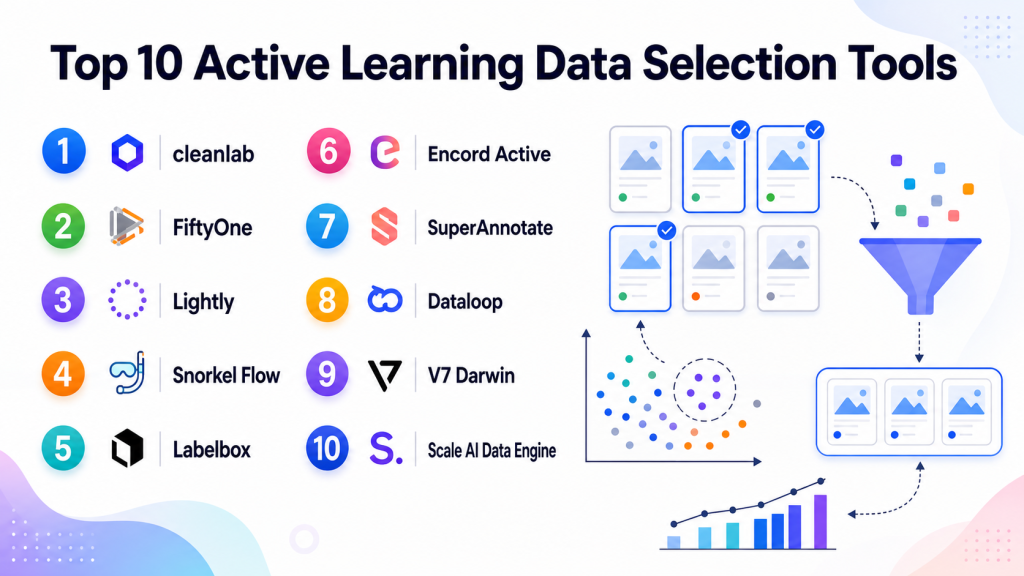
Top 10 Active Learning Data Selection Tools
1 — cleanlab
One-line verdict: Best for teams needing automated data quality checks, label error detection, and active learning workflows.
Short description:
cleanlab helps teams find label errors, outliers, ambiguous samples, and lower-quality data that can weaken model performance. It is commonly used by data scientists and ML engineers who want to improve datasets before or during model training.
Standout Capabilities
- Strong focus on data quality and label error detection.
- Helps identify mislabeled, noisy, ambiguous, and low-confidence examples.
- Useful across classification, text, image, and structured data workflows.
- Can support active learning by prioritizing examples that need review.
- Helps reduce manual review by ranking data quality issues.
- Useful for improving model performance without simply adding more data.
- Developer-friendly for teams that want programmatic control.
AI-Specific Depth
- Model support: Model-agnostic workflows may be supported; BYO model outputs can often be useful.
- RAG / knowledge integration: Varies / N/A.
- Evaluation: Supports data quality checks that can improve evaluation and training datasets.
- Guardrails: N/A for runtime prompt-injection defense; useful for data quality governance.
- Observability: Data quality scores and issue detection may support dataset observability.
Pros
- Strong for detecting label and data quality issues.
- Useful for reducing wasted labeling and review effort.
- Good fit for technical ML and data science teams.
Cons
- Requires understanding of model outputs and dataset structure.
- Not a full annotation workforce platform by itself.
- Enterprise security details should be verified directly.
Security & Compliance
Security features depend on deployment and plan. Buyers should verify SSO, RBAC, audit logs, encryption, data retention, residency, and certifications directly. Certifications: Not publicly stated.
Deployment & Platforms
- Python and developer workflows may be supported.
- Web or enterprise platform options may vary.
- Cloud, local, or enterprise deployment: Varies / N/A.
- Windows/macOS/Linux support depends on setup.
Integrations & Ecosystem
cleanlab fits well into ML pipelines where teams already work with model predictions, labels, and dataset metadata. It is useful before annotation, after annotation, and during model improvement cycles.
- Python ecosystem support may be available.
- Works with model outputs and datasets.
- Can fit into notebook and ML pipeline workflows.
- May integrate with labeling and review workflows through exports.
- Useful with structured, text, and image data.
- Enterprise integration details should be verified.
Pricing Model
Open-source and commercial options may be available. Exact enterprise pricing is not publicly stated.
Best-Fit Scenarios
- Detecting label errors in existing datasets.
- Prioritizing human review for uncertain or noisy samples.
- Improving model quality through dataset cleaning.
2 — FiftyOne
One-line verdict: Best for computer vision teams needing dataset exploration, curation, and active learning workflows.
Short description:
FiftyOne is a dataset visualization, curation, and analysis tool widely used by computer vision teams. It helps teams explore datasets, inspect model predictions, find edge cases, and select valuable samples for labeling or retraining.
Standout Capabilities
- Strong visual dataset exploration for images and video.
- Helps inspect predictions, embeddings, labels, and metadata.
- Useful for finding outliers, duplicates, and model failure cases.
- Supports dataset curation and sample selection workflows.
- Developer-friendly and useful in notebook-based ML workflows.
- Can help build evaluation slices and failure-case collections.
- Strong fit for computer vision model improvement loops.
AI-Specific Depth
- Model support: BYO model and open-source workflows may be supported through integration.
- RAG / knowledge integration: N/A for most use cases.
- Evaluation: Supports analysis of predictions, labels, and dataset slices.
- Guardrails: N/A for runtime guardrails; useful for dataset review and quality control.
- Observability: Dataset-level observability, visual inspection, and model failure analysis may be supported.
Pros
- Excellent for visual dataset exploration.
- Strong fit for computer vision active learning workflows.
- Useful for identifying edge cases and dataset gaps.
Cons
- Less focused on text-only or LLM-specific review workflows.
- Requires technical setup for advanced usage.
- Enterprise security and deployment should be verified directly.
Security & Compliance
Security depends on deployment and configuration. Buyers should verify SSO, RBAC, audit logs, encryption, retention, residency, and certifications directly. Certifications: Not publicly stated.
Deployment & Platforms
- Developer and web-based workflows may be available.
- Local and cloud-style workflows may vary by setup.
- Windows/macOS/Linux support depends on environment.
- Self-hosted or enterprise options: Varies / N/A.
Integrations & Ecosystem
FiftyOne is useful in ML engineering workflows where model outputs, labels, embeddings, and visual inspection need to work together. It fits especially well with computer vision pipelines.
- Python ecosystem support may be available.
- Works with images, videos, labels, predictions, and embeddings.
- Can support dataset slicing and filtering.
- Can integrate with labeling workflows through exports.
- Useful with notebooks and ML experimentation workflows.
- Enterprise ecosystem details should be verified.
Pricing Model
Open-source and enterprise options may be available. Exact enterprise pricing is not publicly stated.
Best-Fit Scenarios
- Computer vision dataset curation.
- Finding model failure cases and rare examples.
- Building active learning loops for image and video models.
3 — Lightly
One-line verdict: Best for vision teams selecting high-value visual data using embeddings and active learning methods.
Short description:
Lightly focuses on data curation and active learning for visual AI workflows. It helps teams select representative, diverse, and high-value images or video frames so they can reduce labeling cost and improve model performance.
Standout Capabilities
- Strong focus on visual data selection and active learning.
- Helps reduce labeling volume by selecting diverse and useful samples.
- Useful for image and video datasets.
- Can support embedding-based selection and dataset curation.
- Helps avoid labeling near-duplicate or redundant samples.
- Good fit for computer vision and edge-case discovery.
- Useful for teams with large unlabeled visual datasets.
AI-Specific Depth
- Model support: BYO model and embedding workflows may be supported depending on setup.
- RAG / knowledge integration: N/A.
- Evaluation: Can support better evaluation and training sets through curated sample selection.
- Guardrails: N/A for runtime AI guardrails.
- Observability: Dataset diversity and selection visibility may be available; exact metrics vary.
Pros
- Strong for reducing computer vision labeling cost.
- Useful for large image and video datasets.
- Helps prioritize diverse, high-value samples.
Cons
- Less ideal for general text or LLM-only workflows.
- Requires integration into data and annotation pipelines.
- Security and enterprise details should be verified directly.
Security & Compliance
Buyers should verify SSO, RBAC, audit logs, encryption, data retention, residency, and certifications directly. Certifications: Not publicly stated.
Deployment & Platforms
- Web and developer workflows may be available.
- Cloud or self-hosted options: Varies / N/A.
- Windows/macOS/Linux support depends on implementation.
- Mobile platforms: Varies / N/A.
Integrations & Ecosystem
Lightly is best used by teams with visual datasets, embeddings, model predictions, and labeling pipelines. It helps connect data selection to annotation and model retraining.
- May support API or Python-based workflows.
- Works with visual datasets and embeddings.
- Can help select samples before annotation.
- May integrate with labeling tools and storage systems.
- Useful for ML training pipelines.
- Export and pipeline support should be tested during pilot.
Pricing Model
Commercial and possibly tiered or enterprise options. Exact pricing is not publicly stated.
Best-Fit Scenarios
- Selecting images or video frames for labeling.
- Reducing duplicate visual data before annotation.
- Building active learning loops for computer vision models.
4 — Snorkel Flow
One-line verdict: Best for teams using programmatic labeling and data-centric workflows to reduce manual labeling.
Short description:
Snorkel Flow helps teams build training datasets using programmatic labeling, weak supervision, and data-centric AI workflows. It is useful when expert logic, rules, heuristics, and model signals can help select or label data more efficiently.
Standout Capabilities
- Strong programmatic labeling and weak supervision approach.
- Helps reduce dependence on fully manual labeling.
- Useful for enterprise datasets with domain-specific rules.
- Supports data-centric workflows for improving model quality.
- Helps teams iterate on labeling logic and data selection.
- Good fit for text, documents, classification, and structured workflows.
- Enables collaboration between data scientists and subject-matter experts.
AI-Specific Depth
- Model support: BYO model and data-centric ML workflows may be supported.
- RAG / knowledge integration: Varies / N/A.
- Evaluation: Can support evaluation of labeling logic and training data quality.
- Guardrails: N/A for runtime prompt-injection defense; useful for governed data workflows.
- Observability: Data development and label quality insights may be available.
Pros
- Reduces manual labeling through programmatic methods.
- Strong for domain-specific and enterprise datasets.
- Useful when subject-matter expertise can be encoded into rules.
Cons
- Requires technical and domain expertise.
- Not ideal for simple visual box annotation.
- Teams must understand weak supervision workflows.
Security & Compliance
Enterprise controls may be available, but buyers should verify SSO, RBAC, audit logs, encryption, retention, residency, and certifications directly. Certifications: Not publicly stated.
Deployment & Platforms
- Web-based enterprise platform.
- Cloud or enterprise deployment: Varies / N/A.
- Self-hosted or hybrid: Varies / N/A.
- Desktop and mobile: Varies / N/A.
Integrations & Ecosystem
Snorkel Flow fits best into data-centric AI workflows where teams need scalable label generation, expert logic, and model improvement pipelines. It is especially useful when manual labeling alone is too slow or expensive.
- Can connect with enterprise data workflows.
- Supports programmatic labeling logic.
- May integrate with ML pipelines.
- Useful for structured and unstructured data.
- Collaboration workflows may support SMEs and data teams.
- Export and integration details vary by setup.
Pricing Model
Typically enterprise-based. Exact pricing is not publicly stated.
Best-Fit Scenarios
- Large datasets where manual labeling is too expensive.
- Domain-specific text, document, or classification workflows.
- Teams wanting programmatic data selection and labeling.
5 — Labelbox
One-line verdict: Best for teams combining data curation, annotation workflows, and active learning with human review.
Short description:
Labelbox is an AI data platform that supports labeling, data curation, review workflows, and model-assisted improvement. It is useful for teams that want to connect selected data with annotation, QA, and model feedback loops.
Standout Capabilities
- Supports data curation and labeling workflows in one platform.
- Useful across images, text, documents, and generative AI feedback.
- Can help teams prioritize data for review and annotation.
- Offers collaboration between annotators, reviewers, and ML teams.
- Supports quality management and dataset organization.
- Useful for human-in-the-loop model improvement.
- Suitable for teams scaling AI data operations.
AI-Specific Depth
- Model support: Varies / N/A; model-assisted workflows may be supported.
- RAG / knowledge integration: Varies / N/A.
- Evaluation: Human review and feedback workflows may support evaluation datasets.
- Guardrails: Workflow permissions and review controls may help; runtime guardrails vary.
- Observability: Labeling and quality analytics may be available; token metrics vary.
Pros
- Combines labeling, curation, and review workflows.
- Good fit for teams needing annotation plus active learning operations.
- Useful across multiple data types.
Cons
- Advanced features may depend on plan.
- May be more platform than very small teams need.
- BYO active learning depth should be tested during pilot.
Security & Compliance
Enterprise controls may be available, but buyers should verify SSO, RBAC, audit logs, encryption, retention, residency, and certifications directly. Certifications: Not publicly stated.
Deployment & Platforms
- Web-based platform.
- Cloud deployment.
- Self-hosted or hybrid: Varies / N/A.
- Desktop and mobile: Varies / N/A.
Integrations & Ecosystem
Labelbox can fit into AI pipelines where data selection, annotation, review, and retraining need to work together. Buyers should test API access, export formats, and how model outputs are used for prioritization.
- API access may be available.
- Cloud storage integrations may be supported.
- Export options vary by data type.
- Human review workflows support dataset improvement.
- Can connect with model-assisted labeling workflows.
- Useful for ML and AI data operations.
Pricing Model
Typically tiered, usage-based, or enterprise-based. Exact pricing is not publicly stated.
Best-Fit Scenarios
- Teams needing active learning plus annotation.
- Human review workflows for selected high-value data.
- AI teams managing large labeling operations.
6 — Encord Active
One-line verdict: Best for visual AI teams needing dataset curation, model failure discovery, and active learning.
Short description:
Encord Active is focused on analyzing and curating visual datasets. It helps teams find data quality issues, model failure patterns, outliers, duplicates, and samples that deserve labeling or review.
Standout Capabilities
- Strong focus on computer vision dataset analysis.
- Helps identify outliers, duplicates, and data quality problems.
- Useful for model failure discovery and dataset debugging.
- Can support active learning workflows for visual AI.
- Helps teams prioritize annotation and review.
- Useful for building better training and evaluation datasets.
- Fits image and video-heavy AI teams.
AI-Specific Depth
- Model support: BYO model and prediction analysis may be supported depending on setup.
- RAG / knowledge integration: N/A.
- Evaluation: Supports dataset and model performance analysis for visual workflows.
- Guardrails: N/A for runtime guardrails; useful for data quality review.
- Observability: Dataset quality and visual model behavior insights may be available.
Pros
- Strong for visual data curation.
- Useful for finding edge cases and model weaknesses.
- Helps reduce labeling waste in computer vision workflows.
Cons
- Less suitable for LLM-only or text-only workflows.
- Works best when teams have model predictions and dataset metadata.
- Enterprise details should be verified directly.
Security & Compliance
Enterprise security features may be available, but buyers should verify SSO, RBAC, audit logs, encryption, retention, residency, and certifications directly. Certifications: Not publicly stated.
Deployment & Platforms
- Web-based workflows may be available.
- Cloud deployment.
- Self-hosted or hybrid: Varies / N/A.
- Desktop and mobile: Varies / N/A.
Integrations & Ecosystem
Encord Active fits into visual AI pipelines where dataset quality, annotation, evaluation, and model improvement need to be connected. It is useful when teams already work with image and video datasets.
- May integrate with annotation workflows.
- Supports visual dataset analysis.
- Can use model predictions and metadata.
- Helps create curated datasets.
- Useful for model failure review.
- Export and API support should be tested directly.
Pricing Model
Typically subscription or enterprise-based. Exact pricing is not publicly stated.
Best-Fit Scenarios
- Visual dataset debugging.
- Selecting images or videos for annotation.
- Building high-quality computer vision evaluation sets.
7 — SuperAnnotate
One-line verdict: Best for multimodal annotation teams needing data curation, review, and AI-assisted selection workflows.
Short description:
SuperAnnotate provides annotation, data management, and review workflows for AI teams. It can support active learning-style processes by helping teams prioritize, label, and review selected data across visual and multimodal projects.
Standout Capabilities
- Supports visual and multimodal annotation workflows.
- Helps manage datasets, labeling projects, and review operations.
- Can support AI-assisted labeling and human review.
- Useful for teams prioritizing selected samples for annotation.
- Supports collaboration across annotators, reviewers, and managers.
- Helps maintain quality control in active learning loops.
- Suitable for teams that need workflow structure and annotation depth.
AI-Specific Depth
- Model support: Varies / N/A; AI-assisted workflows may be supported.
- RAG / knowledge integration: N/A for most use cases.
- Evaluation: Human review and QA workflows may support evaluation datasets.
- Guardrails: Workflow controls and reviewer permissions may help; runtime guardrails vary.
- Observability: Annotation and review analytics may be available.
Pros
- Strong for annotation operations and review workflows.
- Useful for teams combining curation and labeling.
- Good fit for visual and multimodal datasets.
Cons
- Active learning depth should be validated in pilot workflows.
- May require setup effort for complex review pipelines.
- Less ideal for teams needing only lightweight scripts.
Security & Compliance
Security controls may include administrative features, but buyers should verify SSO, RBAC, audit logs, encryption, retention, residency, and certifications directly. Certifications: Not publicly stated.
Deployment & Platforms
- Web-based platform.
- Cloud deployment.
- Self-hosted or private deployment: Varies / N/A.
- Desktop and mobile: Varies / N/A.
Integrations & Ecosystem
SuperAnnotate can connect labeling, review, and dataset operations for teams that need structured human-in-the-loop workflows. It is best evaluated using real data and selected sample pipelines.
- API support may be available.
- Dataset import and export options may be supported.
- Cloud storage connections may be available.
- Review workflows support QA.
- AI-assisted annotation may be supported.
- Integration depth varies by plan.
Pricing Model
Typically tiered or enterprise-based. Exact pricing is not publicly stated.
Best-Fit Scenarios
- Multimodal annotation workflows.
- Active learning loops that require human review.
- Teams needing annotation quality management.
8 — Dataloop
One-line verdict: Best for teams needing AI data operations, automation, and selection workflows in one platform.
Short description:
Dataloop provides data annotation, automation, dataset management, and AI data operations workflows. It is useful for teams that need to connect data selection, labeling, review, automation, and model improvement pipelines.
Standout Capabilities
- Supports annotation and AI data operations in one environment.
- Useful for workflow automation around selected datasets.
- Can support human-in-the-loop and model-in-the-loop processes.
- Helps manage datasets, tasks, reviews, and pipeline steps.
- Suitable for visual and multimodal AI workflows.
- Good fit for teams needing operational control.
- Helps connect selection, review, and retraining processes.
AI-Specific Depth
- Model support: Varies / N/A; model-in-the-loop workflows may be supported.
- RAG / knowledge integration: Varies / N/A.
- Evaluation: Review workflows may support evaluation pipelines.
- Guardrails: Workflow governance and permissions may help; runtime guardrails vary.
- Observability: Workflow and project analytics may be available.
Pros
- Strong fit for operational AI data workflows.
- Useful for automation and pipeline integration.
- Supports teams scaling beyond manual annotation.
Cons
- May require implementation effort.
- Smaller teams may not need full workflow depth.
- Exact active learning capabilities should be tested.
Security & Compliance
Enterprise features may be available, but buyers should verify SSO, RBAC, audit logs, encryption, retention, residency, and certifications directly. Certifications: Not publicly stated.
Deployment & Platforms
- Web-based platform.
- Cloud deployment.
- Hybrid or private deployment: Varies / N/A.
- Desktop and mobile: Varies / N/A.
Integrations & Ecosystem
Dataloop is useful when data selection is part of a larger AI data operations process. It works best when connected to datasets, annotation queues, model outputs, review workflows, and retraining pipelines.
- API and SDK capabilities may be available.
- Automation workflows may be supported.
- Dataset management features support pipeline operations.
- Cloud storage integrations may be available.
- Export formats vary by use case.
- Custom workflow support may be available.
Pricing Model
Typically subscription, usage-based, or enterprise-based. Exact pricing is not publicly stated.
Best-Fit Scenarios
- AI data operations with active learning loops.
- Teams needing workflow automation around selected data.
- Large labeling and review pipelines.
9 — V7 Darwin
One-line verdict: Best for visual AI teams combining annotation, dataset workflows, and AI-assisted review.
Short description:
V7 Darwin supports image, video, and visual data annotation workflows. It is useful for computer vision teams that need to manage datasets, prioritize labeling, and review selected visual samples efficiently.
Standout Capabilities
- Strong visual annotation workflow support.
- Useful for image, video, and document-style visual tasks.
- Can support automation-assisted labeling processes.
- Helps teams manage review and QA workflows.
- Suitable for visual AI and inspection use cases.
- Useful when selected samples need rapid annotation.
- Clean interface for collaborative labeling teams.
AI-Specific Depth
- Model support: Varies / N/A; AI-assisted annotation may be supported.
- RAG / knowledge integration: N/A.
- Evaluation: Human review and QA workflows may support evaluation datasets.
- Guardrails: Workflow permissions and review controls may help; runtime guardrails vary.
- Observability: Annotation and project metrics may be available.
Pros
- Strong fit for visual annotation workflows.
- Useful for teams needing fast review and labeling.
- Good for image and video-heavy AI projects.
Cons
- Less focused on programmatic data selection than specialist tools.
- Not ideal for purely text-based active learning workflows.
- Enterprise details should be verified.
Security & Compliance
Security features may include administrative controls, but buyers should verify SSO, RBAC, audit logs, encryption, retention, residency, and certifications directly. Certifications: Not publicly stated.
Deployment & Platforms
- Web-based platform.
- Cloud deployment.
- Self-hosted or hybrid: Varies / N/A.
- Desktop and mobile: Varies / N/A.
Integrations & Ecosystem
V7 Darwin fits into visual AI workflows where selected data needs to move quickly into labeling and QA. It should be evaluated for export formats, automation, and model-assisted workflows.
- API support may be available.
- Visual dataset import and export may be supported.
- Annotation workflows support images and videos.
- Review and QA workflows may be available.
- Can connect with model development pipelines.
- Integration depth varies by plan.
Pricing Model
Typically subscription or enterprise-based. Exact pricing is not publicly stated.
Best-Fit Scenarios
- Visual AI annotation after data selection.
- Image and video workflows requiring QA.
- Teams needing human review for curated samples.
10 — Scale AI Data Engine
One-line verdict: Best for enterprises needing managed data selection, labeling, feedback, and AI data operations.
Short description:
Scale AI Data Engine supports enterprise AI data workflows, including data labeling, human feedback, data curation, and model improvement operations. It is useful when organizations need managed services and scalable review processes around high-value data.
Standout Capabilities
- Strong enterprise AI data operations support.
- Useful for managed labeling, feedback, and review workflows.
- Can support high-volume and complex data projects.
- Helps teams operationalize human feedback and dataset improvement.
- Suitable for multimodal and domain-specific AI workflows.
- Useful when internal annotation capacity is limited.
- Can support enterprise-scale quality operations.
AI-Specific Depth
- Model support: Varies / N/A; can support workflows around different model types.
- RAG / knowledge integration: Varies / N/A.
- Evaluation: Human feedback and evaluation workflows may be supported.
- Guardrails: Workforce governance and review controls may help; runtime guardrails vary.
- Observability: Project and quality reporting may be available; technical model metrics vary.
Pros
- Strong for enterprise-scale AI data operations.
- Useful when managed reviewers or experts are needed.
- Can reduce internal operational burden.
Cons
- May be too heavy for small teams.
- Pricing is usually project-dependent.
- Less suited for teams wanting fully open-source control.
Security & Compliance
Enterprise security controls may be available, but buyers should verify SSO, RBAC, audit logs, encryption, data retention, residency, and certifications directly. Certifications: Not publicly stated.
Deployment & Platforms
- Web-based and managed service workflows.
- Cloud deployment.
- Private or hybrid options: Varies / N/A.
- Desktop and mobile: Varies / N/A.
Integrations & Ecosystem
Scale AI Data Engine is useful when active learning data selection connects to managed labeling, review, and feedback operations. It is best evaluated through an enterprise pilot with real selection, review, and model improvement workflows.
- APIs may be available.
- Managed workforce workflows may be supported.
- Can support training and evaluation data operations.
- May connect with cloud storage and internal pipelines.
- Useful for multimodal data projects.
- Workflow customization may be available for enterprise buyers.
Pricing Model
Typically enterprise or project-based. Exact pricing is not publicly stated.
Best-Fit Scenarios
- Enterprise data selection and labeling programs.
- Large-scale human feedback and review workflows.
- High-complexity multimodal AI data operations.
Comparison Table
| Tool Name | Best For | Deployment | Model Flexibility | Strength | Watch-Out | Public Rating |
|---|---|---|---|---|---|---|
| cleanlab | Data quality and label error detection | Cloud / Local / Varies | BYO / Model-agnostic | Label issue detection | Requires technical setup | N/A |
| FiftyOne | Computer vision dataset exploration | Local / Cloud / Varies | Open-source / BYO | Visual dataset curation | Best for technical teams | N/A |
| Lightly | Visual active learning | Cloud / Varies | BYO / Embedding-based | Diverse sample selection | Vision-focused | N/A |
| Snorkel Flow | Programmatic labeling | Cloud / Varies | BYO adjacent | Weak supervision | Requires domain expertise | N/A |
| Labelbox | Labeling and curation operations | Cloud / Varies | Hosted / BYO adjacent | Annotation plus review | Advanced features may vary | N/A |
| Encord Active | Visual dataset quality | Cloud / Varies | BYO adjacent | Failure-case discovery | Less text-focused | N/A |
| SuperAnnotate | Multimodal annotation workflows | Cloud / Varies | Hosted / BYO adjacent | Review and QA workflows | Setup effort needed | N/A |
| Dataloop | AI data operations | Cloud / Hybrid / Varies | Hosted / BYO adjacent | Workflow automation | Can be complex | N/A |
| V7 Darwin | Visual annotation after selection | Cloud / Varies | Hosted / BYO adjacent | Visual labeling workflows | Less programmatic selection | N/A |
| Scale AI Data Engine | Enterprise managed data operations | Cloud / Varies | Varies / N/A | Managed AI data workflows | May be too heavy for SMB | N/A |
Scoring & Evaluation
The scoring below is comparative, not absolute. It is designed to help buyers shortlist tools based on active learning fit, data selection capability, AI evaluation usefulness, integration depth, and operational readiness. Scores can change depending on your data type, internal skills, model architecture, annotation process, and compliance needs. A high score does not mean the tool is best for every team. Always validate the shortlist with your own dataset, model outputs, annotation workflow, and measurable model improvement goals.
| Tool | Core | Reliability/Eval | Guardrails | Integrations | Ease | Perf/Cost | Security/Admin | Support | Weighted Total |
|---|---|---|---|---|---|---|---|---|---|
| cleanlab | 9 | 8 | 6 | 8 | 7 | 9 | 7 | 8 | 7.95 |
| FiftyOne | 9 | 8 | 6 | 9 | 7 | 9 | 7 | 8 | 8.10 |
| Lightly | 8 | 8 | 6 | 8 | 7 | 9 | 7 | 7 | 7.75 |
| Snorkel Flow | 8 | 8 | 6 | 8 | 6 | 9 | 7 | 7 | 7.55 |
| Labelbox | 8 | 8 | 7 | 8 | 8 | 8 | 8 | 8 | 7.95 |
| Encord Active | 8 | 8 | 6 | 8 | 8 | 8 | 7 | 8 | 7.70 |
| SuperAnnotate | 8 | 8 | 7 | 8 | 8 | 8 | 7 | 8 | 7.85 |
| Dataloop | 8 | 8 | 7 | 9 | 7 | 8 | 7 | 7 | 7.85 |
| V7 Darwin | 7 | 7 | 6 | 7 | 8 | 8 | 7 | 7 | 7.30 |
| Scale AI Data Engine | 8 | 9 | 8 | 8 | 7 | 7 | 8 | 9 | 7.95 |
Top 3 for Enterprise
- Scale AI Data Engine
- Labelbox
- Snorkel Flow
Top 3 for SMB
- cleanlab
- Encord Active
- SuperAnnotate
Top 3 for Developers
- FiftyOne
- cleanlab
- Lightly
Which Active Learning Data Selection Tool Is Right for You?
Solo / Freelancer
Solo users should start with developer-friendly and lower-overhead options. cleanlab, FiftyOne, and Lightly are strong choices depending on whether the work is data quality, computer vision, or visual sample selection. These tools are useful when you want to improve model performance without paying for unnecessary labeling.
If the dataset is very small, you may not need a full active learning platform. Manual review, notebook-based sampling, or simple confidence-score ranking may be enough until the project grows.
SMB
SMBs should prioritize usability, cost control, and fast integration with annotation workflows. cleanlab is useful for finding noisy labels, FiftyOne is strong for visual inspection, and Labelbox or SuperAnnotate can help when active learning needs to connect directly with human labeling and review.
The best SMB setup is usually practical and lightweight: select high-value samples, label only what matters, review quality, retrain, and measure improvement. Avoid complex enterprise systems unless review volume and governance needs justify them.
Mid-Market
Mid-market teams often need a stronger workflow layer. Labelbox, Dataloop, SuperAnnotate, Encord Active, and Snorkel Flow can help when data selection must connect with annotation, review, quality control, and retraining pipelines.
At this stage, teams should pay attention to dataset versioning, review history, API access, and model feedback loops. The best platform should help teams move from one-time data selection to continuous model improvement.
Enterprise
Enterprises should prioritize governance, auditability, deployment flexibility, access controls, data privacy, and operational scale. Scale AI Data Engine, Snorkel Flow, Labelbox, Dataloop, and cleanlab enterprise-style workflows may fit depending on whether the need is managed review, programmatic labeling, data quality, or full AI data operations.
Enterprise buyers should test active learning workflows using real business data and real model outputs. The pilot should include security review, export testing, reviewer workflows, and measurable impact on model performance or labeling cost.
Regulated industries: finance, healthcare, and public sector
Regulated teams should focus on privacy, data retention, human review records, access controls, and auditability. Active learning must not accidentally expose sensitive data to unauthorized reviewers or external systems.
For healthcare, financial services, legal, insurance, and public sector workflows, every selected sample should be traceable. Teams should know why data was selected, who reviewed it, how it was labeled, and how it affected model performance.
Budget vs premium
Budget-conscious teams can begin with open-source or developer-first tools such as FiftyOne and cleanlab-style workflows. These can deliver strong value if the team has technical skills and a clear ML pipeline.
Premium platforms are more useful when teams need managed labeling, governance, annotation workflows, enterprise support, workflow automation, or reviewer operations. The lowest-cost tool is not always the best if poor integration creates rework.
Build vs buy
Build your own active learning workflow when you have strong ML engineering resources, custom model signals, sensitive data, and a narrow use case. A DIY setup can work well when data selection logic is unique.
Buy a platform when you need collaboration, review queues, governance, annotation integration, dataset analytics, and scale. Many teams use a hybrid approach: custom selection logic combined with a platform for annotation, review, and dataset management.
Implementation Playbook: 30 / 60 / 90 Days
30 Days: Pilot and Success Metrics
- Select one model workflow where labeling or review cost is high.
- Define the active learning goal: reduce cost, improve accuracy, find edge cases, or build better eval sets.
- Connect model predictions, confidence scores, embeddings, metadata, or labels to the selection tool.
- Choose selection strategies such as uncertainty, diversity, outliers, rare classes, or label error detection.
- Create a small pilot dataset with known success metrics.
- Measure baseline model quality before selected data is reviewed.
- Send selected samples to human reviewers or annotation workflows.
- Track cost per reviewed sample, reviewer agreement, label quality, and model improvement.
- Build a basic evaluation harness to compare before and after results.
60 Days: Harden Security, Evaluation, and Rollout
- Add reviewer roles, access controls, and data handling rules.
- Confirm retention rules for selected data, labels, predictions, and review notes.
- Build reusable selection templates for common workflows.
- Create evaluation datasets from hard examples and failure cases.
- Add QA review for selected samples to avoid reinforcing bad labels.
- Introduce red-team examples for safety-sensitive or high-risk workflows.
- Add dataset versioning and prompt/version control where LLM workflows are involved.
- Connect selected data to retraining, fine-tuning, or evaluation pipelines.
- Document incident handling for mislabeled, sensitive, or incorrectly selected data.
90 Days: Optimize Cost, Latency, Governance, and Scale
- Compare active learning results against random sampling.
- Track labeling cost reduction and model quality improvement.
- Add monitoring for drift, outliers, class imbalance, and low-confidence predictions.
- Automate low-risk selection workflows while keeping human review for high-risk samples.
- Build dashboards for data quality, sample selection, labeling progress, and model impact.
- Standardize export formats and dataset handoff processes.
- Review vendor lock-in risks and confirm portability.
- Expand active learning to additional models, teams, or data types.
- Scale only after quality, security, cost, and integration metrics are stable.
Common Mistakes & How to Avoid Them
- Selecting only uncertain data: Combine uncertainty with diversity, rare classes, outliers, and business importance.
- No evaluation baseline: Measure model performance before and after active learning to prove impact.
- Ignoring label quality: Poorly reviewed selected samples can make the model worse.
- Over-automating selection: Keep human review for ambiguous, sensitive, or high-impact examples.
- Unmanaged data retention: Define how selected samples, labels, metadata, and review history are stored.
- No observability: Track why data was selected, how it was reviewed, and whether it improved the model.
- Cost surprises: Monitor labeling cost, reviewer effort, storage, compute, and repeated review cycles.
- Prompt injection exposure: For LLM and agent workflows, include adversarial and unsafe examples in selection and evaluation.
- Vendor lock-in: Keep selected datasets, labels, embeddings, and metadata exportable.
- Ignoring data drift: Active learning should continue as production data changes.
- Using random sampling forever: Random sampling is simple, but it often wastes labeling budget at scale.
- No governance process: Define who can approve selected data, export it, relabel it, or use it for training.
- Treating active learning as a one-time project: The strongest value comes from continuous selection, review, retraining, and evaluation.
- Missing human feedback loops: Active learning works best when selected data is reviewed, corrected, and fed back into the model lifecycle.
FAQs
1. What is an active learning data selection tool?
An active learning data selection tool helps teams choose the most useful samples for labeling, review, retraining, or evaluation. It reduces wasted effort by prioritizing data that is likely to improve model quality.
2. Why is active learning useful for AI teams?
Active learning helps reduce labeling cost, find edge cases, improve model accuracy, and build stronger evaluation datasets. It is especially useful when data volume is large and human review is expensive.
3. Is active learning only for computer vision?
No. Active learning can support computer vision, text classification, document AI, speech, tabular data, RAG evaluation, LLM feedback, and multimodal workflows. Some tools are stronger in specific data types.
4. Can active learning work with BYO models?
Yes, many workflows can use BYO model predictions, confidence scores, embeddings, metadata, or error signals. Exact support depends on the tool and integration method.
5. Do these tools require self-hosting?
Not always. Some tools support local or self-hosted workflows, while others are cloud-based or enterprise-managed. Teams with sensitive data should verify deployment options directly.
6. How does active learning reduce labeling cost?
It avoids labeling redundant or low-value samples. Instead, it prioritizes uncertain, diverse, rare, or high-impact examples that are more likely to improve model performance.
7. Can active learning detect mislabeled data?
Some tools can help identify mislabeled, ambiguous, duplicate, or low-confidence samples. This is useful because label quality often matters as much as label quantity.
8. How does active learning help with evaluation?
Selected hard cases can become evaluation datasets, regression tests, or benchmark slices. This helps teams measure whether model changes improve real weaknesses instead of only average performance.
9. Are active learning tools useful for LLMs?
Yes, active learning ideas can help select conversations, prompts, failures, hallucinations, unsafe outputs, and ambiguous cases for review. Exact LLM support varies by platform.
10. What are guardrails in active learning workflows?
Guardrails include rules for sensitive data, reviewer permissions, safe sample handling, approval workflows, and restrictions on which selected data can be used for training.
11. How do these tools handle privacy?
Privacy depends on the vendor and deployment. Buyers should verify encryption, RBAC, audit logs, retention controls, data residency, and whether selected data is shared with external systems.
12. How can teams avoid vendor lock-in?
Keep datasets, labels, embeddings, metadata, and selection results exportable. Prefer tools with APIs, open formats, and compatibility with your existing ML pipeline.
13. What is the difference between active learning and data labeling?
Data labeling creates labels. Active learning decides which data should be labeled or reviewed first. The two workflows often work together.
14. What alternatives exist to active learning platforms?
Alternatives include random sampling, manual reviewer selection, custom scripts, notebook workflows, labeling platforms with basic filtering, and fully internal data curation systems.
15. How should a team start with active learning?
Start with one model, one dataset, and one measurable goal. Compare selected samples against random samples, review quality carefully, and track whether model performance improves.
Conclusion
Active learning data selection tools help AI teams improve model quality while reducing unnecessary labeling, review, and data processing costs. The best option depends on your data type, model workflow, annotation process, privacy needs, team skills, and scale. cleanlab is strong for data quality and label errors, FiftyOne and Lightly are strong for visual data selection, Snorkel Flow is useful for programmatic labeling, and platforms like Labelbox, Encord Active, SuperAnnotate, Dataloop, V7 Darwin, and Scale AI Data Engine help connect selection with annotation, review, and AI data operations.
Next steps:
- Shortlist: Pick 3 tools based on data type, active learning method, security needs, and pipeline fit.
- Pilot: Test with real model outputs, selected samples, human review, and measurable quality goals.
- Verify and scale: Confirm security, evaluation lift, cost savings, exportability, and workflow stability before rollout.