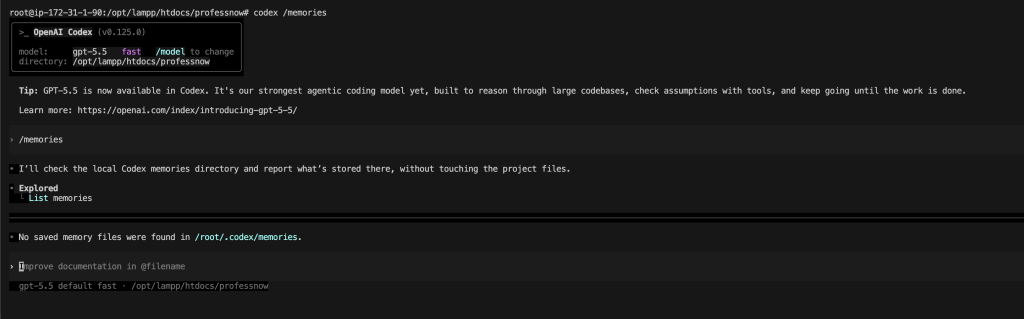
Codex can now remember useful context from earlier work and reuse it in future sessions. This guide explains what ~/.codex/memories/ is, how to enable it, how to use it correctly, what to save, what not to save, and how to combine it with AGENTS.md for a reliable long-term workflow.
Codex Memories are currently off by default. When enabled, they help Codex remember stable preferences, workflows, tech stacks, project conventions, and known pitfalls across threads. OpenAI recommends treating memory as a helpful local recall layer, not as the only source of important rules. Required instructions should still live in AGENTS.md or checked-in documentation. (OpenAI Developers)
1. What is ~/.codex/memories/?
~/.codex/memories/ is the local folder where Codex stores memory-related files.
By default, Codex uses this home directory:
~/.codex
The main memory files live here:
~/.codex/memories/
These files can include summaries, durable memory entries, recent inputs, and supporting evidence from prior Codex threads. OpenAI describes these files as generated state: you can inspect them, especially for troubleshooting, but you should not treat manual editing as the main way to control Codex behavior. (OpenAI Developers)
2. What problem does Codex Memory solve?
Without memory, you may need to repeat the same context every time:
This is a Laravel project.
Use Pest for tests.
Do not edit generated files.
Always check routes first.
Prefer small commits.
Do not touch payment logic without asking.
With memory enabled, Codex can gradually learn stable working context from previous sessions, so future sessions can start with better background knowledge. It is useful for recurring preferences, coding style, common project structure, repeated debugging patterns, and known mistakes to avoid. (OpenAI Developers)
3. Memory is not the same as AGENTS.md
This is the most important concept.
Use Codex Memory for:
Useful background Codex can remember from previous work.
Use AGENTS.md for:
Rules Codex must reliably follow every time.
For example, this belongs in memory:
The developer usually prefers small, targeted pull requests.
This belongs in AGENTS.md:
Never commit secrets.
Always run tests before finishing.
Do not modify generated files.
Codex reads AGENTS.md before doing work, and OpenAI recommends using it for reusable repository guidance such as repo layout, test commands, conventions, constraints, and verification steps. (OpenAI Developers)
4. Where is ~/.codex/memories/ located?
On Linux or macOS:
~/.codex/memories/
On a Linux server, ~ depends on the current user.
For a normal user:
/home/username/.codex/memories/
For root:
/root/.codex/memories/
Check your actual home directory:
echo ~
Then check the Codex folder:
ls -la ~/.codex
5. Enable Codex Memories
Create the Codex config directory:
mkdir -p ~/.codex
Open the config file:
nano ~/.codex/config.toml
Add:
[features]
memories = true
Save the file.
Codex user-level configuration lives in ~/.codex/config.toml, and project-level overrides can live in .codex/config.toml inside a repository. Codex loads configuration from multiple layers, with CLI overrides taking highest priority, followed by profiles, trusted project config, user config, system config, and built-in defaults. (OpenAI Developers)
6. Avoid duplicate [features] blocks
Before adding anything, inspect your config:
cat ~/.codex/config.toml
Bad example:
[features]
memories = true
[features]
codex_hooks = true
Good example:
[features]
memories = true
codex_hooks = true
A TOML config should not have repeated identical table headers unless the format explicitly expects arrays of tables. For normal Codex feature flags, keep all feature flags under one [features] section.
7. Confirm the memory folder
After enabling memory, run:
ls -la ~/.codex/memories
If it does not exist yet, that can be normal.
Codex does not necessarily create memory files immediately. It can skip active or short-lived sessions, redact secrets from generated memory fields, and update memories later instead of immediately when a thread ends. Memories may not update until a thread has been idle long enough. (OpenAI Developers)
You can also check:
find ~/.codex -maxdepth 3 -type d -print
8. Basic memory workflow
A simple workflow looks like this:
1. Enable memories in ~/.codex/config.toml
2. Use Codex normally
3. Give Codex stable context during real work
4. Let Codex generate memory over time
5. Keep hard rules in AGENTS.md
6. Review memory files when troubleshooting
Example first memory-seeding prompt:
Remember this for future Codex work:

I usually prefer small, targeted changes.
Before editing, inspect only the files relevant to the task.
Do not refactor unrelated code.
When a task is ambiguous, make a short plan first.
When changing code, explain what changed and how to test it.
This kind of prompt gives Codex reusable context without locking critical rules only inside memory.
9. What should you save in Codex Memory?
Good memory candidates are durable, reusable, and not secret.
Examples:
The user prefers small, focused changes.
The user prefers minimal dependencies.
The main backend is Laravel.
The frontend uses React and Tailwind.
Tests should be run with npm test.
The project uses PostgreSQL locally.
The team prefers conventional commits.
The user likes short explanations after code changes.
The codebase has legacy modules that should not be refactored casually.
These are useful because they apply across multiple future sessions.
10. What should not go into Codex Memory?
Do not intentionally store secrets or sensitive operational data.
Avoid saving:
API keys
Database passwords
SSH private keys
Production tokens
OAuth secrets
Customer data
Private financial data
Credentials from .env files
One-time incident details
Temporary debugging output
OpenAI says Codex redacts secrets from generated memory fields, but you should still avoid storing secrets and review memory files before sharing your Codex home directory or generated memory artifacts. (OpenAI Developers)
11. How to use /memories inside Codex
Inside the Codex app or TUI, use:
/memories
This lets you control memory behavior for the current thread.
You can decide whether the current thread can:
Use existing memories
Generate future memories
Thread-level choices do not change your global memory settings. (OpenAI Developers)
Use this when you are working on sensitive or temporary tasks.
12. Recommended beginner config
For most users:
[features]
memories = true
That is enough to start.
Then use Codex normally and let memories build over time.
13. Recommended practical config
For users who want memory but want to avoid saving externally sourced or tool-heavy threads:
[features]
memories = true
[memories]
use_memories = true generate_memories = true disable_on_external_context = true min_rollout_idle_hours = 6 max_rollout_age_days = 30 max_unused_days = 30
Meaning:
use_memories = true
Codex can inject existing memories into future sessions.
generate_memories = true
New threads can become memory-generation inputs.
disable_on_external_context = true
Threads that used external context such as MCP tool calls, web search, or tool search are excluded from memory generation.
min_rollout_idle_hours = 6
Codex waits before considering a thread for memory generation.
max_rollout_age_days = 30
Codex only considers recent threads up to the configured age.
The official config reference documents these memory settings, including generate_memories, use_memories, disable_on_external_context, max_rollout_age_days, max_unused_days, and min_rollout_idle_hours. (OpenAI Developers)
14. Advanced memory settings explained
memories.use_memories
[memories]
use_memories = true
When true, Codex can use existing memories in future sessions.
To temporarily stop Codex from using existing memories:
[memories]
use_memories = false
When false, Codex skips injecting existing memories into future sessions. (OpenAI Developers)
memories.generate_memories
[memories]
generate_memories = true
When true, Codex can use newly created threads as inputs for future memory generation.
To stop creating new memories:
[memories]
generate_memories = false
When false, newly created threads are not stored as memory-generation inputs. (OpenAI Developers)
memories.disable_on_external_context
[memories]
disable_on_external_context = true
This is useful when you use MCP tools, web search, or other external context and do not want those threads used for memory generation. (OpenAI Developers)
memories.min_rollout_idle_hours
[memories]
min_rollout_idle_hours = 6
This controls how long a thread must be idle before Codex considers it for memory generation. The documented default is 6 hours, with a clamped range of 1 to 48 hours. (OpenAI Developers)
memories.max_rollout_age_days
[memories]
max_rollout_age_days = 30
This controls the maximum age of threads considered for memory generation. The documented default is 30 days, with a clamped range of 0 to 90 days. (OpenAI Developers)
memories.max_unused_days
[memories]
max_unused_days = 30
This controls how long an unused memory remains eligible for consolidation. The documented default is 30 days, with a clamped range of 0 to 365 days. (OpenAI Developers)
15. How to inspect memories
List memory files:
ls -la ~/.codex/memories
Find files:
find ~/.codex/memories -maxdepth 3 -type f -print
Preview safely:
find ~/.codex/memories -maxdepth 3 -type f -print -exec sed -n '1,80p' {} \;
Check folder size:
du -sh ~/.codex/memories
Search for a keyword:
grep -R "Laravel" ~/.codex/memories
Search for possible secrets before sharing:
grep -R -i "password\|secret\|token\|api_key\|apikey\|private key" ~/.codex/memories
16. How to delete memories
Delete all memories:
rm -rf ~/.codex/memories
Recreate the folder:
mkdir -p ~/.codex/memories
This deletes existing memory files, but it does not necessarily disable memory. If this remains enabled:
[features]
memories = true
Codex may create new memories later.
17. How to disable memory completely
Edit:
nano ~/.codex/config.toml
Set:
[features]
memories = false
[memories]
use_memories = false generate_memories = false
Then remove existing memory files if desired:
rm -rf ~/.codex/memories
18. How to pause memory for sensitive work
Inside Codex:
/memories
Disable memory generation for that thread.
Use this for:
Production debugging
Secret rotation
Security incidents
Customer-specific debugging
.env inspection
Database credential work
Payment provider debugging
Private logs
You can also make your config stricter:
[features]
memories = true
[memories]
use_memories = true generate_memories = true disable_on_external_context = true
19. Combine memory with AGENTS.md
A strong setup uses both.
Create global instructions:
mkdir -p ~/.codex

cat > ~/.codex/AGENTS.md <<'EOF'
# Global Codex working rules

- Prefer small, focused changes.
- Explain what files you changed and why.
- Do not edit unrelated files.
- Do not expose secrets.
- Ask before adding new production dependencies.
- Run relevant tests when possible.
- If a task is complex, make a short plan before editing.
EOF
Codex reads global guidance from the Codex home directory, usually ~/.codex, and also reads project-level AGENTS.md files when present. More specific files closer to the working directory override earlier guidance because they appear later in the combined prompt. (OpenAI Developers)
20. Create project-specific AGENTS.md
Inside a repo:
cat > AGENTS.md <<'EOF'
# Project instructions

## Project layout
- app/ contains application code
- tests/ contains automated tests
- docs/ contains documentation

## Commands
- Run tests with: npm test
- Run lint with: npm run lint
- Run build with: npm run build

## Rules
- Do not edit generated files.
- Do not change public APIs without explaining the impact.
- Keep changes small and reviewable.
- Update tests when behavior changes.

## Done means
- Relevant tests pass.
- No unrelated files are changed.
- The final response explains what changed and how to verify it.
EOF
This is better than relying only on memory because AGENTS.md is explicit, reviewable, shareable with a team, and automatically loaded as project guidance. OpenAI’s best-practices guide describes AGENTS.md as the best place to encode how a team wants Codex to work in a repository. (OpenAI Developers)
21. How to seed memory properly
Do not just say:
Remember my project.
That is too vague.
Use structured context:
Remember this for future Codex sessions:

My coding preferences:
- Prefer small, targeted changes.
- Do not refactor unrelated code.
- Explain assumptions before editing.
- Prefer existing project conventions over introducing new patterns.

My review preferences:
- Summarize changed files.
- Mention tests run.
- Mention any risks or follow-up work.

My safety preferences:
- Never print secrets.
- Avoid reading .env unless explicitly necessary.
- Ask before adding production dependencies.
This gives Codex stable, reusable information.
22. Good memory prompts
For personal coding style
Remember for future Codex work:
I prefer minimal, focused patches. Avoid broad refactors unless I explicitly ask for them. When making changes, explain the exact files changed and the test command to run.
For a tech stack
Remember for future Codex work:
Most of my backend projects use Laravel, MySQL, and Blade. When debugging Laravel, check routes, controllers, models, migrations, middleware, config, and logs only as needed.
For frontend preferences
Remember for future Codex work:
For frontend work, I prefer React with Tailwind, simple components, accessible markup, and minimal new dependencies.
For review behavior
Remember for future Codex work:
When reviewing code, focus on correctness, security, edge cases, performance, and maintainability. Give actionable fixes, not only comments.
For cost control
Remember for future Codex work:
Before scanning a large repository, identify the most likely files first. Avoid reading vendor, node_modules, build output, cache directories, logs, and generated files unless explicitly needed.
23. Bad memory prompts
Avoid vague prompts:
Remember everything about this repo.
Avoid secrets:
Remember my production database password is ...
Avoid temporary facts:
Remember I am debugging this issue today at 3 PM.
Avoid unstable assumptions:
Remember this API is always broken.
Better:
Remember that this codebase has had recurring issues around API timeout handling. When debugging API failures, check retry logic, timeout configuration, and error logging.
24. Memory workflow for large codebases
For a large codebase, memory should help Codex avoid rediscovering the same structure every time.
Example memory prompt:
Remember this large-repo workflow:

1. First identify the relevant module.
2. Avoid scanning the whole repository.
3. Check README, AGENTS.md, routes, entry points, and tests first.
4. Ignore dependencies, generated files, build output, logs, and cache directories.
5. Before editing, state the small set of files to inspect.
6. Make the smallest safe change.
Then encode hard rules in AGENTS.md.
25. Memory workflow for teams
For teams, do not depend on one developer’s local memory.
Use this pattern:
Team-wide required behavior → AGENTS.md
Personal preferences → ~/.codex/AGENTS.md
Helpful previous context → ~/.codex/memories/
Temporary task details → current prompt
Example:
~/.codex/AGENTS.md
Personal preferences.
project/AGENTS.md
Team and repository rules.
~/.codex/memories/
Generated recall from prior work.
Current prompt
Task-specific instructions.
This keeps the workflow reliable and shareable.
26. Memory and config precedence
Codex config can come from several places. In general, one-off CLI flags and --config overrides take priority over profiles, then project config, then user config, then system config, then defaults. (OpenAI Developers)
This matters because memory might be enabled globally but disabled for one run:
codex -c features.memories=false
Or memory might be enabled globally but overridden by a profile.
27. Project-level memory behavior
You can keep general memory enabled globally:
[features]
memories = true
Then control project behavior using project config:
mkdir -p .codex
nano .codex/config.toml
Example:
[memories]
generate_memories = false
This is useful for sensitive repositories.
Project-scoped .codex/config.toml files are loaded only for trusted projects. (OpenAI Developers)
28. Advanced: reduce accidental parent-folder context
For large workspaces or monorepos, configure project root markers carefully.
Codex discovers project configuration by walking up from the working directory until it reaches a project root. By default, a directory containing .git is treated as a project root. You can customize this with project_root_markers. (OpenAI Developers)
Example:
project_root_markers = [".git", "composer.json", "package.json"]
Or force Codex to treat only the current directory as the root:
project_root_markers = []
This can help prevent Codex from accidentally loading broader parent-level context in unusual folder structures.
29. Troubleshooting
Problem: ~/.codex/memories/ does not exist
Check config:
cat ~/.codex/config.toml
Confirm:
[features]
memories = true
Then use Codex normally. The folder may appear later.
Problem: memory folder exists but is empty
This can happen when:
Memories were just enabled.
Threads were too short.
Threads are still active.
Idle time has not passed.
Memory generation is disabled.
The current region/account does not support memories.
Codex may wait before creating memory because it avoids summarizing work that may still be in progress. (OpenAI Developers)
Problem: Codex remembers wrong information
Correct it in the next session:
The previous memory is outdated. Update your understanding:
This project now uses PostgreSQL, not MySQL.
Use pnpm, not npm.
Run tests with pnpm test.
Then add hard rules to AGENTS.md.
If needed, delete memory files:
rm -rf ~/.codex/memories
Problem: Codex ignores memory
Check whether memory usage is disabled:
grep -n "use_memories\|generate_memories\|memories" ~/.codex/config.toml
Look for:
[memories]
use_memories = false
Set it back to:
[memories]
use_memories = true
Problem: You want memory only sometimes
Keep global memory enabled:
[features]
memories = true
Use /memories inside Codex to disable memory for specific sensitive threads. (OpenAI Developers)
30. Recommended final setup
For most developers:
# ~/.codex/config.toml[features]
memories = true
[memories]
use_memories = true generate_memories = true disable_on_external_context = true min_rollout_idle_hours = 6 max_rollout_age_days = 30 max_unused_days = 30
Create global instructions:
mkdir -p ~/.codex

cat > ~/.codex/AGENTS.md <<'EOF'
# Global Codex instructions

- Prefer small, focused changes.
- Do not refactor unrelated code.
- Do not expose secrets.
- Ask before adding major dependencies.
- Explain changed files and verification steps.
- Use the project’s existing conventions.
EOF
Inside each serious project, create:
AGENTS.md
with project-specific rules.
Final mental model
Think of Codex context like this:
Current prompt
= what you want now

AGENTS.md
= rules Codex should reliably follow

~/.codex/config.toml
= how Codex should behave

~/.codex/memories/
= useful context Codex learned over time
Memory is powerful, but it should not be your only control system. Use it to reduce repetition. Use AGENTS.md for rules. Use config.toml for behavior. Use clear prompts for the task at hand.