Introduction
Enterprise Content Connectors for RAG (Retrieval-Augmented Generation) are important components that connect AI applications with enterprise data sources. These connectors allow Large Language Models (LLMs) to access private business information and provide accurate, context-aware responses.
Modern organizations store valuable knowledge across multiple platforms, including:
- Document management systems
- Cloud storage platforms
- Collaboration applications
- Databases
- CRM systems
- Knowledge bases
- Internal business applications
RAG systems require reliable access to this information to generate meaningful answers. Enterprise Content Connectors collect, process, and synchronize data from different sources before sending it to AI pipelines.
These connectors help organizations build:
- Enterprise AI assistants
- Internal knowledge search systems
- Customer support copilots
- AI-powered document assistants
- Employee productivity tools
- Business intelligence applications
Enterprise Content Connectors are widely used by:
- AI engineers
- Data engineers
- MLOps teams
- Enterprise architects
- Software developers
- Knowledge management teams
Modern connectors provide capabilities such as:
- Data source integration
- Document extraction
- Metadata processing
- Permission-aware access
- Data synchronization
- Content transformation
- Vector database preparation
- RAG workflow integration
The goal of Enterprise Content Connectors is to create a secure bridge between enterprise knowledge and AI systems.
What Are Enterprise Content Connectors for RAG?
Enterprise Content Connectors are tools that allow AI systems to connect with different organizational data repositories.
They collect information from sources such as:
- SharePoint
- Google Drive
- Confluence
- Slack
- Salesforce
- ServiceNow
- Databases
- File storage systems
The collected information is processed through a RAG pipeline:
- Data collection
- Content extraction
- Document cleaning
- Chunking
- Embedding generation
- Vector indexing
- AI retrieval
This process allows AI models to answer questions using company-specific information instead of only general training data.
Why Enterprise Content Connectors Matter for RAG
Enterprise data is usually distributed across multiple systems. Employees often spend significant time searching for information stored in different applications.
Without proper connectors, organizations face challenges such as:
- Data silos
- Outdated information
- Poor AI responses
- Security risks
- Manual data management
Enterprise Content Connectors solve these problems by helping organizations:
- Create unified knowledge systems
- Improve AI response accuracy
- Maintain updated information
- Protect sensitive data
- Reduce integration complexity
How Enterprise Content Connectors Work
1. Data Source Connection
The connector establishes a connection with enterprise systems.
Examples:
- Cloud storage
- Databases
- Collaboration tools
- Business applications
2. Content Extraction
The system collects:
- Documents
- Text files
- Records
- Messages
- Metadata
3. Data Processing
Collected information is prepared using:
- Text extraction
- Cleaning
- Formatting
- Chunking
4. Metadata Management
Important information is preserved:
- Author
- Date
- Category
- Access permissions
- Source location
5. AI Preparation
Content is prepared for:
- Embedding models
- Vector databases
- Retrieval systems
6. RAG Integration
Processed information is connected with:
- LLMs
- AI assistants
- Enterprise applications
Key Components of Enterprise Content Connectors
Data Connectors
Allow integration with:
- SaaS platforms
- Databases
- File systems
Authentication System
Manages:
- User identity
- Access permissions
- Security policies
Extraction Engine
Handles:
- Document retrieval
- Data parsing
- Metadata collection
Synchronization Engine
Provides:
- Real-time updates
- Scheduled updates
- Incremental syncing
Transformation Layer
Converts raw information into:
- AI-ready documents
- Searchable content
Security Layer
Maintains:
- Data privacy
- Compliance
- Access control
Types of Enterprise Content Connectors
Document Storage Connectors
Examples:
- SharePoint
- Google Drive
- Dropbox
- OneDrive
Used for managing business documents.
Collaboration Connectors
Examples:
- Slack
- Microsoft Teams
- Confluence
Used for accessing team knowledge.
Business Application Connectors
Examples:
- Salesforce
- ServiceNow
- ERP systems
Used for business data retrieval.
Database Connectors
Examples:
- SQL databases
- Data warehouses
Used for structured information access.
Web Content Connectors
Examples:
- Websites
- Documentation portals
- Knowledge bases
Used for external and internal content retrieval.
Key Features of Enterprise RAG Connectors
Multi-Source Integration
Supports multiple enterprise applications from one AI workflow.
Permission-Aware Retrieval
Ensures users only access authorized information.
Automated Synchronization
Keeps AI knowledge updated automatically.
Metadata Preservation
Maintains document context and information structure.
Security Management
Provides:
- Authentication
- Authorization
- Compliance support
AI Framework Support
Works with:
- RAG frameworks
- Vector databases
- LLM platforms
Common Use Cases
Enterprise AI Assistants
Employees can ask questions about:
- Policies
- Documentation
- Internal processes
Customer Support AI
AI systems can access:
- Product manuals
- Support articles
- Customer information
HR Knowledge Systems
Used for:
- Employee policies
- Training materials
- Company guidelines
IT Operations Assistants
Connects:
- Technical documentation
- Incident records
- System information
Sales Enablement AI
Provides access to:
- Product information
- Market documents
- Customer insights
Legal AI Systems
Processes:
- Contracts
- Regulations
- Compliance information
Benefits of Enterprise Content Connectors
Improved AI Accuracy
AI systems receive relevant business context.
Better Knowledge Discovery
Employees find information faster.
Secure AI Adoption
Sensitive company data remains protected.
Automated Knowledge Updates
AI systems stay synchronized with new information.
Faster RAG Development
Developers spend less time building integrations.
Evaluation Criteria
Integration Coverage
Evaluate:
- Number of supported data sources
- API availability
Security
Consider:
- Authentication
- Permissions
- Compliance
Synchronization
Evaluate:
- Update frequency
- Real-time capabilities
Data Processing
Consider:
- Extraction quality
- Metadata handling
AI Compatibility
Check support for:
- Vector databases
- LLMs
- RAG frameworks
Scalability
Evaluate:
- Enterprise data volume
- Performance
Key Trends
Permission-Aware Enterprise AI
Companies are focusing on secure AI access.
Real-Time Knowledge Retrieval
AI systems require continuously updated information.
Multimodal Content Connectors
Future connectors will support:
- Text
- Images
- Audio
- Video
AI Agent Integration
AI agents will use enterprise connectors for autonomous workflows.
Unified Enterprise Knowledge Platforms
Organizations are creating centralized AI knowledge layers.
Methodology
The following Enterprise Content Connectors were evaluated based on:
- Integration capabilities
- RAG compatibility
- Security features
- Scalability
- Data processing
- Developer experience
- Enterprise adoption
- Performance
- Reliability
- Value
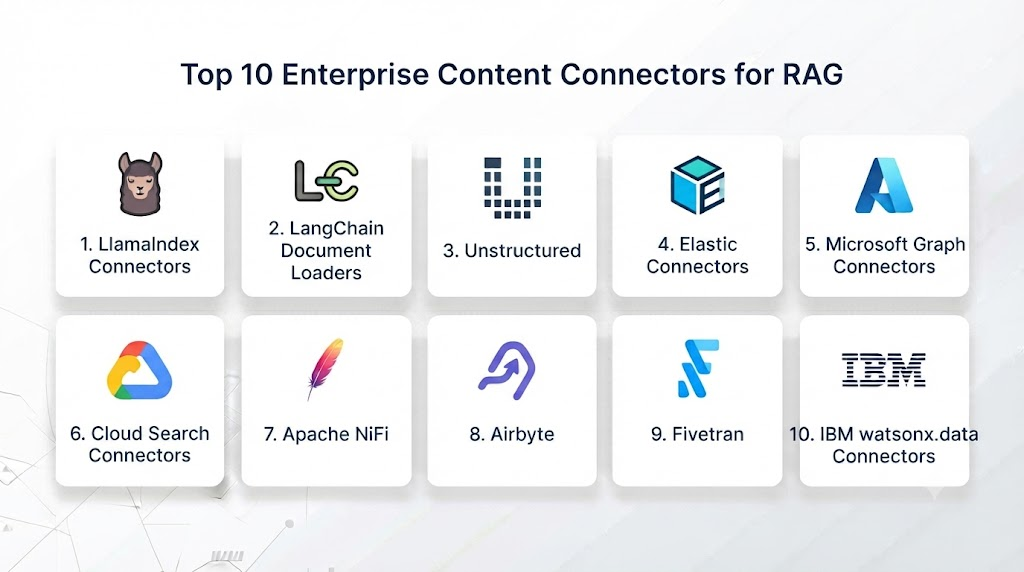
Top 10 Enterprise Content Connectors for RAG
1. LlamaIndex Data Connectors
LlamaIndex provides data connectors designed specifically for connecting enterprise data with LLM applications.
Key Features
- Document ingestion
- Multiple data connectors
- Metadata extraction
- Data indexing
- Vector database integration
- RAG pipeline support
- Query processing
- AI application development
Pros
- Built for RAG applications
- Flexible architecture
- Strong AI ecosystem
- Developer friendly
Cons
- Requires coding knowledge
- Complex workflows need customization
2. LangChain Document Loaders
LangChain provides document loaders for connecting external data sources with AI applications.
Key Features
- File loaders
- Database connectors
- Cloud storage support
- Web content extraction
- Text processing
- Metadata management
- Retrieval workflows
Pros
- Large ecosystem
- Many integrations
- Strong community support
Cons
- Can become complex
- Requires development skills
3. Unstructured Connectors
Unstructured focuses on document extraction and preparation for AI applications.
Key Features
- PDF processing
- OCR support
- Document parsing
- Table extraction
- Metadata extraction
- AI-ready content preparation
Pros
- Excellent document handling
- Supports complex files
- Good RAG integration
Cons
- Advanced features may require paid plans
4. Microsoft Graph Connectors
Microsoft Graph Connectors connect enterprise Microsoft applications with AI systems.
Key Features
- SharePoint integration
- OneDrive access
- Teams connectivity
- Permission management
- Enterprise search
- Identity integration
Pros
- Strong enterprise security
- Excellent Microsoft integration
- Permission-aware
Cons
- Best suited for Microsoft environments
5. Google Cloud Enterprise Search Connectors
Google Cloud provides connectors for enterprise AI search applications.
Key Features
- Data source integration
- Document indexing
- AI retrieval
- Security controls
- Metadata processing
- Cloud scalability
Pros
- Managed platform
- Google AI ecosystem
- Enterprise scalability
Cons
- Google Cloud dependency
6. Amazon Kendra Connectors
Amazon Kendra provides enterprise search connectors for AWS users.
Key Features
- Enterprise data connectors
- Document indexing
- Natural language search
- Metadata handling
- Permission management
- AWS integration
Pros
- AWS ecosystem support
- Managed service
- Strong security
Cons
- AWS dependency
- Cost management required
7. Haystack Connectors
Haystack provides open-source components for RAG systems.
Key Features
- Document ingestion
- Retrieval pipelines
- Vector database support
- Search workflows
- Evaluation tools
Pros
- Open source
- Flexible
- RAG focused
Cons
- Requires setup
8. Airbyte
Airbyte provides data integration connectors for moving information between systems.
Key Features
- Large connector library
- Data synchronization
- API connections
- Database support
- Pipeline automation
Pros
- Many integrations
- Open source
- Flexible deployment
Cons
- Requires AI processing layer
9. Apache NiFi
Apache NiFi provides enterprise data flow management.
Key Features
- Data ingestion
- Workflow automation
- Data transformation
- Real-time processing
- Monitoring
Pros
- Powerful workflows
- Enterprise adoption
- Flexible
Cons
- Complex configuration
10. Fivetran
Fivetran provides managed data connectors for enterprise data pipelines.
Key Features
- Automated synchronization
- SaaS connectors
- Database integration
- Monitoring
- Cloud deployment
Pros
- Reliable
- Easy management
- Enterprise ready
Cons
- Commercial pricing
Comparison Table: Top 10 Enterprise Content Connectors for RAG
| No. | Tool Name | Best For | Platform(s) Supported | Deployment | Standout Feature | Public Rating |
|---|---|---|---|---|---|---|
| 1 | LlamaIndex Data Connectors | RAG applications | Cloud / Local | Flexible | AI data integration | 4.8/5 |
| 2 | LangChain Document Loaders | AI developers | Cloud / Local | Flexible | Large ecosystem | 4.7/5 |
| 3 | Unstructured Connectors | Document AI | Cloud / Local | Flexible | Document extraction | 4.7/5 |
| 4 | Microsoft Graph Connectors | Microsoft data | Azure | Managed | Permission-aware access | 4.6/5 |
| 5 | Google Cloud Enterprise Search Connectors | Enterprise search | GCP | Managed | AI retrieval | 4.6/5 |
| 6 | Amazon Kendra Connectors | AWS search | AWS | Managed | Natural language search | 4.5/5 |
| 7 | Haystack Connectors | Open-source RAG | Cloud / Local | Flexible | Modular pipelines | 4.5/5 |
| 8 | Airbyte | Data integration | Cloud / Local | Flexible | Connector ecosystem | 4.5/5 |
| 9 | Apache NiFi | Data workflows | Cloud / Local | Enterprise | Flow automation | 4.4/5 |
| 10 | Fivetran | Data synchronization | Cloud | Managed | Automated pipelines | 4.4/5 |
Weighted Evaluation Table
| No. | Tool Name | Integration 25% | Ease of Use 15% | RAG Compatibility 15% | Security 10% | Performance 10% | Support 10% | Value 15% | Total |
|---|---|---|---|---|---|---|---|---|---|
| 1 | LlamaIndex | 25 | 15 | 15 | 9 | 10 | 10 | 14 | 98 |
| 2 | LangChain | 24 | 15 | 15 | 9 | 10 | 10 | 14 | 97 |
| 3 | Unstructured | 25 | 14 | 15 | 9 | 10 | 10 | 13 | 96 |
| 4 | Microsoft Graph | 24 | 13 | 14 | 10 | 10 | 10 | 13 | 94 |
| 5 | Google Connectors | 24 | 13 | 15 | 10 | 10 | 10 | 12 | 94 |
| 6 | Amazon Kendra | 23 | 13 | 14 | 10 | 10 | 10 | 12 | 92 |
| 7 | Haystack | 23 | 14 | 15 | 9 | 10 | 10 | 14 | 95 |
| 8 | Airbyte | 25 | 14 | 12 | 9 | 10 | 10 | 14 | 94 |
| 9 | Apache NiFi | 24 | 12 | 12 | 10 | 10 | 10 | 14 | 92 |
| 10 | Fivetran | 24 | 15 | 12 | 10 | 10 | 10 | 11 | 92 |
Which Enterprise Content Connector Is Right for You?
Choose LlamaIndex for RAG-focused applications.
Choose LangChain for flexible AI development.
Choose Unstructured for document-heavy workflows.
Choose Microsoft Graph Connectors for Microsoft environments.
Choose Google Cloud Connectors for Google Cloud AI systems.
Choose Amazon Kendra Connectors for AWS enterprise search.
Choose Haystack for open-source RAG pipelines.
Choose Airbyte for broad data integration.
Choose Apache NiFi for enterprise data workflows.
Choose Fivetran for managed data synchronization.
Implementation Playbook
Phase 1: Identify Data Sources
- Select enterprise systems
- Define required knowledge
- Review permissions
Phase 2: Configure Connectors
- Authenticate platforms
- Setup synchronization
- Map metadata
Phase 3: Prepare Data
- Extract documents
- Clean information
- Create chunks
Phase 4: Build RAG System
- Generate embeddings
- Store vectors
- Connect LLMs
Phase 5: Maintain Knowledge
- Update content
- Monitor quality
- Manage permissions
Common Mistakes
- Ignoring security permissions
- Poor metadata management
- No synchronization strategy
- Connecting unnecessary data
- Weak document quality
- Lack of monitoring
FAQs
1. What are Enterprise Content Connectors for RAG?
They are tools that connect enterprise data sources with RAG-based AI systems.
2. Why are connectors needed for RAG?
They allow AI models to access private company knowledge.
3. What data sources can connectors support?
They support documents, databases, SaaS applications, and cloud storage.
4. Do connectors improve AI accuracy?
Yes, they provide relevant context to AI models.
5. Are Enterprise Content Connectors secure?
Most provide authentication and permission management.
6. Can connectors update data automatically?
Yes, many support scheduled and real-time synchronization.
7. Do connectors work with vector databases?
Yes, they prepare content for embeddings and retrieval.
8. Can AI agents use enterprise connectors?
Yes, connectors provide knowledge access for AI agents.
9. Are open-source connectors available?
Yes, LlamaIndex, LangChain, Haystack, Airbyte, and NiFi support open-source usage.
10. What is the future of enterprise connectors?
They will become a major foundation for secure enterprise AI systems.
Conclusion
Enterprise Content Connectors for RAG are becoming a critical part of modern AI infrastructure. They help organizations connect business knowledge with AI systems while maintaining security, accuracy, and continuous updates.Tools such as LlamaIndex, LangChain, Unstructured, Microsoft Graph Connectors, Amazon Kendra, Airbyte, and Apache NiFi help enterprises build reliable AI knowledge systems.As Generative AI and AI agents continue expanding, enterprise content connectors will play an important role in creating secure, intelligent, and context-aware AI applications.