Introduction
GPU Scheduling for Inference Platforms helps teams allocate GPU resources efficiently for AI model serving. In simple words, these platforms decide which model, request, pod, endpoint, or workload gets access to which GPU, when it runs, how much GPU memory it can use, and how resources should scale when demand changes.
This matters because inference workloads are no longer predictable. LLMs, RAG assistants, image models, speech systems, AI agents, and multimodal applications can create sudden spikes in GPU demand. Without proper scheduling, teams may waste expensive GPUs, overload nodes, experience long queues, or fail to meet latency expectations.
Real-world use cases include:
- Scheduling LLM inference workloads across GPU clusters
- Sharing GPU infrastructure between multiple AI teams
- Prioritizing production inference over experimental jobs
- Improving GPU utilization through batching and placement
- Scaling AI agents and RAG workloads during demand spikes
- Managing GPU capacity across Kubernetes, cloud, and hybrid environments
Evaluation criteria for buyers:
- GPU-aware workload placement
- Support for NVIDIA and accelerator ecosystems
- Kubernetes and cloud-native compatibility
- Multi-tenant scheduling and quota controls
- Queueing, priority, and preemption support
- Autoscaling and node provisioning support
- Inference latency and throughput optimization
- GPU memory visibility and utilization tracking
- Support for LLM serving runtimes
- Security, RBAC, and auditability
- Hybrid and on-prem deployment flexibility
- Integration with monitoring and MLOps workflows
Best for: AI platform teams, ML infrastructure teams, MLOps teams, DevOps teams, enterprises, AI startups, SaaS companies, research platforms, and organizations running GPU-heavy inference workloads in production.
Not ideal for: small teams using only hosted model APIs, casual AI experiments, or low-volume prototypes. In those cases, managed inference endpoints or simple cloud GPU instances may be enough before investing in dedicated GPU scheduling.
What’s Changed in GPU Scheduling for Inference Platforms
- GPU utilization is now a board-level cost concern. AI infrastructure teams must prove that expensive GPUs are being used efficiently instead of sitting idle.
- LLM inference creates unique scheduling pressure. Long context windows, token streaming, KV cache usage, and memory-heavy models require smarter scheduling than standard container workloads.
- Multi-tenant GPU sharing is becoming essential. Enterprises increasingly need to share GPU clusters between research, production inference, fine-tuning, experimentation, and batch jobs.
- Priority scheduling matters more. Production inference, customer-facing endpoints, and regulated workflows often need priority over development or background workloads.
- Queueing is a major part of inference reliability. When GPU capacity is limited, teams need controlled queues, backpressure, preemption, and fairness policies.
- Autoscaling and scheduling are converging. GPU scheduling now connects with node autoscaling, cluster autoscaling, workload placement, and cost-aware provisioning.
- Inference runtimes are becoming more specialized. Teams are using runtimes such as vLLM, Triton, TensorRT-based serving, and other optimized serving stacks that need GPU-aware orchestration.
- AI agents create bursty GPU demand. A single user request can trigger multiple model calls, tool calls, retrieval steps, and retries, making capacity planning harder.
- Hybrid GPU infrastructure is growing. Many teams use a mix of cloud GPUs, on-prem GPU servers, Kubernetes clusters, and managed inference platforms.
- Observability is no longer optional. Teams need visibility into GPU utilization, memory, queue time, request latency, pod placement, model load time, and throughput.
- Security and governance expectations are rising. Shared GPU environments need access controls, workload isolation, quotas, audit logs, and policy enforcement.
- Vendor lock-in is a concern. Buyers want portable scheduling patterns that work across clouds, Kubernetes clusters, and self-hosted infrastructure where possible.
Quick Buyer Checklist
Use this checklist to shortlist GPU scheduling platforms quickly:
- Does the tool support GPU-aware scheduling and workload placement?
- Can it schedule inference workloads by GPU memory, utilization, priority, or queue depth?
- Does it support Kubernetes, containers, and cloud-native environments?
- Can it share GPUs across teams, namespaces, or projects?
- Does it provide quota, priority, and preemption controls?
- Can it work with LLM serving runtimes such as vLLM, Triton, or custom serving stacks?
- Does it support autoscaling or integration with node provisioning tools?
- Can it track GPU utilization, memory usage, latency, queue time, and throughput?
- Does it support batch and real-time inference workloads?
- Can it isolate workloads for security and compliance needs?
- Does it integrate with monitoring, logging, and alerting tools?
- Does it support cloud, self-hosted, or hybrid deployment?
- Does it reduce GPU idle time without hurting production latency?
- Does it provide admin controls, RBAC, and auditability?
- Can teams export metrics, logs, and scheduling data to avoid lock-in?
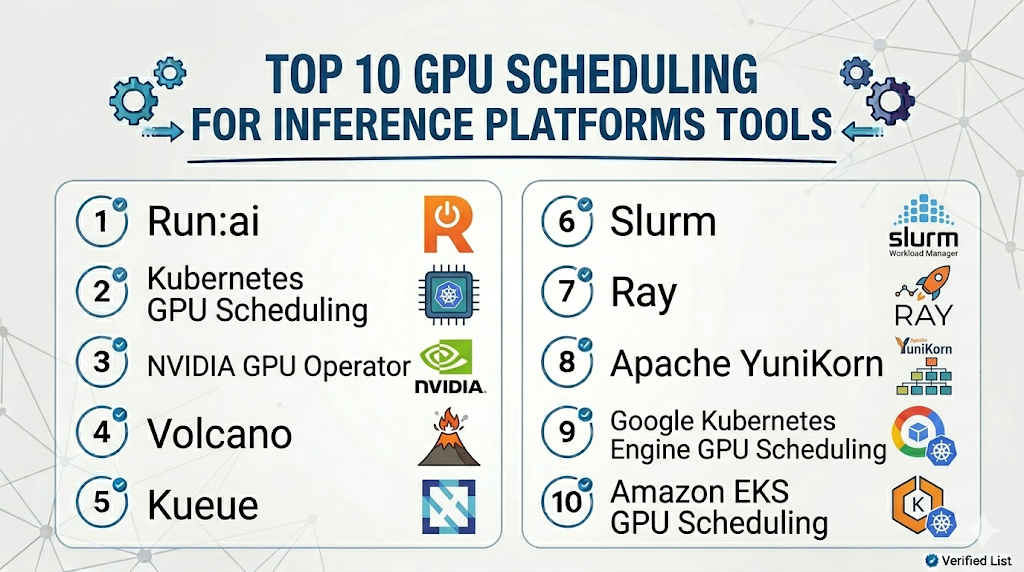
Top 10 GPU Scheduling for Inference Platforms Tools
1 — Run:ai
One-line verdict: Best for enterprises needing GPU orchestration, sharing, quotas, and AI workload scheduling.
Short description :
Run:ai provides GPU orchestration and workload management for AI infrastructure teams. It helps organizations allocate GPU resources, share capacity across teams, manage quotas, and improve utilization across training and inference workloads.
Standout Capabilities
- GPU resource orchestration for AI workloads
- Fractional and shared GPU allocation patterns depending on setup
- Queueing, quota, and priority management
- Kubernetes-based AI workload scheduling
- Visibility into GPU utilization and workload behavior
- Support for multi-team AI infrastructure
- Useful for enterprise GPU capacity governance
AI-Specific Depth Must Include
- Model support: BYO models and multiple AI workloads depending on infrastructure
- RAG / knowledge integration: N/A, usually handled in the application layer
- Evaluation: Varies / N/A, typically paired with external evaluation tools
- Guardrails: Varies / N/A, requires companion AI safety controls
- Observability: GPU utilization, workload metrics, queue visibility, resource usage, and scheduling data depending on setup
Pros
- Strong fit for enterprise GPU sharing and governance
- Helps improve GPU utilization across many teams
- Useful for production, research, and experimentation workloads
Cons
- May be more advanced than small teams need
- Requires Kubernetes and platform engineering maturity
- Exact deployment, pricing, and security details should be verified directly
Security & Compliance
Security features such as RBAC, SSO, audit logs, encryption, retention controls, and residency may vary by deployment and plan. Certifications are Not publicly stated here.
Deployment & Platforms
- Kubernetes-based deployment
- Cloud, self-hosted, or hybrid depending on infrastructure
- Web-based management interface: Varies / N/A
- Works with GPU clusters and AI infrastructure environments
- Windows, macOS, and Linux access depends on admin and developer workflows
Integrations & Ecosystem
Run:ai fits AI infrastructure teams that need to manage GPU access across many teams and workloads. It can sit alongside Kubernetes, MLOps tools, inference runtimes, and observability systems.
- Kubernetes clusters
- GPU infrastructure
- AI workload queues
- Monitoring systems
- MLOps workflows
- Containerized inference workloads
- Multi-team resource governance
Pricing Model No exact prices unless confident
Typically enterprise-oriented pricing based on deployment scope, cluster size, usage, and support requirements. Exact pricing is Not publicly stated.
Best-Fit Scenarios
- Enterprises sharing GPU clusters across teams
- AI platforms needing quota and priority scheduling
- Organizations optimizing GPU utilization across inference and training
2 — Kubernetes GPU Scheduling
One-line verdict: Best for teams building custom GPU scheduling workflows on cloud-native infrastructure.
Short description :
Kubernetes can schedule GPU workloads through device plugins, node labels, taints, tolerations, resource requests, and autoscaling integrations. It is useful for teams that want a cloud-native foundation for AI inference infrastructure.
Standout Capabilities
- Container-native GPU workload scheduling
- Works with device plugins for accelerator access
- Supports node labels, taints, tolerations, and affinity
- Integrates with autoscaling and provisioning tools
- Portable across many cloud and self-hosted environments
- Supports multi-tenant namespace patterns
- Strong ecosystem for monitoring, logging, and CI/CD
AI-Specific Depth Must Include
- Model support: BYO models and custom inference workloads through containers
- RAG / knowledge integration: N/A, handled in application and data layers
- Evaluation: Varies / N/A, usually paired with external evaluation tools
- Guardrails: Varies / N/A, handled through application and policy layers
- Observability: Pod metrics, GPU metrics through integrations, logs, latency, node health, and workload status depending on setup
Pros
- Flexible and widely adopted infrastructure foundation
- Works across cloud, on-prem, and hybrid environments
- Strong ecosystem for custom AI platform engineering
Cons
- Native scheduling may need extensions for advanced GPU fairness
- Requires platform engineering expertise
- GPU sharing, quotas, and queueing may need additional tools
Security & Compliance
Security depends on cluster configuration, RBAC, network policies, secrets management, audit logging, encryption, image controls, and infrastructure governance. Certifications are Not publicly stated.
Deployment & Platforms
- Kubernetes clusters
- Cloud, self-hosted, or hybrid
- Linux-based container environments
- Works with managed Kubernetes services and self-managed clusters
- Web interface depends on cluster tooling
Integrations & Ecosystem
Kubernetes is a strong foundation for GPU scheduling when teams want control and portability. It can be extended with autoscalers, GPU operators, queue managers, and inference runtimes.
- Container runtimes
- GPU device plugins
- Cluster autoscalers
- Monitoring tools
- CI/CD pipelines
- Model serving frameworks
- Policy and security tools
Pricing Model No exact prices unless confident
Open-source usage is available. Costs depend on cloud services, GPU instances, operations, support, and infrastructure management.
Best-Fit Scenarios
- Teams building custom AI platforms
- Organizations standardizing inference on Kubernetes
- Hybrid or multi-cloud GPU infrastructure strategies
3 — NVIDIA GPU Operator
One-line verdict: Best for teams standardizing NVIDIA GPU management inside Kubernetes environments.
Short description :
NVIDIA GPU Operator helps automate the setup and management of NVIDIA GPU software components in Kubernetes. It is useful for teams that need drivers, device plugins, runtime components, and GPU monitoring foundations for AI inference clusters.
Standout Capabilities
- Automates NVIDIA GPU software stack management
- Supports Kubernetes GPU enablement patterns
- Helps manage drivers, device plugins, and runtime components
- Provides a foundation for GPU-aware workloads
- Works with NVIDIA inference and AI tooling
- Useful for standardizing GPU cluster operations
- Supports monitoring integration patterns depending on setup
AI-Specific Depth Must Include
- Model support: BYO models through GPU-enabled Kubernetes workloads
- RAG / knowledge integration: N/A
- Evaluation: N/A, requires external evaluation tools
- Guardrails: N/A, requires companion AI safety controls
- Observability: GPU metrics and operational signals depending on monitoring configuration
Pros
- Strong foundation for NVIDIA GPU clusters
- Helps reduce manual GPU stack setup
- Useful for Kubernetes-based inference infrastructure
Cons
- Not a complete scheduler or inference platform alone
- Requires Kubernetes and NVIDIA ecosystem knowledge
- Advanced workload fairness and quotas need companion tools
Security & Compliance
Security depends on Kubernetes configuration, container policies, node access, driver management, RBAC, logging, and infrastructure controls. Certifications are Not publicly stated.
Deployment & Platforms
- Kubernetes-based
- Cloud, on-prem, or hybrid GPU clusters
- Linux-based GPU node environments
- Works with NVIDIA GPU infrastructure
- Web interface: N/A unless provided by surrounding platform
Integrations & Ecosystem
NVIDIA GPU Operator is commonly used as a foundation layer for GPU-enabled Kubernetes environments. It works alongside schedulers, inference runtimes, monitoring tools, and model-serving platforms.
- Kubernetes
- NVIDIA device plugin
- NVIDIA container runtime components
- GPU monitoring workflows
- Triton Inference Server
- vLLM or other serving runtimes through Kubernetes
- Cluster operations tools
Pricing Model No exact prices unless confident
Software usage and infrastructure cost vary by deployment, support, GPUs, and operational model. Exact pricing is Varies / N/A.
Best-Fit Scenarios
- Kubernetes clusters using NVIDIA GPUs
- Teams standardizing GPU node operations
- AI infrastructure teams preparing clusters for inference serving
4 — Volcano
One-line verdict: Best for Kubernetes teams needing batch, queueing, and gang scheduling for AI workloads.
Short description :
Volcano is a cloud-native batch scheduling system for Kubernetes workloads. It is useful for AI teams that need queueing, resource fairness, priority, and gang scheduling across training, batch inference, and large AI jobs.
Standout Capabilities
- Batch scheduling for Kubernetes
- Queue-based resource management
- Gang scheduling for distributed workloads
- Priority and fairness policies
- Useful for AI, ML, and data workloads
- Can schedule GPU-heavy jobs depending on cluster setup
- Helps manage shared compute environments
AI-Specific Depth Must Include
- Model support: BYO models and AI workloads through Kubernetes jobs and pods
- RAG / knowledge integration: N/A
- Evaluation: N/A, paired with external evaluation tools
- Guardrails: N/A
- Observability: Scheduling status, queue behavior, job state, and cluster metrics depending on setup
Pros
- Strong queueing and batch scheduling capabilities
- Useful for shared GPU clusters with large workloads
- Fits Kubernetes-based AI and data platforms
Cons
- More batch-oriented than real-time inference-first
- Requires Kubernetes expertise
- Inference-specific latency optimization may need companion tooling
Security & Compliance
Security depends on Kubernetes RBAC, namespaces, network policies, audit logs, secrets management, and infrastructure controls. Certifications are Not publicly stated.
Deployment & Platforms
- Kubernetes-native
- Cloud, self-hosted, or hybrid
- Linux/container environments
- Web interface: Varies / N/A
- Works with GPU-enabled clusters depending on setup
Integrations & Ecosystem
Volcano fits teams that need structured queueing for shared AI clusters. It can complement model serving platforms, batch inference pipelines, and distributed training workflows.
- Kubernetes
- Batch jobs
- GPU-enabled workloads
- ML pipelines
- Data processing workflows
- Monitoring tools
- Multi-team compute queues
Pricing Model No exact prices unless confident
Open-source usage is available. Costs depend on infrastructure, GPUs, cluster operations, and support model.
Best-Fit Scenarios
- Shared GPU clusters with queueing needs
- Batch inference and large AI jobs
- Kubernetes teams needing fairness and priority scheduling
5 — Kueue
One-line verdict: Best for Kubernetes teams needing native job queueing and resource management for AI workloads.
Short description :
Kueue is a Kubernetes-native job queueing system designed to manage workloads based on quotas and resource availability. It is useful for teams running AI jobs, batch inference, and cluster workloads that need controlled admission.
Standout Capabilities
- Kubernetes-native workload queueing
- Resource quota and admission control patterns
- Useful for shared compute environments
- Supports batch-style AI workloads
- Helps prevent overload in constrained clusters
- Can work with GPU workloads depending on setup
- Fits platform teams standardizing job scheduling
AI-Specific Depth Must Include
- Model support: BYO models and workloads through Kubernetes jobs and custom workloads
- RAG / knowledge integration: N/A
- Evaluation: N/A, requires external evaluation tooling
- Guardrails: N/A
- Observability: Queue status, workload admission, resource usage signals depending on monitoring setup
Pros
- Kubernetes-native approach to queueing and quotas
- Useful for managing shared GPU capacity
- Helps reduce uncontrolled workload contention
Cons
- More job-oriented than real-time inference-oriented
- Requires Kubernetes platform skills
- Needs companion tools for model serving, evaluation, and observability
Security & Compliance
Security depends on Kubernetes configuration, RBAC, namespaces, workload policies, audit logging, and infrastructure controls. Certifications are Not publicly stated.
Deployment & Platforms
- Kubernetes-native
- Cloud, self-hosted, or hybrid
- Containerized workloads
- Linux-based cluster environments
- Web interface: Varies / N/A
Integrations & Ecosystem
Kueue is useful when GPU scheduling requires quota-based admission rather than unmanaged job launches. It works well with Kubernetes-native AI platform patterns.
- Kubernetes jobs
- Batch workloads
- GPU-enabled clusters
- AI pipelines
- Cluster autoscaling workflows
- Monitoring tools
- Multi-tenant resource governance
Pricing Model No exact prices unless confident
Open-source usage is available. Costs depend on cluster infrastructure, operations, support, and GPU resources.
Best-Fit Scenarios
- Teams needing queue-based admission control
- Shared Kubernetes GPU environments
- Batch inference or AI job platforms
6 — Slurm
One-line verdict: Best for HPC and research environments scheduling large GPU workloads across clusters.
Short description :
Slurm is a workload manager widely used in high-performance computing environments. It is useful for research labs, universities, scientific computing teams, and infrastructure groups managing large GPU clusters and queued workloads.
Standout Capabilities
- Mature workload scheduling for HPC clusters
- Strong queueing and job management model
- Supports large GPU and compute clusters depending on setup
- Useful for research, training, and batch inference
- Priority, partition, and resource allocation controls
- Suitable for multi-user shared environments
- Works well for scheduled and batch-heavy workloads
AI-Specific Depth Must Include
- Model support: BYO models and workloads through cluster jobs
- RAG / knowledge integration: N/A
- Evaluation: N/A, external evaluation required
- Guardrails: N/A
- Observability: Job status, resource allocation, cluster usage, queue behavior, and GPU metrics depending on integrations
Pros
- Mature and widely used in HPC-style environments
- Strong queueing and resource allocation capabilities
- Useful for large GPU clusters and research workloads
Cons
- Less cloud-native than Kubernetes-first tools
- Real-time inference workflows may require additional architecture
- User experience may be less friendly for product engineering teams
Security & Compliance
Security depends on cluster configuration, identity integration, access controls, logging, network design, storage controls, and operational policies. Certifications are Not publicly stated.
Deployment & Platforms
- HPC cluster environments
- Self-hosted or hybrid
- Linux-based compute clusters
- Cloud HPC deployments possible depending on setup
- Web interface: Varies / N/A
Integrations & Ecosystem
Slurm fits environments where GPU scheduling follows HPC-style queueing and job control. It is often used for research, large batch workloads, and shared compute clusters.
- HPC clusters
- GPU compute nodes
- Batch jobs
- Research workloads
- Scientific computing pipelines
- Monitoring tools
- Cluster storage systems
Pricing Model No exact prices unless confident
Open-source usage is available. Costs depend on cluster infrastructure, GPUs, operations, support, and administration.
Best-Fit Scenarios
- Research institutions managing GPU clusters
- HPC teams running batch inference or model workloads
- Organizations with existing Slurm-based infrastructure
7 — Ray
One-line verdict: Best for teams scheduling distributed Python inference and AI workloads across compute clusters.
Short description :
Ray is a distributed computing framework for scaling Python and AI workloads. It is useful for teams running distributed inference, batch processing, model serving, and custom AI workflows that need flexible scheduling across resources.
Standout Capabilities
- Distributed workload execution
- Python-native scaling patterns
- Supports Ray Serve for model serving workflows
- Resource-aware scheduling capabilities
- Useful for batch and real-time AI workloads
- Works across clusters and cloud environments depending on setup
- Strong fit for custom AI systems
AI-Specific Depth Must Include
- Model support: BYO and open-source models depending on workload and serving setup
- RAG / knowledge integration: N/A, handled in application layer
- Evaluation: Varies / N/A, external evaluation usually required
- Guardrails: Varies / N/A, companion controls required
- Observability: Ray dashboard, workload metrics, cluster metrics, latency and throughput signals depending on setup
Pros
- Strong for distributed AI workloads
- Useful for custom inference pipelines
- Flexible scheduling for Python-native teams
Cons
- Requires distributed systems knowledge
- Not a pure GPU quota manager by itself
- Enterprise security and governance depend on deployment choices
Security & Compliance
Security depends on deployment architecture, cluster access, networking, secrets management, logging, encryption, and operational governance. Certifications are Not publicly stated.
Deployment & Platforms
- Cloud, self-hosted, or hybrid depending on setup
- Python and distributed compute environments
- Kubernetes integration possible
- Linux-heavy production environments
- Web interface: Ray dashboard depending on setup
Integrations & Ecosystem
Ray fits teams building custom inference and distributed AI platforms. It can work with serving runtimes, data pipelines, and orchestration layers.
- Ray Serve
- Python ML workflows
- Kubernetes
- Cloud compute
- Batch inference
- Model serving APIs
- Monitoring tools through instrumentation
Pricing Model No exact prices unless confident
Open-source usage is available. Managed or enterprise options may vary. Infrastructure cost depends on compute, GPUs, deployment, and operations.
Best-Fit Scenarios
- Teams scaling Python AI workloads
- Distributed batch and real-time inference
- Organizations building custom serving platforms
8 — Apache YuniKorn
One-line verdict: Best for organizations needing hierarchical resource scheduling across Kubernetes workloads.
Short description :
Apache YuniKorn is a resource scheduler for Kubernetes and big data workloads. It is useful for organizations that need hierarchical queues, fairness, and resource sharing across teams and workloads.
Standout Capabilities
- Hierarchical queue-based scheduling
- Resource fairness and sharing controls
- Kubernetes workload scheduling
- Useful for multi-tenant compute environments
- Can support data and AI workloads depending on setup
- Admission and resource management patterns
- Fits shared platform environments
AI-Specific Depth Must Include
- Model support: BYO workloads through Kubernetes scheduling
- RAG / knowledge integration: N/A
- Evaluation: N/A
- Guardrails: N/A
- Observability: Queue status, scheduling metrics, resource usage, and workload behavior depending on setup
Pros
- Useful for multi-tenant resource fairness
- Supports hierarchical queue models
- Can help manage shared GPU and compute clusters
Cons
- Not inference-specific
- Requires platform engineering setup
- Needs companion tools for serving, monitoring, and evaluation
Security & Compliance
Security depends on Kubernetes RBAC, namespaces, queue policies, audit logs, network controls, and cluster governance. Certifications are Not publicly stated.
Deployment & Platforms
- Kubernetes-based
- Cloud, self-hosted, or hybrid
- Containerized workloads
- Linux-based clusters
- Web interface: Varies / N/A
Integrations & Ecosystem
YuniKorn fits shared compute platforms where teams need fair scheduling and hierarchical resource allocation. It can complement AI platforms running on Kubernetes.
- Kubernetes
- Big data workloads
- AI jobs
- GPU-enabled clusters
- Queue-based resource policies
- Monitoring systems
- Multi-tenant compute environments
Pricing Model No exact prices unless confident
Open-source usage is available. Costs depend on cluster infrastructure, operations, GPU capacity, and support model.
Best-Fit Scenarios
- Multi-tenant Kubernetes compute platforms
- Teams needing hierarchical GPU resource queues
- Organizations balancing AI, data, and batch workloads
9 — Google Kubernetes Engine GPU Scheduling
One-line verdict: Best for Google Cloud teams scheduling GPU workloads with managed Kubernetes capabilities.
Short description :
Google Kubernetes Engine supports GPU-enabled workloads through managed Kubernetes infrastructure and node pool configuration. It is useful for teams running inference workloads in Google Cloud while relying on managed cluster operations.
Standout Capabilities
- Managed Kubernetes for GPU workloads
- GPU node pools and autoscaling patterns depending on setup
- Integration with Google Cloud monitoring and identity services
- Supports containerized inference deployments
- Useful for cloud-native AI teams
- Can run serving runtimes and orchestration tools
- Fits teams standardized on Google Cloud
AI-Specific Depth Must Include
- Model support: BYO models through containerized workloads
- RAG / knowledge integration: N/A, handled in application and data layers
- Evaluation: Varies / N/A, paired with external evaluation tools
- Guardrails: Varies / N/A
- Observability: Cluster metrics, node metrics, GPU signals, logs, and workload metrics depending on configuration
Pros
- Managed Kubernetes reduces cluster operations burden
- Strong fit for Google Cloud AI infrastructure
- Supports flexible GPU workload deployment
Cons
- Cloud-specific environment
- Advanced scheduling may need Kubernetes extensions
- Costs depend heavily on node pool and workload design
Security & Compliance
Security depends on Google Cloud configuration, IAM, networking, encryption, logging, workload identity, retention, and regional setup. Certifications should be verified directly for required services and regions.
Deployment & Platforms
- Google Cloud managed Kubernetes
- Cloud deployment
- GPU node pools
- Containerized workloads
- Self-hosted: N/A
Integrations & Ecosystem
Google Kubernetes Engine GPU workflows fit teams already using Google Cloud data, monitoring, identity, and AI services. It can host inference runtimes and scheduling extensions.
- Kubernetes workloads
- GPU node pools
- Cloud monitoring
- Google Cloud IAM
- Model serving frameworks
- CI/CD workflows
- Data and AI services
Pricing Model No exact prices unless confident
Usage-based cloud pricing depends on GPU node types, cluster configuration, storage, networking, and related services. Exact pricing varies by workload.
Best-Fit Scenarios
- Google Cloud-centered AI teams
- Managed Kubernetes GPU inference
- Teams combining cloud services with custom model serving
10 — Amazon EKS GPU Scheduling
One-line verdict: Best for AWS teams scheduling GPU inference workloads with managed Kubernetes infrastructure.
Short description :
Amazon EKS supports GPU workloads through managed Kubernetes clusters, GPU node groups, and integrations with AWS infrastructure services. It is useful for teams running containerized inference workloads in AWS.
Standout Capabilities
- Managed Kubernetes for GPU workloads
- GPU-enabled node groups and autoscaling patterns depending on setup
- Integration with AWS identity, monitoring, and networking
- Supports containerized AI inference platforms
- Useful for AWS-native infrastructure teams
- Can host KServe, Ray, Triton, vLLM, and custom serving stacks
- Fits cloud-native AI platform strategies
AI-Specific Depth Must Include
- Model support: BYO models through containerized workloads
- RAG / knowledge integration: N/A, handled in application and data layers
- Evaluation: Varies / N/A, paired with external evaluation tools
- Guardrails: Varies / N/A
- Observability: Cluster metrics, node metrics, GPU signals, logs, and workload metrics depending on configuration
Pros
- Strong fit for AWS-native Kubernetes teams
- Flexible foundation for GPU inference platforms
- Can support many open-source serving and scheduling tools
Cons
- Cloud-specific environment
- Advanced GPU fairness and queueing may need extensions
- Cost and performance depend on configuration
Security & Compliance
Security depends on AWS account configuration, IAM, networking, encryption, logging, cluster policies, retention, and regional setup. Certifications should be verified directly for required services and regions.
Deployment & Platforms
- AWS managed Kubernetes
- Cloud deployment
- GPU node groups
- Containerized workloads
- Self-hosted: N/A
Integrations & Ecosystem
Amazon EKS GPU scheduling fits teams already standardized on AWS and Kubernetes. It can host AI serving runtimes, queueing systems, and observability stacks.
- Kubernetes workloads
- GPU node groups
- AWS identity and networking
- Cloud monitoring
- Model serving frameworks
- CI/CD pipelines
- AI infrastructure tools
Pricing Model No exact prices unless confident
Usage-based cloud pricing depends on GPU instances, cluster configuration, storage, networking, autoscaling, and related AWS services. Exact pricing varies by workload.
Best-Fit Scenarios
- AWS-native AI platform teams
- Managed Kubernetes GPU inference
- Organizations running custom model serving stacks in AWS
Comparison Table
| Tool Name | Best For | Deployment Cloud/Self-hosted/Hybrid | Model Flexibility Hosted / BYO / Multi-model / Open-source | Strength | Watch-Out | Public Rating |
|---|---|---|---|---|---|---|
| Run:ai | Enterprise GPU orchestration | Cloud, self-hosted, hybrid | BYO, multi-workload | GPU sharing and quotas | Enterprise setup required | N/A |
| Kubernetes GPU Scheduling | Custom cloud-native platforms | Cloud, self-hosted, hybrid | BYO, open-source | Flexible foundation | Needs extensions for advanced scheduling | N/A |
| NVIDIA GPU Operator | NVIDIA GPU cluster enablement | Cloud, self-hosted, hybrid | BYO | GPU stack automation | Not a full scheduler alone | N/A |
| Volcano | Batch and queue scheduling | Cloud, self-hosted, hybrid | BYO, open-source | Queue and gang scheduling | Less real-time inference focused | N/A |
| Kueue | Kubernetes job queueing | Cloud, self-hosted, hybrid | BYO, open-source | Quota-based admission | More job-oriented | N/A |
| Slurm | HPC GPU clusters | Self-hosted, hybrid | BYO, open-source | Mature HPC scheduling | Less cloud-native | N/A |
| Ray | Distributed AI workloads | Cloud, self-hosted, hybrid | BYO, open-source | Python-native scaling | Requires Ray expertise | N/A |
| Apache YuniKorn | Hierarchical resource scheduling | Cloud, self-hosted, hybrid | BYO, open-source | Multi-tenant queues | Not inference-specific | N/A |
| Google Kubernetes Engine GPU Scheduling | Google Cloud GPU Kubernetes | Cloud | BYO, hosted cloud workloads | Managed GKE foundation | Cloud-specific | N/A |
| Amazon EKS GPU Scheduling | AWS GPU Kubernetes | Cloud | BYO, hosted cloud workloads | Managed EKS foundation | Cloud-specific | N/A |
Scoring & Evaluation Transparent Rubric
| Tool | Core | Reliability/Eval | Guardrails | Integrations | Ease | Perf/Cost | Security/Admin | Support | Weighted Total |
|---|---|---|---|---|---|---|---|---|---|
| Run:ai | 9 | 6 | 5 | 8 | 7 | 9 | 8 | 8 | 7.75 |
| Kubernetes GPU Scheduling | 8 | 5 | 4 | 9 | 6 | 8 | 7 | 8 | 7.10 |
| NVIDIA GPU Operator | 8 | 4 | 3 | 9 | 7 | 8 | 7 | 8 | 6.95 |
| Volcano | 8 | 4 | 4 | 8 | 6 | 8 | 6 | 7 | 6.75 |
| Kueue | 7 | 4 | 4 | 8 | 6 | 7 | 6 | 7 | 6.40 |
| Slurm | 8 | 4 | 3 | 7 | 5 | 8 | 7 | 8 | 6.65 |
| Ray | 8 | 5 | 4 | 8 | 6 | 9 | 6 | 8 | 7.05 |
| Apache YuniKorn | 7 | 4 | 4 | 7 | 5 | 7 | 6 | 7 | 6.20 |
| Google Kubernetes Engine GPU Scheduling | 8 | 5 | 5 | 8 | 8 | 8 | 8 | 8 | 7.45 |
| Amazon EKS GPU Scheduling | 8 | 5 | 5 | 8 | 8 | 8 | 8 | 8 | 7.45 |
Top 3 for Enterprise
- Run:ai
- Google Kubernetes Engine GPU Scheduling
- Amazon EKS GPU Scheduling
Top 3 for SMB
- Kubernetes GPU Scheduling
- Ray
- NVIDIA GPU Operator
Top 3 for Developers
- Ray
- Kubernetes GPU Scheduling
- Kueue
Which GPU Scheduling for Inference Platform Is Right for You?
Solo / Freelancer
Solo users usually do not need a dedicated GPU scheduler unless they are running self-hosted models or serious AI infrastructure. For small prototypes, hosted model APIs or a single GPU instance may be simpler.
Recommended options:
- Kubernetes GPU Scheduling if you already know Kubernetes
- Ray if you are building Python-native distributed workloads
- NVIDIA GPU Operator if you are setting up an NVIDIA GPU Kubernetes node environment
Avoid enterprise GPU orchestration unless your workloads are large enough to justify the complexity.
SMB
Small and midsize businesses should focus on tools that reduce GPU waste without creating too much operational overhead. The right choice depends on whether the team already runs Kubernetes or prefers managed cloud infrastructure.
Recommended options:
- Kubernetes GPU Scheduling for flexible cloud-native infrastructure
- Ray for distributed Python inference workloads
- Kueue for queue-based workload control
- Google Kubernetes Engine GPU Scheduling or Amazon EKS GPU Scheduling for managed Kubernetes environments
SMBs should prioritize predictable operations, clear metrics, and simple scaling before adopting heavy governance workflows.
Mid-Market
Mid-market teams usually have multiple AI workloads, several teams sharing GPUs, and growing pressure to control cost and latency. They need quota controls, better workload placement, and visibility into GPU usage.
Recommended options:
- Run:ai for shared GPU orchestration and quotas
- Kubernetes GPU Scheduling as a flexible platform base
- Volcano for queueing and batch-heavy workloads
- Ray for distributed AI workloads
- NVIDIA GPU Operator for NVIDIA cluster enablement
Mid-market buyers should evaluate GPU utilization, queue time, team fairness, and production latency together.
Enterprise
Enterprises need governance, multi-tenancy, workload isolation, quotas, observability, auditability, and integration with existing cloud or on-prem infrastructure.
Recommended options:
- Run:ai for enterprise GPU sharing and orchestration
- Amazon EKS GPU Scheduling for AWS-centered Kubernetes platforms
- Google Kubernetes Engine GPU Scheduling for Google Cloud-centered platforms
- Kubernetes GPU Scheduling with extensions for cloud-neutral platforms
- Slurm for HPC-style environments
- Volcano or Kueue for queue-driven workload management
Enterprise buyers should verify identity integration, RBAC, audit logs, isolation, network controls, workload policies, support, and operational maturity.
Regulated industries finance/healthcare/public sector
Regulated organizations need strong controls around who can run GPU workloads, what data is processed, where inference happens, and how logs or outputs are retained.
Important priorities:
- Private networking and workload isolation
- RBAC and audit logs
- Quotas by team or project
- Data residency and retention controls
- Secure secrets and model artifact access
- Production priority for high-risk workflows
- Incident handling for overloaded or failed inference
- Monitoring for utilization, latency, and access patterns
Strong-fit options may include Run:ai, managed Kubernetes GPU environments, Kubernetes GPU Scheduling, Slurm, or controlled self-hosted GPU platforms depending on governance needs.
Budget vs premium
Budget-conscious teams should begin by improving visibility and reducing idle GPU time before adopting complex orchestration.
Budget-friendly direction:
- Kubernetes GPU Scheduling if a cluster already exists
- NVIDIA GPU Operator for NVIDIA GPU cluster enablement
- Kueue for quota-based job control
- Ray for distributed Python workloads
- Slurm for HPC-style GPU scheduling
Premium direction:
- Run:ai for enterprise GPU orchestration
- Managed Kubernetes GPU services for reduced operational burden
- Commercial support around Kubernetes, GPU operators, or AI platform layers
The right choice depends on whether your main challenge is GPU sharing, queue fairness, production inference latency, cloud operations, or infrastructure cost.
Build vs buy when to DIY
DIY can work when:
- You already have strong Kubernetes or HPC skills
- You run a small number of GPU workloads
- You can build dashboards and policies internally
- Your teams can manage quotas, queues, and scaling rules
- You do not need enterprise support or advanced governance
Buy or adopt a dedicated platform when:
- GPU costs are large and rising
- Multiple teams compete for GPU capacity
- Production inference needs priority
- You need quotas, fairness, and workload isolation
- You need dashboards and admin controls
- You need support for hybrid infrastructure
- You need formal governance and auditability
A practical approach is to start with Kubernetes or cloud-managed GPU scheduling, then add specialized orchestration when sharing, cost, and governance become harder to manage manually.
Implementation Playbook 30 / 60 / 90 Days
30 Days: Pilot and success metrics
Start with one GPU-backed inference workload. Choose something with visible latency, cost, or utilization issues.
Key tasks:
- Inventory current GPU workloads and owners
- Measure baseline GPU utilization, memory usage, latency, queue time, and cost
- Identify production and non-production workloads
- Select one inference workload for scheduling improvement
- Define success metrics such as utilization, latency, throughput, and cost reduction
- Configure GPU resource requests and limits
- Add basic monitoring for GPU usage and workload placement
- Create a simple priority policy
- Document fallback and escalation steps
- Review data handling and access boundaries
AI-specific tasks:
- Build an initial evaluation harness
- Add prompt or output monitoring if the workload serves LLMs
- Run basic red-team checks before traffic expansion
- Track latency, throughput, token generation, and cost
- Define incident handling for overloaded or degraded inference
60 Days: Harden security, evaluation, and rollout
After the pilot proves useful, expand scheduling controls and operational readiness.
Key tasks:
- Add workload queues or quota rules
- Configure priority and preemption policies where appropriate
- Add GPU memory and utilization dashboards
- Test autoscaling or node provisioning behavior
- Add alerting for queue backlog, GPU saturation, and latency spikes
- Review RBAC, namespace isolation, and secrets handling
- Add rollout and rollback procedures for inference services
- Train platform and AI teams on scheduling policies
- Expand to more inference workloads
- Convert incidents into platform improvements
AI-specific tasks:
- Add model version tracking
- Add output quality checks before routing changes
- Monitor prompt or agent changes that affect GPU usage
- Track tool-call spikes and retry loops
- Add guardrail failure monitoring where relevant
- Review sensitive data in logs and traces
90 Days: Optimize cost, latency, governance, and scale
Once scheduling is stable, turn GPU scheduling into a repeatable AI infrastructure capability.
Key tasks:
- Standardize GPU workload classes
- Define quota policies by team, environment, or business unit
- Tune scheduling rules for latency-sensitive workloads
- Optimize batching and concurrency where applicable
- Review idle GPU time and right-size capacity
- Build executive dashboards for GPU cost and utilization
- Add governance reviews for high-priority workloads
- Review cloud versus self-hosted cost trade-offs
- Create internal GPU scheduling playbooks
- Scale policies across more clusters and teams
AI-specific tasks:
- Monitor LLM token throughput and queue behavior
- Optimize serving runtimes and model placement
- Add advanced red-team and evaluation workflows
- Improve incident handling for degraded model behavior
- Add routing policies for model size and workload type
- Scale evaluation, guardrails, scheduling, and observability across teams
Common Mistakes & How to Avoid Them
- Scheduling GPUs like CPUs: GPU workloads need memory, utilization, model size, and accelerator-aware scheduling.
- No GPU utilization visibility: Without metrics, teams cannot know whether GPUs are overloaded, idle, fragmented, or poorly allocated.
- Ignoring memory constraints: A workload may request a GPU but fail because available GPU memory is insufficient for the model.
- No priority policy: Production inference should not compete equally with low-priority experiments during traffic spikes.
- Overprovisioning expensive GPUs: Idle GPUs create major waste. Use quotas, autoscaling, and better placement to reduce waste.
- No queueing strategy: When capacity is constrained, unmanaged workloads can create failures instead of controlled waiting.
- Ignoring cold starts and model load time: Large models may require warm capacity or smarter placement to avoid slow startup.
- No workload isolation: Shared clusters need namespace, tenant, and network boundaries to reduce risk.
- No fallback plan: If a GPU node fails or capacity is full, teams need fallback models, queues, or degraded service modes.
- Treating all inference the same: Batch inference, real-time chat, image generation, and agent workflows have different scheduling needs.
- No link between quality and scheduling: Faster or cheaper placement should not reduce model quality or safety.
- Ignoring agent-driven spikes: AI agents can create hidden GPU demand through repeated calls and retries.
- Vendor lock-in without portability planning: Keep container images, model artifacts, and deployment definitions portable where possible.
- No ownership model: Assign owners for GPU quotas, priority rules, dashboards, and incident response.
FAQs
1. What is GPU scheduling for inference?
GPU scheduling for inference is the process of assigning AI model-serving workloads to available GPUs based on resource needs, priority, latency, and capacity.
2. Why is GPU scheduling important for AI inference?
GPUs are expensive and limited. Good scheduling improves utilization, reduces waiting time, protects production workloads, and lowers infrastructure waste.
3. How is GPU scheduling different from CPU scheduling?
GPU scheduling must consider GPU memory, accelerator type, model size, utilization, batching, throughput, and device availability, not just CPU and memory.
4. Can Kubernetes schedule GPU workloads?
Yes, Kubernetes can schedule GPU workloads through device plugins and resource requests. Advanced sharing, quota, fairness, and queueing often require additional tools.
5. What is GPU sharing?
GPU sharing allows multiple workloads to use GPU capacity more efficiently, depending on hardware, software, and isolation requirements. Exact support varies by platform.
6. Do these tools support BYO models?
Most GPU scheduling platforms support BYO models because they schedule containers, jobs, or inference services rather than only one vendor’s model format.
7. Do these tools support self-hosting?
Many do. Kubernetes-based tools, Slurm, Ray, and GPU operators can run in self-hosted or hybrid environments. Managed cloud GPU services are cloud-hosted.
8. How do these tools help with privacy?
Self-hosted or private cloud deployments can keep inference workloads in controlled environments. Teams must verify logging, retention, network isolation, and access controls.
9. What metrics should I monitor first?
Start with GPU utilization, GPU memory, queue time, request latency, throughput, error rate, node health, idle time, and cost by workload or team.
10. What is queue-based GPU scheduling?
Queue-based scheduling controls when workloads are admitted based on available resources, priority, quotas, and fairness policies. It helps avoid cluster overload.
11. What is preemption in GPU scheduling?
Preemption allows higher-priority workloads to take resources from lower-priority workloads. It is useful when production inference must be protected during capacity pressure.
12. Can GPU scheduling reduce AI infrastructure cost?
Yes. Better placement, sharing, autoscaling, and queueing can reduce idle GPUs and improve utilization, but poor configuration can still waste resources.
13. What are alternatives to GPU scheduling platforms?
Alternatives include managed model APIs, fixed GPU servers, simple cloud endpoints, manual job queues, or fully managed inference services.
14. Can I switch tools later?
Yes, but switching is easier if workloads are containerized, deployment definitions are portable, and metrics or scheduling policies can be exported or recreated.
15. What is the best choice for Kubernetes teams?
Kubernetes GPU Scheduling, Run:ai, NVIDIA GPU Operator, Volcano, Kueue, and YuniKorn are relevant options depending on whether the need is GPU enablement, sharing, queueing, or enterprise orchestration.
Conclusion
GPU Scheduling for Inference Platforms is becoming essential for teams running AI workloads on expensive accelerator infrastructure. The best option depends on your environment: Run:ai is strong for enterprise GPU orchestration, Kubernetes provides a flexible foundation, NVIDIA GPU Operator helps standardize GPU cluster setup, Volcano and Kueue support queue-based scheduling, Slurm fits HPC environments, Ray fits distributed Python workloads, and managed Kubernetes GPU services fit cloud-standardized teams. There is no single universal winner because every organization has different infrastructure, workload types, latency needs, compliance expectations, and platform maturity. Start by shortlisting three options, run a pilot on one real GPU-backed inference workload, verify security, evaluation, latency, cost, and scheduling behavior, then scale the approach across more models, teams, and production AI systems.
I really liked how the article highlights the importance of managing GPU resources for real-time and batch inference workloads.
This is a valuable resource for anyone working with AI infrastructure and inference optimization. The content is well-organized and provides useful operational insights throughout the comparison.
The pros and cons section gives a balanced understanding of each GPU scheduling solution instead of focusing only on advantages. That makes the article more useful for practical decision-making.