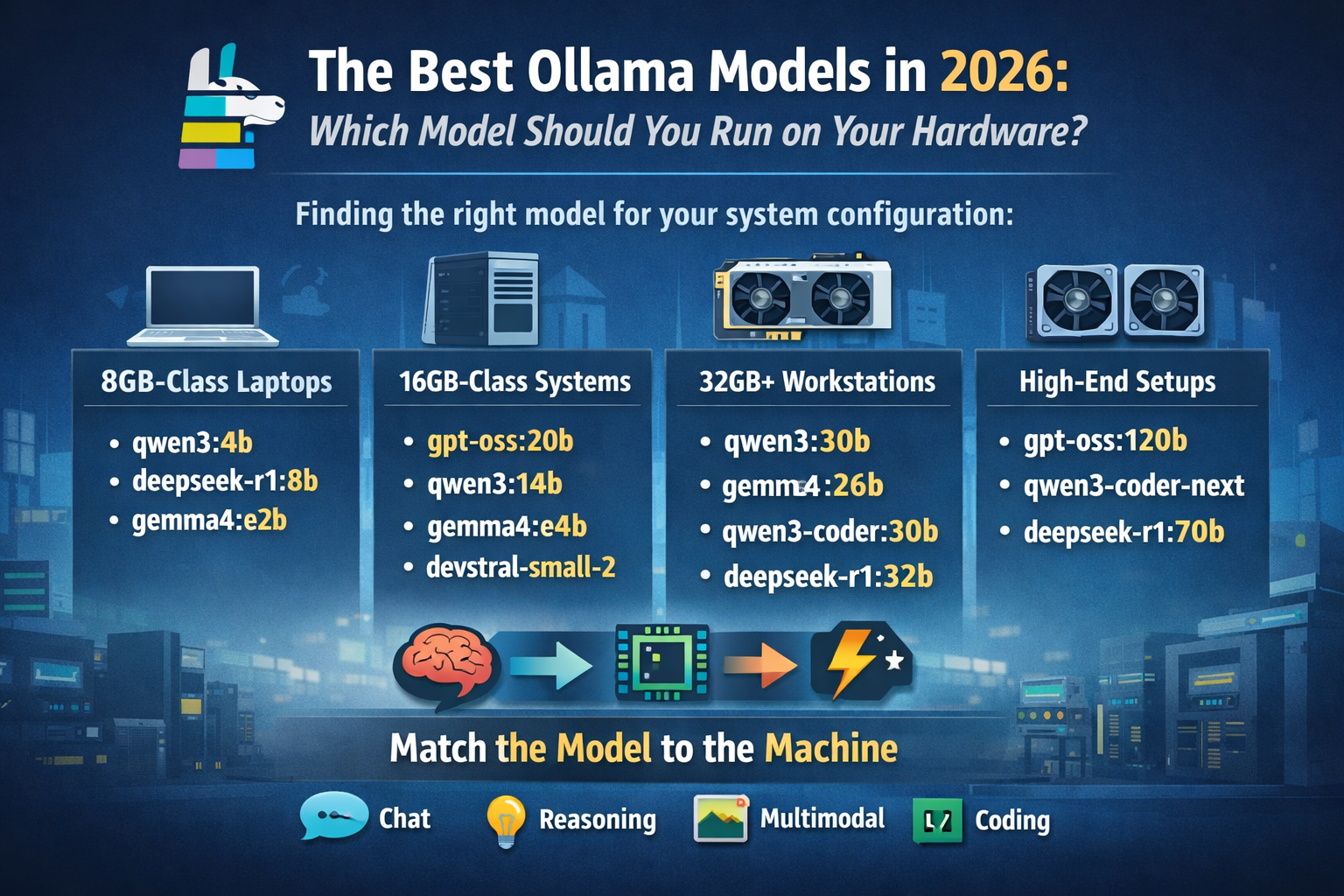
A practical guide to the best Ollama models in 2026, including the top choices for general chat, reasoning, coding, multimodal tasks, and the best model for every system configuration.
Local AI is moving fast, and Ollama users are feeling it. A model that looked like the best choice six months ago can already feel outdated today. The real challenge is not finding the “biggest” model. It is finding the right model for your hardware, your workload, and your patience. This article is adapted from your research notes and model comparisons.
Here is the most important takeaway up front: there is no single best Ollama model for everyone. The best model depends on three things: how much memory you have, what kind of work you do, and whether you care more about speed or raw intelligence.
The biggest Ollama mistake: assuming :latest means “best”
A lot of people install a model with the :latest tag and assume they are getting the strongest version in that family. In practice, that is usually not true. In Ollama, :latest often points to the default tag, not the most capable tag.
That means qwen3:latest is not necessarily the best Qwen3 model, gemma4:latest is not the most powerful Gemma 4 model, and the same pattern applies across several families. If you want the strongest experience, you should usually choose a specific size tag such as qwen3:30b, gemma4:26b, or qwen3-coder:30b instead of relying on :latest.
The best overall Ollama model right now
For most people, the best all-round local model in Ollama today is qwen3:30b.
Why does it stand out? Because it hits the sweet spot. It is strong at general chat, reasoning, coding, long-context work, and tool use, while still staying within reach of prosumer hardware. It offers the kind of performance that makes local AI feel genuinely premium without demanding absurd amounts of memory.
On a 24GB GPU or a Mac with 32GB or more unified memory, qwen3:30b is the first model I would test. It is the best balance of quality, efficiency, and practicality for serious local use.
Best Ollama models by use case
Best for general-purpose local AI: qwen3:30b
If you want one model that can do a bit of everything well, start here. It is currently the most balanced answer for users who want a smart, modern, local assistant without moving into huge workstation territory. It performs well across writing, reasoning, coding, and multilingual work.
Best for reasoning on 16GB-class systems: gpt-oss:20b
If your priority is step-by-step thinking, structured problem solving, or agentic workflows, gpt-oss:20b is one of the cleanest choices in the 16GB memory class. It gives strong reasoning performance without demanding the kind of hardware that only a few enthusiasts own.
For users with much larger machines, gpt-oss:120b becomes the high-end option. But for most people, the 20B version is the realistic sweet spot.
Best for multimodal tasks: gemma4:e4b and gemma4:26b
If you need image understanding or lighter multimodal work, the Gemma 4 family is one of the most interesting options available in Ollama right now.
For smaller systems, gemma4:e4b is the smart pick. For stronger workstations, gemma4:26b is the better choice because it pushes much further on reasoning and coding while still staying relatively efficient. If your workflow involves both text and vision, this is the family to watch.
Best for coding agents: devstral-small-2
For autonomous or semi-autonomous software engineering work, devstral-small-2 is one of the strongest practical models you can run locally. It is especially attractive because it delivers serious coding-agent performance without forcing you into extreme hardware territory.
This is not just another general model that happens to write code. It is one of the most compelling choices for real development workflows, especially for users who care about repo-scale tasks, debugging, and agent-style assistance.
Best coding assistant for most developers: qwen3-coder:30b
If your main goal is coding rather than general chat, then qwen3-coder:30b is one of the strongest local choices in Ollama today. It is better suited for long-context repository work and tool-heavy programming tasks than many older coding models that used to dominate local AI discussions.
For large workstations, qwen3-coder-next becomes the more ambitious option. But for most developers, qwen3-coder:30b is the better balance between performance and practicality.
Best Ollama model for your system configuration
Choosing the right model starts with hardware, not hype.
CPU-only systems or 8GB-class laptops
If you are running Ollama on a very small machine, stay realistic. You want small, efficient models in the roughly 2.5GB to 7GB range.
The best choices here are:
qwen3:4bfor general-purpose usedeepseek-r1:8bfor lightweight reasoninggemma4:e2bfor smaller multimodal workloads
At this level, chasing massive context windows is usually a mistake. A smaller context and a faster model will feel much better in day-to-day use.
12GB to 16GB GPU or 16GB to 24GB unified memory
This is where local AI starts getting genuinely useful. You can run models that feel modern and capable rather than merely “okay.”
The best fits in this tier are:
gpt-oss:20bfor reasoning and agentic tasksqwen3:14bfor general chatgemma4:e4bfor multimodal usedevstral-small-2for coding and software engineering
This is the tier where many users should stop upgrading blindly and start optimizing their model selection.
24GB GPU or 32GB+ unified memory
This is the current sweet spot for serious Ollama users.
At this level, you can comfortably run:
qwen3:30bas the best overall modelgemma4:26bfor powerful multimodal workdeepseek-r1:32bfor heavier reasoningqwen3-coder:30bfor coding-first workflows
This is the hardware class where local AI starts to feel premium instead of experimental.
48GB+ unified memory or 60GB+ VRAM
Now you are entering true workstation territory.
This is where models like gpt-oss:120b, deepseek-r1:70b, and qwen3-coder-next become realistic. These are not beginner-friendly setups, but if you have the hardware, they offer some of the most impressive local performance available today.
Extreme memory setups
Once you move into the very largest Qwen variants, the hardware demands become enormous. These models are fascinating, but for most people they make more sense in cloud-assisted or highly specialized environments than on a personal machine.
In other words, just because a model exists in Ollama does not mean it is the right choice for your desktop.
Why newer Ollama models feel so much better
One of the most important trends in 2025 and 2026 is efficiency through smarter architecture. Many of the strongest newer models are no longer brute-force dense models in the old sense. They use more efficient active-parameter designs, which means they can deliver stronger results without demanding absurd hardware.
That is why models like Qwen3 30B, Gemma 4 26B, and Qwen3-Coder 30B feel so much stronger than many older local favorites at similar memory budgets. This is also why older “safe picks” like CodeLlama are no longer the best default recommendation for most new Ollama users.
Two rules that matter more than benchmark charts
The first rule is simple: context length is not free.
A huge context window sounds impressive, but it costs memory. On borderline hardware, the smartest move is often to keep the better model and lower the context window, instead of switching to a much weaker model.
The second rule: Apple Silicon has become one of the best local AI platforms.
On older Intel Macs, Ollama is much more limited. But on modern Apple Silicon machines with enough unified memory, models in the 15GB to 20GB class suddenly become very practical. That makes Macs with 32GB or more memory surprisingly strong for serious Ollama use.
Final verdict
As of 2026, these are the recommendations worth remembering:
Best overall model: qwen3:30b
Best reasoning model for mid-range systems: gpt-oss:20b
Best multimodal family: gemma4:e4b and gemma4:26b
Best coding agent: devstral-small-2
Best coding assistant: qwen3-coder:30b
Best high-end workstation choices: qwen3-coder-next and gpt-oss:120b
The real winner, though, is not a model name. It is matching the model to the machine.
That is what separates a frustrating Ollama setup from one that feels fast, smart, and worth using every day.
Share your CPU, GPU, VRAM, RAM, and OS, and I’ll turn this into a personalized blog section with exact model recommendations for your machine.