Introduction
AI Parental Control with ML Monitoring tools use machine learning, automated classification, behavioral analysis, and intelligent alerts to help parents understand and manage how children use connected devices. Unlike traditional parental controls that mainly depend on fixed website blocklists, schedules, and app restrictions, ML-enabled systems can analyze patterns across apps, websites, searches, messages, screen activity, and device usage, depending on the product.
These tools can help families identify potentially concerning online behavior, manage excessive screen time, filter inappropriate content, detect risky searches, and create healthier digital routines. Some platforms also provide location features, app controls, social-media monitoring, and automated alerts.
Common use cases include content filtering, cyberbullying detection, online-risk monitoring, screen-time management, inappropriate-content detection, app supervision, location monitoring, and digital-wellbeing management.When evaluating these platforms, consider detection accuracy, false positives, age appropriateness, privacy, data retention, device coverage, AI transparency, parental controls, alert customization, reporting, security, and whether monitoring is proportionate to the child’s age and Parents, guardians, families with children using smartphones or tablets, schools and family organizations with appropriate consent, and households looking for more intelligent alternatives to basic website blocki Families that only need simple screen-time schedules or app blocking, users uncomfortable with extensive monitoring, and situations where monitoring could undermine trust or violate applicable privacy requirements.
What’s Changed in AI Parental Control with ML Monitoring
- Machine learning is moving parental controls beyond static website blocklists.
- AI can classify websites, applications, searches, images, and other digital content.
- Behavioral analysis can identify unusual usage patterns rather than relying only on predefined rules.
- Risk detection can help surface potentially concerning activity for parental review.
- Automated alerts can reduce the need for parents to constantly inspect activity manually.
- AI-enabled systems can increasingly distinguish different categories of potentially inappropriate content.
- Multimodal moderation can evaluate text, images, and other content where supported.
- Personalized age-based controls are becoming more important as children mature.
- AI can help reduce notification overload by prioritizing potentially higher-risk events.
- Privacy is increasingly important because parental-control systems may process highly sensitive information about minors.
- False positives remain a major concern because automated systems can misunderstand context.
- Parents increasingly need transparent explanations instead of unexplained AI-generated warnings.
- Device ecosystems are becoming more important because monitoring capabilities differ between operating systems.
- Local or on-device processing can potentially reduce unnecessary transmission of sensitive information where supported.
- Human review remains important for serious decisions because automated classifications can be wrong.
- Strong parental controls increasingly need security protections against children bypassing or disabling supervision.
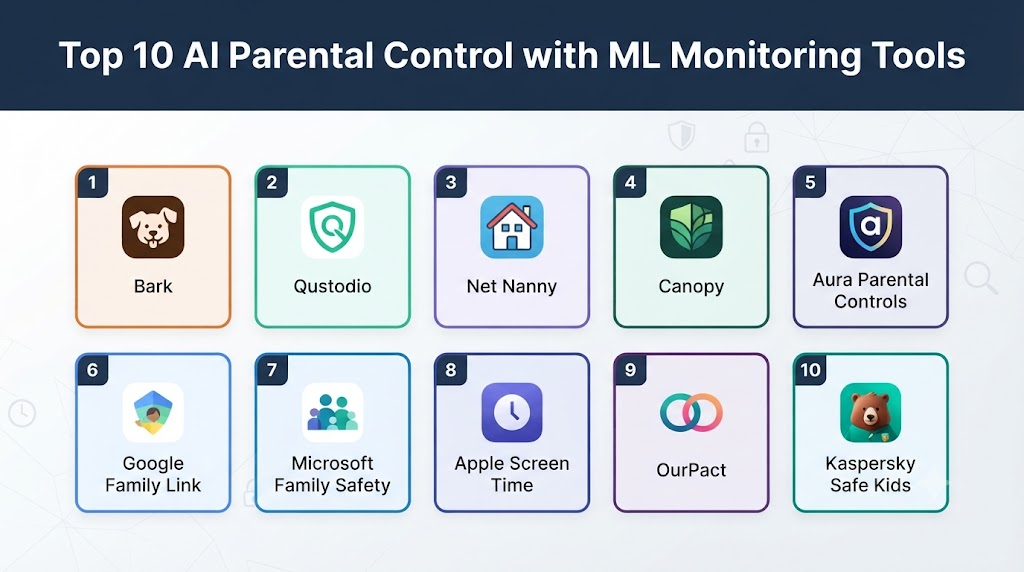
Top 10 AI Parental Control with ML Monitoring Tools
1. Bark
One-line verdict: Best for families wanting broad AI-assisted monitoring of children’s digital activity and potentially risky online behavior.
Short description:
Bark is designed around parental monitoring and online-safety alerts. It uses automated analysis to identify potentially concerning content and activity across supported services, helping parents focus on issues that may require attention.
Standout Capabilities
- AI-assisted activity monitoring
- Risk alerts
- Content analysis
- Screen-time controls
- Website and app controls
- Family safety dashboard
- Alerts for potentially concerning activity
- Support for multiple digital platforms
AI-Specific Depth
- Model support: Proprietary AI and machine-learning systems; exact model architecture is not publicly stated.
- RAG / knowledge integration: Platform and account data are analyzed for monitoring purposes; exact retrieval architecture is not publicly stated.
- Evaluation: Automated detection systems are used; detailed evaluation methodology is not publicly stated.
- Guardrails: Content and safety detection mechanisms are used; detailed AI guardrail architecture is not publicly stated.
- Observability: Parent-facing alerts and activity reports are available; internal model traces and token metrics are not exposed.
Pros
- Broad monitoring capabilities
- Focuses attention on potentially concerning activity
- Combines monitoring with parental controls
Cons
- Monitoring can create privacy and trust concerns
- Automated alerts can require contextual interpretation
- Features differ across platforms and services
Security & Compliance
Security and privacy practices should be reviewed before deployment. Specific AI certifications are not publicly stated.
Deployment & Platforms
- Android
- iOS
- Supported web and connected services
- Cloud-based components
Integrations & Ecosystem
Bark is designed to work across supported digital services and devices.
- Smartphones
- Tablets
- Websites
- Apps
- Online services
- Family dashboards
Pricing Model
Subscription-based model; exact pricing varies.
Best-Fit Scenarios
- Families wanting broad online monitoring
- Parents concerned about digital safety
- Households with children using multiple online services
2. Qustodio
One-line verdict: Best for families combining intelligent monitoring, screen-time management, content filtering, and device-level parental controls.
Short description:
Qustodio provides parental controls covering screen time, applications, websites, activity monitoring, and other family-management functions. Its intelligent filtering and monitoring features can help parents manage children’s digital environments.
Standout Capabilities
- Screen-time management
- Website filtering
- App controls
- Activity reporting
- Family dashboard
- Search supervision
- Location-related features
- Custom rules
AI-Specific Depth
- Model support: Proprietary automated classification and monitoring technologies; exact model architecture is not publicly stated.
- RAG / knowledge integration: Activity and content information can be processed for monitoring; exact architecture is not publicly stated.
- Evaluation: Detailed ML evaluation methodology is not publicly stated.
- Guardrails: Content-filtering and parental-control mechanisms provide rule-based safeguards; detailed AI guardrail architecture is not publicly stated.
- Observability: Parent-facing activity reports are available; internal AI traces are not publicly exposed.
Pros
- Broad parental-control feature set
- Strong screen-time management
- Suitable for multiple devices
Cons
- Some features vary by operating system
- Advanced functionality may require a paid plan
- Automated classification can require parental judgment
Security & Compliance
Privacy and security practices should be reviewed according to the devices and data being monitored. Specific AI certifications are not publicly stated.
Deployment & Platforms
- Android
- iOS
- Windows
- macOS
- Cloud-connected services
Integrations & Ecosystem
- Mobile devices
- Computers
- Apps
- Websites
- Location services
- Family management dashboard
Pricing Model
Free and subscription-based options may be available; exact pricing varies.
Best-Fit Scenarios
- Multi-device families
- Screen-time management
- Website and app control
3. Net Nanny
One-line verdict: Best for families prioritizing intelligent web filtering, screen-time controls, and proactive protection from inappropriate online content.
Short description:
Net Nanny is a parental-control platform focused heavily on internet safety and content filtering. Its technology can automatically classify online content rather than relying exclusively on manually maintained blocklists.
Standout Capabilities
- Intelligent web filtering
- Content categorization
- Screen-time controls
- Website blocking
- Family monitoring
- App management
- Internet usage reports
- Custom filtering
AI-Specific Depth
- Model support: Proprietary filtering technology; exact ML model architecture is not publicly stated.
- RAG / knowledge integration: Web-content classification and monitoring; exact retrieval architecture is not publicly stated.
- Evaluation: Detailed AI evaluation methodology is not publicly stated.
- Guardrails: Content filtering and parental rules provide protective controls.
- Observability: Parent-facing activity information is available; internal model traces are not publicly exposed.
Pros
- Strong content-filtering focus
- Useful parental controls
- Designed for family internet safety
Cons
- Monitoring capabilities vary by platform
- Automated filtering can occasionally require exceptions
- Advanced controls may require paid plans
Security & Compliance
Specific AI certifications are not publicly stated.
Deployment & Platforms
- Android
- iOS
- Windows
- macOS
- Cloud-connected services
Integrations & Ecosystem
- Web browsing
- Mobile devices
- Computers
- Family dashboard
- Screen-time controls
Pricing Model
Subscription-based model; exact pricing varies.
Best-Fit Scenarios
- Web filtering
- Family internet safety
- Screen-time management
4. Canopy
One-line verdict: Best for families seeking proactive content protection with controls designed around online safety and inappropriate-content prevention.
Short description:
Canopy focuses on protecting children from inappropriate online material while providing parents with tools for device supervision. Its technology is designed to identify and prevent access to certain categories of harmful content.
Standout Capabilities
- AI-assisted content filtering
- Inappropriate-content prevention
- Device management
- Screen-time controls
- Family profiles
- Online safety controls
- Parental dashboard
AI-Specific Depth
- Model support: Proprietary filtering technology; exact AI models are not publicly stated.
- RAG / knowledge integration: Content classification and filtering; exact architecture is not publicly stated.
- Evaluation: Detailed model evaluation methodology is not publicly stated.
- Guardrails: Content filtering functions as a protective control; detailed AI guardrail architecture is not publicly stated.
- Observability: Parent controls and activity information are available; internal AI observability is not publicly exposed.
Pros
- Strong focus on content protection
- Designed specifically for family safety
- Useful filtering controls
Cons
- Filtering is not the same as comprehensive behavioral monitoring
- Device compatibility should be checked
- Some features may require subscriptions
Security & Compliance
Specific AI certifications are not publicly stated.
Deployment & Platforms
- Android
- iOS
- Other supported devices may vary
- Cloud-based services
Integrations & Ecosystem
- Smartphones
- Tablets
- Web activity
- Family profiles
- Content filtering
Pricing Model
Subscription-based model; exact pricing varies.
Best-Fit Scenarios
- Content protection
- Younger children
- Families prioritizing web safety
5. Aura Parental Controls
One-line verdict: Best for families wanting parental controls combined with broader digital safety, identity protection, and family security features.
Short description:
Aura offers a broader digital-security ecosystem that includes parental controls and family safety functionality. This makes it relevant to households looking beyond basic screen-time management.
Standout Capabilities
- Parental controls
- Digital safety
- Content management
- Screen-time features
- Family protection
- Identity-security ecosystem
- Activity monitoring
AI-Specific Depth
- Model support: Proprietary automated technologies; exact AI models are not publicly stated.
- RAG / knowledge integration: User and security information may be processed for relevant services; exact architecture is not publicly stated.
- Evaluation: Detailed AI evaluation methodology is not publicly stated.
- Guardrails: Parental-control policies and security controls are used.
- Observability: Parent-facing reports and alerts are available where supported.
Pros
- Broader digital-security ecosystem
- Family-focused product approach
- Combines multiple safety functions
Cons
- Broader security features may be unnecessary for families wanting only parental controls
- Exact monitoring capabilities vary
- Subscription cost may be higher than basic tools
Security & Compliance
Security is a central part of the product category, but specific AI certifications should be verified directly. Not publicly stated where details are unavailable.
Deployment & Platforms
- Android
- iOS
- Web
- Cloud-based services
Integrations & Ecosystem
- Family accounts
- Mobile devices
- Security services
- Parental controls
- Digital safety features
Pricing Model
Subscription-based model; exact pricing varies.
Best-Fit Scenarios
- Whole-family digital protection
- Families wanting broader security
- Parents managing multiple digital risks
6. Family Link
One-line verdict: Best for families using Google devices and services that need straightforward parental supervision, app controls, and screen-time management.
Short description:
Google Family Link provides parental controls for managing children’s Google accounts and supported devices. It focuses on practical controls such as screen-time limits, app supervision, and device management.
Standout Capabilities
- Screen-time limits
- App management
- Device supervision
- Google account controls
- Activity information
- Family management
- Location-related functionality
- Content restrictions
AI-Specific Depth
- Model support: Google uses machine learning across many products, but the exact models used for Family Link’s parental-control functions are not publicly stated.
- RAG / knowledge integration: Google account and device information can support parental controls; exact architecture is not publicly stated.
- Evaluation: Detailed AI evaluation methodology for Family Link is not publicly stated.
- Guardrails: Account, content, and device controls provide policy-based safeguards.
- Observability: Parent-facing activity and device information are available.
Pros
- Strong ecosystem integration
- Useful for Android and Google-family environments
- Straightforward parental controls
Cons
- Best suited to Google-centric environments
- Advanced AI monitoring is not its primary purpose
- Capabilities differ between platforms
Security & Compliance
Google provides security controls across its services, but specific AI certifications for Family Link are not publicly stated.
Deployment & Platforms
- Android
- iOS for parent management
- Google services
- Cloud-based
Integrations & Ecosystem
- Google accounts
- Android devices
- Google Play
- Family management
- Location features
Pricing Model
Core parental-control functionality is generally provided as part of the Google ecosystem.
Best-Fit Scenarios
- Android families
- Google account management
- Basic-to-intermediate parental controls
7. Microsoft Family Safety
One-line verdict: Best for families deeply invested in Microsoft accounts, Windows devices, Xbox, and Microsoft ecosystem-based parental controls.
Short description:
Microsoft Family Safety provides tools for managing children’s digital activity across supported Microsoft services and devices. It focuses on screen-time, content, app, and family-management features.
Standout Capabilities
- Screen-time management
- Windows controls
- Xbox supervision
- Web filtering
- App and game controls
- Family dashboard
- Activity reports
AI-Specific Depth
- Model support: Microsoft uses AI and machine learning extensively across its ecosystem, but specific Family Safety models are not publicly stated.
- RAG / knowledge integration: Microsoft account and device information can support family management.
- Evaluation: Family Safety-specific AI evaluation methodology is not publicly stated.
- Guardrails: Content restrictions and parental policies provide protective controls.
- Observability: Activity and usage reporting is available.
Pros
- Excellent Microsoft ecosystem integration
- Useful Windows and Xbox controls
- Central family management
Cons
- Less useful outside Microsoft environments
- Not primarily an AI behavioral-monitoring platform
- Capabilities vary by device
Security & Compliance
Specific Family Safety AI certifications are not publicly stated.
Deployment & Platforms
- Windows
- Xbox
- Android
- iOS
- Microsoft cloud ecosystem
Integrations & Ecosystem
- Microsoft accounts
- Windows
- Xbox
- Family groups
- Web controls
- Mobile applications
Pricing Model
Core family-management functionality is available within the Microsoft ecosystem, with some features potentially tied to broader Microsoft services.
Best-Fit Scenarios
- Windows households
- Xbox families
- Microsoft account management
8. Mobicip
One-line verdict: Best for families seeking cross-platform parental controls, web filtering, screen-time management, and activity supervision.
Short description:
Mobicip provides parental-control capabilities across supported devices. It combines web filtering, screen-time management, application controls, and monitoring features for family use.
Standout Capabilities
- Web filtering
- Screen-time scheduling
- App blocking
- Activity monitoring
- Family dashboard
- Cross-platform management
- Content controls
AI-Specific Depth
- Model support: Automated filtering and classification technologies; exact AI models are not publicly stated.
- RAG / knowledge integration: Web and device activity can support filtering and reporting.
- Evaluation: Detailed AI evaluation methodology is not publicly stated.
- Guardrails: Filtering policies and parental restrictions provide safeguards.
- Observability: Parent dashboards provide activity information.
Pros
- Cross-platform orientation
- Broad parental-control functionality
- Flexible scheduling
Cons
- AI depth may vary by feature
- Some functionality requires subscription
- Monitoring capabilities depend on operating system
Security & Compliance
Specific AI certifications are not publicly stated.
Deployment & Platforms
- Android
- iOS
- Windows
- macOS
- Cloud-based
Integrations & Ecosystem
- Websites
- Apps
- Mobile devices
- Computers
- Family dashboard
- Screen-time tools
Pricing Model
Subscription-based model; exact pricing varies.
Best-Fit Scenarios
- Multi-device families
- Web filtering
- Screen-time management
9. Kidslox
One-line verdict: Best for parents wanting straightforward device restrictions, screen-time scheduling, content blocking, and family device management.
Short description:
Kidslox focuses on simplifying parental controls across children’s devices. It provides tools for controlling applications, screen time, and access to online content.
Standout Capabilities
- Screen-time schedules
- App blocking
- Website restrictions
- Device controls
- Family profiles
- Usage management
- Parental dashboard
AI-Specific Depth
- Model support: Specific AI/ML model architecture is not publicly stated.
- RAG / knowledge integration: Activity and device information may support controls; exact architecture is not publicly stated.
- Evaluation: Detailed AI evaluation methodology is not publicly stated.
- Guardrails: Blocking and scheduling policies provide parental safeguards.
- Observability: Usage information and control dashboards are available.
Pros
- Simple parental controls
- Easy-to-understand scheduling
- Useful for device management
Cons
- Less focused on advanced AI monitoring
- Feature availability differs by platform
- Not ideal for highly detailed behavioral analysis
Security & Compliance
Specific AI certifications are not publicly stated.
Deployment & Platforms
- Android
- iOS
- Cloud-connected services
Integrations & Ecosystem
- Mobile devices
- Apps
- Websites
- Family accounts
- Screen-time management
Pricing Model
Subscription-based model; exact pricing varies.
Best-Fit Scenarios
- Screen-time control
- Younger children
- Basic device management
10. MMGuardian
One-line verdict: Best for parents seeking detailed smartphone supervision, communication monitoring, content alerts, and device-level parental controls.
Short description:
MMGuardian provides parental-control and monitoring capabilities focused heavily on children’s mobile devices. Depending on the supported platform and configuration, it can provide information about communication, applications, device usage, and potentially concerning activity.
Standout Capabilities
- Smartphone monitoring
- Text-message supervision
- App management
- Screen-time controls
- Web filtering
- Location features
- Alerts
- Parent dashboard
AI-Specific Depth
- Model support: Automated monitoring technologies are used; exact AI model architecture is not publicly stated.
- RAG / knowledge integration: Device, communication, and activity information can support monitoring.
- Evaluation: Detailed AI evaluation methodology is not publicly stated.
- Guardrails: Parental controls and monitoring policies provide safeguards.
- Observability: Parent-facing reports and alerts are available.
Pros
- Detailed mobile-device supervision
- Strong parental-control features
- Useful alerting capabilities
Cons
- Monitoring sensitive communications raises privacy and trust considerations
- Capabilities vary between Android and iOS
- Automated alerts require contextual interpretation
Security & Compliance
Specific AI certifications are not publicly stated. Parents should review current privacy and data-retention practices before deployment.
Deployment & Platforms
- Android
- iOS
- Cloud-connected services
Integrations & Ecosystem
- Smartphones
- Messaging
- Apps
- Web activity
- Location
- Parent dashboard
Pricing Model
Subscription-based model; exact pricing varies.
Best-Fit Scenarios
- Smartphone monitoring
- Teen digital safety
- Communication supervision
Comparison Table
| Tool Name | Best For | Deployment | Model Flexibility | Strength | Watch-Out | Public Rating |
|---|---|---|---|---|---|---|
| Bark | Online-risk monitoring | Cloud / Mobile | Proprietary | AI-assisted alerts | Privacy and false positives | N/A |
| Qustodio | Comprehensive parental controls | Cloud / Multi-platform | Proprietary | Broad device controls | Platform differences | N/A |
| Net Nanny | Web filtering | Cloud / Multi-platform | Proprietary | Intelligent filtering | Filtering limitations | N/A |
| Canopy | Content protection | Cloud / Mobile | Proprietary | Inappropriate-content prevention | Limited behavioral scope | N/A |
| Aura Parental Controls | Family digital security | Cloud / Mobile | Proprietary | Broader security ecosystem | May be more than needed | N/A |
| Family Link | Google families | Cloud / Android | Proprietary | Google integration | Google-centric | N/A |
| Microsoft Family Safety | Microsoft families | Cloud / Multi-platform | Proprietary | Windows/Xbox integration | Ecosystem dependency | N/A |
| Mobicip | Cross-platform families | Cloud / Multi-platform | Proprietary | Flexible controls | AI depth varies | N/A |
| Kidslox | Simple device management | Cloud / Mobile | Proprietary | Screen-time controls | Less advanced AI monitoring | N/A |
| MMGuardian | Smartphone monitoring | Cloud / Mobile | Proprietary | Mobile supervision | Privacy concerns | N/A |
Scoring & Evaluation
The scoring below is comparative rather than absolute. A platform designed for simple screen-time controls should not necessarily be expected to provide the same behavioral monitoring as an AI-first safety platform.
- Core features – 20%
- AI reliability & evaluation – 15%
- Guardrails & safety – 10%
- Integrations & ecosystem – 15%
- Ease of use – 10%
- Performance & cost controls – 15%
- Security & admin – 10%
- Support & community – 5%
| Tool | Core | Reliability/Eval | Guardrails | Integrations | Ease | Perf/Cost | Security/Admin | Support | Weighted Total |
|---|---|---|---|---|---|---|---|---|---|
| Bark | 10 | 9 | 9 | 10 | 9 | 8 | 9 | 9 | 9.15 |
| Qustodio | 10 | 8 | 9 | 10 | 9 | 9 | 9 | 9 | 9.05 |
| Net Nanny | 9 | 8 | 9 | 9 | 9 | 9 | 9 | 9 | 8.80 |
| Canopy | 9 | 8 | 10 | 8 | 9 | 8 | 9 | 8 | 8.65 |
| Aura Parental Controls | 9 | 8 | 9 | 9 | 9 | 8 | 9 | 9 | 8.80 |
| Family Link | 9 | 8 | 9 | 10 | 10 | 10 | 9 | 10 | 9.25 |
| Microsoft Family Safety | 9 | 8 | 9 | 10 | 9 | 10 | 9 | 10 | 9.10 |
| Mobicip | 9 | 8 | 9 | 9 | 9 | 8 | 8 | 8 | 8.65 |
| Kidslox | 8 | 7 | 9 | 8 | 10 | 9 | 8 | 8 | 8.40 |
| MMGuardian | 9 | 8 | 9 | 8 | 8 | 8 | 8 | 8 | 8.35 |
Top 3 for Enterprise
- Bark
- Qustodio
- Microsoft Family Safety
Top 3 for SMB
- Qustodio
- Bark
- Net Nanny
Top 3 for Developers
- Microsoft Family Safety
- Google Family Link
- Bark
Which AI Parental Control with ML Monitoring Tool Is Right for You?
Solo / Family User
For most parents, start with the smallest level of monitoring that solves the actual problem.
If you mainly need screen-time limits, Family Link or Microsoft Family Safety may be sufficient depending on your device ecosystem. For broader online-risk monitoring, Bark or Qustodio may be more appropriate.
SMB
Organizations supporting families, children’s programs, or digital-wellness initiatives should focus on privacy, consent, administrative controls, and transparency.
Important requirements include:
- Centralized management
- Appropriate consent
- Data minimization
- Role-based access
- Reporting
- Alert management
- Retention controls
- Clear escalation processes
Mid-Market
Larger organizations should evaluate technical integration, security, reporting, and administrative capabilities before deploying monitoring across many devices.
They should also determine exactly what data is collected and whether monitoring is appropriate for the age groups involved.
Enterprise
Enterprise deployments require significantly stronger governance.
Consider:
- SSO
- RBAC
- Audit logging
- Data retention
- Encryption
- API access
- Data residency
- Administrative separation
- Security testing
- Incident response
- Vendor risk management
- AI evaluation
Regulated Industries
Organizations operating in education, healthcare, public services, or other regulated environments should conduct legal and privacy reviews before collecting or analyzing children’s data.
Monitoring minors can involve highly sensitive information. Automated systems should not be the sole basis for disciplinary, educational, medical, or other high-impact decisions.
Budget vs Premium
Basic parental controls are often enough when the main goal is:
- Screen-time scheduling
- App restrictions
- Website blocking
- Device management
Premium monitoring becomes more useful when parents want broader alerts, behavioral analysis, cross-platform supervision, or additional family-safety services.
Build vs Buy
Most families should buy rather than build.
Building a parental-control system becomes relevant for technology companies, device manufacturers, schools, or large organizations with specialized requirements.
A custom solution requires:
- Content classification
- ML evaluation
- Privacy architecture
- Child-safety policies
- Device integrations
- Secure data processing
- False-positive management
- Human escalation
- Continuous model testing
Implementation Playbook
First 30 Days: Pilot + Success Metrics
- Identify the actual safety problem.
- Define age-appropriate monitoring rules.
- Select supported devices.
- Create child profiles.
- Configure screen-time limits.
- Test website filtering.
- Test app controls.
- Review AI-generated alerts.
- Record false positives.
- Establish parent escalation procedures.
Days 31–60: Security + Evaluation + Rollout
- Review privacy policies.
- Configure data-retention settings.
- Check parental authentication.
- Test whether children can bypass controls.
- Evaluate alert accuracy.
- Test potentially ambiguous content.
- Review notification frequency.
- Establish incident-handling procedures.
- Document acceptable monitoring practices.
- Train parents or administrators.
Days 61–90: Optimization + Governance + Scale
- Review alert quality.
- Reduce unnecessary notifications.
- Tune monitoring thresholds.
- Evaluate device performance.
- Review account security.
- Establish regular privacy reviews.
- Review vendor changes.
- Monitor false-positive rates.
- Create escalation procedures.
- Reassess controls as children grow older.
Common Mistakes & How to Avoid Them
- Assuming AI alerts are always accurate.
- Treating automated risk classifications as facts.
- Monitoring children without explaining appropriate boundaries.
- Collecting more data than necessary.
- Keeping monitoring data indefinitely.
- Ignoring false positives.
- Using excessive monitoring that damages trust.
- Failing to protect the parent account.
- Allowing children to bypass controls easily.
- Ignoring differences between Android and iOS.
- Assuming every app can be monitored equally.
- Using one set of controls for every age group.
- Relying solely on AI to identify cyberbullying or exploitation.
- Making disciplinary decisions solely from automated alerts.
- Ignoring data-security risks.
- Failing to review vendor privacy changes.
- Using location tracking without considering privacy and age appropriateness.
- Failing to update parental-control settings as children mature.
- Choosing a product solely because it advertises AI.
- Forgetting that technical monitoring cannot replace communication and digital-literacy education.
FAQs
What is AI parental control?
AI parental control combines traditional parental-control functions with machine learning or automated intelligence to classify content, analyze activity, prioritize alerts, or personalize safety controls.
How does ML monitoring work?
Machine-learning systems can analyze patterns, content categories, searches, applications, or other supported activity and identify information that may match predefined risk categories.
Can AI parental controls detect inappropriate content?
Some platforms can automatically identify certain categories of potentially inappropriate content. Detection accuracy varies, and automated classifications should be treated as indicators rather than absolute conclusions.
Can AI detect cyberbullying?
Some monitoring platforms advertise or provide technology intended to identify potentially concerning communication patterns. Context remains important because automated systems can misunderstand jokes, disagreements, slang, or normal conversations.
Can parental-control tools monitor messages?
Some platforms offer communication monitoring on supported devices or services. Capabilities vary substantially by operating system, application, permissions, and product.
Do parental-control apps work on iPhones?
Many support iOS, but iOS restrictions can affect what third-party applications can access. Always verify the specific monitoring capabilities required.
Do these tools work on Android?
Android generally provides broader device-management possibilities for parental-control applications, although capabilities vary between products and Android versions.
Can AI parental controls monitor social media?
Some platforms can monitor supported social platforms or associated activity, but coverage varies and can change as platforms modify their APIs and privacy restrictions.
Do these tools store children’s data?
Many parental-control services process and store some information to provide monitoring and reporting. Parents should carefully review data collection, retention, deletion, and sharing practices.
Can parents use their own AI model?
Consumer parental-control platforms generally do not provide unrestricted BYO-model functionality. Organizations building custom systems can have greater model-selection flexibility.
Can parental-control software be self-hosted?
Most mainstream consumer products are cloud-based rather than fully self-hosted. Self-hosting is more commonly associated with specialized or open-source solutions.
Are AI parental-control alerts always accurate?
No. AI systems can produce false positives and false negatives. Parents should consider alerts as signals requiring context rather than definitive judgments.
Can children bypass AI parental controls?
Depending on the device and product, children may attempt to bypass restrictions through VPNs, alternative browsers, factory resets, account changes, or other methods. Strong device administration and secure parent accounts can reduce some risks.
Are AI parental controls better than traditional parental controls?
They can provide more sophisticated content classification and activity analysis, but traditional controls remain useful for straightforward screen-time and app restrictions.
How much do AI parental-control tools cost?
Pricing varies widely. Many use subscription models, while some ecosystem-based controls are available without a separate parental-control subscription.
Can parental-control tools monitor location?
Some products offer location features. Parents should consider whether location tracking is necessary and appropriate for the child’s age and circumstances.
Are these tools suitable for teenagers?
They can be, but monitoring should generally become more age-appropriate as children mature. Transparent expectations and conversations about privacy can be as important as technical controls.
Can schools use AI parental-control technology?
Schools may use certain digital-safety and filtering technologies, but monitoring students involves additional legal, privacy, consent, and governance considerations.
Can AI parental controls replace parenting?
No. Technology can reduce exposure to certain risks and provide useful signals, but digital literacy, communication, boundaries, and parental involvement remain essential.
What is the best AI parental-control platform?
There is no universal winner. Bark is particularly focused on online-risk monitoring, Qustodio offers broad parental controls, Net Nanny emphasizes web filtering, while Family Link and Microsoft Family Safety are especially useful within their respective device ecosystems.
What are alternatives to AI parental controls?
Alternatives include built-in device parental controls, router-level filtering, DNS filtering, browser safety settings, family agreements, digital-literacy education, and direct parental supervision.
Conclusion
AI Parental Control with ML Monitoring tools can give families a more intelligent way to manage children’s digital experiences. Instead of relying entirely on static blocklists and fixed schedules, modern systems can use automated classification and behavioral analysis to surface potentially concerning activity.However, AI monitoring should not be treated as a replacement for parenting, communication, or human judgment. False positives, incomplete visibility, privacy concerns, platform limitations, and changing online environments all affect the reliability of automated monitoring.For broad online-risk monitoring, Bark is a strong option to consider. Qustodio is well suited to families wanting comprehensive parental controls, while Net Nanny is particularly relevant for web filtering. Families already invested in Google or Microsoft ecosystems may find Family Link or Microsoft Family Safety more convenient.The right choice depends on the child’s age, devices, family expectations, required level of monitoring, privacy preferences, and specific online-safety concerns.