Introduction
AI code generation for scientific computing uses artificial intelligence to help researchers, engineers, data scientists, and developers write, understand, optimize, test, and document code used for numerical and scientific workloads. These tools can generate Python, C++, Fortran, MATLAB, Julia, CUDA, SQL, and other code depending on the platform and workflow.
Scientific computing has unusually demanding requirements compared with ordinary application development. Generated code may involve numerical methods, matrix operations, differential equations, simulations, optimization, statistical models, GPU computing, and high-performance computing. A syntactically correct program is not necessarily scientifically correct, so validation is essential.
Best for: Researchers, computational scientists, engineers, scientific software developers, university laboratories, R&D organizations, HPC teams, and data scientists working with numerical workloads.
Not ideal for: Safety-critical numerical systems without rigorous review, projects with extremely specialized proprietary algorithms that require deep domain expertise, or simple scripts where AI assistance provides little productivity benefit.
When evaluating these tools, consider scientific reasoning quality, numerical accuracy, programming-language support, context handling, repository awareness, GPU support, testing, debugging, documentation, privacy, deployment, model flexibility, latency, cost, and integration with existing scientific-computing environments.
What’s Changed in AI Code Generation for Scientific Computing
- AI coding assistants are moving beyond autocomplete: Modern systems can generate complete functions, modules, tests, documentation, and multi-step implementation plans.
- Agentic coding is becoming more important: Coding agents can inspect repositories, modify multiple files, run tests, diagnose failures, and iterate on implementations.
- Scientific reasoning is becoming a major evaluation area: Code generation needs to account for equations, numerical stability, units, boundary conditions, and domain constraints.
- Long-context repositories improve legacy-code assistance: AI can work with larger scientific codebases and understand relationships between multiple files.
- GPU code generation is expanding: AI assistants can help create CUDA, GPU kernels, parallel algorithms, and performance-oriented implementations.
- AI can assist with HPC modernization: Legacy scientific code can be translated, refactored, documented, and adapted for newer architectures.
- Multimodal workflows are emerging: Researchers can provide equations, plots, tables, diagrams, and code together when explaining a computational problem.
- Automated testing is increasingly important: Generated scientific code should be evaluated with numerical benchmarks, unit tests, regression tests, and known analytical solutions.
- Model choice is becoming more flexible: Organizations increasingly consider hosted models, enterprise models, open-source models, and bring-your-own-model strategies.
- Privacy is critical for research: Proprietary algorithms, unpublished research, experimental data, and source code may require strict retention and access controls.
- Cost and latency matter for agentic workflows: Large repository analysis and repeated tool calls can consume substantially more resources than simple code completion.
- Human verification remains essential: AI-generated scientific code should be treated as an engineering hypothesis until validated.
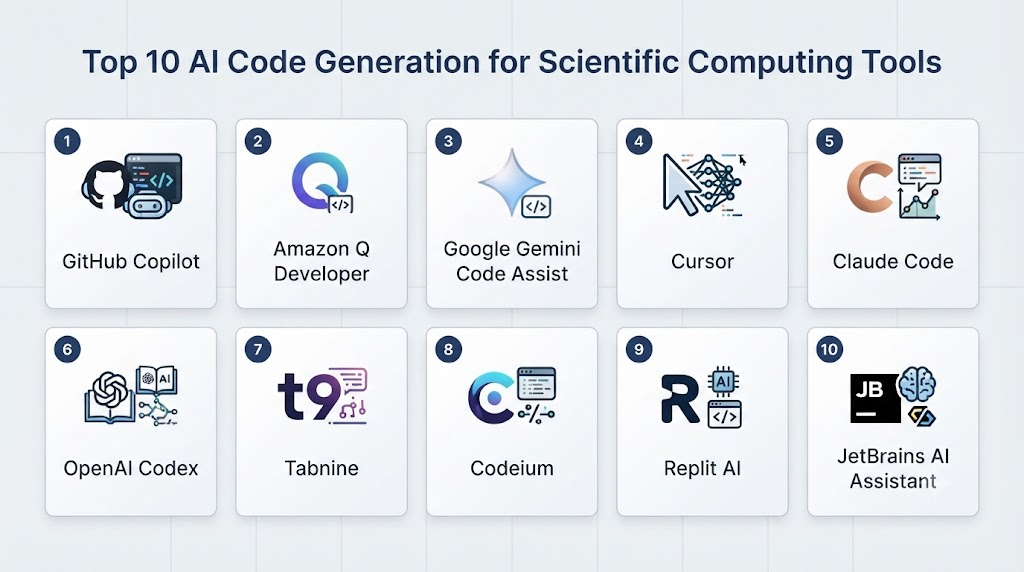
Top 10 AI Code Generation for Scientific Computing Tools
1. GitHub Copilot
One-line verdict: Best overall for researchers and scientific developers who want AI coding assistance integrated into mainstream development workflows.
Short description:
GitHub Copilot provides AI-powered coding assistance for generating, explaining, editing, and debugging software. Its broad language support makes it useful for scientific programmers working across Python, C++, JavaScript, and other languages.
Standout Capabilities
- Inline code completion.
- Natural-language code generation.
- Code explanation.
- Refactoring assistance.
- Test generation.
- Debugging assistance.
- Repository-aware development.
- Agentic coding capabilities.
AI-Specific Depth
- Model support: Multiple supported AI models depending on product configuration.
- RAG / knowledge integration: Repository and workspace context can be used during coding workflows.
- Evaluation: Testing can be integrated into coding workflows.
- Guardrails: Enterprise policy and coding controls vary by configuration.
- Observability: Usage and administrative capabilities vary by plan.
Pros
- Excellent IDE integration.
- Broad programming-language coverage.
- Strong ecosystem for collaborative development.
Cons
- Generated scientific algorithms still require expert validation.
- Advanced functionality can depend on subscription or environment.
- Cloud-based AI may require careful consideration for sensitive research code.
Security & Compliance
Enterprise security features, access controls, audit capabilities, and data-handling policies depend on the selected product configuration. Certifications should be verified for the current plan.
Deployment & Platforms
- Windows.
- macOS.
- Linux.
- IDE-based workflows.
- Cloud-connected development.
Integrations & Ecosystem
GitHub Copilot integrates with common software-development environments and Git-based workflows.
- Visual Studio Code.
- Visual Studio.
- JetBrains IDEs.
- GitHub.
- Git repositories.
- Development workflows.
Pricing Model
Subscription and enterprise licensing models. Exact pricing can vary by plan and is best verified before purchase.
Best-Fit Scenarios
- Python scientific development.
- Engineering software teams.
- Researchers working with Git-based projects.
2. Cursor
One-line verdict: Best for developers who want an AI-first coding environment for large scientific repositories and iterative development.
Short description:
Cursor is an AI-focused code editor designed around code generation, editing, repository understanding, and agent-style development. It can be useful for scientific programmers who want an AI assistant deeply integrated into their development environment.
Standout Capabilities
- AI-assisted coding.
- Repository context.
- Multi-file editing.
- Codebase analysis.
- Agentic workflows.
- Debugging assistance.
- Code refactoring.
- Natural-language development.
AI-Specific Depth
- Model support: Multiple model options depending on current availability and plan.
- RAG / knowledge integration: Codebase indexing and contextual retrieval.
- Evaluation: Developers can run tests and validation workflows.
- Guardrails: Workspace and user controls vary.
- Observability: Usage and model information depend on configuration.
Pros
- Strong codebase context.
- Good multi-file editing workflow.
- Useful for iterative scientific software development.
Cons
- AI-generated numerical code still needs validation.
- Cloud model usage can raise data-governance concerns.
- Features and model availability can change quickly.
Security & Compliance
Security and enterprise controls vary by product configuration. Specific certifications should be verified before deployment.
Deployment & Platforms
- Windows.
- macOS.
- Linux.
- Desktop development environment.
Integrations & Ecosystem
- Git.
- GitHub.
- Python.
- C/C++.
- Jupyter-oriented workflows.
- Extensions and developer tooling.
Pricing Model
Subscription-based plans with usage differences between tiers. Exact pricing is Not publicly stated here.
Best-Fit Scenarios
- Scientific software development.
- Large Python repositories.
- AI-assisted refactoring.
3. Claude Code
One-line verdict: Best for complex scientific coding tasks requiring repository-level reasoning, debugging, refactoring, and agentic workflows.
Short description:
Claude Code is an agentic coding environment designed to work directly with software repositories and development tools. It can analyze code, implement changes, run commands, inspect results, and iterate on solutions.
Standout Capabilities
- Repository analysis.
- Multi-file code modification.
- Command-line workflows.
- Test execution.
- Debugging.
- Refactoring.
- Code explanation.
- Agentic implementation.
AI-Specific Depth
- Model support: Claude model family.
- RAG / knowledge integration: Repository context and local project information.
- Evaluation: Can use project tests and validation commands.
- Guardrails: User-controlled execution and tool permissions.
- Observability: Usage and execution visibility varies by environment.
Pros
- Strong reasoning for complicated codebases.
- Effective multi-step workflows.
- Useful for legacy scientific software.
Cons
- Requires careful command and code review.
- Not a replacement for scientific validation.
- Cost can increase with intensive agentic workflows.
Security & Compliance
Security and enterprise controls vary by deployment. Specific certifications should be verified against the applicable service configuration.
Deployment & Platforms
- Terminal-based workflows.
- macOS.
- Linux.
- Windows environments through supported configurations.
Integrations & Ecosystem
- Git.
- Shell environments.
- Python.
- C/C++.
- Scientific repositories.
- Development tooling.
Pricing Model
Usage or subscription-based depending on access method. Exact pricing varies by plan.
Best-Fit Scenarios
- Complex research codebases.
- Legacy scientific software.
- Agentic debugging.
4. OpenAI Codex
One-line verdict: Best for agentic software development where scientific code needs generation, modification, testing, and repository-level reasoning.
Short description:
OpenAI Codex is designed for AI-assisted software engineering and can support coding tasks ranging from implementation and debugging to repository-level changes. It is particularly useful when scientific development involves multiple files and iterative testing.
Standout Capabilities
- Code generation.
- Repository analysis.
- Multi-file changes.
- Debugging.
- Test creation.
- Agentic coding.
- Code explanation.
- Development automation.
AI-Specific Depth
- Model support: OpenAI coding models.
- RAG / knowledge integration: Repository and task context.
- Evaluation: Test-driven coding workflows.
- Guardrails: Tool permissions and execution controls depend on environment.
- Observability: Usage and task information depend on deployment.
Pros
- Strong general-purpose coding capability.
- Useful for complex implementation tasks.
- Supports iterative development workflows.
Cons
- Scientific correctness still requires domain validation.
- Computationally expensive workflows may require careful usage management.
- Exact capabilities depend on the deployment environment.
Security & Compliance
Enterprise security and data controls depend on the relevant OpenAI product and configuration. Specific certifications should be verified for the intended environment.
Deployment & Platforms
- Cloud-based workflows.
- Developer environments.
- Repository-based development.
- Supported desktop and terminal workflows.
Integrations & Ecosystem
- Git repositories.
- Development environments.
- Command-line workflows.
- Python.
- C/C++.
- Automated tests.
Pricing Model
Plan- and usage-dependent. Exact pricing varies by product and configuration.
Best-Fit Scenarios
- Agentic scientific development.
- Repository refactoring.
- Automated testing and implementation.
5. Amazon Q Developer
One-line verdict: Best for scientific teams already operating heavily within AWS and seeking AI-assisted development and cloud engineering.
Short description:
Amazon Q Developer provides AI-powered coding and software-development assistance. It can help developers generate code, understand projects, troubleshoot issues, and work with cloud-oriented development environments.
Standout Capabilities
- Code generation.
- Code explanation.
- Debugging.
- Software modernization.
- AWS development assistance.
- Developer productivity.
- Security-oriented coding assistance.
- Cloud integration.
AI-Specific Depth
- Model support: Amazon Q uses supported underlying AI models and capabilities.
- RAG / knowledge integration: Context-aware development features.
- Evaluation: Developer testing workflows.
- Guardrails: Enterprise controls depend on configuration.
- Observability: Usage and administrative visibility vary.
Pros
- Strong AWS ecosystem integration.
- Useful for cloud-based scientific computing.
- Good option for enterprise development teams.
Cons
- Most valuable for AWS-centric organizations.
- Scientific domain reasoning still requires expert review.
- Feature availability varies across environments.
Security & Compliance
AWS provides extensive security and enterprise controls, but the exact capabilities and certifications applicable to Amazon Q Developer should be verified for the specific service configuration.
Deployment & Platforms
- IDEs.
- AWS environments.
- Cloud.
- Developer workstations.
Integrations & Ecosystem
- AWS.
- Git.
- IDEs.
- Cloud infrastructure.
- Python.
- Java.
- C++ and other supported languages.
Pricing Model
Tiered and usage-dependent models may apply. Exact pricing varies by product and usage.
Best-Fit Scenarios
- AWS scientific workloads.
- Cloud-native research software.
- Enterprise development.
6. Google Gemini Code Assist
One-line verdict: Best for developers seeking AI coding assistance across Google Cloud, IDEs, and large-scale engineering workflows.
Short description:
Gemini Code Assist provides AI-powered coding assistance for generating, explaining, transforming, and debugging code. It can support scientific developers working with Python and other common programming languages.
Standout Capabilities
- Code generation.
- Code completion.
- Debugging.
- Code explanation.
- Cloud development.
- Large-context assistance.
- Development workflow integration.
- Enterprise-oriented administration.
AI-Specific Depth
- Model support: Gemini model family.
- RAG / knowledge integration: Context and codebase-aware capabilities vary.
- Evaluation: Developer testing and validation workflows.
- Guardrails: Enterprise policy controls vary by configuration.
- Observability: Usage and administrative capabilities depend on plan.
Pros
- Strong general coding capabilities.
- Useful for cloud and data workloads.
- Good fit for Google Cloud users.
Cons
- Cloud-centric teams may gain the most value.
- Numerical accuracy is not guaranteed.
- Advanced functionality can depend on product configuration.
Security & Compliance
Security and compliance capabilities vary by edition and deployment. Verify the specific controls and certifications required by your organization.
Deployment & Platforms
- IDEs.
- Cloud.
- Developer workstations.
- Enterprise environments.
Integrations & Ecosystem
- Google Cloud.
- Git.
- IDEs.
- Python.
- Data tools.
- Cloud development platforms.
Pricing Model
Tiered and enterprise pricing models may apply. Exact pricing varies.
Best-Fit Scenarios
- Cloud scientific computing.
- Data science teams.
- Google Cloud environments.
7. JetBrains AI Assistant
One-line verdict: Best for researchers who prefer JetBrains development environments and need integrated AI assistance for scientific software.
Short description:
JetBrains AI Assistant provides AI-powered assistance within JetBrains development environments. It can help generate, explain, refactor, document, and modify code across scientific programming workflows.
Standout Capabilities
- Code generation.
- Code explanation.
- Refactoring.
- Documentation.
- Test generation.
- IDE integration.
- Codebase assistance.
- Multiple AI model options depending on configuration.
AI-Specific Depth
- Model support: Multiple model options depending on current product configuration.
- RAG / knowledge integration: Project and code context.
- Evaluation: Supports development testing workflows.
- Guardrails: IDE and organizational controls vary.
- Observability: Usage visibility depends on environment.
Pros
- Deep IDE integration.
- Good refactoring capabilities.
- Useful for large scientific projects.
Cons
- Best experience depends on JetBrains workflows.
- AI-generated scientific algorithms require review.
- Some functionality depends on plan and model configuration.
Security & Compliance
Enterprise controls and data handling vary by deployment. Specific certifications are Not publicly stated here.
Deployment & Platforms
- Windows.
- macOS.
- Linux.
- JetBrains IDEs.
Integrations & Ecosystem
- IntelliJ IDEA.
- PyCharm.
- CLion.
- DataSpell.
- Git.
- Python.
- C/C++.
Pricing Model
Subscription-based and product-dependent. Exact pricing varies.
Best-Fit Scenarios
- Python research projects.
- C++ scientific software.
- JetBrains-based teams.
8. Tabnine
One-line verdict: Best for organizations prioritizing private AI coding assistance and enterprise control over source-code workflows.
Short description:
Tabnine provides AI-assisted code generation and completion with a strong emphasis on enterprise development environments and controlled deployment. It can support scientific developers working with common programming languages.
Standout Capabilities
- Code completion.
- Code generation.
- Enterprise AI coding.
- Code explanation.
- Private development workflows.
- Organizational administration.
- Multiple development environments.
- Developer productivity.
AI-Specific Depth
- Model support: Supported hosted and enterprise model options vary.
- RAG / knowledge integration: Codebase context capabilities vary.
- Evaluation: Standard software testing workflows.
- Guardrails: Enterprise controls and policy features vary.
- Observability: Administrative and usage monitoring varies.
Pros
- Strong focus on enterprise privacy.
- Useful for controlled coding environments.
- Broad development-language support.
Cons
- Scientific reasoning remains dependent on the underlying model.
- Advanced features can depend on enterprise configuration.
- Smaller ecosystem than some major coding platforms.
Security & Compliance
Security, privacy, deployment, and compliance capabilities should be verified against the current enterprise offering.
Deployment & Platforms
- Cloud.
- Enterprise.
- IDE environments.
- Controlled/private configurations vary.
Integrations & Ecosystem
- VS Code.
- JetBrains.
- Git.
- Python.
- C/C++.
- Enterprise development environments.
Pricing Model
Subscription and enterprise models. Exact pricing varies.
Best-Fit Scenarios
- Research organizations with privacy requirements.
- Enterprise software teams.
- Proprietary scientific codebases.
9. Sourcegraph Cody
One-line verdict: Best for understanding and generating code across large, complex scientific repositories and legacy software systems.
Short description:
Sourcegraph Cody is designed around codebase understanding and AI-assisted software development. Its repository context makes it particularly relevant to organizations maintaining large scientific or engineering codebases.
Standout Capabilities
- Codebase search.
- Code explanation.
- Code generation.
- Repository context.
- Refactoring.
- Documentation.
- Legacy-code understanding.
- Enterprise development workflows.
AI-Specific Depth
- Model support: Model options vary by product configuration.
- RAG / knowledge integration: Strong codebase-context capabilities.
- Evaluation: Developer-managed testing and validation.
- Guardrails: Enterprise policies vary.
- Observability: Usage and administrative controls depend on deployment.
Pros
- Strong repository understanding.
- Useful for legacy scientific software.
- Helpful for large development organizations.
Cons
- Best suited to larger codebases.
- Scientific correctness requires domain-specific validation.
- Product capabilities can change as the platform evolves.
Security & Compliance
Enterprise security features vary by deployment. Required certifications should be independently verified.
Deployment & Platforms
- Cloud.
- Enterprise.
- Development environments.
- Self-hosted/private capabilities vary.
Integrations & Ecosystem
- Git repositories.
- Code search.
- IDEs.
- Python.
- C++.
- Large enterprise codebases.
Pricing Model
Commercial and enterprise pricing. Exact pricing is Not publicly stated here.
Best-Fit Scenarios
- Large scientific repositories.
- Legacy code modernization.
- Enterprise research organizations.
10. Continue
One-line verdict: Best for developers wanting lightweight AI-powered coding assistance directly inside a familiar editor.
Short description:
Continue is an open-source AI coding assistant designed to bring AI-powered code assistance into development environments. It can be configured around different models and can provide a flexible foundation for scientific coding workflows.
Standout Capabilities
- Code completion.
- Chat-based coding.
- Open-source architecture.
- Model flexibility.
- IDE integration.
- Custom configuration.
- Codebase context.
- Local-model possibilities.
AI-Specific Depth
- Model support: Hosted and open-source model options depending on configuration.
- RAG / knowledge integration: Codebase context and retrieval capabilities.
- Evaluation: Developer-controlled testing.
- Guardrails: Configurable through the surrounding development architecture.
- Observability: Depends on deployment and configured tooling.
Pros
- Flexible architecture.
- Strong model-choice potential.
- Useful for private or customized workflows.
Cons
- Requires more technical setup than fully managed assistants.
- Enterprise support depends on the chosen configuration.
- Users are responsible for validating the overall AI stack.
Security & Compliance
Security depends heavily on model provider, infrastructure, and deployment architecture. Specific certifications are Not publicly stated for every possible configuration.
Deployment & Platforms
- Windows.
- macOS.
- Linux.
- IDE environments.
- Local/self-hosted configurations.
Integrations & Ecosystem
- VS Code.
- JetBrains.
- Open-source models.
- Hosted AI models.
- Git.
- Local development environments.
Pricing Model
Open-source software with optional commercial or infrastructure costs depending on deployment.
Best-Fit Scenarios
- Researchers wanting model flexibility.
- Private scientific development.
- Custom AI coding environments.
Comparison Table
| Tool | Best For | Deployment | Model Flexibility | Strength | Watch-Out | Public Rating |
|---|---|---|---|---|---|---|
| GitHub Copilot | General scientific development | Cloud/IDE | Multi-model | Broad ecosystem | Scientific validation required | N/A |
| Cursor | AI-first development | Desktop/Cloud | Multi-model | Codebase context | Usage costs | N/A |
| Claude Code | Agentic development | Terminal/Cloud | Claude | Repository reasoning | Needs careful execution review | N/A |
| OpenAI Codex | Agentic coding | Cloud/Developer environments | OpenAI | Multi-step coding | Validate numerical results | N/A |
| Amazon Q Developer | AWS scientific workloads | Cloud/IDE | Hosted models | AWS integration | Best in AWS environments | N/A |
| Gemini Code Assist | Cloud/data development | Cloud/IDE | Gemini | Google ecosystem | Configuration-dependent | N/A |
| JetBrains AI Assistant | JetBrains users | Desktop/IDE | Multi-model | IDE integration | Plan-dependent features | N/A |
| Tabnine | Private enterprise coding | Cloud/Enterprise | Varies | Enterprise privacy focus | Feature differences by plan | N/A |
| Sourcegraph Cody | Large repositories | Cloud/Enterprise | Multi-model | Codebase understanding | Best for larger teams | N/A |
| Continue | Custom/private coding | Local/Cloud | Open/BYO/Multi-model | Flexibility | Requires setup | N/A |
Scoring & Evaluation
The scores below are comparative estimates for scientific-code-generation suitability, not official vendor ratings. A higher score indicates stronger overall suitability for scientific computing workflows.
| Tool | Core | Reliability/Eval | Guardrails | Integrations | Ease | Perf/Cost | Security/Admin | Support | Weighted Total |
|---|---|---|---|---|---|---|---|---|---|
| GitHub Copilot | 9.5 | 8.5 | 8.5 | 10 | 9.5 | 8.5 | 9 | 10 | 9.2 |
| Cursor | 9.5 | 9 | 8.5 | 9 | 9 | 8 | 8.5 | 9 | 8.9 |
| Claude Code | 9.5 | 9.5 | 8.5 | 9 | 8 | 8 | 8.5 | 9.5 | 9.0 |
| OpenAI Codex | 9.5 | 9.5 | 9 | 9 | 8.5 | 8 | 9 | 9.5 | 9.1 |
| Amazon Q Developer | 9 | 8.5 | 9 | 9.5 | 8.5 | 8.5 | 9.5 | 9.5 | 9.0 |
| Gemini Code Assist | 9 | 8.5 | 9 | 9.5 | 9 | 8.5 | 9 | 9.5 | 9.0 |
| JetBrains AI Assistant | 9 | 8.5 | 8.5 | 9.5 | 9.5 | 8.5 | 9 | 9.5 | 9.0 |
| Tabnine | 8.5 | 8 | 9 | 9 | 9 | 8 | 9.5 | 9 | 8.7 |
| Sourcegraph Cody | 9 | 9 | 8.5 | 9.5 | 8 | 8 | 9 | 9 | 8.8 |
| Continue | 8.5 | 8.5 | 8.5 | 9 | 7.5 | 9 | 8.5 | 8 | 8.5 |
Top 3 for Enterprise
- GitHub Copilot
- OpenAI Codex
- Amazon Q Developer
Top 3 for SMB
- GitHub Copilot
- Cursor
- Gemini Code Assist
Top 3 for Developers
- Claude Code
- OpenAI Codex
- Cursor
Which AI Code Generation for Scientific Computing Tool Is Right for You?
Solo / Freelancer
Individual researchers and independent developers should prioritize ease of use, model quality, IDE integration, and predictable costs.
GitHub Copilot, Cursor, Claude Code, and Continue are strong starting points depending on the desired development style.
For occasional numerical work, a simple coding assistant may be enough. For larger research projects, repository-aware agents provide considerably more value.
SMB
SMBs should prioritize:
- Developer adoption.
- IDE integration.
- Privacy.
- Git integration.
- Automated testing.
- Cost controls.
- Model flexibility.
A good SMB workflow is to standardize one or two coding assistants rather than allowing every developer to select unrelated tools.
Mid-Market
Mid-market organizations should create an internal AI coding policy.
It should define:
- Which models are permitted.
- What source code may be submitted.
- How generated code must be reviewed.
- What testing is required.
- How AI usage is monitored.
- How sensitive research data is handled.
Scientific teams should additionally create numerical regression tests for important algorithms.
Enterprise
Enterprises should treat AI coding as part of their software-engineering governance.
Important capabilities include:
- Central administration.
- Access controls.
- Repository permissions.
- Data-retention policies.
- Model governance.
- Auditability.
- Secure development.
- Automated testing.
- Software supply-chain controls.
Large scientific organizations should also maintain separate validation standards for numerical and simulation code.
Regulated Industries
Organizations in aerospace, healthcare, energy, defense, finance, and other regulated sectors should not assume that AI-generated code is safe simply because it passes normal software tests.
Scientific and engineering applications may require additional:
- Numerical validation.
- Reproducibility.
- Documentation.
- Model provenance.
- Human review.
- Change approval.
- Audit records.
Budget vs Premium
Budget tools can be sufficient for autocomplete, code explanation, and simple generation.
Premium or enterprise systems become more valuable when teams need:
- Large-context reasoning.
- Agentic coding.
- Repository-wide changes.
- Enterprise administration.
- Security controls.
- Private deployments.
- Advanced model choices.
Calculate total cost using developer productivity rather than subscription price alone.
Build vs Buy
Build when:
- Research code is highly proprietary.
- You require local models.
- You need specialized scientific evaluation.
- Your organization has strong ML infrastructure.
- You need complete control over data and models.
Buy when:
- You need rapid adoption.
- Developers already use supported IDEs.
- You want managed infrastructure.
- Internal AI platform development would be more expensive than licensing.
Implementation Playbook
First 30 Days: Pilot + Success Metrics
Select a small scientific development team.
Choose two or three representative tasks:
- Generate numerical functions.
- Refactor legacy code.
- Generate unit tests.
- Document scientific modules.
- Translate code between languages.
Measure:
- Developer time saved.
- Acceptance rate of generated code.
- Defect rate.
- Test coverage.
- Review time.
- AI usage.
- Cost per developer.
Create a scientific benchmark containing known problems with expected outputs.
Days 31–60: Harden Security + Evaluation
Create an evaluation harness covering both software and scientific correctness.
Test:
- Unit-test performance.
- Numerical accuracy.
- Floating-point behavior.
- Boundary conditions.
- Convergence.
- Performance.
- Memory consumption.
- Parallel execution.
- GPU correctness.
- Regression behavior.
For agentic tools, test whether the system can safely operate on repositories and execute commands.
Add:
- Prompt/version control.
- Model version tracking.
- Code review.
- Security scanning.
- Dependency checks.
- Red-team testing.
Days 61–90: Optimize + Govern + Scale
Expand successful workflows across additional teams.
Create reusable prompts and engineering templates for:
- Numerical methods.
- Scientific testing.
- Documentation.
- HPC optimization.
- GPU programming.
- Data analysis.
- Simulation workflows.
Track:
- Productivity.
- Cost.
- Quality.
- Defect rates.
- Model performance.
- Developer adoption.
Common Mistakes & How to Avoid Them
- Assuming syntactically correct code is scientifically correct: Validate numerical behavior.
- Skipping tests: Require automated unit and regression testing.
- Ignoring floating-point behavior: Test numerical stability and precision.
- Trusting generated equations: Verify formulas independently.
- Using AI for unsupported extrapolation: Validate against known scientific cases.
- Ignoring security: Scan generated dependencies and code.
- Sending proprietary research code to uncontrolled services: Establish data-handling policies.
- No repository context: Use tools capable of understanding project architecture.
- No human review: Require qualified review for important scientific algorithms.
- Ignoring performance: Benchmark generated code against existing implementations.
- Ignoring HPC architecture: Check memory access, parallelism, vectorization, and communication costs.
- Assuming AI-generated GPU code is optimized: Profile it on real hardware.
- No model/version tracking: Record important AI-assisted changes.
- Overusing agentic workflows: Give agents only the permissions they need.
- Ignoring dependency security: Review newly generated packages and libraries.
- No evaluation benchmark: Establish representative scientific problems before rollout.
- Measuring only lines of code: Productivity should include correctness and review effort.
- Ignoring legacy-code context: Analyze dependencies and historical assumptions before refactoring.
- No rollback strategy: Maintain version-controlled source and reproducible environments.
- Allowing AI to become the final authority: Treat AI as an assistant, not the scientific decision-maker.
FAQs
What is AI code generation for scientific computing?
It is the use of AI coding assistants to generate, modify, explain, test, optimize, and document software used for scientific and numerical workloads.
Can AI generate scientific Python code?
Yes. Python is one of the most widely supported languages for AI coding assistants and is heavily used in scientific computing.
Can AI generate C++ and Fortran?
Many coding assistants can generate C++ and may assist with Fortran, but capability and quality vary significantly between models and tools.
Can AI generate CUDA code?
Yes. Modern coding models can assist with CUDA and GPU programming, although generated kernels should always be profiled and tested on the intended hardware.
Can AI write numerical algorithms correctly?
It can generate useful implementations, but correctness is not guaranteed. Numerical algorithms should be validated against analytical solutions, trusted implementations, or experimental results.
Can AI help with HPC programming?
Yes. AI can assist with MPI, OpenMP, CUDA, parallel algorithms, optimization, and HPC-related code, but performance needs to be benchmarked on actual infrastructure.
Can AI convert MATLAB code to Python?
AI coding assistants can help translate MATLAB workflows into Python, but numerical behavior, library differences, indexing, plotting, and performance should be reviewed carefully.
Can AI generate Fortran modernization code?
Yes. AI can help explain legacy Fortran, refactor sections, generate documentation, and translate components to newer languages. Large-scale modernization requires systematic testing.
Is AI-generated scientific code safe to use?
It can be useful, but safety depends on validation. Important scientific software should go through normal engineering review, testing, security scanning, and numerical verification.
Can these tools work with private research code?
Some enterprise and private configurations provide stronger controls, but organizations should verify data retention, model training policies, deployment architecture, and access controls before submitting sensitive code.
Can I use an open-source AI model for scientific coding?
Yes. Open-source models can provide greater control over deployment and data, but they may require additional infrastructure and engineering effort.
What is the best AI coding tool for researchers?
There is no universal winner. GitHub Copilot is a strong general choice, while Claude Code, OpenAI Codex, Cursor, and specialized or configurable tools can be better for different workflows.
Should scientists use AI coding agents?
They can be highly useful for repository exploration, refactoring, testing, documentation, and repetitive implementation tasks. Permissions should be controlled and generated changes reviewed.
How should scientific AI coding tools be evaluated?
Use a benchmark containing representative algorithms and compare correctness, numerical accuracy, performance, test quality, maintainability, and developer time.
Can AI optimize scientific code?
Yes. AI can suggest vectorization, parallelization, memory improvements, algorithm changes, and GPU implementations. Profiling is necessary to confirm that the changes actually improve performance.
Can AI generate simulation software?
It can assist with simulation code, numerical solvers, data-processing pipelines, and model implementations. Complex simulation systems still require domain experts.
Can AI generate unit tests for scientific software?
Yes. AI is particularly useful for generating test cases, edge cases, assertions, and regression-test structures, but expected numerical values should be independently verified.
How does AI handle scientific documentation?
It can explain complex code, generate docstrings, summarize modules, create usage examples, and convert technical implementation details into more readable documentation.
What is the biggest risk of AI coding in scientific computing?
The biggest risk is accepting plausible-looking code without verifying its scientific correctness. A program can run successfully while implementing the wrong mathematical method.
What is the biggest benefit?
The biggest benefit is reducing the amount of repetitive programming work while helping scientists spend more time on research questions, model development, experimentation, and analysis.
Conclusion
AI code generation is becoming a practical productivity layer for scientific computing. The strongest tools can do much more than autocomplete: they can understand repositories, generate implementations, create tests, debug failures, refactor legacy software, explain unfamiliar code, and participate in multi-step development workflows.For general scientific programming, GitHub Copilot remains a strong mainstream choice. Cursor, Claude Code, and OpenAI Codex are particularly useful for agentic and repository-level development. Amazon Q Developer and Gemini Code Assist are compelling for organizations already committed to their respective cloud ecosystems. JetBrains AI Assistant is well suited to JetBrains-centric teams, while Tabnine, Sourcegraph Cody, and Continue offer valuable options for organizations prioritizing enterprise control, codebase understanding, or model flexibility.