Introduction
AI Bug Localization Tools are specialized platforms designed to automatically detect, locate, and prioritize software bugs in AI-powered systems and traditional applications. Unlike conventional debugging or static analysis tools, these platforms leverage machine learning, program analysis, and predictive models to pinpoint potential defects quickly and accurately. They help reduce manual effort, accelerate debugging, and improve software reliability across complex codebases.
Why it matters
- Faster Bug Detection: AI-powered tools analyze code and runtime behavior to locate bugs quickly, reducing mean time to resolution (MTTR).
- Improved Software Quality: Accurate bug localization prevents production defects, increasing system reliability and user satisfaction.
- Cost Efficiency: Early bug detection reduces costs associated with late-stage debugging and production incidents.
- Supports Continuous Integration/Delivery: Automated bug detection fits into CI/CD pipelines, allowing developers to catch defects before deployment.
- Enhanced AI Code Understanding: For AI-integrated systems, these tools understand model interactions, pipelines, and APIs to detect subtle failures.
- Prioritization and Impact Analysis: Helps teams focus on high-risk areas, optimizing developer effort.
- Compliance and Governance: Captures logs and traces, supporting auditability in regulated industries like finance and healthcare.
Real-world use cases
- SaaS Platforms: Detecting integration bugs in AI APIs used for recommendation engines or analytics dashboards.
- E-commerce: Finding defects in AI-driven personalization engines before deployment.
- Finance: Identifying bugs in AI models affecting risk scoring, fraud detection, or regulatory reporting.
- Healthcare: Pinpointing issues in AI diagnostic or workflow systems.
- DevOps: Automating bug localization in CI/CD pipelines to improve continuous delivery speed.
- Gaming & Multimedia: Detecting runtime bugs in AI-powered physics engines, recommendation systems, or real-time simulations.
Evaluation Criteria for Buyers
- Accuracy: Ability to correctly identify bug locations with minimal false positives.
- Automation: Supports automatic code scanning, runtime analysis, and predictive bug localization.
- Integration: Works with CI/CD tools, IDEs, version control systems, and monitoring platforms.
- Multimodal Support: Capable of analyzing code, logs, and runtime AI outputs.
- Observability: Provides traceability, logs, metrics, and dashboards for developers.
- Scalability: Handles large codebases and multiple repositories efficiently.
- Security & Privacy: Ensures sensitive code and data are protected during analysis.
- Ease of Use: Simple setup, intuitive UI, and actionable bug reports.
- Cost Efficiency: Optimizes resource usage and minimizes computational cost.
- Support & Community: Access to technical support, documentation, and community guidance.
Best for: Software developers, QA engineers, DevOps teams, AI engineers, and enterprises with AI-intensive applications.
Not ideal for: Small teams with simple applications, or projects without AI components where manual debugging is sufficient.
What’s Changed in AI Bug Localization Tools
- Agentic workflows for automated bug triaging and resolution recommendations.
- Integration with multimodal inputs: code, runtime logs, AI outputs, and configuration files.
- Advanced evaluation and testing frameworks for reliability and anomaly detection.
- Built-in guardrails against unsafe AI predictions or faulty code modifications.
- Enterprise privacy features: code/data residency, retention, and access control.
- Cost and latency optimization in large-scale bug scans.
- Model routing and BYO model support for proprietary AI codebases.
- Observability enhancements: token usage, execution traces, runtime metrics.
- Governance and compliance tracking for regulated industries.
- AI-assisted prioritization of high-risk bugs.
- Predictive bug analysis to anticipate errors before deployment.
Quick Buyer Checklist
- Verify data privacy and retention policies.
- Confirm support for hosted, BYO, and open-source AI models.
- Check for RAG or knowledge integration if analyzing complex AI pipelines.
- Evaluate automation for bug scanning and reporting.
- Ensure guardrails prevent unsafe AI-driven code modifications.
- Assess latency, throughput, and cost controls.
- Verify auditability, logging, and admin controls.
- Consider risk of vendor lock-in.
- Look for multimodal analysis support.
- Ensure integration with CI/CD, IDEs, and monitoring platforms.
- Confirm predictive bug prioritization capabilities.
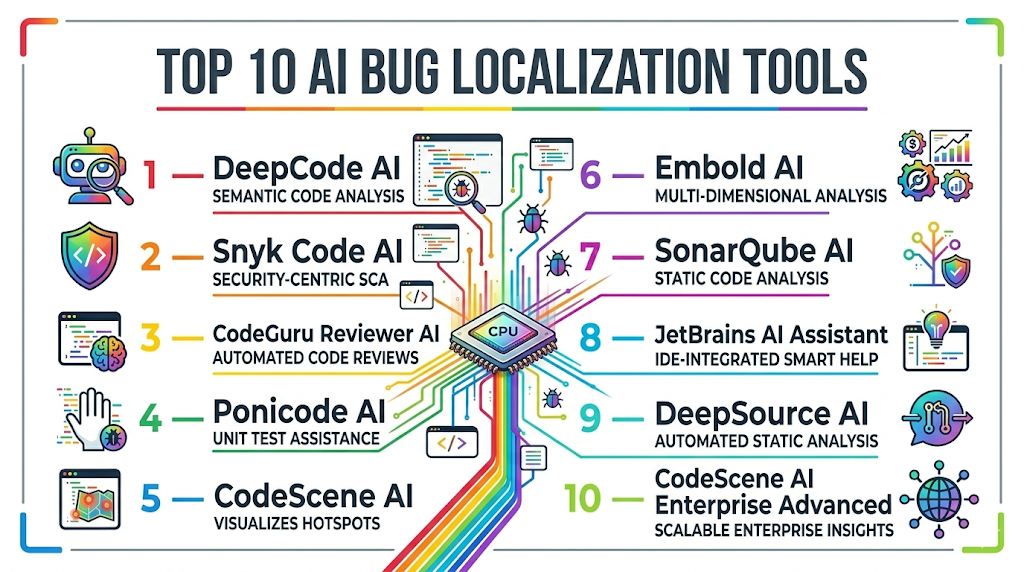
Top 10 AI Bug Localization Tools
1 — DeepCode AI
One-line verdict: Best for large enterprises seeking AI-powered automated bug detection across complex, multi-language codebases.
Short description : DeepCode AI leverages machine learning to automatically scan source code, detect bugs, and provide actionable recommendations for developers. It identifies code anomalies, security vulnerabilities, and potential runtime issues. Large teams use it to prioritize fixes efficiently, reduce manual debugging, and improve code quality across multiple repositories.
Standout Capabilities
- AI-driven static code analysis
- Real-time bug detection and code suggestions
- Multi-language support for enterprise-scale repositories
- Integration with CI/CD pipelines for automated regression
- Security vulnerability detection and prioritization
- Visual dashboards for issue tracking and trends
- Predictive bug risk scoring
AI-Specific Depth
- Model support: Proprietary and open-source code models
- RAG / knowledge integration: Connectors for code knowledge bases
- Evaluation: Regression and static analysis
- Guardrails: Policy enforcement for coding standards
- Observability: Execution traces, bug metrics, and risk visualization
Pros
- Highly accurate bug detection
- Supports large and complex codebases
- Predictive bug prioritization reduces developer effort
Cons
- Initial setup can be complex
- Learning curve for small teams
- Focused mainly on static analysis rather than runtime errors
Security & Compliance
- SSO, RBAC, encryption, and data retention controls
- Certifications: Not publicly stated
Deployment & Platforms
- Web, Windows, macOS, Linux
- Cloud / Hybrid
Integrations & Ecosystem
- IDE plugins for live code feedback
- GitHub, GitLab, Bitbucket support
- CI/CD pipeline integration
- APIs for automation
Pricing Model
- Tiered subscription, enterprise licensing available
Best-Fit Scenarios
- Enterprise-scale codebases
- Multi-language repositories
- Continuous integration with automated bug detection
2 — Snyk Code AI
One-line verdict: Ideal for security-focused dev teams needing AI-driven bug and vulnerability detection.
Short description : Snyk Code AI automatically scans code to detect security vulnerabilities and bugs in real-time. It integrates with IDEs, CI/CD pipelines, and version control, helping developers prioritize security-related fixes. Teams use it to enforce compliance policies while reducing production risks associated with AI or software defects.
Standout Capabilities
- Automated vulnerability detection
- Real-time code scanning with actionable fixes
- Multi-language support for enterprise environments
- CI/CD integration for continuous checks
- Prioritization based on severity and impact
AI-Specific Depth
- Model support: Proprietary
- RAG / knowledge integration: N/A
- Evaluation: Regression and vulnerability analysis
- Guardrails: Security policy enforcement
- Observability: Issue severity and fix metrics
Pros
- Strong security and compliance focus
- Real-time actionable feedback for developers
- Prioritizes high-risk vulnerabilities
Cons
- Less effective for non-security bugs
- Limited runtime defect detection
- Enterprise features may require higher tiers
Security & Compliance
- SSO, audit logging, RBAC, encryption
- Certifications: Not publicly stated
Deployment & Platforms
- Web, Windows, macOS, Linux
- Cloud / Hybrid
Integrations & Ecosystem
- GitHub, GitLab, Bitbucket
- Slack, Jira integration
- CI/CD pipeline support
- APIs for automation
Pricing Model
- Usage-based subscription with tiered enterprise options
Best-Fit Scenarios
- Security-focused development teams
- CI/CD integrated AI pipelines
- Multi-language code repositories
3 — CodeGuru Reviewer AI
One-line verdict: Best for AWS-based environments needing AI-assisted bug detection and performance insights.
Short description : CodeGuru Reviewer AI analyzes Java and Python codebases to detect potential defects, resource inefficiencies, and concurrency issues. It integrates with AWS repositories and CI/CD pipelines, prioritizing issues for developers. Teams use it to improve performance, reliability, and security in cloud-native applications.
Standout Capabilities
- Static code analysis with machine learning
- Concurrency and performance issue detection
- Automated recommendations for bug fixes
- Integration with Git repositories and CI/CD
- Prioritized bug scoring
AI-Specific Depth
- Model support: Proprietary / Hosted
- RAG / knowledge integration: N/A
- Evaluation: Regression and static code analysis
- Guardrails: Coding standards enforcement
- Observability: Metrics for code quality, performance, and defect density
Pros
- Detects performance and concurrency issues
- Prioritizes high-risk bugs
- Tight integration with AWS services
Cons
- Limited language support beyond Java/Python
- AWS-centric environment
- Requires expertise for full setup
Security & Compliance
- SSO, encryption, audit logging
- Certifications: Not publicly stated
Deployment & Platforms
- Cloud, Web
- Windows, macOS, Linux
Integrations & Ecosystem
- GitHub, AWS CodeCommit, Bitbucket
- CI/CD pipelines
- APIs for automation
Pricing Model
- Tiered subscription based on repository size
Best-Fit Scenarios
- AWS-hosted applications
- Java and Python codebases
- Continuous integration with automated code reviews
4 — Ponicode AI
One-line verdict: Ideal for frontend and backend JS/TS developers needing predictive bug localization with AI-assisted test coverage.
Short description : Ponicode AI automatically generates unit tests and predicts bug locations in JavaScript, TypeScript, and Python projects. Developers use it to increase code coverage, reduce debugging time, and detect potential runtime defects early. It integrates with IDEs for real-time recommendations.
Standout Capabilities
- AI-assisted test generation
- Predictive bug location
- Multi-language support (JS, TS, Python)
- IDE integration for live feedback
- CI/CD integration
AI-Specific Depth
- Model support: Proprietary
- RAG / knowledge integration: N/A
- Evaluation: Regression and test coverage validation
- Guardrails: N/A
- Observability: Metrics on prediction accuracy and coverage
Pros
- Boosts productivity
- Reduces manual debugging
- Improves test coverage
Cons
- Limited enterprise compliance features
- Focused on specific languages
- Requires IDE plugin installation
Security & Compliance
- Access control, encryption
- Certifications: Not publicly stated
Deployment & Platforms
- Web, Windows, macOS
- Cloud / Hybrid
Integrations & Ecosystem
- VS Code, IntelliJ IDEs
- CI/CD pipelines
- Jira, Slack for alerts
Pricing Model
- Subscription-based
Best-Fit Scenarios
- Agile developer teams
- Frontend and backend JS/TS projects
- Automated test coverage improvement
5 — CodeScene AI
One-line verdict: Best for large enterprises needing predictive bug detection and code hotspot analysis to prioritize fixes.
Short description: CodeScene AI uses machine learning to analyze code evolution, detect hotspots, and predict defect-prone areas. Developers leverage it to identify high-risk modules, prioritize fixes, and reduce technical debt. Its predictive insights are especially useful for multi-team or multi-repository projects with complex workflows.
Standout Capabilities
- Predictive bug localization using historical code patterns
- Behavioral code analysis to identify hotspots
- Risk-based prioritization of defects
- Multi-language support
- CI/CD integration for automated monitoring
- Visual dashboards for code health trends
AI-Specific Depth
- Model support: Proprietary
- RAG / knowledge integration: N/A
- Evaluation: Predictive bug analysis and regression testing
- Guardrails: Policy enforcement for risky code changes
- Observability: Metrics dashboards and trend analysis
Pros
- Identifies high-risk code areas effectively
- Supports multi-team enterprise repositories
- Predictive bug insights improve developer efficiency
Cons
- Initial setup can be complex
- Requires historical code data for best results
- Enterprise-focused, may be overkill for SMBs
Security & Compliance
- SSO, RBAC, encryption, retention policies
- Certifications: Not publicly stated
Deployment & Platforms
- Cloud / Hybrid
- Web, Windows, Linux, macOS
Integrations & Ecosystem
- GitHub, GitLab, Bitbucket
- CI/CD pipelines, Jira, Slack
- APIs for automated analysis
Pricing Model
- Tiered subscription, enterprise licensing available
Best-Fit Scenarios
- Enterprise-scale codebases
- Predictive bug prioritization
- Multi-repository monitoring
6 — Embold AI
One-line verdict: Ideal for teams needing maintainability insights and AI-assisted bug localization across multi-language code.
Short description: Embold AI analyzes software code to detect anti-patterns, maintainability issues, and potential bugs. It helps development teams prevent runtime failures, reduce technical debt, and ensure long-term code quality. Embold integrates with CI/CD pipelines to automate checks and provide actionable insights during development.
Standout Capabilities
- AI-driven static analysis for bug and anti-pattern detection
- Maintainability and technical debt evaluation
- Multi-language support
- Integration with CI/CD pipelines
- Code quality dashboards and actionable suggestions
AI-Specific Depth
- Model support: Proprietary
- RAG / knowledge integration: N/A
- Evaluation: Regression, static analysis, code quality checks
- Guardrails: N/A
- Observability: Dashboards with defect trends and maintainability scores
Pros
- Early detection of maintainability issues
- Multi-language support
- Reduces runtime defects and improves long-term code health
Cons
- Runtime bug detection limited
- Enterprise features may require higher-tier plans
- Requires training to interpret metrics effectively
Security & Compliance
- Encryption, access control
- Certifications: Not publicly stated
Deployment & Platforms
- Cloud / Hybrid
- Web, Windows, Linux, macOS
Integrations & Ecosystem
- GitHub, GitLab, Bitbucket
- CI/CD pipelines
- Slack and Jira notifications
Pricing Model
- Subscription-based, tiered
Best-Fit Scenarios
- Maintainability-focused teams
- Multi-language projects
- Agile CI/CD pipelines
7 — SonarQube AI
One-line verdict: Best for enterprises seeking AI-assisted static code analysis with integrated bug detection across multiple languages.
Short description : SonarQube AI combines static code analysis with machine learning to detect bugs, security issues, and code smells. It provides detailed dashboards and actionable recommendations, helping developers improve code quality, maintain compliance, and reduce the risk of runtime defects.
Standout Capabilities
- AI-powered static analysis for bugs and vulnerabilities
- Multi-language support
- Code quality metrics and dashboards
- Automated suggestions for fixes
- CI/CD integration for continuous analysis
AI-Specific Depth
- Model support: Proprietary / Open-source
- RAG / knowledge integration: N/A
- Evaluation: Regression, static analysis, bug detection
- Guardrails: N/A
- Observability: Metrics dashboards and trend monitoring
Pros
- Supports multiple languages and large codebases
- Detailed actionable insights
- Integrates with CI/CD pipelines easily
Cons
- Focused on static code, limited runtime analysis
- Requires configuration for enterprise-scale projects
- Learning curve for interpreting advanced metrics
Security & Compliance
- SSO, RBAC, encryption
- Certifications: Not publicly stated
Deployment & Platforms
- Cloud / On-prem / Hybrid
- Web, Windows, Linux, macOS
Integrations & Ecosystem
- GitHub, GitLab, Bitbucket
- IDE plugins (VS Code, IntelliJ)
- CI/CD pipelines
- Jira integration for issue tracking
Pricing Model
- Subscription-based, enterprise tiers
Best-Fit Scenarios
- Enterprise development teams
- Multi-language repositories
- Continuous integration with automated quality checks
8 — JetBrains AI Assistant
One-line verdict: Ideal for developers needing real-time AI bug detection within JetBrains IDEs for faster coding feedback.
Short description : JetBrains AI Assistant provides real-time bug detection and suggestions directly in JetBrains IDEs like IntelliJ and PyCharm. Developers benefit from predictive bug localization, code improvement suggestions, and AI-assisted testing without leaving the IDE, improving productivity and reducing debugging cycles.
Standout Capabilities
- IDE-integrated AI bug detection
- Predictive bug localization and suggestions
- Multi-language support
- CI/CD integration
- Live code metrics and analytics
AI-Specific Depth
- Model support: Proprietary / Hosted
- RAG / knowledge integration: N/A
- Evaluation: Regression and real-time code analysis
- Guardrails: Policy enforcement within IDE
- Observability: Code metrics and predictive bug trends
Pros
- Real-time feedback while coding
- Reduces manual debugging
- Seamlessly integrated into JetBrains IDEs
Cons
- IDE-specific, cannot be used standalone
- Limited enterprise-level reporting
- Requires model updates for best performance
Security & Compliance
- Encryption and access control
- Certifications: Not publicly stated
Deployment & Platforms
- Windows, macOS, Linux
- Cloud / On-prem optional
Integrations & Ecosystem
- JetBrains IDEs (IntelliJ, PyCharm, WebStorm)
- CI/CD pipelines
- Git repositories
Pricing Model
- Subscription-based, IDE-integrated
Best-Fit Scenarios
- Developers using JetBrains tools
- Agile development environments
- Real-time predictive bug detection
9 — DeepSource AI
One-line verdict: Best for multi-language automated code reviews with integrated bug localization and CI/CD support.
Short description : DeepSource AI automatically analyzes code for bugs, performance issues, and anti-patterns across multiple languages. It integrates with CI/CD pipelines to enforce code quality, helping developers identify and fix bugs before production deployments.
Standout Capabilities
- Automated code review and bug detection
- Multi-language support
- CI/CD pipeline integration
- Detection of anti-patterns and code smells
- Predictive bug prioritization
AI-Specific Depth
- Model support: Proprietary / BYO
- RAG / knowledge integration: N/A
- Evaluation: Regression, predictive bug detection
- Guardrails: Policy enforcement
- Observability: Metrics dashboards and trend analysis
Pros
- Reduces manual code reviews
- CI/CD-ready
- Prioritizes high-risk code areas
Cons
- Runtime testing limited
- Enterprise features may require higher tiers
- Requires team training
Security & Compliance
- Encryption, RBAC, audit logs
- Certifications: Not publicly stated
Deployment & Platforms
- Cloud / Hybrid
- Web, Windows, Linux, macOS
Integrations & Ecosystem
- GitHub, GitLab, Bitbucket
- CI/CD pipelines, Jira, Slack
- APIs for automation
Pricing Model
- Subscription-based, usage-tiered
Best-Fit Scenarios
- Agile multi-language teams
- Continuous code reviews
- Predictive bug prioritization
10 — CodeScene AI Enterprise Advanced
One-line verdict: Ideal for large enterprises needing predictive bug detection and risk analysis across complex repositories.
Short description : CodeScene AI Enterprise Advanced uses machine learning to analyze code evolution, detect hotspots, and prioritize high-risk areas. Enterprises leverage it for large-scale repositories, predictive bug localization, and governance. It integrates with CI/CD pipelines to automate regression testing and maintain code quality over time.
Standout Capabilities
- Predictive bug detection using ML
- Behavioral analysis for code hotspots
- Risk-based prioritization
- Multi-language support
- CI/CD integration and dashboards
AI-Specific Depth
- Model support: Proprietary
- RAG / knowledge integration: N/A
- Evaluation: Regression and predictive analysis
- Guardrails: Policy enforcement
- Observability: Metrics dashboards and trend visualization
Pros
- Enterprise-grade predictive insights
- Supports large and complex repositories
- Integrates with DevOps pipelines
Cons
- Higher cost
- Steep learning curve
- Initial setup can be complex
Security & Compliance
- SSO, RBAC, encryption, audit logs
- Certifications: Not publicly stated
Deployment & Platforms
- Cloud / Hybrid
- Windows, macOS, Linux
Integrations & Ecosystem
- GitHub, GitLab, Bitbucket
- CI/CD pipelines, Jira
- APIs for automation
Pricing Model
- Tiered subscription, enterprise licenses
Best-Fit Scenarios
- Large-scale enterprise codebases
- Predictive risk analysis and bug localization
- Continuous integration and delivery pipelines
Comparison Table
| Tool Name | Best For | Deployment | Model Flexibility | Strength | Watch-Out | Public Rating |
|---|---|---|---|---|---|---|
| DeepCode AI | Large enterprise codebases | Cloud / Hybrid | Proprietary / Open-source | ML-driven bug detection | Setup complexity | N/A |
| Snyk Code AI | Security-focused dev teams | Cloud / Hybrid | Proprietary | Security bug localization | Limited runtime coverage | N/A |
| CodeGuru Reviewer AI | AWS projects | Cloud | Proprietary / Hosted | Performance & concurrency detection | AWS-centric | N/A |
| Ponicode AI | Frontend & backend JS/TS | Cloud / Hybrid | Proprietary | AI-assisted test & bug detection | Limited enterprise compliance | N/A |
| CodeScene AI | Behavioral analysis & predictive bugs | Cloud / Hybrid | Proprietary | Hotspot & risk detection | Complexity for small teams | N/A |
| Embold AI | Maintainability & code health | Cloud / Hybrid | Proprietary | Early bug localization | Runtime analysis minimal | N/A |
| SonarQube AI | Enterprise code quality | Cloud / On-prem / Hybrid | Proprietary / Open-source | Automated code quality insights | Static analysis focus | N/A |
| JetBrains AI Assistant | Developers using JetBrains IDEs | Cloud / On-prem | Proprietary / Hosted | Real-time IDE bug localization | IDE-specific | N/A |
| DeepSource AI | Multi-language automated reviews | Cloud / Hybrid | Proprietary / BYO | CI/CD integrated bug detection | Runtime testing limited | N/A |
| CodeScene AI Enterprise Advanced | Large enterprise predictive analysis | Cloud / Hybrid | Proprietary | Predictive bug & risk insights | Higher cost | N/A |
Scoring & Evaluation (Transparent Rubric)
Weighted scoring: Core features 20%, AI reliability & evaluation 15%, Guardrails 10%, Integrations & ecosystem 15%, Ease 10%, Performance & cost 15%, Security & admin 10%, Support & community 5%.
| Tool | Core | Reliability/Eval | Guardrails | Integrations | Ease | Perf/Cost | Security/Admin | Support | Weighted Total |
|---|---|---|---|---|---|---|---|---|---|
| DeepCode AI | 9 | 8 | 8 | 9 | 7 | 8 | 8 | 7 | 8.3 |
| Snyk Code AI | 8 | 8 | 7 | 8 | 8 | 7 | 8 | 7 | 7.8 |
| CodeGuru Reviewer AI | 8 | 7 | 7 | 8 | 7 | 7 | 7 | 7 | 7.4 |
| Ponicode AI | 7 | 7 | 6 | 7 | 8 | 7 | 6 | 6 | 6.8 |
| CodeScene AI | 9 | 8 | 8 | 8 | 7 | 8 | 8 | 7 | 8.1 |
| Embold AI | 8 | 7 | 7 | 7 | 8 | 7 | 7 | 7 | 7.4 |
| SonarQube AI | 8 | 8 | 7 | 8 | 7 | 7 | 7 | 7 | 7.5 |
| JetBrains AI Assistant | 7 | 7 | 6 | 7 | 8 | 7 | 6 | 6 | 6.8 |
| DeepSource AI | 8 | 7 | 7 | 7 | 7 | 7 | 7 | 7 | 7.2 |
| CodeScene AI Enterprise Advanced | 9 | 9 | 8 | 8 | 7 | 8 | 8 |
Top 3 for Enterprise:
- DeepCode AI → Large-scale repositories, predictive bug prioritization, enterprise compliance.
- CodeScene AI Enterprise Advanced → Predictive insights for high-risk areas and code hotspots.
- SonarQube AI → Automated quality checks with static analysis for multiple languages.
Top 3 for SMB:
- Ponicode AI → Low-code, IDE-integrated, lightweight for small teams.
- Embold AI → Early bug detection and maintainability insights for mid-size codebases.
- DeepSource AI → Multi-language automated code reviews, easy CI/CD integration.
Top 3 for Developers:
- JetBrains AI Assistant → Real-time IDE feedback for developers.
- CodeGuru Reviewer AI → AWS-native analysis with performance insights.
- Snyk Code AI → Security-focused bug detection and actionable guidance.
Which AI Bug Localization Tool Is Right for You?
Solo / Freelancer
- Recommended: Ponicode AI, JetBrains AI Assistant
- Why: Lightweight, IDE-integrated, and low-cost solutions. Real-time feedback reduces debugging effort for individuals.
- Use case: Freelance JS/TS/Python projects, AI microservices, or small SaaS modules.
SMB
- Recommended: DeepSource AI, Embold AI, Ponicode AI
- Why: Cloud-based, low maintenance, with CI/CD integration. Automates bug localization to optimize developer productivity.
- Use case: Agile SMB teams managing multiple small repositories or e-commerce platforms.
Mid-Market
- Recommended: CodeGuru Reviewer AI, Snyk Code AI
- Why: Supports predictive bug localization, multi-language support, and prioritizes critical bugs.
- Use case: Mid-market companies deploying AI-integrated microservices or multi-cloud applications.
Enterprise
- Recommended: DeepCode AI, CodeScene AI Enterprise Advanced, SonarQube AI
- Why: Enterprise-grade, end-to-end bug localization with predictive insights, governance, and compliance support.
- Use case: Large repositories, regulated industries, and AI-heavy systems.
Regulated industries (Finance/Healthcare/Public Sector)
- Recommended: DeepCode AI, CodeScene AI Enterprise Advanced
- Why: Audit logs, retention policies, policy enforcement, and predictive bug prioritization for compliance.
Budget vs Premium
- Budget-focused: Ponicode AI, DeepSource AI → low-cost, cloud-native, developer-friendly.
- Premium-focused: DeepCode AI, CodeScene Enterprise Advanced, SonarQube AI → enterprise-grade predictive insights, CI/CD integration, and governance.
Build vs Buy
- Build (DIY): Internal teams with strong ML expertise can create custom bug localization models.
- Buy (Commercial): Most teams benefit from pre-built AI models, predictive analytics, and enterprise support to save setup time and reduce risk.
Implementation Playbook (30 / 60 / 90 Days)
30 Days – Pilot Phase:
- Identify 1–2 critical modules or AI pipelines.
- Measure success metrics: bug detection rate, time-to-fix, false positives.
- Enable logging and dashboards for real-time observability.
- Conduct human validation to verify AI bug predictions.
60 Days – Expansion & Security:
- Extend coverage to additional modules or microservices.
- Implement SSO, RBAC, encryption, and retention policies.
- Integrate with CI/CD pipelines for automated checks.
- Validate AI-predicted bugs and adjust thresholds or policies.
90 Days – Optimization & Scaling:
- Optimize cost and latency for bug scans.
- Scale dashboards and reporting to multiple teams.
- Automate regression testing for ongoing development.
- Refine AI models to improve predictive accuracy.
- Enforce governance and compliance across repositories.
Common Mistakes & How to Avoid Them
- Ignoring guardrails for unsafe AI predictions.
- Skipping human validation of AI-detected bugs.
- Unmanaged code and data retention policies.
- Lack of observability or dashboards for tracking issues.
- Cost overruns from large-scale scans without optimization.
- Over-automation without developer oversight.
- Vendor lock-in without abstraction layer.
- Not differentiating runtime vs static bugs.
- Incomplete coverage of AI or multi-language pipelines.
- Failing to integrate with CI/CD workflows.
- Neglecting predictive bug prioritization.
- Poor communication between QA and development teams.
- Ignoring security vulnerabilities in AI pipelines.
- Not leveraging historical data to anticipate high-risk areas.
FAQs
- Which programming languages do these tools support?
Most tools cover Java, Python, JavaScript, and TypeScript, while enterprise tools may include C# and other languages. Check vendor specifications for full compatibility. - Can these tools detect runtime bugs?
Some focus on static analysis, but tools like DeepCode AI and Embold AI can also analyze runtime logs for AI pipeline defects. - Are these tools suitable for freelancers or small teams?
Yes, Ponicode AI and JetBrains AI Assistant are lightweight, easy to deploy, and cost-effective for individual developers or small teams. - Do these tools integrate with CI/CD pipelines?
Yes. All leading tools integrate with Jenkins, GitHub Actions, GitLab CI, or Bitbucket pipelines to enable automated bug detection during deployment. - How do they handle sensitive code or proprietary repositories?
Most tools support encryption, SSO, RBAC, and retention policies to protect confidential code, with hybrid deployment options for private repositories. - Can they prioritize bugs?
Yes, predictive algorithms assess severity and impact, allowing teams to focus on high-risk defects first, improving time-to-fix efficiency. - Do they support AI-driven code pipelines?
Yes. These tools analyze AI model outputs, API interactions, and pipelines for potential bugs or integration errors. - How accurate are AI predictions?
Accuracy varies by tool, but enterprise-grade solutions combine predictive models with human validation to minimize false positives. - Do they support multiple repositories?
Yes. Enterprise tools like DeepCode AI and CodeScene handle large-scale multi-repository environments efficiently. - Are these tools cloud-based or on-prem?
Both options are available. Many tools provide cloud-native deployment with optional hybrid or on-premises configurations for security-sensitive environments. - Do they provide dashboards and observability?
Yes. Detailed metrics track bug density, hotspots, trends, and predictive scoring for developers and QA teams. - Can they detect security vulnerabilities?
Security-focused tools like Snyk Code AI identify vulnerabilities in addition to functional or runtime bugs. - Do these tools integrate with IDEs?
Yes, JetBrains AI Assistant and Ponicode AI provide IDE integration for real-time code suggestions and bug detection. - Do they provide predictive bug localization?
Yes, tools like CodeScene AI and DeepCode AI use historical data and ML models to identify areas prone to defects. - Which industries benefit most from these tools?
Finance, healthcare, SaaS, e-commerce, and regulated sectors benefit the most due to the need for compliance, predictive bug detection, and high software reliability.
Conclusion
AI Bug Localization Tools are essential for detecting defects, improving code quality, and reducing debugging time in modern AI-integrated applications. Choosing the right tool depends on team size, codebase complexity, compliance needs, and budget. Enterprises gain maximum benefit from predictive and enterprise-grade tools like DeepCode AI and CodeScene AI Enterprise Advanced, while SMBs and developers may prefer lightweight, cloud-native solutions like Ponicode AI or DeepSource AI.
Next Steps:
- Shortlist tools aligned with your AI workflows and repository size.
- Pilot the tools to validate bug detection, CI/CD integration, and predictive accuracy.
- Verify security, compliance, and evaluation metrics before scaling across the organization.
A very insightful breakdown of features, pros, and cons across top tools. It’s highly useful for improving bug detection and faster issue resolution!
This blog clearly shows how AI is improving bug tracking and root-cause analysis in software development. The structured comparison makes it highly engaging and useful.