Introduction
Computer vision edge deployment tooling helps organizations run image and video AI models directly on devices close to where visual data is generated. Instead of sending every camera frame to a remote cloud service, edge systems can process images locally on cameras, gateways, industrial computers, robots, vehicles, or embedded devices.
This approach can reduce latency, bandwidth usage, cloud costs, and exposure of sensitive visual data. It is especially useful for manufacturing inspection, robotics, retail analytics, transportation, security monitoring, agriculture, healthcare devices, and autonomous systems.
Best for: AI engineers, computer-vision developers, robotics teams, embedded engineers, manufacturers, system integrators, and enterprises deploying vision models across large numbers of edge devices.
Not ideal for: Projects that only need occasional batch image processing, applications with very low data volumes, or teams without a clear requirement for low-latency or local inference.
What to Evaluate Before Choosing
Important buying criteria include:
- Hardware compatibility.
- GPU, NPU, CPU, and accelerator support.
- Model-format compatibility.
- ONNX support.
- TensorRT or equivalent optimization.
- Quantization.
- Pruning and compression.
- Object detection and segmentation support.
- Video-stream processing.
- Multi-camera support.
- Real-time performance.
- Memory consumption.
- Power efficiency.
- Edge device management.
- Model deployment automation.
- Remote updates.
- Monitoring and observability.
- Security.
- Privacy.
- Container support.
- Cloud integration.
- Vendor lock-in.
What’s Changed in Computer Vision Edge Deployment Tooling
- Edge AI is increasingly moving from CPU-only inference toward GPU, NPU, TPU, and dedicated AI accelerator architectures.
- Model quantization is becoming increasingly important for reducing memory usage and inference latency.
- Smaller vision models are being designed specifically for edge environments.
- Multimodal models are expanding the scope of edge perception beyond traditional object detection.
- Vision-language models are creating new possibilities for local scene understanding.
- Edge devices increasingly need to handle multiple models simultaneously.
- Real-time video pipelines are becoming more sophisticated as cameras increase in resolution and frame rate.
- Model optimization is becoming as important as model accuracy.
- Developers increasingly need portability across heterogeneous hardware.
- Containerized AI deployment is becoming more common for industrial and enterprise edge systems.
- Remote model updates are becoming essential when thousands of devices are deployed in the field.
- Edge AI systems increasingly require telemetry for model latency, frame rate, dropped frames, and hardware utilization.
- Privacy requirements are encouraging local processing of sensitive video.
- Security-by-design is becoming more important because compromised edge devices can expose both cameras and AI models.
- Organizations are increasingly evaluating total inference cost rather than model accuracy alone.
- AI deployment workflows increasingly combine model conversion, optimization, testing, deployment, monitoring, and rollback.
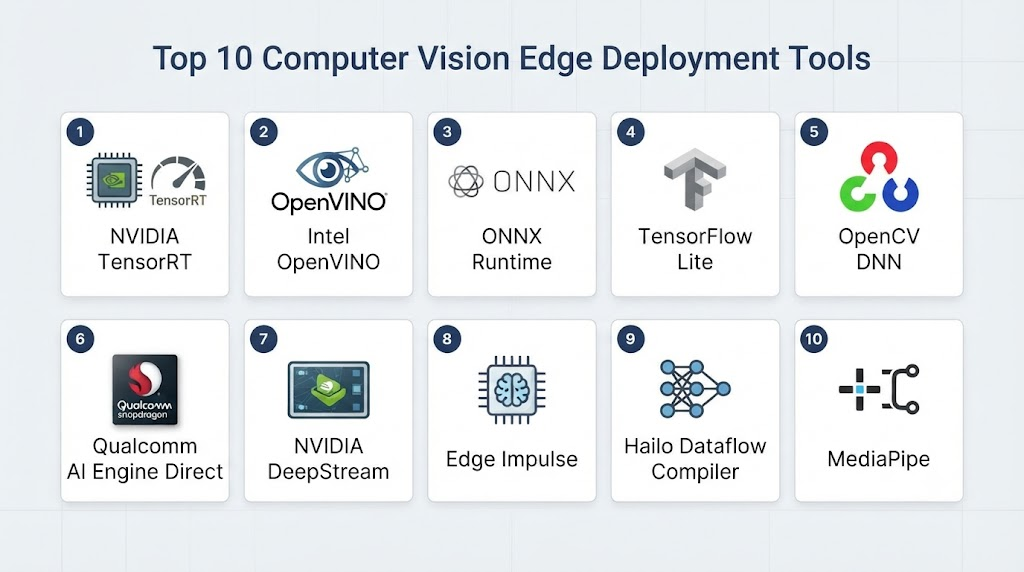
Top 10 Computer Vision Edge Deployment Tools
1. NVIDIA DeepStream
One-line verdict: Best for high-performance real-time computer vision and video analytics on NVIDIA-powered edge systems.
Short description:
NVIDIA DeepStream is a video analytics development framework designed for building high-performance AI applications around NVIDIA hardware. It is particularly useful for multi-camera systems, industrial vision, robotics, smart-city applications, and other workloads requiring efficient real-time video processing.
Standout Capabilities
- Real-time video analytics.
- Multi-camera processing.
- GPU-accelerated inference.
- Object detection.
- Object tracking.
- Video decoding and encoding.
- Stream batching.
- Pipeline-based architecture.
- Integration with NVIDIA AI technologies.
AI-Specific Depth
- Model support: Supports common model deployment workflows through NVIDIA inference technologies.
- RAG / knowledge integration: N/A for core video analytics.
- Evaluation: Application-dependent.
- Guardrails: Application and infrastructure security controls.
- Observability: Video pipeline and performance monitoring capabilities.
Pros
- Excellent performance for NVIDIA hardware.
- Strong video analytics capabilities.
- Suitable for multi-camera workloads.
Cons
- Strong NVIDIA hardware dependency.
- Requires engineering knowledge for complex pipelines.
- Can be excessive for simple image inference.
Security & Compliance
Security depends on the deployment architecture, operating system, container configuration, and application implementation. Specific certifications vary by surrounding NVIDIA products and deployment.
Deployment & Platforms
- Edge: Yes.
- Linux: Yes.
- Containers: Yes.
- Cloud: Can be integrated with cloud environments.
- Hybrid: Yes.
Integrations & Ecosystem
DeepStream integrates closely with NVIDIA’s broader AI ecosystem.
- NVIDIA TensorRT.
- NVIDIA Triton Inference Server.
- NVIDIA CUDA.
- GStreamer.
- Docker.
- MQTT and messaging systems.
- Cloud IoT platforms.
Pricing Model
The framework itself is available as part of NVIDIA’s software ecosystem. Hardware and associated infrastructure costs vary.
Best-Fit Scenarios
- Multi-camera video analytics.
- Industrial computer vision.
- Smart-city systems.
2. NVIDIA TensorRT
One-line verdict: Best for optimizing trained deep-learning models for fast, efficient inference on NVIDIA GPUs and edge accelerators.
Short description:
NVIDIA TensorRT is an inference optimization and runtime technology focused on accelerating deep-learning models. It is widely relevant to computer-vision deployment where latency, throughput, and hardware efficiency matter.
Standout Capabilities
- Model optimization.
- Graph optimization.
- Reduced-precision inference.
- GPU acceleration.
- Runtime optimization.
- Inference engines.
- Deep-learning deployment.
- Integration with NVIDIA hardware.
AI-Specific Depth
- Model support: Supports model-conversion workflows from commonly used frameworks.
- RAG / knowledge integration: N/A.
- Evaluation: Benchmarking and application-level evaluation.
- Guardrails: N/A as a primary function.
- Observability: Performance profiling and benchmarking capabilities.
Pros
- Strong inference performance.
- Excellent NVIDIA hardware integration.
- Useful for production optimization.
Cons
- NVIDIA hardware dependency.
- Optimization may require model-specific engineering.
- Less useful for hardware-agnostic deployments.
Security & Compliance
Security depends on the deployment environment and NVIDIA software stack.
Deployment & Platforms
- Edge: Yes.
- Cloud: Yes.
- Linux: Yes.
- Windows: Supported in applicable environments.
- Embedded NVIDIA platforms: Yes.
Integrations & Ecosystem
- CUDA.
- DeepStream.
- Triton.
- PyTorch workflows.
- ONNX.
- NVIDIA Jetson.
- NVIDIA GPUs.
Pricing Model
Software availability varies by NVIDIA product and environment; hardware costs are separate.
Best-Fit Scenarios
- Low-latency vision inference.
- NVIDIA Jetson deployments.
- GPU-based production systems.
3. OpenVINO
One-line verdict: Best for deploying optimized computer-vision models across Intel CPUs, GPUs, and AI accelerators.
Short description:
OpenVINO is an open-source toolkit designed to optimize and deploy AI inference workloads across Intel hardware. It is particularly useful for developers who want to deploy computer-vision models on edge devices without relying exclusively on discrete GPUs.
Standout Capabilities
- Model optimization.
- Edge inference.
- CPU acceleration.
- GPU acceleration.
- NPU support in applicable hardware.
- Quantization workflows.
- Computer-vision deployment.
- Cross-hardware inference.
AI-Specific Depth
- Model support: Supports several popular model formats and conversion workflows.
- RAG / knowledge integration: N/A for core vision deployment.
- Evaluation: Benchmarking and model validation workflows.
- Guardrails: N/A as a primary capability.
- Observability: Performance benchmarking and profiling capabilities.
Pros
- Strong Intel hardware support.
- Open-source ecosystem.
- Useful for CPU-centric edge deployments.
Cons
- Primarily optimized around Intel hardware.
- Performance varies by model and device.
- Advanced optimization requires technical expertise.
Security & Compliance
Security depends on the operating system, device configuration, and application architecture.
Deployment & Platforms
- Edge: Yes.
- Linux: Yes.
- Windows: Yes.
- Cloud: Yes.
- Hybrid: Yes.
Integrations & Ecosystem
- ONNX.
- PyTorch.
- TensorFlow.
- Intel hardware.
- OpenCV.
- Python.
- C++.
Pricing Model
Open-source software; hardware and infrastructure costs vary.
Best-Fit Scenarios
- Intel-based edge devices.
- Industrial vision.
- CPU-efficient AI inference.
4. ONNX Runtime
One-line verdict: Best for portable AI inference when developers need a flexible runtime across CPUs, GPUs, and specialized accelerators.
Short description:
ONNX Runtime is an open-source inference runtime designed to execute machine-learning models across different hardware environments. Its portability makes it valuable for computer-vision developers who need to move models between development and production environments.
Standout Capabilities
- Cross-platform inference.
- ONNX model execution.
- Hardware acceleration.
- Quantization support.
- Multiple execution providers.
- Python and C++ APIs.
- Embedded deployment.
- Model portability.
AI-Specific Depth
- Model support: ONNX and models converted into ONNX-compatible workflows.
- RAG / knowledge integration: N/A.
- Evaluation: Application-dependent benchmarking and testing.
- Guardrails: N/A.
- Observability: Application and runtime profiling.
Pros
- Strong portability.
- Open-source.
- Broad hardware ecosystem.
Cons
- Optimization depends on execution provider.
- Complex workloads may require additional engineering.
- Not a complete device-management platform.
Security & Compliance
Security depends primarily on the deployment environment and application architecture.
Deployment & Platforms
- Edge: Yes.
- Cloud: Yes.
- Linux: Yes.
- Windows: Yes.
- Mobile: Supported through applicable runtime options.
Integrations & Ecosystem
- ONNX.
- PyTorch.
- TensorFlow.
- NVIDIA hardware.
- Intel hardware.
- ARM environments.
- Custom accelerators.
Pricing Model
Open-source.
Best-Fit Scenarios
- Cross-hardware computer vision.
- Portable inference applications.
- Custom edge AI systems.
5. Google Coral Edge TPU
One-line verdict: Best for compact, power-efficient vision inference on compatible edge devices using Google’s Edge TPU ecosystem.
Short description:
Google Coral is an edge AI hardware and software ecosystem designed for efficient local inference. It is especially relevant for applications that need compact, low-power computer-vision processing.
Standout Capabilities
- Edge inference.
- Low-power AI.
- Tensor processing.
- Embedded vision.
- Local inference.
- Camera applications.
- Compact hardware.
- Real-time classification and detection.
AI-Specific Depth
- Model support: Optimized for compatible TensorFlow Lite workflows.
- RAG / knowledge integration: N/A.
- Evaluation: Application-dependent.
- Guardrails: N/A.
- Observability: Application-level monitoring.
Pros
- Compact edge AI hardware.
- Low-power inference.
- Suitable for embedded vision.
Cons
- Hardware-specific constraints.
- Model compatibility limitations.
- Less flexible than general-purpose GPU platforms.
Security & Compliance
Security depends on device architecture and application implementation.
Deployment & Platforms
- Edge: Yes.
- Embedded: Yes.
- Linux: Supported on applicable devices.
- Cloud: Not required for inference.
Integrations & Ecosystem
- TensorFlow Lite.
- Embedded Linux.
- USB and PCIe accelerator options.
- Python.
- C++.
- Camera systems.
Pricing Model
Hardware and ecosystem costs vary.
Best-Fit Scenarios
- Smart cameras.
- Embedded vision.
- Low-power AI applications.
6. Qualcomm AI Stack
One-line verdict: Best for deploying optimized computer-vision workloads across Qualcomm-powered mobile, automotive, robotics, and edge devices.
Short description:
Qualcomm provides a broad AI software and hardware ecosystem designed to accelerate machine-learning workloads on its processors and AI engines. It is useful for edge vision applications where power efficiency and heterogeneous compute are important.
Standout Capabilities
- On-device AI.
- Neural processing acceleration.
- Computer vision.
- Power-efficient inference.
- Mobile AI.
- Robotics.
- Automotive AI.
- Hardware acceleration.
AI-Specific Depth
- Model support: Supports relevant Qualcomm AI deployment workflows and model conversion technologies.
- RAG / knowledge integration: Application-dependent.
- Evaluation: Performance benchmarking and application testing.
- Guardrails: Application-level.
- Observability: Hardware and application profiling depends on the tooling used.
Pros
- Strong power efficiency.
- Broad embedded ecosystem.
- Suitable for mobile and edge devices.
Cons
- Qualcomm hardware dependency.
- Toolchain can be specialized.
- Capabilities vary significantly across chip families.
Security & Compliance
Security capabilities depend on the Qualcomm platform and device implementation.
Deployment & Platforms
- Edge: Yes.
- Mobile: Yes.
- Automotive: Yes.
- Embedded: Yes.
- Linux/Android: Applicable platform support varies.
Integrations & Ecosystem
- Qualcomm AI Engine.
- Android.
- Linux.
- Camera frameworks.
- Robotics platforms.
- Automotive systems.
- AI model frameworks.
Pricing Model
Commercial hardware and software ecosystem; exact pricing varies by platform and deployment.
Best-Fit Scenarios
- Embedded computer vision.
- Robotics.
- Automotive vision systems.
7. Hailo AI Software Suite
One-line verdict: Best for efficient edge computer vision using dedicated Hailo AI accelerators in cameras, robotics, and embedded systems.
Short description:
Hailo provides AI acceleration technologies designed specifically for edge inference. Its software ecosystem helps developers deploy optimized neural networks on Hailo hardware for computer-vision and related AI applications.
Standout Capabilities
- Dedicated AI acceleration.
- Edge vision.
- Model compilation.
- Quantization.
- Real-time inference.
- Multi-model workloads.
- Embedded deployment.
- Power-efficient processing.
AI-Specific Depth
- Model support: Supports compatible model formats through Hailo’s conversion and compilation workflow.
- RAG / knowledge integration: N/A.
- Evaluation: Model benchmarking and deployment validation.
- Guardrails: N/A as a primary feature.
- Observability: Performance monitoring depends on the Hailo tooling and host application.
Pros
- Designed specifically for edge AI.
- Strong performance-per-watt potential.
- Suitable for multi-camera systems.
Cons
- Requires Hailo hardware.
- Specialized development workflow.
- Hardware availability influences deployment options.
Security & Compliance
Security depends on the complete edge-device architecture.
Deployment & Platforms
- Edge: Yes.
- Embedded: Yes.
- Linux: Supported on applicable platforms.
- Cloud: Not required for local inference.
Integrations & Ecosystem
- Hailo accelerators.
- Linux.
- GStreamer.
- ONNX workflows.
- Raspberry Pi ecosystem.
- Embedded camera platforms.
- Computer-vision frameworks.
Pricing Model
Commercial hardware and software ecosystem; exact pricing varies.
Best-Fit Scenarios
- Smart cameras.
- Robotics.
- Industrial vision.
8. Edge Impulse
One-line verdict: Best for teams wanting an end-to-end workflow for developing, optimizing, and deploying AI models on edge devices.
Short description:
Edge Impulse provides tools for building machine-learning applications for edge devices. It supports data collection, model development, optimization, and deployment across embedded hardware, making it useful for computer vision and other sensor-based AI workloads.
Standout Capabilities
- Edge model development.
- Dataset management.
- Computer vision.
- Model optimization.
- Embedded deployment.
- Device testing.
- Impulse design.
- Hardware integration.
AI-Specific Depth
- Model support: Supports multiple machine-learning workflows and embedded deployment targets.
- RAG / knowledge integration: N/A for standard edge vision workflows.
- Evaluation: Dataset evaluation and model testing capabilities.
- Guardrails: N/A as a primary capability.
- Observability: Device and model performance depends on deployment configuration.
Pros
- Accessible edge-AI workflow.
- Good for prototyping.
- Broad embedded ecosystem.
Cons
- Advanced enterprise architectures may require additional infrastructure.
- Hardware-specific limitations remain.
- Large deployments need careful device management planning.
Security & Compliance
Security depends on the deployment environment and service configuration.
Deployment & Platforms
- Edge: Yes.
- Embedded: Yes.
- Cloud: Development and management capabilities.
- Hybrid: Yes.
Integrations & Ecosystem
- Microcontrollers.
- Linux devices.
- Embedded hardware.
- Camera systems.
- Python.
- C++.
- Edge AI accelerators.
Pricing Model
Commercial plans and usage structures vary by offering.
Best-Fit Scenarios
- Embedded vision prototypes.
- IoT computer vision.
- Rapid edge-AI development.
9. Roboflow
One-line verdict: Best for teams building, training, optimizing, and deploying custom computer-vision models across edge inference environments.
Short description:
Roboflow provides a computer-vision development platform covering dataset management, annotation, model development, evaluation, and deployment. It can be useful for organizations that need a complete workflow from visual data preparation to edge inference.
Standout Capabilities
- Dataset management.
- Image annotation.
- Model training.
- Computer-vision APIs.
- Object detection.
- Segmentation.
- Model evaluation.
- Deployment workflows.
AI-Specific Depth
- Model support: Supports multiple computer-vision model workflows and deployment options.
- RAG / knowledge integration: N/A for traditional vision workflows.
- Evaluation: Dataset and model evaluation capabilities.
- Guardrails: Application-dependent.
- Observability: Deployment monitoring depends on the selected deployment architecture.
Pros
- Strong computer-vision workflow.
- Useful dataset tooling.
- Good for rapid development and deployment.
Cons
- Advanced edge deployments may require additional infrastructure.
- Cloud tooling can introduce platform dependency.
- Costs depend on usage and deployment requirements.
Security & Compliance
Security capabilities depend on the specific product and deployment configuration. Specific certifications should be verified for the applicable offering.
Deployment & Platforms
- Cloud: Yes.
- Edge: Supported through deployment options.
- Self-hosted: Available for applicable products/configurations.
- Hybrid: Possible.
Integrations & Ecosystem
- Python.
- REST APIs.
- Computer-vision frameworks.
- Edge devices.
- Cloud platforms.
- Model formats.
- Camera systems.
Pricing Model
Tiered and usage-based models may apply; exact pricing varies.
Best-Fit Scenarios
- Custom vision applications.
- Manufacturing inspection.
- Object detection projects.
10. OpenCV
One-line verdict: Best for developers building highly customized computer-vision pipelines that need direct control over image processing and deployment.
Short description:
OpenCV is an open-source computer-vision library used across embedded systems, robotics, industrial automation, mobile applications, and AI pipelines. It provides the foundational image-processing capabilities needed to build custom edge-vision systems.
Standout Capabilities
- Image processing.
- Video processing.
- Camera integration.
- Feature detection.
- Object tracking.
- Computer-vision algorithms.
- Hardware acceleration options.
- Python and C++ development.
AI-Specific Depth
- Model support: Can integrate with deep-learning inference frameworks and model runtimes.
- RAG / knowledge integration: N/A.
- Evaluation: Application-dependent.
- Guardrails: N/A.
- Observability: Requires application-level instrumentation.
Pros
- Highly flexible.
- Open-source.
- Huge developer ecosystem.
Cons
- Requires substantial development work for complete AI products.
- Device management is not a core function.
- Production optimization is the developer’s responsibility.
Security & Compliance
Security depends on the application and deployment environment.
Deployment & Platforms
- Edge: Yes.
- Linux: Yes.
- Windows: Yes.
- macOS: Yes.
- Android: Yes.
- Embedded: Yes.
Integrations & Ecosystem
- Python.
- C++.
- ONNX Runtime.
- TensorRT.
- OpenVINO.
- GStreamer.
- Embedded hardware.
Pricing Model
Open-source.
Best-Fit Scenarios
- Custom computer vision.
- Robotics.
- Embedded image processing.
Comparison Table
| Tool | Best For | Deployment | Model Flexibility | Strength | Watch-Out | Public Rating |
|---|---|---|---|---|---|---|
| NVIDIA DeepStream | Real-time video analytics | Edge / Hybrid | NVIDIA ecosystem | Multi-stream performance | NVIDIA dependency | N/A |
| NVIDIA TensorRT | NVIDIA inference optimization | Edge / Cloud | NVIDIA-focused | High-performance inference | Hardware dependency | N/A |
| OpenVINO | Intel edge inference | Edge / Cloud | Multi-format | CPU/NPU optimization | Intel focus | N/A |
| ONNX Runtime | Portable inference | Edge / Cloud / Hybrid | Multi-model | Hardware flexibility | Optimization varies | N/A |
| Google Coral | Low-power embedded vision | Edge | TensorFlow Lite-oriented | Power efficiency | Hardware constraints | N/A |
| Qualcomm AI Stack | Mobile and embedded AI | Edge / Embedded | Qualcomm ecosystem | Power-efficient AI | Qualcomm dependency | N/A |
| Hailo AI Software Suite | Dedicated edge acceleration | Edge | Hailo ecosystem | Performance per watt | Accelerator dependency | N/A |
| Edge Impulse | Embedded AI development | Edge / Cloud | Multi-model | End-to-end workflow | Deployment scale needs planning | N/A |
| Roboflow | Vision development and deployment | Cloud / Edge | Multi-model | Dataset-to-deployment workflow | Platform dependency | N/A |
| OpenCV | Custom vision pipelines | Edge / Embedded | Highly flexible | Developer control | Requires engineering | N/A |
Scoring & Evaluation
The following scores are comparative estimates for typical computer-vision edge deployment requirements rather than official vendor scores. A real evaluation should benchmark the exact model, camera resolution, frame rate, hardware, power budget, and operating environment.
| Tool | Core | Reliability/Eval | Guardrails | Integrations | Ease | Perf/Cost | Security/Admin | Support | Weighted Total |
|---|---|---|---|---|---|---|---|---|---|
| NVIDIA DeepStream | 9.5 | 9 | 8 | 9.5 | 7.5 | 9.5 | 8.5 | 9.5 | 8.9 |
| NVIDIA TensorRT | 9.5 | 9 | 7.5 | 9 | 7 | 10 | 8.5 | 9.5 | 8.8 |
| OpenVINO | 9 | 8.5 | 7.5 | 9 | 8 | 9 | 8.5 | 9 | 8.6 |
| ONNX Runtime | 9 | 8.5 | 7.5 | 9.5 | 8 | 9 | 8 | 9 | 8.6 |
| Google Coral | 8 | 8 | 7 | 7.5 | 8.5 | 9.5 | 8 | 8.5 | 8.1 |
| Qualcomm AI Stack | 8.5 | 8.5 | 7.5 | 8.5 | 7 | 9.5 | 8.5 | 9 | 8.3 |
| Hailo AI Software Suite | 8.5 | 8.5 | 7.5 | 8 | 7.5 | 9.5 | 8 | 8.5 | 8.3 |
| Edge Impulse | 8.5 | 8.5 | 7.5 | 8.5 | 9 | 8.5 | 8 | 8.5 | 8.4 |
| Roboflow | 9 | 9 | 7.5 | 9 | 9 | 8 | 8 | 9 | 8.7 |
| OpenCV | 9.5 | 8 | 7 | 10 | 7.5 | 9 | 7.5 | 10 | 8.7 |
Top 3 for Enterprise
- NVIDIA DeepStream
- OpenVINO
- Roboflow
Top 3 for SMB
- Edge Impulse
- Roboflow
- OpenVINO
Top 3 for Developers
- ONNX Runtime
- OpenCV
- NVIDIA TensorRT
Which Computer Vision Edge Deployment Tool Is Right for You?
Solo / Freelancer
Developers working independently should prioritize portability, documentation, community support, and low infrastructure overhead.
Good starting points include:
- OpenCV for custom pipelines.
- ONNX Runtime for portable inference.
- OpenVINO for Intel hardware.
- Edge Impulse for embedded prototypes.
Avoid building a complicated multi-service architecture before proving the actual inference workload.
SMB
SMBs should focus on deployment simplicity.
A practical stack might combine:
- OpenCV for camera processing.
- ONNX Runtime or OpenVINO for inference.
- A lightweight message broker for telemetry.
- Containerization for deployment.
- Centralized monitoring for production devices.
For teams without extensive computer-vision expertise, a more complete development platform can reduce implementation time.
Mid-Market
Mid-market organizations should evaluate both model performance and operational management.
Important questions include:
- How many devices will be deployed?
- How many cameras per device?
- What resolution and frame rate are required?
- Can inference run offline?
- How will models be updated?
- How will failed devices be recovered?
- How will inference quality be monitored?
NVIDIA DeepStream, OpenVINO, ONNX Runtime, Roboflow, and Edge Impulse can fit different parts of this architecture.
Enterprise
Enterprise deployments should evaluate the entire lifecycle:
- Dataset management.
- Model training.
- Model conversion.
- Optimization.
- Hardware acceleration.
- Deployment.
- Monitoring.
- Security.
- Remote updates.
- Rollbacks.
- Governance.
For large-scale video analytics, NVIDIA DeepStream is particularly relevant where NVIDIA hardware is already standardized. For heterogeneous hardware, ONNX Runtime can offer greater portability.
Regulated Industries
Organizations processing sensitive video should consider local inference wherever practical.
Evaluate:
- Data residency.
- Video retention.
- Encryption.
- Device authentication.
- Access control.
- Model protection.
- Camera access.
- Audit logs.
- Remote-management security.
- Human review for sensitive decisions.
Avoid assuming that edge processing alone guarantees privacy. A compromised edge device can still expose cameras, stored frames, credentials, and model artifacts.
Budget vs Premium
Open-source tools can reduce software licensing costs but increase engineering responsibilities.
Premium platforms may provide:
- Better development workflows.
- Enterprise support.
- Device management.
- Deployment automation.
- Monitoring.
- Easier model optimization.
Calculate total cost using:
- Hardware.
- Accelerators.
- Engineering.
- Model training.
- Storage.
- Bandwidth.
- Device management.
- Software licensing.
- Maintenance.
- Remote support.
Build vs Buy
Build a custom stack when:
- You require unusual camera pipelines.
- Hardware is highly specialized.
- Your inference algorithms are proprietary.
- You need complete control over deployment.
- Your engineering team can maintain the infrastructure.
Buy or adopt a managed platform when:
- Speed matters.
- You need dataset management.
- You have many devices.
- Remote deployment is important.
- Your team wants a standardized workflow.
A hybrid architecture is often the strongest approach: use established runtimes for inference while maintaining proprietary application logic.
Implementation Playbook
First 30 Days: Pilot + Success Metrics
Choose one representative camera and one target device.
Measure:
- Inference latency.
- Frames per second.
- Detection accuracy.
- Memory usage.
- CPU utilization.
- GPU/NPU utilization.
- Power consumption.
- Temperature.
- Dropped frames.
Benchmark both the baseline model and optimized versions.
Do not optimize only for model accuracy. A slightly less accurate model that runs reliably at the required frame rate may be more valuable in production.
Days 31–60: Security + Evaluation + Rollout
Create an evaluation dataset containing:
- Normal scenes.
- Difficult lighting.
- Occlusion.
- Motion blur.
- Camera angle changes.
- Different object sizes.
- Rare events.
- Empty scenes.
- False-positive examples.
Introduce:
- Model version control.
- Dataset version control.
- Automated regression testing.
- Secure device authentication.
- Protected model artifacts.
- Remote deployment procedures.
- Rollback mechanisms.
Test adversarial and unusual visual conditions before production.
Days 61–90: Optimization + Governance + Scale
At this stage:
- Quantize models where appropriate.
- Optimize preprocessing.
- Reduce unnecessary frame processing.
- Batch workloads where latency permits.
- Use hardware acceleration.
- Optimize video decoding.
- Monitor inference latency.
- Track model accuracy.
- Monitor device health.
- Establish update policies.
- Automate deployment.
For large fleets, introduce staged model rollouts rather than updating every device simultaneously.
Common Mistakes & How to Avoid Them
- Optimizing the model but ignoring the video pipeline: Decoding and preprocessing can become major bottlenecks.
- Ignoring hardware-specific benchmarking: A model’s performance varies substantially between edge devices.
- Testing only ideal images: Real-world lighting, blur, occlusion, and camera changes can reduce accuracy.
- Using oversized models: Larger models can exceed edge memory and latency budgets.
- Ignoring quantization: Reduced-precision inference can significantly improve deployment efficiency when accuracy remains acceptable.
- No evaluation dataset: Production decisions require representative validation data.
- No model version control: Always know which model is deployed on each device.
- No rollback strategy: Failed model updates need a fast recovery path.
- Sending every frame to the cloud: Local processing can reduce bandwidth and privacy exposure.
- Ignoring device temperature: Sustained AI workloads can cause thermal throttling.
- Ignoring power consumption: Battery-powered devices need efficiency as a primary design constraint.
- No observability: Monitor latency, dropped frames, resource utilization, and model outputs.
- Overlooking camera changes: Camera replacements or firmware updates can alter model behavior.
- Ignoring security: Protect device credentials, model files, APIs, and remote-management interfaces.
FAQs
What is computer vision edge deployment?
It means running computer-vision models close to the camera or data source instead of sending every image or video frame to a remote cloud system.
Why deploy computer vision at the edge?
Edge inference can reduce latency, bandwidth consumption, cloud-processing costs, and exposure of sensitive visual data.
Which hardware can run computer vision models?
Depending on the model and workload, computer vision can run on CPUs, GPUs, NPUs, TPUs, FPGAs, and dedicated AI accelerators.
Does edge deployment require a GPU?
No. Many models can run efficiently on CPUs or specialized accelerators. The best hardware depends on the model, frame rate, resolution, latency, and power requirements.
What is model quantization?
Quantization reduces the numerical precision used by a model, potentially reducing memory consumption and improving inference performance with an acceptable accuracy trade-off.
Can edge devices run multiple vision models?
Yes. Capable hardware can run multiple models, although memory, compute capacity, thermal limits, and latency requirements must be considered.
What is the difference between TensorRT and ONNX Runtime?
TensorRT is strongly optimized for NVIDIA hardware, while ONNX Runtime is designed for broader portability through different execution providers.
Is OpenCV an AI deployment platform?
OpenCV is primarily a computer-vision library rather than a complete AI deployment-management platform. It provides foundational tools that can be combined with inference runtimes.
Can computer vision run completely offline?
Yes. Many edge systems can perform inference without continuous cloud connectivity. Remote management, model updates, or centralized analytics may still require network connectivity.
How should edge AI models be evaluated?
Use representative datasets and measure accuracy, latency, throughput, memory consumption, power consumption, false positives, and false negatives.
What is edge AI observability?
It involves monitoring both device health and AI behavior, including inference latency, frame rate, resource utilization, model versions, errors, and prediction quality.
How can edge computer vision reduce costs?
Processing video locally can reduce the amount of data transmitted and processed centrally. However, device hardware, maintenance, and deployment costs must also be considered.
Is self-hosting better than cloud deployment?
Not always. Self-hosting provides greater infrastructure control, while cloud-managed systems can simplify development and centralized management. The right choice depends on the workload.
How do I protect AI models deployed on edge devices?
Use secure device identity, encrypted communication, controlled access, protected model storage, signed updates where supported, and a secure remote-management architecture.
Can edge vision systems receive remote model updates?
Yes. Production systems can be designed to distribute new models remotely, but staged rollouts, version control, health checks, and rollback mechanisms are important.
What is the biggest challenge in edge computer vision?
The biggest challenge is balancing accuracy, latency, memory, power consumption, hardware cost, and operational reliability simultaneously.
Conclusion
Computer Vision Edge Deployment Tooling is becoming a critical part of modern AI infrastructure as organizations move visual intelligence closer to cameras, robots, vehicles, factories, and embedded devices.There is no universal winner. NVIDIA DeepStream and TensorRT are strong choices for NVIDIA-centric high-performance video systems. OpenVINO is particularly useful for Intel-based deployments, while ONNX Runtime provides an attractive portability layer. OpenCV remains valuable when developers need maximum control over custom vision pipelines. Platforms such as Edge Impulse and Roboflow can simplify development and deployment workflows.The most important consideration is not simply which tool has the fastest benchmark. The right solution must meet the complete production requirement: model accuracy, latency, hardware compatibility, power consumption, privacy, security, deployment automation, monitoring, and long-term maintainability.