Introduction
AI Contact Center QA Tools are intelligent platforms that automate the evaluation of customer interactions across voice calls, chat, email, and messaging channels. These tools leverage artificial intelligence, natural language processing, speech analytics, sentiment detection, and compliance monitoring to help QA teams analyze interactions at scale. By automatically scoring agent performance, identifying compliance gaps, detecting customer sentiment, and generating actionable coaching insights, AI QA tools provide a more complete and data-driven view of contact center quality than traditional manual review processes.
Why It Matters
- Improves QA coverage
AI QA tools help teams move beyond reviewing a small sample of calls or chats. This gives managers a broader and more reliable view of customer experience, agent performance, and compliance risk. - Reduces manual review workload
Manual QA is slow, repetitive, and difficult to scale. AI can pre-score conversations, highlight risky moments, and allow QA analysts to focus on judgment, calibration, and coaching. - Improves agent coaching
Instead of giving agents generic feedback, supervisors can coach based on real examples, missed steps, tone issues, compliance gaps, or customer frustration signals found in actual conversations. - Strengthens compliance monitoring
Industries such as banking, insurance, healthcare, telecom, and public services need consistent monitoring of disclosures, verification steps, consent language, and sensitive data handling. - Creates better customer experience visibility
AI QA tools show patterns that are hard to find manually, such as repeated product confusion, broken support processes, escalation delays, and common customer objections.
Real-world use cases:
- Reviewing customer calls automatically for quality and compliance
- Scoring agent conversations using AI-assisted scorecards
- Detecting sentiment, escalation risk, and customer frustration
- Coaching agents based on real interaction patterns
- Monitoring AI chatbot and voice agent performance
- Finding process gaps across support, sales, and service teams
Evaluation criteria for buyers:
- Conversation coverage: The tool should evaluate more than a small manual sample of interactions.
- Scoring flexibility: Teams should be able to customize QA scorecards, rubrics, and evaluation rules.
- AI accuracy: The platform should detect intent, sentiment, compliance moments, and agent behaviors reliably.
- Human review workflow: QA managers should be able to approve, edit, calibrate, and dispute AI scores.
- Speech and text analytics: Strong tools analyze both voice and digital conversations.
- Coaching workflows: The system should turn QA findings into coaching actions.
- Integrations: CRM, CCaaS, helpdesk, telephony, workforce management, and BI connections matter.
- Privacy and governance: Sensitive customer data requires retention controls, auditability, access control, and encryption.
- Observability: Leaders need dashboards for trends, score movement, risk, cost, latency, and QA coverage.
- Ease of use: QA teams should not need engineering support for every scorecard or workflow update.
- Scalability: The platform should support large interaction volumes across teams, queues, and locations.
- Cost fit: Pricing should match call volume, seats, channels, and enterprise governance needs.
Best for: Contact center leaders, QA managers, customer experience teams, BPOs, support operations teams, compliance teams, sales quality teams, and enterprise service organizations that manage high-volume customer interactions.
Not ideal for: Very small teams with low interaction volume, companies that only need basic call recording, or support teams that do not yet have defined QA scorecards, coaching workflows, or measurable quality goals.
What’s Changed in AI Contact Center QA Tools
- Automated QA coverage is becoming the default: Teams increasingly expect AI to evaluate a much larger share of conversations instead of relying only on manual sampling.
- AI and human QA are blending: The best systems support AI scoring, human calibration, dispute workflows, and final supervisor review.
- Voice, chat, email, and messaging QA are converging: Buyers want one QA layer across omnichannel support rather than separate tools for each channel.
- AI agent evaluation is now important: QA programs must review conversations handled by AI agents, copilots, and human agents together.
- Compliance detection is more advanced: Tools are improving at identifying required statements, missed disclosures, verification issues, and risky language.
- Sentiment and emotion analysis are more practical: Teams use sentiment trends to detect frustration, churn risk, escalation risk, and coaching opportunities.
Quick Buyer Checklist
- Check whether the tool can evaluate voice, chat, email, and messaging interactions.
- Confirm whether it supports automated QA scoring and human QA calibration.
- Review data privacy, retention, encryption, and access control options.
- Ask whether the platform supports hosted AI, BYO models, or configurable AI workflows.
- Confirm CRM, CCaaS, helpdesk, telephony, and knowledge base integrations.
- Evaluate scorecard customization, rubric design, weightings, and QA rules.
- Look for AI evaluation features such as confidence scores, review queues, and error tracking.
- Check for guardrails around sensitive data, compliance language, and unsafe AI recommendations.
- Review observability dashboards for score trends, coaching impact, compliance risk, and QA coverage.
- Understand latency and cost controls for high-volume interaction analysis.
- Confirm audit logs, RBAC, SSO, and admin controls for enterprise governance.
- Assess vendor lock-in risk by checking export options, APIs, and workflow portability.
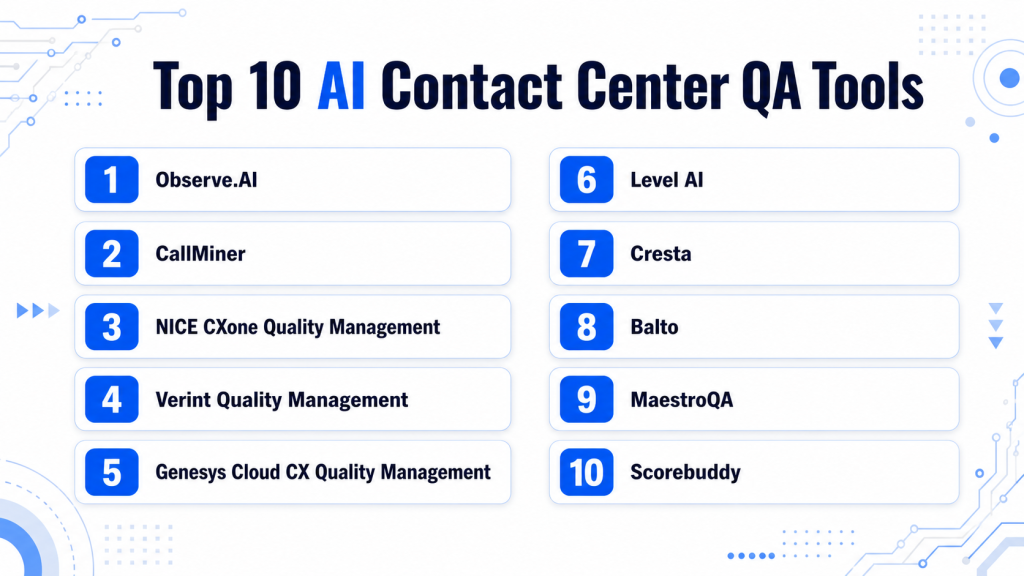
Top 10 AI Contact Center QA Tools
1 — Observe.AI
One-line verdict: Best for contact centers needing AI-powered QA, coaching, and conversation intelligence at scale.
Short description:
Observe.AI helps contact centers analyze customer interactions, automate QA evaluations, and surface coaching insights. It is designed for support, sales, and CX teams that want broader conversation coverage and stronger performance visibility. The platform is especially useful for teams moving from manual sampling to AI-assisted quality management.
Standout Capabilities
- Automated QA scoring for customer interactions
- Conversation intelligence for calls and digital support
- Agent coaching insights based on real interactions
- Quality monitoring for human and AI conversations
- Performance dashboards for supervisors and QA teams
- Support for compliance and behavior detection workflows
- Voice of customer insights from conversation trends
AI-Specific Depth
- Model support: Proprietary AI, BYO model support not publicly stated
- RAG / knowledge integration: Knowledge and workflow integration varies by deployment
- Evaluation: AI scoring, human review, calibration workflows
- Guardrails: Policy checks and compliance monitoring, prompt-injection defense not publicly stated
- Observability: Conversation logs, QA score trends, performance dashboards
Pros
- Strong fit for automated QA at scale
- Useful coaching and performance visibility
- Good for teams needing broader interaction coverage
Cons
- May require setup effort for scorecards and workflows
- Advanced value depends on clean support processes
- Exact pricing is not publicly stated
Security & Compliance
SSO, RBAC, audit logs, encryption, data retention controls, and residency details vary by plan and deployment. Certifications are Not publicly stated.
Deployment & Platforms
- Web-based platform
- Cloud deployment
- Desktop and mobile access varies by workflow
Integrations & Ecosystem
Observe.AI commonly fits into contact center, CRM, and support workflows where teams need automated QA and performance intelligence.
- CRM and CCaaS integrations
- Call recording and telephony system connections
- Helpdesk and support workflow integrations
- Analytics and reporting exports
- API availability varies by plan
- Coaching and QA workflow support
Pricing Model
Typically subscription-based or enterprise contract-based. Exact pricing is Not publicly stated.
Best-Fit Scenarios
- Scaling QA beyond manual sampling
- Coaching agents using conversation intelligence
- Monitoring support quality and compliance trends
2 — CallMiner
One-line verdict: Best for enterprises needing deep speech analytics, sentiment insights, and quality intelligence.
Short description:
CallMiner focuses on conversation analytics and quality intelligence for contact centers. It helps teams analyze voice and text interactions to detect patterns, agent behaviors, sentiment, and compliance risk. It is well-suited for enterprises that need deeper analytics across large volumes of customer conversations.
Standout Capabilities
- Speech analytics for customer conversations
- Sentiment and emotion trend analysis
- Agent performance and behavior insights
- Compliance monitoring workflows
- Interaction categorization and discovery
- Trend dashboards for CX and operations teams
- Support for quality and coaching programs
AI-Specific Depth
- Model support: Proprietary AI
- RAG / knowledge integration: Varies / N/A
- Evaluation: AI-assisted analytics with human review workflows
- Guardrails: Compliance rules and policy detection, prompt-injection defense not publicly stated
- Observability: Analytics dashboards, interaction trends, score and category reporting
Pros
- Strong conversation analytics depth
- Useful for compliance and sentiment monitoring
- Good fit for large interaction volumes
Cons
- May require analytical maturity to use fully
- Setup and taxonomy design can take effort
- Pricing details are not publicly stated
Security & Compliance
Enterprise security controls vary by contract and deployment. Certifications are Not publicly stated.
Deployment & Platforms
- Web-based platform
- Cloud deployment
- Hybrid options vary by enterprise agreement
Integrations & Ecosystem
CallMiner is commonly used alongside contact center systems, BI tools, and QA workflows.
- Contact center platform integrations
- Call recording system connections
- CRM and operational data integrations
- Analytics exports
- API support varies
- Quality and coaching workflow alignment
Pricing Model
Enterprise subscription or contract-based model. Exact pricing is Not publicly stated.
Best-Fit Scenarios
- Speech analytics at enterprise scale
- Sentiment and compliance monitoring
- Identifying customer experience trends
3 — NICE CXone Quality Management
One-line verdict: Best for enterprises needing QA inside a broader cloud contact center suite.
Short description:
NICE CXone Quality Management supports contact center quality programs within the larger NICE CXone ecosystem. It helps supervisors evaluate interactions, manage scorecards, coach agents, and connect QA with workforce and CX operations. It is especially relevant for enterprises already using or considering a unified CCaaS platform.
Standout Capabilities
- Quality management within a broader CX platform
- Interaction evaluation and scorecard workflows
- Speech and text analytics capabilities
- Coaching and performance improvement support
- Workforce and contact center ecosystem alignment
- Reporting for quality and operational leaders
- Enterprise-grade contact center scalability
AI-Specific Depth
- Model support: Proprietary AI
- RAG / knowledge integration: Varies by CXone configuration
- Evaluation: QA scorecards, analytics, human review
- Guardrails: Policy and compliance workflows, prompt-injection defense not publicly stated
- Observability: Quality dashboards, interaction analytics, performance reporting
Pros
- Strong fit for enterprise contact centers
- Works well in broader NICE environments
- Good QA and workforce ecosystem alignment
Cons
- Best value often comes inside the broader suite
- Implementation can be complex
- Exact pricing is not publicly stated
Security & Compliance
Enterprise security controls such as access management, auditability, and encryption vary by product and contract. Certifications are Not publicly stated.
Deployment & Platforms
- Web-based platform
- Cloud deployment
- Mobile access varies by role and configuration
Integrations & Ecosystem
NICE CXone QM works best when connected to broader contact center operations.
- NICE CXone ecosystem
- CRM integrations
- Workforce engagement tools
- Contact center analytics
- Telephony and routing systems
- Reporting and BI workflows
Pricing Model
Subscription or enterprise contract-based. Exact pricing is Not publicly stated.
Best-Fit Scenarios
- Enterprise QA inside a CCaaS suite
- Contact centers needing workforce and QA alignment
- Large support teams standardizing quality programs
4 — Verint Quality Management
One-line verdict: Best for large organizations connecting QA, speech analytics, and workforce engagement.
Short description:
Verint Quality Management helps organizations evaluate interactions, manage QA workflows, and improve agent performance. It is often used in complex contact center environments where speech analytics, workforce optimization, and customer experience insights need to work together. It fits teams that want QA tied to broader operational intelligence.
Standout Capabilities
- Quality management and evaluation workflows
- Speech analytics and conversation intelligence
- Coaching and performance improvement tools
- Workforce engagement ecosystem support
- Compliance and risk monitoring capabilities
- Dashboards for QA and operations leaders
- Support for large enterprise environments
AI-Specific Depth
- Model support: Proprietary AI
- RAG / knowledge integration: Varies / N/A
- Evaluation: QA scorecards, analytics, human review
- Guardrails: Compliance and policy monitoring, prompt-injection defense not publicly stated
- Observability: Dashboards, call analytics, QA reporting
Pros
- Strong enterprise contact center depth
- Useful for complex workforce environments
- Good fit for speech analytics and QA alignment
Cons
- May be more complex than SMB teams need
- Implementation effort can be significant
- Pricing is not publicly stated
Security & Compliance
Security, admin, retention, and audit features vary by deployment and agreement. Certifications are Not publicly stated.
Deployment & Platforms
- Web-based platform
- Cloud and hybrid options vary
- Enterprise platform access depends on configuration
Integrations & Ecosystem
Verint is commonly used in enterprise contact centers with multiple workforce and CX systems.
- Contact center platform integrations
- Workforce engagement integrations
- CRM and operational systems
- Analytics and reporting tools
- Speech analytics modules
- API availability varies
Pricing Model
Enterprise subscription or contract-based. Exact pricing is Not publicly stated.
Best-Fit Scenarios
- Enterprise QA and speech analytics
- Workforce engagement and coaching programs
- Compliance-focused contact centers
5 — Genesys Cloud CX Quality Management
One-line verdict: Best for Genesys contact centers needing integrated QA, coaching, and CX analytics.
Short description:
Genesys Cloud CX Quality Management helps contact center teams evaluate customer interactions and coach agents inside the Genesys ecosystem. It is built for organizations that want QA, routing, analytics, and workforce workflows connected in one environment. It is strongest when used as part of a broader Genesys Cloud CX setup.
Standout Capabilities
- Integrated quality management inside Genesys Cloud CX
- Scorecards and interaction evaluations
- Coaching and supervisor workflows
- Contact center analytics and reporting
- Omnichannel quality support
- Workforce engagement alignment
- Scalable enterprise contact center architecture
AI-Specific Depth
- Model support: Proprietary AI
- RAG / knowledge integration: Varies by Genesys configuration
- Evaluation: Scorecards, human review, analytics workflows
- Guardrails: Policy controls vary, prompt-injection defense not publicly stated
- Observability: Interaction analytics, QA dashboards, operational reporting
Pros
- Strong fit for existing Genesys users
- Unified CX and QA workflow
- Scalable for large contact centers
Cons
- Less attractive outside Genesys ecosystem
- Advanced configuration may need expertise
- Pricing is not publicly stated
Security & Compliance
Security controls vary by plan and enterprise configuration. Certifications are Not publicly stated.
Deployment & Platforms
- Web-based platform
- Cloud deployment
- Mobile access varies by role
Integrations & Ecosystem
Genesys Cloud CX QM works best with the broader Genesys contact center platform.
- Genesys Cloud CX ecosystem
- CRM integrations
- Workforce engagement tools
- Telephony and routing systems
- Analytics and reporting workflows
- API and extensibility options vary
Pricing Model
Subscription or enterprise contract-based. Exact pricing is Not publicly stated.
Best-Fit Scenarios
- Genesys-based contact centers
- Omnichannel QA programs
- Enterprise coaching and quality workflows
6 — Level AI
One-line verdict: Best for teams needing AI-native QA, rubric management, and agent performance insights.
Short description:
Level AI focuses on AI-powered contact center intelligence, quality assurance, and agent performance improvement. It helps QA teams evaluate interactions, build scoring rubrics, and understand patterns in customer conversations. It is a strong option for teams that want a modern AI-first approach to QA and coaching.
Standout Capabilities
- AI-assisted QA evaluation workflows
- Custom rubric and scorecard capabilities
- Conversation intelligence for support teams
- Agent performance insights
- Coaching and improvement workflows
- Support for customer intent and behavior detection
- Dashboards for QA and operations leaders
AI-Specific Depth
- Model support: Proprietary AI
- RAG / knowledge integration: Varies / N/A
- Evaluation: AI scoring, human review, calibration workflows
- Guardrails: Policy checks vary, prompt-injection defense not publicly stated
- Observability: QA dashboards, score trends, interaction analytics
Pros
- Modern AI-focused QA experience
- Useful rubric and scoring flexibility
- Strong fit for coaching-driven teams
Cons
- Enterprise feature depth may vary by plan
- Integration needs should be validated
- Exact pricing is not publicly stated
Security & Compliance
SSO, RBAC, audit logs, data retention, and residency details vary by agreement. Certifications are Not publicly stated.
Deployment & Platforms
- Web-based platform
- Cloud deployment
- Mobile access varies
Integrations & Ecosystem
Level AI typically connects with customer support and contact center systems to enrich QA workflows.
- CCaaS and telephony integrations
- CRM and helpdesk integrations
- Knowledge and workflow system connections
- Analytics exports
- QA and coaching workflows
- API availability varies
Pricing Model
Subscription or enterprise contract-based. Exact pricing is Not publicly stated.
Best-Fit Scenarios
- AI-native QA programs
- Custom scorecard and rubric workflows
- Coaching-focused contact center teams
7 — Cresta
One-line verdict: Best for AI-driven contact centers connecting QA, agent assist, and performance intelligence.
Short description:
Cresta supports contact centers with AI capabilities across agent assistance, conversation intelligence, and quality management. It helps teams identify what successful conversations look like and apply those insights to agent coaching and performance improvement. It is well suited for organizations that want AI to support both real-time operations and post-interaction QA.
Standout Capabilities
- Conversation intelligence for contact centers
- Agent assist and coaching alignment
- Quality and performance insights
- AI-driven behavior detection
- Customer interaction analysis
- Supervisor dashboards
- Workflow support for operations teams
AI-Specific Depth
- Model support: Proprietary AI
- RAG / knowledge integration: Varies by deployment
- Evaluation: AI-assisted insights, human review workflows
- Guardrails: Policy checks vary, prompt-injection defense not publicly stated
- Observability: Conversation analytics, dashboards, performance trends
Pros
- Strong connection between QA and agent assist
- Useful for performance improvement programs
- Good fit for AI-first contact centers
Cons
- Best value depends on broader operational adoption
- May require workflow change management
- Exact pricing is not publicly stated
Security & Compliance
Enterprise security controls vary by contract and configuration. Certifications are Not publicly stated.
Deployment & Platforms
- Web-based platform
- Cloud deployment
- Platform availability varies by configuration
Integrations & Ecosystem
Cresta is often used alongside contact center systems, CRMs, and agent workflows.
- CRM integrations
- CCaaS and telephony connections
- Agent assist workflows
- Analytics dashboards
- Coaching and QA workflows
- API availability varies
Pricing Model
Enterprise subscription or contract-based. Exact pricing is Not publicly stated.
Best-Fit Scenarios
- AI-assisted contact center coaching
- Linking QA insights to agent performance
- High-volume customer service teams
8 — Balto
One-line verdict: Best for contact centers needing real-time agent guidance with quality and compliance support.
Short description:
Balto focuses on real-time conversation guidance and quality improvement for contact center agents. It helps agents follow scripts, handle objections, and maintain compliance during live conversations. QA teams can use it to reinforce best practices and reduce performance variation across agents.
Standout Capabilities
- Real-time agent guidance
- Script adherence support
- Quality and compliance prompts
- Coaching insights from conversations
- Performance dashboards
- Behavior tracking during calls
- Support for live call improvement
AI-Specific Depth
- Model support: Proprietary AI
- RAG / knowledge integration: Varies / N/A
- Evaluation: Real-time guidance and post-call review workflows vary
- Guardrails: Compliance prompts and policy guidance, prompt-injection defense not publicly stated
- Observability: Call behavior dashboards, guidance usage, performance trends
Pros
- Strong real-time guidance capability
- Useful for sales and support teams
- Helps reduce missed steps during live calls
Cons
- Not only a traditional post-call QA platform
- Value depends on script and workflow quality
- Exact pricing is not publicly stated
Security & Compliance
Security and compliance controls vary by deployment. Certifications are Not publicly stated.
Deployment & Platforms
- Web-based platform
- Cloud deployment
- Works with supported telephony and contact center tools
Integrations & Ecosystem
Balto fits best where live agent guidance and quality consistency are priorities.
- Telephony integrations
- Contact center workflow support
- CRM alignment varies
- Coaching dashboards
- Compliance prompt workflows
- Reporting exports vary
Pricing Model
Subscription or enterprise contract-based. Exact pricing is Not publicly stated.
Best-Fit Scenarios
- Real-time call guidance
- Sales and support script adherence
- Reducing compliance misses during live calls
9 — MaestroQA
One-line verdict: Best for omnichannel QA teams needing structured scorecards, coaching, and human review workflows.
Short description:
MaestroQA is a quality assurance and coaching platform for customer support teams. It helps teams create scorecards, evaluate interactions, calibrate reviewers, and connect QA results to coaching. It is especially useful for support organizations that want structured QA operations across multiple channels.
Standout Capabilities
- Custom QA scorecards
- Human review and calibration workflows
- Coaching management tools
- Omnichannel QA support
- Agent performance tracking
- QA reporting dashboards
- Workflow alignment for support operations
AI-Specific Depth
- Model support: Varies / N/A
- RAG / knowledge integration: Varies / N/A
- Evaluation: Human review, calibration, AI-assisted capabilities vary
- Guardrails: Policy workflows vary, prompt-injection defense not publicly stated
- Observability: QA score reporting, coaching dashboards, review history
Pros
- Strong structured QA workflow
- Good fit for human-led QA programs
- Useful coaching and calibration capabilities
Cons
- AI depth may vary by configuration
- Less AI-native than some conversation intelligence platforms
- Exact pricing is not publicly stated
Security & Compliance
Security controls vary by contract and configuration. Certifications are Not publicly stated.
Deployment & Platforms
- Web-based platform
- Cloud deployment
- Mobile access varies
Integrations & Ecosystem
MaestroQA fits into support operations where QA review, calibration, and coaching are key.
- Helpdesk integrations
- Support workflow connections
- QA scorecard workflows
- Coaching tools
- Reporting dashboards
- API availability varies
Pricing Model
Subscription or contract-based. Exact pricing is Not publicly stated.
Best-Fit Scenarios
- Human-led QA programs
- Omnichannel support quality evaluation
- Coaching and calibration workflows
10 — Scorebuddy
One-line verdict: Best for teams needing practical QA scorecards, reporting, and quality management workflows.
Short description:
Scorebuddy provides contact center quality assurance software for evaluating interactions, managing scorecards, and tracking agent performance. It is useful for teams that need structured QA without unnecessary complexity. AI capabilities vary, but the platform fits QA teams focused on evaluation consistency, reporting, and coaching.
Standout Capabilities
- QA scorecards and evaluation workflows
- Agent performance reporting
- Coaching and feedback support
- Quality calibration workflows
- Dashboards for QA teams
- Support for contact center quality programs
- Practical setup for structured QA operations
AI-Specific Depth
- Model support: Varies / N/A
- RAG / knowledge integration: Varies / N/A
- Evaluation: QA evaluations, human review, AI capabilities vary
- Guardrails: Policy workflows vary, prompt-injection defense not publicly stated
- Observability: Score trends, QA dashboards, evaluation history
Pros
- Practical QA workflow support
- Good for structured scorecard programs
- Easier to adopt than highly complex enterprise platforms
Cons
- AI automation depth should be validated
- May not fit advanced speech analytics needs
- Exact pricing is not publicly stated
Security & Compliance
Security controls vary by deployment and plan. Certifications are Not publicly stated.
Deployment & Platforms
- Web-based platform
- Cloud deployment
- Platform availability varies
Integrations & Ecosystem
Scorebuddy works best when connected to existing contact center and support workflows.
- Contact center system integrations
- Helpdesk and support workflow connections
- QA scorecard management
- Reporting dashboards
- Coaching workflow support
- API availability varies
Pricing Model
Subscription-based or contract-based. Exact pricing is Not publicly stated.
Best-Fit Scenarios
- Structured QA scorecard programs
- Mid-market contact center quality teams
- Coaching and reporting workflows
Comparison Table
| Tool Name | Best For | Deployment | Model Flexibility | Strength | Watch-Out | Public Rating |
|---|---|---|---|---|---|---|
| Observe.AI | Automated QA at scale | Cloud | Hosted | Conversation intelligence | Setup effort | N/A |
| CallMiner | Speech analytics | Cloud / Hybrid | Hosted | Deep analytics | Requires analytics maturity | N/A |
| NICE CXone QM | Enterprise CCaaS QA | Cloud | Hosted | Unified CX platform | Suite complexity | N/A |
| Verint QM | Workforce-linked QA | Cloud / Hybrid | Hosted | Enterprise WEM depth | Complex implementation | N/A |
| Genesys Cloud CX QM | Genesys contact centers | Cloud | Hosted | CX ecosystem fit | Best inside Genesys | N/A |
| Level AI | AI-native QA teams | Cloud | Hosted | Rubric flexibility | Validate integrations | N/A |
| Cresta | Agent assist plus QA | Cloud | Hosted | Performance intelligence | Change management | N/A |
| Balto | Real-time guidance | Cloud | Hosted | Live call coaching | Not purely post-call QA | N/A |
| MaestroQA | Human-led QA programs | Cloud | Varies / N/A | Calibration workflows | AI depth varies | N/A |
| Scorebuddy | Practical QA scorecards | Cloud | Varies / N/A | Structured QA workflow | Advanced AI varies | N/A |
Scoring & Evaluation Transparent Rubric
This scoring is comparative, not absolute. It reflects how each tool fits common AI contact center QA requirements across quality automation, evaluation, safety, integrations, usability, performance, governance, and support. Scores are directional and should be validated through a pilot using your real conversations, scorecards, channels, and compliance rules. A tool with a lower score may still be the best fit if it matches your existing contact center stack or operating model. Public ratings are not used because they can vary by market, plan, region, and review source.
| Tool | Core | Reliability/Eval | Guardrails | Integrations | Ease | Perf/Cost | Security/Admin | Support | Weighted Total |
|---|---|---|---|---|---|---|---|---|---|
| Observe.AI | 9 | 8 | 8 | 8 | 7 | 7 | 8 | 8 | 8.0 |
| CallMiner | 9 | 8 | 8 | 8 | 7 | 7 | 8 | 8 | 8.0 |
| NICE CXone QM | 9 | 8 | 8 | 9 | 7 | 7 | 9 | 8 | 8.3 |
| Verint QM | 8 | 8 | 8 | 8 | 7 | 7 | 8 | 8 | 7.8 |
| Genesys Cloud CX QM | 8 | 8 | 8 | 9 | 7 | 7 | 8 | 8 | 8.0 |
| Level AI | 8 | 8 | 7 | 8 | 8 | 7 | 7 | 7 | 7.6 |
| Cresta | 8 | 8 | 7 | 8 | 7 | 7 | 7 | 7 | 7.4 |
| Balto | 8 | 7 | 7 | 7 | 8 | 7 | 7 | 7 | 7.3 |
| MaestroQA | 7 | 7 | 6 | 8 | 8 | 8 | 7 | 7 | 7.3 |
| Scorebuddy | 7 | 7 | 6 | 7 | 8 | 8 | 7 | 7 | 7.1 |
Top 3 for Enterprise
- NICE CXone Quality Management
- Observe.AI
- CallMiner
Top 3 for SMB
- MaestroQA
- Scorebuddy
- Level AI
Top 3 for Developers
- Level AI
- Observe.AI
- Genesys Cloud CX Quality Management
Which AI Contact Center QA Tool Is Right for You?
Solo / Freelancer
Solo operators usually do not need a full AI contact center QA platform unless they run a high-volume support service or consulting operation. A lightweight QA scorecard workflow, call recording review process, or simple helpdesk analytics setup may be enough. If AI QA is needed, prioritize ease of use, low setup effort, and simple reporting.
SMB
SMBs should look for tools that offer practical QA scorecards, coaching workflows, and simple reporting without heavy implementation. Scorebuddy, MaestroQA, and Level AI can be good options depending on how much AI automation is required. The goal should be to standardize quality reviews first, then expand into automated scoring and analytics.
Mid-Market
Mid-market teams often need a balance of automation, integrations, and supervisor usability. Observe.AI, Level AI, Cresta, and Balto can support teams that want stronger automation, coaching, and real-time or post-call insights. Buyers should prioritize integration with existing helpdesk, CRM, telephony, and CCaaS systems.
Enterprise
Enterprises should prioritize governance, scalability, omnichannel coverage, compliance workflows, and advanced analytics. NICE CXone QM, Verint, Genesys Cloud CX QM, CallMiner, and Observe.AI are strong fits for complex environments. The final choice should depend on your existing CCaaS stack, data residency needs, QA maturity, and workforce operations.
Regulated industries finance healthcare public sector
Regulated industries should prioritize audit logs, encryption, role-based access, retention controls, compliance detection, and human review workflows. CallMiner, NICE, Verint, Genesys, and Observe.AI are often better aligned with large governance needs. Buyers should validate security documentation, data handling, and compliance capabilities before purchase.
Budget vs premium
Budget-focused teams should avoid buying the most advanced analytics platform before defining QA goals. Start with scorecards, calibration, and coaching workflows, then add AI automation. Premium tools are worth considering when interaction volume is high, compliance exposure is significant, or manual QA is no longer scalable.
Build vs buy when to DIY
DIY may work if you have engineering capacity, internal speech analytics pipelines, strict data control needs, and custom QA logic. However, most teams should buy because contact center QA requires reliable transcription, scoring, integrations, dashboards, coaching workflows, security controls, and ongoing model tuning. DIY is best for experimentation, while buying is better for production-scale operations.
Implementation Playbook (30 / 60 / 90 Days)
30 Days – Pilot & Initial Setup
- Identify one or two support queues or channels to pilot AI QA.
- Define success metrics: QA coverage, scoring accuracy, reviewer time saved, agent coaching adoption, and compliance detection.
- Import a sample of real calls, chats, or emails to test AI scoring.
- Set up basic admin roles, permissions, and retention policies.
- Configure initial QA scorecards and rubrics.
- Run human calibration sessions to benchmark AI against experienced QA reviewers.
- Document areas where AI performs well and where human review is still required.
- Set up observability dashboards to track latency, token usage, and scoring outputs.
60 Days – Integration & Optimization
- Expand pilot to additional queues, languages, or support channels.
- Integrate AI QA with CRM, CCaaS, helpdesk, telephony, and coaching systems.
- Implement advanced workflow routing for escalations flagged by AI.
- Refine scorecards, rubrics, and AI evaluation rules based on pilot feedback.
- Conduct red-team testing: include sensitive or edge-case conversations to validate AI safety.
- Train QA managers and supervisors to interpret AI results and apply coaching recommendations.
- Monitor cost efficiency and token usage to prevent unexpected expenses.
- Enable feedback loops for continuous AI model improvement and calibration.
90 Days – Scale, Governance & Performance
- Roll out AI QA across all channels, queues, and support teams.
- Implement enterprise governance: audit logs, compliance tracking, access control, and retention rules.
- Optimize latency, AI performance, and cost controls for high-volume interactions.
- Schedule periodic AI model evaluation and retraining based on real data.
- Introduce predictive analytics and trend dashboards for coaching, compliance, and performance improvement.
- Conduct monthly reviews to assess QA coverage, scoring reliability, agent performance, and customer outcomes.
- Establish cross-functional teams for AI QA oversight, including support operations, QA, IT, and compliance.
- Implement continuous improvement cycles leveraging AI insights and human calibration.
Common Mistakes & How to Avoid Them
- Automating QA before defining quality: Build clear scorecards and coaching goals before relying on AI scoring.
- Using AI scores without calibration: Compare AI evaluations against human reviewers regularly to maintain trust.
- Ignoring false positives and false negatives: Track where the model over-flags or misses issues and tune workflows accordingly.
- Skipping human review: Keep human QA involved for sensitive, complex, or disputed conversations.
- Reviewing only calls: Include chat, email, messaging, and AI-agent interactions if your customers use multiple channels.
- Failing to update scorecards: QA criteria should evolve with products, policies, scripts, and customer expectations.
- Poor knowledge base hygiene: AI QA insights are weaker when policies, scripts, and support documentation are outdated.
- Unmanaged data retention: Define what conversations are stored, how long they are retained, and who can access them.
- Weak access controls: Use role-based permissions so sensitive recordings and evaluations are not exposed broadly.
- No observability: Monitor QA coverage, score trends, latency, cost, escalations, and compliance events.
- Cost surprises: Estimate volume-based usage before analyzing every interaction across every channel.
- Over-focusing on agent mistakes: Use QA insights to fix process gaps, product friction, training issues, and policy confusion.
- Vendor lock-in: Check export options, APIs, scorecard portability, and integration flexibility before committing.
- Ignoring AI-agent QA: Evaluate chatbot and voice-agent interactions with the same seriousness as human conversations.
FAQs
1. What are AI Contact Center QA Tools?
AI Contact Center QA Tools use artificial intelligence to evaluate customer conversations, score agent performance, detect compliance risks, and generate coaching insights. They help QA teams review more interactions than traditional manual sampling.
2. Can AI QA tools replace human QA analysts?
No. AI can automate scoring, highlight risks, and reduce manual workload, but human reviewers are still needed for calibration, judgment, disputes, compliance interpretation, and coaching quality.
3. Are AI QA tools safe for sensitive customer data?
They can be safe when configured correctly with encryption, access controls, audit logs, retention rules, and data governance policies. Buyers should verify each vendor’s security controls before adoption.
4. Do these tools analyze both voice and chat?
Many modern tools support voice and digital channels, but coverage varies by platform. Buyers should confirm support for calls, chat, email, messaging, transcripts, and AI-agent conversations.
5. What is automated QA scoring?
Automated QA scoring uses AI to evaluate interactions against predefined criteria such as greeting, verification, compliance language, empathy, resolution quality, and escalation handling. Human review is still important for validation.
6. How accurate are AI QA evaluations?
Accuracy depends on transcription quality, scorecard design, model behavior, language, accents, conversation complexity, and calibration. Teams should test AI scores against human QA reviewers before scaling.
7. Can AI QA tools help with compliance?
Yes, many tools can detect missed disclosures, risky language, verification gaps, and policy violations. However, legal and compliance teams should validate rules and review high-risk findings.
8. Do AI QA tools support BYO models?
Some platforms may support flexible AI or enterprise model options, while others rely on proprietary models. Buyers should ask directly about BYO model support, model routing, data usage, and retention.
9. Can these tools be self-hosted?
Most leading contact center QA platforms are cloud-based, though some enterprise vendors may offer hybrid or specialized deployment options. Self-hosting availability should be confirmed with each vendor.
10. How do AI QA tools integrate with contact center systems?
They typically integrate with CCaaS, telephony, CRM, helpdesk, call recording, workforce management, and BI systems. Integration depth varies by vendor, plan, and customer environment.
11. What metrics should teams track after implementation?
Track QA coverage, score accuracy, coaching completion, compliance events, customer sentiment, first contact resolution, escalation rate, agent improvement, reviewer time saved, and cost per analyzed interaction.
12. How should teams avoid vendor lock-in?
Check whether scorecards, evaluations, transcripts, analytics, and reports can be exported. Also review API availability, integration flexibility, data ownership terms, and migration support.
13. Are AI QA tools useful for AI chatbots and AI voice agents?
Yes. As AI agents handle more conversations, QA teams need to evaluate AI responses for correctness, tone, safety, escalation quality, and policy compliance.
14. What are alternatives to AI Contact Center QA Tools?
Alternatives include manual QA spreadsheets, call recording review, basic helpdesk analytics, speech analytics tools, workforce engagement suites, and custom internal analytics pipelines. These may work for smaller or simpler teams.
Conclusion
AI Contact Center QA Tools help support organizations move from limited manual sampling to broader, smarter, and more consistent quality evaluation. The best tool depends on your contact center stack, compliance needs, interaction volume, QA maturity, and coaching workflow. Enterprise teams may prefer platforms with deep analytics and governance, while SMBs may benefit from simpler scorecard and coaching tools. The most successful rollout starts with clear quality definitions, human calibration, and practical metrics rather than full automation on day one.
Next steps: shortlist tools based on your channels and QA goals, run a pilot with real conversations and human reviewer benchmarks, then verify security, evaluation quality, integrations, and cost controls before scaling across teams.
I appreciated how the blog focused on improving both customer experience and agent productivity through AI-driven QA systems. Very relevant and well-written content.