Introduction
AI Customer Support Chatbots are intelligent software agents designed to interact with customers in real time. Using natural language processing, machine learning, and increasingly multimodal capabilities, these chatbots can resolve inquiries, provide product guidance, and escalate complex issues when necessary. By automating routine support interactions, companies can enhance efficiency, reduce wait times, and provide 24/7 assistance.
AI chatbots are critical due to growing customer expectations for instant support, higher volumes of support requests, and the need for personalized, consistent experiences. They are increasingly integrated with other AI systems, including RAG-enabled knowledge bases and analytics platforms, enabling proactive problem-solving and predictive support.
Real-world use cases:
- Automating FAQ responses on websites and mobile apps
- Providing in-app product guidance and onboarding assistance
- Handling order tracking, returns, and account inquiries
- Escalating complex issues to human agents intelligently
- Integrating with CRM to personalize customer interactions
- Multilingual support for global customer bases
Evaluation criteria for buyers:
- Accuracy & reliability: Ability to understand intent correctly
- Multimodal input: Support for text, voice, and chat with attachments
- Integration capabilities: CRM, helpdesk, and messaging apps
- RAG/knowledge integration: Connectors to internal and external knowledge bases
- Guardrails: Security, compliance, and prompt injection defense
- Privacy & data retention: Handling sensitive customer data safely
- Scalability: Handling large volumes without latency
- Analytics & reporting: Monitoring performance, satisfaction, and resolution rates
- Ease of use: Simple configuration and maintenance
- Customizability: Ability to adjust tone, workflows, and scripts
- Cost efficiency: Cost per conversation or seat-based licensing
- Observability: Logs, token metrics, and performance dashboards
Best for: Customer support managers, IT administrators, large enterprises, SaaS companies, e-commerce platforms, financial services.
Not ideal for: Small teams with minimal customer queries; basic rule-based chatbots may suffice.
What’s Changed in AI Customer Support Chatbots
- Adoption of agentic workflows for autonomous problem resolution
- Integration of voice, image, and video inputs for multimodal support
- Improved evaluation frameworks to monitor hallucinations and reliability
- Advanced guardrails to prevent prompt injection and data leakage
- Enterprise-grade privacy, retention, and data residency controls
- Cost and latency optimization, including model routing and BYO AI models
- Enhanced observability with token usage, latency, and performance dashboards
- Seamless RAG knowledge integration for personalized, up-to-date responses
- AI-assisted human escalation recommendations
- Predictive analytics for proactive customer support
- Stronger compliance features, including auditability and governance
Quick Buyer Checklist
- Evaluate data privacy and retention policies
- Check model choice: hosted, BYO, or open-source
- Ensure integration with CRM, helpdesk, and messaging platforms
- Look for RAG/knowledge integration capabilities
- Assess evaluation and testing frameworks
- Verify guardrails and security policies
- Monitor latency, token usage, and cost controls
- Confirm auditability and admin controls
- Consider vendor lock-in and portability
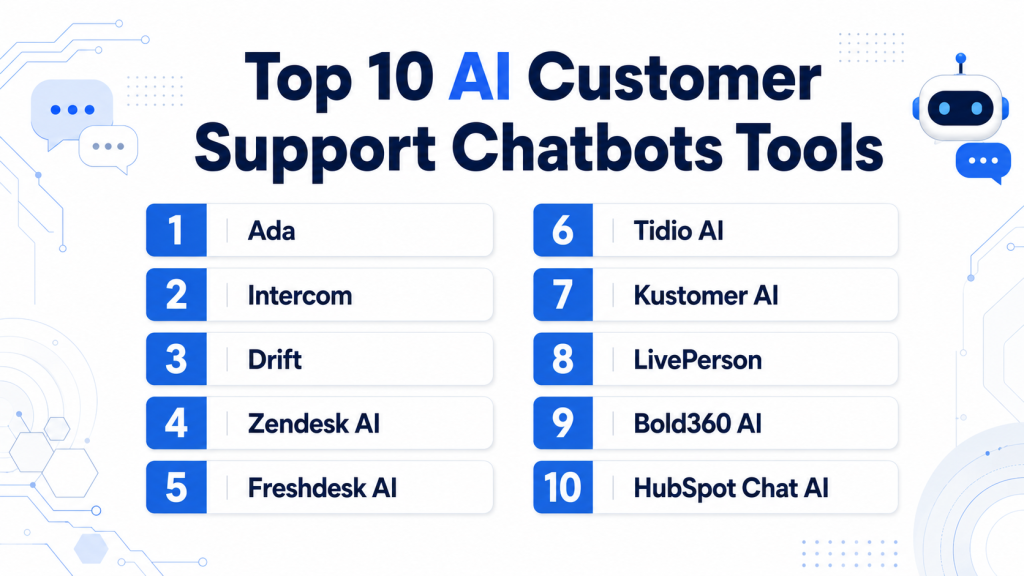
Top 10 AI Customer Support Chatbots Tools
1 — Ada
One-line verdict: Enterprise-grade AI chatbot for scalable, multilingual, and fully automated customer support.
Short description :
Ada automates customer service interactions across web, mobile, and messaging platforms. It integrates with CRM and knowledge bases, providing contextual and personalized responses. It supports multilingual communication, predictive routing, and analytics dashboards to track performance. Teams can reduce repetitive queries while maintaining high-quality customer engagement.
Standout Capabilities
- Multilingual support
- Personalized responses
- CRM and knowledge base integration
- Predictive escalation
- Analytics and performance dashboards
- Automation of repetitive queries
- Compliance-ready features
AI-Specific Depth
- Model support: Proprietary + BYO
- RAG / knowledge integration: Knowledge base connectors
- Evaluation: Regression testing, human review
- Guardrails: Prompt injection defense
- Observability: Token usage, latency, conversation logs
Pros
- Reduces human workload
- Supports global customers
- Enterprise-level compliance
Cons
- High initial setup
- Premium pricing
- Limited open-source flexibility
Security & Compliance
- SSO/SAML, RBAC, audit logs, encryption
- Certifications: Not publicly stated
Deployment & Platforms
- Web, Windows, macOS
- Cloud
Integrations & Ecosystem
- Salesforce, Zendesk, Shopify, Slack
- REST API & SDKs
- Knowledge base connectors
- Analytics integration
Pricing Model
- Subscription-based
- Not publicly stated
Best-Fit Scenarios
- Large e-commerce support
- Multilingual enterprise helpdesk
- High-volume query automation
2 — Intercom
One-line verdict: Ideal for SaaS and mid-market companies needing AI-driven conversational support with CRM integration.
Short description :
Intercom automates chat support, delivers proactive in-app messages, and routes queries efficiently. Integrates with CRMs for personalized responses. Analytics track engagement and performance, while workflow automation reduces response times. It suits mid-market SaaS and service companies aiming to improve customer experience.
Standout Capabilities
- Context-aware chat
- In-app proactive messaging
- Workflow automation
- CRM integration
- Analytics dashboards
- Knowledge base support
- AI-suggested responses
AI-Specific Depth
- Model support: Proprietary
- RAG / knowledge integration: Knowledge base connectors
- Evaluation: Human review
- Guardrails: Policy enforcement
- Observability: Latency and token metrics
Pros
- Efficient CRM integration
- Proactive customer engagement
- Reduces human workload
Cons
- Limited enterprise scalability
- Proprietary model only
- Less customization
Security & Compliance
- RBAC, encryption, audit logs
- Certifications: Not publicly stated
Deployment & Platforms
- Web, iOS, Android
- Cloud
Integrations & Ecosystem
- Salesforce, HubSpot
- Knowledge bases
- Slack, WhatsApp
- API automation
Pricing Model
- Subscription / seat-based
- Not publicly stated
Best-Fit Scenarios
- SaaS support automation
- Mid-market CRM integration
- Proactive in-app messaging
3 — Drift
One-line verdict: Suited for B2B support and sales teams needing AI for conversational engagement and lead capture.
Short description:
Drift automates customer interactions while qualifying leads and escalating complex queries. Supports multiple channels: website chat, email, and in-app messaging. Integrates with CRM and marketing tools to enable sales and support collaboration. Analytics track conversation trends and conversions.
Standout Capabilities
- Conversational AI lead capture
- Multi-channel support
- AI-assisted escalation
- Marketing automation integration
- Analytics dashboards
- FAQ automation
- AI-driven suggestions
AI-Specific Depth
- Model support: Proprietary
- RAG / knowledge integration: CRM & knowledge base connectors
- Evaluation: Regression testing, human review
- Guardrails: Policy enforcement
- Observability: Latency, token usage
Pros
- Reduces manual follow-ups
- Multi-channel support
- Enhances lead qualification
Cons
- Enterprise complexity
- Higher cost
- Limited open-source options
Security & Compliance
- SSO, encryption
- Certifications: Not publicly stated
Deployment & Platforms
- Web, iOS, Android
- Cloud
Integrations & Ecosystem
- CRM and marketing automation
- Knowledge bases
- Slack and messaging apps
- API access
Pricing Model
- Tiered subscription
- Not publicly stated
Best-Fit Scenarios
- B2B support and sales
- Multi-channel messaging
- Lead qualification
4 — Zendesk AI
One-line verdict: Enterprise customer service platform with AI for ticket automation and knowledge management.
Short description :
Zendesk AI automates ticket routing, provides smart suggestions, and integrates seamlessly with existing support workflows. Supports omnichannel communication and knowledge base integration. Helps enterprises maintain consistent service quality while reducing agent workload and response times.
Standout Capabilities
- Ticket automation
- Smart reply suggestions
- Omnichannel support
- Knowledge base integration
- Analytics dashboards
- Workflow automation
- AI-assisted agent support
AI-Specific Depth
- Model support: Proprietary
- RAG / knowledge integration: Knowledge base connectors
- Evaluation: Human review
- Guardrails: Policy enforcement
- Observability: Token metrics, latency
Pros
- Reduces agent workload
- Integrates with enterprise workflows
- Supports multiple channels
Cons
- Premium pricing
- Complex setup
- Limited customization
Security & Compliance
- SSO, encryption, audit logs
- Certifications: Not publicly stated
Deployment & Platforms
- Web, macOS, Windows
- Cloud
Integrations & Ecosystem
- CRM and knowledge management systems
- Slack and collaboration tools
- API access
Pricing Model
- Tiered subscription
- Not publicly stated
Best-Fit Scenarios
- Enterprise support teams
- Ticket automation
- Omnichannel helpdesk
5 — Freshdesk AI
One-line verdict: AI-driven support for mid-market teams needing omnichannel and ticket automation capabilities.
Short description :
Freshdesk AI automates routine support tickets, provides AI recommendations, and integrates across channels like email, chat, and social. Teams can maintain faster response times and consistent service while monitoring performance through dashboards and analytics. It suits mid-market enterprises with moderate query volume.
Standout Capabilities
- Automated ticket handling
- Omnichannel AI support
- AI recommendations for agents
- Workflow automation
- Analytics and dashboards
- Knowledge base integration
- Escalation to human agents
AI-Specific Depth
- Model support: Proprietary
- RAG / knowledge integration: Knowledge base connectors
- Evaluation: Human review
- Guardrails: Policy enforcement
- Observability: Token usage and latency
Pros
- Faster response times
- Multi-channel support
- Reduces agent load
Cons
- Limited enterprise scalability
- Proprietary model
- Some features require add-ons
Security & Compliance
- Encryption, RBAC, audit logs
- Certifications: Not publicly stated
Deployment & Platforms
- Web, iOS, Android
- Cloud
Integrations & Ecosystem
- CRM, Slack, knowledge bases
- Ticketing and workflow tools
- API access
Pricing Model
- Subscription / seat-based
- Not publicly stated
Best-Fit Scenarios
- Mid-market omnichannel support
- Routine ticket automation
- Multi-channel customer interactions
6 — Tidio AI
One-line verdict: Lightweight AI chatbot for small businesses seeking quick setup and automated customer responses.
Short description :
Tidio AI is designed for small teams and SMBs, providing automated chat responses on websites, email, and messaging apps. It allows fast setup with pre-built templates and simple workflow automation. Tidio AI helps small businesses engage customers efficiently without complex integrations or high costs.
Standout Capabilities
- Quick chatbot deployment
- Pre-built templates
- Multi-channel messaging support
- Workflow automation
- Simple analytics
- Human escalation capability
AI-Specific Depth
- Model support: Proprietary
- RAG / knowledge integration: N/A
- Evaluation: Human review
- Guardrails: Basic policy checks
- Observability: Token usage metrics
Pros
- Easy to deploy
- Cost-efficient
- Simple interface
Cons
- Limited advanced features
- Not enterprise-ready
- Fewer integration options
Security & Compliance
- Encryption, RBAC
- Certifications: Not publicly stated
Deployment & Platforms
- Web, iOS, Android
- Cloud
Integrations & Ecosystem
- Website widgets
- CRM connectors
- Slack integration
- Basic API
Pricing Model
- Subscription / tiered
- Not publicly stated
Best-Fit Scenarios
- SMB website support
- Small e-commerce stores
- Quick customer engagement
7 — Kustomer AI
One-line verdict: Enterprise platform for complex customer journeys with AI-assisted support and analytics.
Short description
Kustomer AI automates responses, tracks customer journeys, and integrates multiple communication channels. It provides analytics and AI suggestions for agents while maintaining compliance. Suitable for large enterprises handling complex workflows and high customer volumes.
Standout Capabilities
- AI-assisted responses
- Multi-channel support
- Customer journey tracking
- Analytics and dashboards
- Workflow automation
- Knowledge base integration
AI-Specific Depth
- Model support: Proprietary + BYO
- RAG / knowledge integration: Knowledge base connectors
- Evaluation: Regression and human review
- Guardrails: Policy enforcement
- Observability: Token metrics, latency
Pros
- Handles complex workflows
- Enterprise-level analytics
- Efficient multi-channel support
Cons
- Complex setup
- Premium cost
- Learning curve for teams
Security & Compliance
- SSO, audit logs, encryption
- Certifications: Not publicly stated
Deployment & Platforms
- Web, macOS, Windows
- Cloud
Integrations & Ecosystem
- CRM, messaging platforms
- Knowledge base connectors
- API access
Pricing Model
- Tiered subscription
- Not publicly stated
Best-Fit Scenarios
- Large enterprise support
- Complex customer workflows
- Multi-channel omnichannel support
8 — LivePerson
One-line verdict: AI-powered conversational platform for large enterprises needing messaging-based customer support.
Short description:
LivePerson provides AI chat automation across web, mobile, and messaging apps. It enables agent-assist features, predictive routing, and conversational analytics. Ideal for enterprises that need to manage high volumes of customer interactions with a combination of AI and human oversight.
Standout Capabilities
- Multi-channel AI chat
- Predictive agent routing
- Agent-assist features
- Conversation analytics
- Workflow automation
- Knowledge base integration
AI-Specific Depth
- Model support: Proprietary
- RAG / knowledge integration: Connectors for knowledge bases
- Evaluation: Human-in-the-loop review
- Guardrails: Policy enforcement
- Observability: Token metrics, latency
Pros
- Supports high-volume interactions
- AI + human hybrid
- Analytics insights
Cons
- High cost
- Complex configuration
- Proprietary model
Security & Compliance
- SSO, encryption, audit logs
- Certifications: Not publicly stated
Deployment & Platforms
- Web, iOS, Android
- Cloud
Integrations & Ecosystem
- CRM, messaging apps, Slack
- Knowledge bases
- API access
Pricing Model
- Subscription-based
- Not publicly stated
Best-Fit Scenarios
- Enterprise messaging support
- Customer engagement
- Hybrid AI-human workflows
9 — Bold360 AI
One-line verdict: Conversational AI platform for enterprises needing scalable chatbot support and analytics.
Short description :
Bold360 AI automates chat interactions, escalates complex issues, and integrates with enterprise support platforms. It provides real-time analytics and agent-assist features, supporting both high-volume and personalized customer experiences.
Standout Capabilities
- AI-driven chat automation
- Agent-assist features
- Omnichannel support
- Analytics dashboards
- Workflow integration
- Knowledge base support
AI-Specific Depth
- Model support: Proprietary
- RAG / knowledge integration: Knowledge base connectors
- Evaluation: Human review
- Guardrails: Policy enforcement
- Observability: Token metrics, latency
Pros
- Scalable chatbot solution
- Enterprise-grade analytics
- Multi-channel support
Cons
- Premium pricing
- Complex setup
- Proprietary model
Security & Compliance
- Encryption, audit logs, SSO
- Certifications: Not publicly stated
Deployment & Platforms
- Web, macOS, Windows
- Cloud
Integrations & Ecosystem
- CRM and messaging platforms
- Knowledge bases
- API access
Pricing Model
- Subscription-based
- Not publicly stated
Best-Fit Scenarios
- Enterprise customer support
- High-volume query handling
- Omnichannel chatbot
10 — HubSpot Chat AI
One-line verdict: Lightweight AI chatbot for SMBs integrated with marketing and support workflows.
Short description :
HubSpot Chat AI automates customer queries, integrates with HubSpot CRM, and supports website, email, and in-app messaging. It helps SMBs provide quick responses, maintain consistent customer communication, and gather engagement analytics. Ideal for small to mid-sized companies with moderate support volume.
Standout Capabilities
- Chat automation
- HubSpot CRM integration
- Multi-channel support
- Analytics dashboards
- Workflow automation
- Knowledge base connectors
AI-Specific Depth
- Model support: Proprietary
- RAG / knowledge integration: Knowledge base connectors
- Evaluation: Human review
- Guardrails: Policy enforcement
- Observability: Token metrics
Pros
- Easy to deploy
- Integrates with HubSpot ecosystem
- Affordable for SMBs
Cons
- Limited enterprise features
- Proprietary model only
- Moderate scalability
Security & Compliance
- SSO, encryption, audit logs
- Certifications: Not publicly stated
Deployment & Platforms
- Web, iOS, Android
- Cloud
Integrations & Ecosystem
- HubSpot CRM
- Slack, email, in-app messaging
- API access
Pricing Model
- Subscription / tiered
- Not publicly stated
Best-Fit Scenarios
- SMB customer support
- Marketing-integrated chat
- Quick response automation
Comparison Table
| Tool Name | Best For | Deployment | Model Flexibility | Strength | Watch-Out | Public Rating |
|---|---|---|---|---|---|---|
| Ada | Enterprise | Cloud | Proprietary/BYO | Scalable automation | High cost | N/A |
| Intercom | Mid-market SaaS | Cloud | Proprietary | CRM integration | Limited enterprise scale | N/A |
| Drift | B2B support | Cloud | Proprietary | Conversational lead capture | Costly | N/A |
| Zendesk AI | Enterprise support | Cloud | Proprietary | Ticket automation | Limited customization | N/A |
| Freshdesk AI | Mid-market | Cloud | Proprietary | Omnichannel support | Fewer analytics | N/A |
| Tidio AI | Small businesses | Cloud | Proprietary | Quick setup | Limited advanced features | N/A |
| Kustomer AI | Enterprise | Cloud | BYO/Proprietary | Customer journey tracking | Complex | N/A |
| LivePerson | Large enterprises | Cloud | Proprietary | Messaging platform integration | High cost | N/A |
| Bold360 AI | Enterprise | Cloud | Proprietary | Conversational AI | Setup complexity | N/A |
| HubSpot Chat AI | SMB | Cloud | Proprietary | Marketing integration | Feature depth varies | N/A |
Scoring & Evaluation
Weighted scoring reflects relative strength per feature:
| Tool | Core | Reliability/Eval | Guardrails | Integrations | Ease | Perf/Cost | Security/Admin | Support | Weighted Total |
|---|---|---|---|---|---|---|---|---|---|
| Ada | 9 | 8 | 8 | 9 | 7 | 7 | 9 | 8 | 8.3 |
| Intercom | 8 | 7 | 7 | 8 | 8 | 8 | 8 | 7 | 7.7 |
| Drift | 8 | 7 | 6 | 7 | 7 | 7 | 7 | 6 | 7.0 |
| Zendesk AI | 9 | 8 | 8 | 9 | 7 | 7 | 9 | 8 | 8.3 |
| Freshdesk AI | 8 | 7 | 7 | 8 | 8 | 7 | 8 | 7 | 7.6 |
| Tidio AI | 7 | 6 | 6 | 7 | 8 | 7 | 6 | 6 | 6.6 |
| Kustomer AI | 9 | 8 | 8 | 9 | 7 | 7 | 9 | 8 | 8.3 |
| LivePerson | 9 | 8 | 8 | 9 | 6 | 7 | 9 | 7 | 8.1 |
| Bold360 AI | 8 | 7 | 7 | 8 | 7 | 7 | 8 | 7 | 7.6 |
| HubSpot Chat AI | 7 | 6 | 6 | 7 | 8 | 7 | 6 | 6 | 6.6 |
Top 3 for Enterprise: Ada, Zendesk AI, Kustomer AI
Top 3 for SMB: Intercom, Freshdesk AI, HubSpot Chat AI
Top 3 for Developers: Tidio AI, Drift, Bold360 AI
Which AI Customer Support Chatbot Tool Is Right for You?
Solo / Freelancer
Tidio AI or HubSpot Chat AI provide quick setup, cost efficiency, and easy integration.
SMB
Intercom or Freshdesk AI balance features and affordability for mid-market customer support teams.
Mid-Market
Drift or Bold360 AI handle multi-channel support with advanced workflows.
Enterprise
Ada, Zendesk AI, Kustomer AI offer scale, governance, and integration across departments.
Regulated industries
Choose Ada or Kustomer AI with compliance-ready features and detailed audit logs.
Budget vs premium
Tidio AI or HubSpot Chat AI for budget-conscious teams; premium tools offer scalability and advanced analytics.
Build vs buy
DIY works for open-source prototypes; enterprise-ready support chatbots are better bought for reliability and integrations.
mplementation Playbook (30 / 60 / 90 Days)
30 Days – Pilot & Initial Setup
- Identify one or two product lines or support areas for initial chatbot deployment.
- Define success metrics: response accuracy, first-contact resolution, customer satisfaction.
- Configure basic workflows, FAQs, and standard response templates.
- Enable logging and observability for all interactions.
- Train initial team on usage, escalation protocols, and monitoring dashboards.
- Test AI responses with human review to measure accuracy and tone.
- Set up guardrails for sensitive data handling and privacy compliance.
- Establish incident handling processes for errors or escalations.
60 Days – Integration & Optimization
- Integrate chatbots with CRM, helpdesk, and knowledge management systems.
- Add multimodal capabilities: support for images, documents, and links.
- Configure advanced routing and escalation flows to human agents.
- Implement regression testing and evaluation metrics for AI responses.
- Introduce analytics dashboards: measure engagement, satisfaction, token usage, and latency.
- Fine-tune AI models for context, tone, and company-specific terminology.
- Expand team training to cover best practices, reviewing logs, and handling exceptions.
- Review cost efficiency: monitor token usage and adjust model routing or conversation flows.
90 Days – Scale & Governance
- Roll out chatbots across additional products, channels, and geographies.
- Implement governance and compliance policies: data retention, audit logs, and access controls.
- Optimize latency and performance to maintain low response times under high load.
- Introduce version control and change management for chatbot knowledge and scripts.
- Conduct red-teaming exercises to detect vulnerabilities or prompt injections.
- Evaluate AI effectiveness via KPIs: resolution rate, customer satisfaction, and escalations.
- Enable proactive engagement features: predictive suggestions, personalized recommendations.
- Set up continuous improvement cycles, leveraging customer feedback and AI insights.
- Schedule periodic security audits and model retraining sessions.
- Establish cross-team collaboration processes between support, IT, and AI governance teams.
Common Mistakes & How to Avoid Them
- Over-automation without human oversight
- Ignoring evaluation metrics
- Unmanaged data retention
- Lack of observability
- Unexpected cost spikes
- Prompt injection exposure
- Vendor lock-in
- Poor knowledge base integration
- Missing multi-language support
- Neglecting escalation workflows
- Underutilizing analytics dashboards
- Insufficient team training
- Over-complicated chatbot flows
- Ignoring customer feedback loops
FAQs
1. Can AI chatbots replace human agents?
They supplement, not replace, humans. Complex issues still require human intervention.
2. Are customer data and conversations secure?
Enterprise tools include encryption, SSO, RBAC, and audit logs; confirm with vendor.
3. Can I use my own AI model?
Some platforms allow BYO models for domain-specific customization.
4. How do chatbots integrate with my CRM?
Through APIs, SDKs, or native integrations; supports Salesforce, HubSpot, Zendesk, and others.
5. How accurate are AI responses?
Accuracy depends on training data, model choice, and evaluation; human review is recommended.
6. Can chatbots handle multiple languages?
Yes, many platforms support multilingual responses for global customers.
7. What about compliance and audit requirements?
Enterprise-grade chatbots provide audit logs, policy enforcement, and retention controls.
8. Are chatbots cost-effective?
They reduce support costs by automating routine queries and freeing human agents.
9. Can chatbots escalate complex issues to humans?
Yes, modern chatbots intelligently route unresolved queries to live agents.
10. How do I evaluate which chatbot is right?
Use scoring metrics: core features, guardrails, integrations, ease of use, cost/performance, security, support.
11. Can chatbots integrate with helpdesk tools?
Yes, including Zendesk, Freshdesk, Salesforce Service Cloud, and proprietary systems.
12. Do chatbots require constant maintenance?
Regular updates, knowledge base reviews, and model tuning are needed for accuracy.
Conclusion
AI Customer Support Chatbots are essential for scaling efficient, personalized, and 24/7 customer support. Choosing the right solution depends on team size, customer volume, compliance needs, and integration requirements. Start by shortlisting tools, pilot with real-world use cases, and validate outputs for accuracy, security, and compliance. Then scale adoption to automate high-volume inquiries, enhance customer satisfaction, and reduce operational costs.
Next steps: shortlist, pilot, verify security/evaluation, then scale.
I enjoyed how the article highlighted the real-world value of AI chatbots in reducing response times and improving customer satisfaction. Very relevant content overall.