Introduction
AI Requirements-to-Code Generators are tools that transform natural language or structured specifications into functional code automatically. They leverage AI models to interpret requirements, produce implementation-ready code snippets, and sometimes generate full modules, helping developers accelerate software development.
These tools are critical due to the increasing complexity of software systems, tight delivery schedules, and the need for faster prototyping. They enable developers to convert high-level requirements into working code, improve productivity, and reduce errors caused by misinterpretation of specifications.
Why It Matters
- Speeds up development cycles: Converts requirements directly into executable code to reduce time-to-market.
- Reduces human error: AI ensures alignment between requirements and code, minimizing misinterpretations.
- Supports rapid prototyping: Teams can test features faster by generating initial code automatically.
- Enhances collaboration: Product managers and developers can iterate quickly with a shared source of truth.
- Improves code consistency: Generates standardized and maintainable code across projects.
- Optimizes resource utilization: Allows developers to focus on complex logic while AI handles boilerplate or repetitive tasks.
Real-World Use Cases
- Translating business specifications into functional modules in Python, Java, or JavaScript.
- Generating backend API code from structured requirement documents.
- Auto-creating unit tests based on functional requirements.
- Rapidly prototyping new software features for MVPs.
- Generating front-end UI components from design specifications.
- Converting regulatory or compliance specifications into rule-based logic.
Evaluation Criteria for Buyers
- Accuracy of code generation: Ensures generated code reflects the requirements correctly.
- Supported languages and frameworks: Compatibility with your tech stack.
- Evaluation and testing capabilities: Automated tests, regression, and human review.
- Integration flexibility: Works with IDEs, CI/CD pipelines, and project management tools.
- Ease of use: Simple workflow for developers and non-technical stakeholders.
- Customization and templates: Ability to tailor code patterns and styles.
- Security and compliance: Sensitive data handling and enterprise-grade controls.
- Observability: Metrics on code generation success, latency, and errors.
- Collaboration features: Multi-user editing, approvals, and annotations.
- Cost efficiency and scalability: Predictable pricing and model scaling.
- Guardrails: Prevents generating insecure or inefficient code.
- Multimodal input: Accepts structured requirements, text, or diagrams.
Best for: software developers, engineering managers, product teams, AI-first startups, and enterprises aiming for rapid prototyping.
Not ideal for: teams with very simple systems or where code must be handwritten for strict compliance or optimization needs.
What’s Changed in AI Requirements-to-Code Generators
- Agentic workflows: AI can suggest optimal implementation patterns and call other tools automatically.
- Multimodal inputs: Tools accept text, tables, diagrams, and structured specs.
- Evaluation & testing: Improved regression checks, unit test generation, and human review support.
- Guardrails: Enforced secure coding practices and prompt injection prevention.
- Enterprise privacy: Data residency, retention policies, and encrypted input handling.
- Cost and latency optimization: Model routing, BYO model support, and token-efficient generation.
- Observability: Tracks generation time, success rates, token usage, and code quality metrics.
- CI/CD integration: Automatically pushes generated code into development pipelines.
- Collaboration: Supports annotations, approvals, and team-based code generation review.
- Compliance readiness: Generates code aligned with regulatory or coding standards.
Quick Buyer Checklist (Scan-Friendly)
- Data privacy & retention compliance
- Model type: hosted, BYO, open-source, multi-model routing
- RAG/knowledge integration for domain-specific logic
- Evaluation & testing support for generated code
- Guardrails for security and coding standards
- Latency & cost optimization for large projects
- Auditability & admin controls
- Vendor lock-in risk assessment
- Collaboration and review workflow features
- Supported programming languages and frameworks
- Template and style customization
- Integration with IDEs and CI/CD pipelines
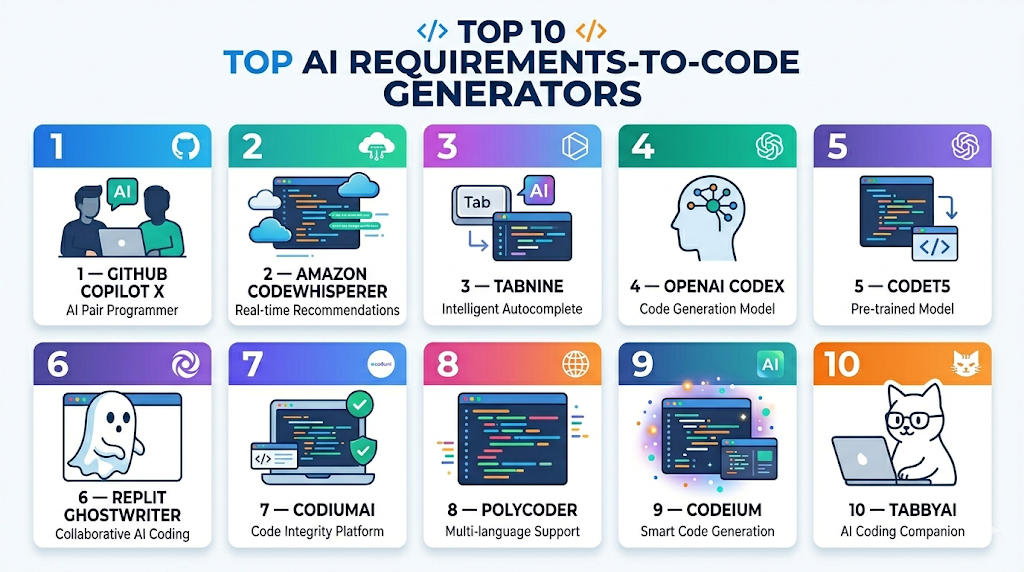
Top 10 AI Requirements-to-Code Generators
1 — GitHub Copilot X
One-line verdict: Best for developers seeking AI-assisted code generation directly integrated into VS Code and GitHub workflows.
Short description: GitHub Copilot X uses AI to convert requirements, comments, or code prompts into working code in multiple languages. It is suitable for developers, product teams, and open-source contributors looking for fast prototyping and coding assistance.
Standout Capabilities
- Autocomplete code from comments or specifications
- Generates functions, classes, and boilerplate code
- Supports multiple programming languages
- Suggests code snippets during live coding
- Integrates with GitHub Actions for CI/CD
- Provides inline test code suggestions
AI-Specific Depth
- Model support: Proprietary
- RAG / knowledge integration: GitHub repository context
- Evaluation: Unit test generation and regression checks
- Guardrails: Security suggestions and prompt injection defense
- Observability: Tracks usage, token counts, and generation latency
Pros
- Tight integration with VS Code
- Fast prototyping from requirements
- Reduces boilerplate coding
Cons
- Dependent on GitHub ecosystem
- Subscription required for advanced features
- Can occasionally suggest incorrect or insecure code
Security & Compliance
- SSO, RBAC, encryption
- Not publicly stated
Deployment & Platforms
- Web, Windows, macOS, Linux, VS Code plugin
- Cloud
Integrations & Ecosystem
- GitHub Actions, CI/CD pipelines
- GitLab, Jira
- IDE plugins
- API access for automation
Pricing Model
Subscription-based
Best-Fit Scenarios
- Rapid prototyping
- Developer productivity enhancements
- Open-source contribution acceleration
2 — Amazon CodeWhisperer
One-line verdict: Ideal for teams building AWS-based applications needing AI-generated code with security guidance.
Short description: CodeWhisperer generates code snippets, full functions, and infrastructure code directly from natural language requirements, optimized for AWS environments. Developers and cloud teams use it to accelerate feature delivery while ensuring best practices.
Standout Capabilities
- Generates backend, frontend, and AWS-specific code
- Inline security recommendations
- Supports multiple programming languages
- Suggests unit tests and validation code
- Integrates with IDEs like VS Code, JetBrains
- AI context-aware suggestions based on project files
AI-Specific Depth
- Model support: Proprietary
- RAG / knowledge integration: AWS documentation and best practices
- Evaluation: Regression and human review
- Guardrails: Security and best practice enforcement
- Observability: Tracks usage, generation latency, and security warnings
Pros
- Optimized for AWS deployments
- Security-focused code suggestions
- Supports multiple languages
Cons
- Best for AWS-centric teams
- Paid tier for enterprise features
- Can misinterpret ambiguous requirements
Security & Compliance
- SSO, RBAC, encryption, audit logs
- Not publicly stated
Deployment & Platforms
- Web, Windows, macOS, Linux, IDE plugins
- Cloud
Integrations & Ecosystem
- AWS SDK, GitHub, CI/CD pipelines
- IDE integration
- API access
Pricing Model
Tiered subscription
Best-Fit Scenarios
- AWS application development
- Secure code generation
- Cloud team acceleration
3 — Tabnine
One-line verdict: Best for developers seeking AI-assisted code completion and requirements-to-code translation across multiple languages.
Short description: Tabnine AI generates code snippets and functions from natural language requirements, supporting multiple programming languages and IDEs. It helps teams accelerate development while maintaining consistency and coding standards. Ideal for developers, software teams, and startups seeking rapid prototyping.
Standout Capabilities
- AI code completion and function generation
- Supports multiple languages and frameworks
- Integrates with VS Code, JetBrains, and other IDEs
- Inline suggestions during live coding
- Suggests tests and documentation snippets
- Supports team-level configuration for coding standards
AI-Specific Depth
- Model support: Proprietary
- RAG / knowledge integration: N/A
- Evaluation: Unit test generation and regression checks
- Guardrails: Coding best practices and security alerts
- Observability: Tracks suggestion usage and latency
Pros
- Speeds up coding tasks
- Multi-language support
- Maintains coding standards across teams
Cons
- Paid subscription for enterprise features
- Limited full application generation
- Occasional incorrect code suggestions
Security & Compliance
- SSO, RBAC, encryption
- Not publicly stated
Deployment & Platforms
- Web, Windows, macOS, Linux, IDE plugins
- Cloud
Integrations & Ecosystem
- VS Code, JetBrains
- GitHub/GitLab
- CI/CD pipelines
- API access
Pricing Model
Subscription-based
Best-Fit Scenarios
- Multi-language development
- Rapid prototyping
- Team productivity enhancement
4 — OpenAI Codex
One-line verdict: Ideal for AI-first teams generating code from high-level specifications and requirements.
Short description: OpenAI Codex interprets natural language prompts to generate executable code in multiple programming languages. It supports both standalone code generation and integration with IDEs. Ideal for developers, AI teams, and product engineers accelerating software delivery from requirements.
Standout Capabilities
- Converts requirements to functional code
- Supports Python, JavaScript, Java, and more
- Generates helper functions and modules
- Provides context-aware code suggestions
- Integrates with IDEs and automation pipelines
AI-Specific Depth
- Model support: Proprietary
- RAG / knowledge integration: N/A
- Evaluation: Regression testing and human review
- Guardrails: Secure code recommendations
- Observability: Token usage, latency, and suggestion metrics
Pros
- Supports multiple programming languages
- Ideal for rapid prototyping
- Reduces manual coding effort
Cons
- Requires careful prompt design
- Can generate errors in complex requirements
- API subscription required for full access
Security & Compliance
- Encryption and RBAC
- Not publicly stated
Deployment & Platforms
- Web, Windows, macOS, Linux, IDE plugins
- Cloud
Integrations & Ecosystem
- VS Code, JetBrains IDEs
- CI/CD pipelines
- GitHub/GitLab
Pricing Model
Subscription/API-based
Best-Fit Scenarios
- AI-first software teams
- Rapid prototyping and testing
- Multi-language project development
5 — CodeT5
One-line verdict: Best for developers needing open-source AI for code generation from requirements and specifications.
Short description: CodeT5 is an open-source model designed for translating textual requirements into code. It supports multiple languages and integrates into development workflows for automated code generation. Teams can leverage CodeT5 for experimentation, research, and production pipelines.
Standout Capabilities
- Open-source and extensible
- Supports Python, Java, JavaScript
- Pretrained on code repositories for context-aware generation
- Can generate unit tests and code snippets
- Integrates with IDEs and CI/CD
AI-Specific Depth
- Model support: Open-source / BYO model
- RAG / knowledge integration: N/A
- Evaluation: Offline evaluation, human review
- Guardrails: Schema compliance and code standards
- Observability: Usage and performance metrics
Pros
- Open-source and flexible
- Multi-language support
- Can be customized for domain-specific code
Cons
- Requires technical setup
- Less polished than proprietary tools
- Limited GUI and collaboration
Security & Compliance
- Varies / N/A
Deployment & Platforms
- Windows, macOS, Linux
- Self-hosted or cloud
Integrations & Ecosystem
- IDE integration
- CI/CD pipelines
- APIs for automation
Pricing Model
Open-source, free with optional enterprise support
Best-Fit Scenarios
- Research and experimentation
- Domain-specific AI code generation
- Open-source project acceleration
6 — Replit Ghostwriter
One-line verdict: Best for individual developers and small teams needing AI-generated code from requirements quickly.
Short description: Replit Ghostwriter generates code in multiple languages directly from textual requirements. It supports live coding, IDE integration, and real-time testing, helping developers accelerate prototyping and small project development.
Standout Capabilities
- AI code completion from requirements
- Live testing and code validation
- Supports Python, JavaScript, Java, and more
- Inline documentation and comments generation
- Collaboration with team-based coding
AI-Specific Depth
- Model support: Proprietary
- RAG / knowledge integration: N/A
- Evaluation: Unit tests and offline validation
- Guardrails: Security-aware code suggestions
- Observability: Tracks usage, latency, and success rates
Pros
- Rapid code generation
- Easy IDE integration
- Supports team collaboration
Cons
- Limited enterprise capabilities
- Cloud-dependent
- Not suited for large-scale production
Security & Compliance
- SSO, RBAC, encryption
- Not publicly stated
Deployment & Platforms
- Web, Windows, macOS, Linux
- Cloud
Integrations & Ecosystem
- Replit IDE, GitHub
- API access
- CI/CD pipelines
Pricing Model
Subscription-based
Best-Fit Scenarios
- Small teams or solo developers
- Rapid prototyping
- Learning and experimentation
7 — CodiumAI
One-line verdict: Ideal for teams generating secure, testable code from specifications with built-in evaluation.
Short description: CodiumAI converts requirements into functional, testable code while generating unit and integration tests automatically. It ensures security checks and code quality standards are applied. Useful for development teams focused on quality, security, and maintainability.
Standout Capabilities
- Generates code and tests from requirements
- Security-focused code generation
- Supports Python, JavaScript, Java
- Integration with IDEs and pipelines
- Version and collaboration management
AI-Specific Depth
- Model support: Proprietary
- RAG / knowledge integration: N/A
- Evaluation: Automated tests, regression, human review
- Guardrails: Security and code compliance
- Observability: Test coverage, generation metrics
Pros
- Focused on secure code
- Generates tests automatically
- Ensures maintainable standards
Cons
- Limited language support
- Enterprise features require subscription
- Setup for pipelines may require effort
Security & Compliance
- SSO, RBAC, audit logs
- Not publicly stated
Deployment & Platforms
- Web, Windows, macOS
- Cloud
Integrations & Ecosystem
- IDEs, GitHub, CI/CD pipelines
- API access
Pricing Model
Subscription-based
Best-Fit Scenarios
- Secure code generation
- Teams needing automatic tests
- Production-ready feature development
8 — PolyCoder
One-line verdict: Best for developers needing multi-language code generation from text-based requirements in open-source environments.
Short description: PolyCoder is an open-source AI model that generates code across multiple programming languages from textual specifications. It is ideal for experimentation, research, and small-scale automation projects.
Standout Capabilities
- Multi-language code generation
- Open-source and extendable
- Supports unit test suggestions
- Lightweight and easy to integrate
- Version tracking and code comparison
AI-Specific Depth
- Model support: Open-source / BYO
- RAG / knowledge integration: N/A
- Evaluation: Offline evaluation and human review
- Guardrails: N/A
- Observability: Metrics on usage and performance
Pros
- Open-source flexibility
- Supports multiple languages
- Can be integrated into custom pipelines
Cons
- Requires setup and maintenance
- Limited enterprise support
- Minimal collaboration features
Security & Compliance
- Varies / N/A
Deployment & Platforms
- Windows, macOS, Linux
- Self-hosted or cloud
Integrations & Ecosystem
- IDE integration
- APIs for pipeline automation
Pricing Model
Free / open-source
Best-Fit Scenarios
- Research and experimentation
- Small automation projects
- Multi-language coding practice
9 — Codeium
One-line verdict: Ideal for developers seeking fast code generation from requirements with team collaboration features.
Short description: Codeium converts high-level requirements into working code, providing real-time suggestions and inline test generation. It supports multiple languages and is designed for teams needing fast prototyping and consistent coding practices.
Standout Capabilities
- Converts textual requirements into code
- Supports Python, JavaScript, Java, C++
- Generates inline unit tests
- Team collaboration and code suggestions
- Integrates with IDEs
AI-Specific Depth
- Model support: Proprietary
- RAG / knowledge integration: N/A
- Evaluation: Regression tests and human review
- Guardrails: Security recommendations
- Observability: Tracks token usage and latency
Pros
- Fast prototyping
- Multi-language support
- Team collaboration
Cons
- Cloud-dependent
- Enterprise features require subscription
- Occasional inaccurate suggestions
Security & Compliance
- SSO, RBAC, encryption
- Not publicly stated
Deployment & Platforms
- Web, IDE plugins
- Cloud
Integrations & Ecosystem
- VS Code, JetBrains
- CI/CD pipelines
- GitHub/GitLab
Pricing Model
Subscription-based
Best-Fit Scenarios
- Rapid prototyping
- Team coding acceleration
- Multi-language development
10 — TabbyAI
One-line verdict: Best for developers wanting requirements-to-code AI with real-time feedback and code suggestions.
Short description: TabbyAI translates textual requirements into code, offering inline suggestions, debugging hints, and test generation. It supports collaboration and multiple programming languages, making it suitable for startups, AI-first teams, and agile developers.
Standout Capabilities
- Real-time code generation from requirements
- Inline debugging suggestions
- Supports multiple languages
- Automated unit test creation
- Team collaboration features
AI-Specific Depth
- Model support: Proprietary
- RAG / knowledge integration: N/A
- Evaluation: Offline testing, human review
- Guardrails: Coding best practices enforcement
- Observability: Tracks code generation metrics
Pros
- Rapid code generation
- Multi-language support
- Collaboration-enabled
Cons
- Paid subscription for full features
- Limited enterprise integration
- May require prompt tuning
Security & Compliance
- SSO, RBAC, encryption
- Not publicly stated
Deployment & Platforms
- Web, IDE plugins
- Cloud
Integrations & Ecosystem
- GitHub, GitLab
- IDEs, CI/CD pipelines
Pricing Model
Subscription-based
Best-Fit Scenarios
- Agile startups
- Rapid feature prototyping
- Multi-language development
Comparison Table
| Tool Name | Best For | Deployment | Model Flexibility | Strength | Watch-Out | Public Rating |
|---|---|---|---|---|---|---|
| GitHub Copilot X | Developers | Cloud, IDE plugins | Proprietary | Fast coding from requirements | GitHub ecosystem only | N/A |
| Amazon CodeWhisperer | AWS teams | Cloud, IDE plugins | Proprietary | Secure AWS-optimized code | AWS-centric | N/A |
| Tabnine | Multi-language devs | Cloud, IDE plugins | Proprietary | Multi-language suggestions | Paid enterprise features | N/A |
| OpenAI Codex | AI-first teams | Cloud, IDE plugins | Proprietary | High-quality requirement-to-code | Prompt-sensitive | N/A |
| CodeT5 | Researchers / open-source | Self-hosted / Cloud | Open-source / BYO | Open-source flexibility | Setup required | N/A |
| Replit Ghostwriter | Small teams / solo devs | Cloud, IDE plugin | Proprietary | Fast prototyping | Cloud-dependent | N/A |
| CodiumAI | Security-focused teams | Cloud, IDE plugin | Proprietary | Secure, testable code | Limited language support | N/A |
| PolyCoder | Open-source projects | Self-hosted / Cloud | Open-source / BYO | Multi-language support | Minimal collaboration | N/A |
| Codeium | Teams needing collaboration | Cloud, IDE plugin | Proprietary | Team-oriented code generation | Cloud-dependent | N/A |
| TabbyAI | Agile developers | Cloud, IDE plugin | Proprietary | Real-time feedback and tests | Enterprise integration limited | N/A |
Scoring & Evaluation (Transparent Rubric)
Scoring is comparative, based on features, reliability, guardrails, integrations, ease, performance, security, and support. Weighted Total is 0–10:
| Tool | Core | Reliability/Eval | Guardrails | Integrations | Ease | Perf/Cost | Security/Admin | Support | Weighted Total |
|---|---|---|---|---|---|---|---|---|---|
| GitHub Copilot X | 9 | 9 | 8 | 9 | 8 | 9 | 8 | 8 | 8.8 |
| Amazon CodeWhisperer | 9 | 8 | 9 | 8 | 8 | 8 | 8 | 7 | 8.2 |
| Tabnine | 8 | 7 | 7 | 8 | 8 | 8 | 7 | 7 | 7.5 |
| OpenAI Codex | 9 | 8 | 8 | 8 | 7 | 8 | 7 | 7 | 7.9 |
| CodeT5 | 7 | 7 | 7 | 7 | 7 | 7 | 6 | 6 | 6.8 |
| Replit Ghostwriter | 8 | 7 | 7 | 7 | 8 | 7 | 7 | 7 | 7.4 |
| CodiumAI | 8 | 8 | 8 | 7 | 7 | 7 | 7 | 7 | 7.7 |
| PolyCoder | 7 | 7 | 7 | 6 | 7 | 7 | 6 | 6 | 6.6 |
| Codeium | 8 | 8 | 7 | 7 | 7 | 7 | 7 | 7 | 7.5 |
| TabbyAI | 8 | 7 | 7 | 7 | 7 | 7 | 7 | 6 | 7.2 |
Top 3 for Enterprise:
- GitHub Copilot X: Scales for large developer teams with CI/CD integration and multi-language support.
- Amazon CodeWhisperer: Secure, optimized for AWS infrastructure, suitable for enterprise deployments.
- OpenAI Codex: High-quality requirement-to-code generation for complex projects and AI-driven workflows.
Top 3 for SMB:
- Replit Ghostwriter: Lightweight, fast for small teams or solo developers.
- Tabnine: Multi-language productivity boost for mid-sized teams.
- Codeium: Collaboration-oriented code generation with inline suggestions.
Top 3 for Developers:
- PolyCoder: Open-source experimentation and research.
- TabbyAI: Real-time feedback and inline testing for agile developers.
- CodeT5: Flexible open-source model for prototyping and custom pipelines.
Which AI Requirements-to-Code Tool Is Right for You?
Solo / Freelancer
- Replit Ghostwriter or PolyCoder for fast prototyping and small projects.
- Ideal for learning, experimentation, or small feature generation.
SMB
- Tabnine, Codeium, TabbyAI provide collaborative features and multi-language support.
- Supports agile development and rapid prototyping.
Mid-Market
- OpenAI Codex and GitHub Copilot X handle multiple languages and project scaling.
- Provides CI/CD integration and versioning for team workflows.
Enterprise
- GitHub Copilot X, Amazon CodeWhisperer, OpenAI Codex provide security, compliance, and governance features.
- Suitable for regulated industries and large teams with complex requirements.
Regulated industries
- Tools with RBAC, audit logs, and encryption like Amazon CodeWhisperer and GitHub Copilot X are recommended.
Budget vs Premium
- Open-source or lightweight tools like PolyCoder reduce cost but need setup.
- Enterprise SaaS solutions provide full features and support at higher cost.
Build vs Buy
- DIY with CodeT5 or PolyCoder is suitable for experimentation.
- Enterprise SaaS tools recommended for speed, governance, and multi-team projects.
Implementation Playbook (30 / 60 / 90 Days)
30 Days – Pilot & Metrics:
- Select 1–2 high-priority modules or features to generate code from requirements.
- Define success metrics: accuracy, code quality, developer adoption, and latency.
- Validate AI-generated code against expected functionality and requirements.
- Identify edge cases and ambiguous requirements to refine prompts.
- Train a small group of developers on workflow and AI integration.
- Document initial findings and adjustments needed for full-scale rollout.
60 Days – Harden Security & Rollout:
- Integrate the tool into IDEs and CI/CD pipelines for automated code generation.
- Implement guardrails to prevent insecure, inefficient, or non-compliant code.
- Establish review workflow: human verification of generated code before merging.
- Apply code style guidelines and template standardization across teams.
- Monitor metrics: code success rates, latency, error frequency, and token usage.
- Expand pilot to additional modules or teams, adjusting workflows as needed.
- Conduct training sessions for wider developer adoption and feedback collection.
90 Days – Optimize, Govern & Scale:
- Scale tool usage to all teams and projects, ensuring consistent coding practices.
- Standardize prompts, templates, and AI configuration for domain-specific code.
- Monitor and analyze AI outputs for errors, edge cases, or performance bottlenecks.
- Evaluate cost efficiency: optimize token usage, model routing, and latency for high-demand projects.
- Integrate automated testing: unit, integration, and regression tests generated by AI.
- Apply governance: maintain audit logs, version control, and compliance reporting.
- Establish regular evaluation cycles to refine prompts, improve reliability, and reduce hallucinations.
- Encourage cross-team collaboration: document best practices, common patterns, and reusable templates.
Common Mistakes & How to Avoid Them
- Over-relying on AI without human review
- Ignoring evaluation of generated code
- Unmanaged data retention or sensitive info
- Lack of observability and metrics
- Unexpected costs due to high usage
- Over-automation without human oversight
- Vendor lock-in without export options
- Not tracking version history
- Inconsistent coding standards
- Missing unit test generation
- Misaligned requirements and prompts
- Lack of integration with pipelines
- Ignoring guardrails for security
- Minimal collaboration workflow
FAQs
- What is an AI Requirements-to-Code Generator?
Tools that convert textual or structured requirements into executable code automatically, helping accelerate development and reduce manual effort. - Which programming languages are supported?
Most support Python, JavaScript, Java, C++, and other common languages, with some offering multi-language AI translation for teams. - Can I integrate these tools with CI/CD pipelines?
Yes, most tools integrate with IDEs and development pipelines for automatic code updates, testing, and deployment workflows. - Do they generate tests automatically?
Many tools produce unit and integration tests alongside generated code to ensure correctness and maintainability. - Are these tools secure for enterprise code?
Enterprise-grade tools provide SSO, RBAC, and encryption to protect sensitive projects and adhere to compliance requirements. - Can I self-host open-source options?
Yes, tools like CodeT5 and PolyCoder support self-hosting, providing more control over infrastructure and data handling. - How accurate is the generated code?
Accuracy depends on prompt quality, model training, and human review, especially for complex or ambiguous requirements. - Do they support multi-team collaboration?
Yes, many tools include features for shared editing, comments, approvals, and version control to support team workflows. - Can AI generate backend and frontend code?
Some tools, like CodiumAI or CodeWhisperer, support both backend modules and frontend UI components from requirements. - Are these tools cost-efficient?
Open-source options reduce cost but require setup; enterprise SaaS subscriptions provide scale, support, and reliability. - Can I switch tools easily?
Exporting prompts, templates, and generated code enables migration between platforms with minimal disruption. - What are the alternatives?
Manual coding, low-code platforms, or pre-written templates remain options for small projects or teams not needing full AI automation.
Conclusion
AI Requirements-to-Code Generators are transforming software development by converting requirements into functional code, accelerating delivery, and reducing errors. They enable rapid prototyping, maintain coding standards, and improve collaboration across teams. Choosing the right tool depends on team size, tech stack, security, and project complexity.
Next steps:
- Shortlist tools based on language support, workflow, and team size.
- Pilot key modules to evaluate accuracy, usability, and integration.
- Verify security and compliance with guardrails, RBAC, and data retention policies.
Excellent article explaining how AI is transforming the journey from requirements gathering to code generation. The structured comparison adds strong value for developers and product teams.