Introduction
AI-Powered SOAR Automation combines Security Orchestration, Automation and Response with artificial intelligence to help security teams investigate alerts, coordinate security tools, enrich incidents, recommend actions, and automate repetitive response workflows. Traditional SOAR platforms already connect security products and execute predefined playbooks, while AI adds capabilities such as natural-language investigation, incident summarization, contextual reasoning, and workflow assistance.This category is becoming increasingly useful as security teams face high alert volumes, fragmented security tools, cloud-native infrastructure, and increasingly sophisticated attacks. AI can help analysts move from an alert to an actionable investigation more quickly while allowing deterministic automation to handle repeatable tasks.Common use cases include phishing investigation, malware triage, identity-threat response, endpoint isolation, threat-intelligence enrichment, suspicious-login investigation, vulnerability prioritization, incident summarization, and automated case management.
What’s Changed in AI-Powered SOAR Automation
- AI assistants can summarize security incidents from multiple telemetry sources.
- Natural-language interfaces can make complex investigation workflows easier to access.
- Agentic workflows can coordinate multiple investigation steps while operating within defined permissions.
- AI can help analysts enrich alerts with threat intelligence and contextual information.
- Security teams are increasingly combining deterministic playbooks with AI-assisted decision-making.
- Human approval is becoming an important control for high-impact automated actions.
- AI-generated response recommendations need testing against realistic incident scenarios.
- Prompt-injection protection matters when AI processes attacker-controlled emails, files, URLs, and logs.
- Model routing can help balance investigation quality, latency, and operating costs.
- Organizations are paying more attention to AI data retention and privacy.
- Auditability is increasingly important when AI contributes to incident decisions.
- Security teams need visibility into AI actions, tool calls, failures, and recommendations.
- Automated workflows increasingly span endpoint, identity, cloud, email, network, and vulnerability platforms.
- AI can help create and improve playbooks, but generated automation should be reviewed before production use.
- Organizations are moving toward continuous testing of automated response workflows.
- Excessive automation without safeguards can increase the impact of false positives.
Quick Buyer Checklist
- Incident orchestration.
- Automated playbooks.
- AI-assisted investigation.
- Natural-language security queries.
- Threat-intelligence enrichment.
- Endpoint integrations.
- Identity integrations.
- Email-security integrations.
- Cloud integrations.
- Ticketing integrations.
- Case management.
- Human approval workflows.
- RBAC.
- SSO.
- Audit logs.
- API support.
- Data retention controls.
- Data residency options.
- AI data privacy.
- Prompt-injection defenses.
- AI evaluation.
- Workflow testing.
- Model flexibility.
- BYO model support where required.
- Cost and latency controls.
- Execution permissions.
- Rollback capabilities.
- Vendor lock-in risk.
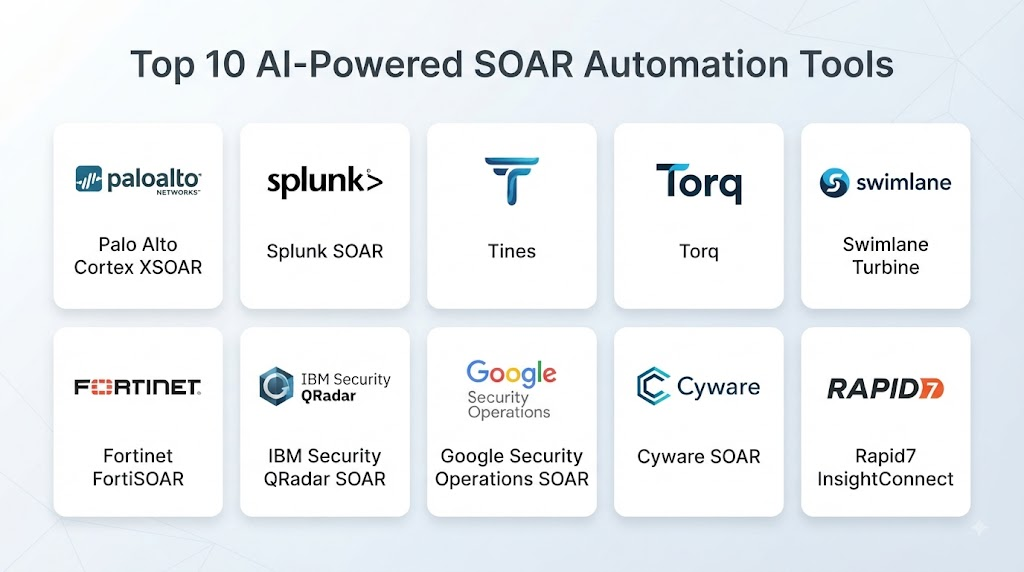
Top 10 AI-Powered SOAR Automation Tools
1. Palo Alto Networks Cortex XSOAR
One-line verdict: Best for enterprise SOCs needing extensive security orchestration, investigation workflows, integrations, and automated response.
Short description
Cortex XSOAR is a security orchestration and response platform designed to centralize incident management, automate repetitive security processes, and connect multiple security technologies. It is particularly relevant to organizations with mature SOC workflows and large security-tool ecosystems.
Standout Capabilities
- Security orchestration.
- Automated incident response.
- Playbook automation.
- Case management.
- Threat-intelligence integration.
- Security-tool integrations.
- Investigation workflows.
- SOC process automation.
AI-Specific Depth
- Model support: AI capabilities vary by product and configuration.
- RAG / knowledge integration: Security knowledge and connected security data can support contextual workflows.
- Evaluation: Playbook testing and workflow validation are available; AI-specific evaluation varies.
- Guardrails: Role-based access and controlled playbook execution support governed automation.
- Observability: Incident and playbook activity can be monitored and audited.
Pros
- Broad security integration ecosystem.
- Mature playbook automation.
- Strong enterprise SOC capabilities.
Cons
- Can require significant implementation expertise.
- Complex environments may require extensive playbook management.
- Enterprise pricing may be substantial.
Security & Compliance
Enterprise access controls, authentication, auditing, and security features are available. Specific certifications should be verified for the applicable deployment and service.
Deployment & Platforms
- Cloud.
- Enterprise environments.
- Web.
- Deployment options vary by offering.
Integrations & Ecosystem
Cortex XSOAR is designed to connect security products and operational systems.
- SIEM platforms.
- Endpoint security.
- Identity platforms.
- Threat intelligence.
- Email security.
- Ticketing systems.
- APIs.
Pricing Model
Enterprise/custom pricing.
Best-Fit Scenarios
- Large SOC environments.
- Complex security-tool ecosystems.
- Organizations requiring extensive automated playbooks.
2. Splunk SOAR
One-line verdict: Best for organizations already using Splunk and seeking security automation connected to existing analytics workflows.
Short description
Splunk SOAR helps security teams automate investigation and response actions through playbooks and integrations. Its connection with the broader Splunk ecosystem can be valuable for organizations that already use Splunk security analytics.
Standout Capabilities
- Security orchestration.
- Automated response.
- Playbook workflows.
- Incident investigation.
- Security integrations.
- Case management.
- Threat-intelligence enrichment.
- SOC automation.
AI-Specific Depth
- Model support: AI capabilities vary across Splunk products.
- RAG / knowledge integration: Security data and organizational context can support AI-assisted workflows.
- Evaluation: Playbook testing is supported; generative-AI evaluation varies.
- Guardrails: Permissions and workflow controls help govern automation.
- Observability: Security and workflow activity can be monitored.
Pros
- Strong integration with Splunk.
- Extensive security automation capabilities.
- Mature enterprise ecosystem.
Cons
- Can be complex for smaller teams.
- Costs can depend heavily on architecture and usage.
- Advanced workflows require experienced security engineers.
Security & Compliance
Enterprise authentication, access management, auditing, and encryption capabilities are available. Specific certifications should be verified for the selected service.
Deployment & Platforms
- Cloud.
- Self-managed options vary.
- Hybrid environments.
- Web.
Integrations & Ecosystem
Splunk SOAR supports broad security and IT integrations.
- SIEM.
- Endpoint security.
- Email security.
- Identity.
- Threat intelligence.
- Ticketing.
- APIs.
Pricing Model
Enterprise/custom subscription pricing.
Best-Fit Scenarios
- Existing Splunk customers.
- Mature SOC teams.
- Organizations with complex response workflows.
3. Microsoft Security Copilot
One-line verdict: Best for Microsoft-centric security teams wanting AI-assisted investigation and security operations across Microsoft security services.
Short description
Microsoft Security Copilot provides generative AI capabilities for security operations, investigation, threat analysis, and security workflows. It is particularly relevant for organizations using Microsoft’s broader security ecosystem.
Standout Capabilities
- AI-assisted security investigation.
- Incident summarization.
- Threat analysis.
- Natural-language interaction.
- Security-context analysis.
- Microsoft security integration.
- Analyst assistance.
- Security workflow support.
AI-Specific Depth
- Model support: Microsoft-provided AI capabilities with supported model options varying by service.
- RAG / knowledge integration: Security data and connected organizational context can be used for investigation.
- Evaluation: Microsoft provides mechanisms and guidance for evaluating AI-assisted security workflows; implementation varies.
- Guardrails: Enterprise identity and security controls help govern access and actions.
- Observability: Security workflows and service activity can be monitored through the Microsoft ecosystem.
Pros
- Strong Microsoft security integration.
- Natural-language security assistance.
- Useful for analyst productivity.
Cons
- Best fit depends heavily on Microsoft ecosystem adoption.
- AI-assisted capabilities do not replace deterministic automation.
- Costs depend on service configuration and usage.
Security & Compliance
Microsoft provides enterprise security, identity, access management, auditing, encryption, and governance capabilities. Specific certifications should be validated for the applicable service.
Deployment & Platforms
- Cloud.
- Web.
- Microsoft security ecosystem.
- APIs and connected services.
Integrations & Ecosystem
Security Copilot can work with Microsoft security products and supported integrations.
- Microsoft Sentinel.
- Microsoft Defender.
- Microsoft Entra.
- Threat intelligence.
- Security workflows.
- APIs.
Pricing Model
Subscription and usage structures vary by service and configuration.
Best-Fit Scenarios
- Microsoft-heavy enterprises.
- SOC analyst assistance.
- Organizations modernizing security operations.
4. Google Security Operations
One-line verdict: Best for organizations combining large-scale security analytics with AI-assisted investigation and security operations workflows.
Short description
Google Security Operations provides SIEM, security analytics, threat detection, and investigation capabilities. Its AI technologies can support analyst workflows and help security teams process large volumes of security information.
Standout Capabilities
- SIEM.
- Threat detection.
- Security analytics.
- Threat intelligence.
- AI-assisted investigation.
- Detection engineering.
- Security operations workflows.
- Large-scale telemetry analysis.
AI-Specific Depth
- Model support: Google AI capabilities vary by service.
- RAG / knowledge integration: Security telemetry and contextual knowledge can support investigation.
- Evaluation: Security detection testing is available; AI evaluation varies by feature.
- Guardrails: Enterprise identity and security controls provide governance.
- Observability: Security telemetry and operational analytics are supported.
Pros
- Strong analytics capabilities.
- Large-scale security telemetry support.
- AI-assisted security workflows.
Cons
- Enterprise deployment can require specialist skills.
- Broad capabilities can increase implementation complexity.
- Pricing varies according to usage and architecture.
Security & Compliance
Enterprise identity, encryption, access management, auditing, and governance capabilities are available. Specific certifications should be confirmed for the relevant services.
Deployment & Platforms
- Cloud.
- Web.
- APIs.
- Enterprise environments.
Integrations & Ecosystem
Google Security Operations supports connections across security and infrastructure environments.
- Cloud services.
- Identity systems.
- Endpoint security.
- Network platforms.
- Threat intelligence.
- APIs.
Pricing Model
Enterprise/custom and usage-based structures vary.
Best-Fit Scenarios
- Large security operations teams.
- High-volume environments.
- Organizations requiring advanced analytics.
5. Tines
One-line verdict: Best for teams wanting flexible security automation workflows without building every integration from scratch.
Short description
Tines is a workflow automation platform widely used for security operations and related automation tasks. It enables teams to connect security tools and build workflows for repetitive operational processes.
Standout Capabilities
- Visual workflow automation.
- Security orchestration.
- API-based integrations.
- Automated enrichment.
- Incident workflows.
- Case-management automation.
- Custom automation.
- Security operations workflows.
AI-Specific Depth
- Model support: AI integrations vary by workflow and configuration.
- RAG / knowledge integration: Can connect external knowledge sources through supported integrations.
- Evaluation: Workflow testing is supported; AI-specific evaluation varies.
- Guardrails: Workflow permissions and execution controls can govern automation.
- Observability: Workflow execution and automation activity can be monitored.
Pros
- Flexible workflow design.
- Strong automation orientation.
- Useful integration capabilities.
Cons
- Advanced workflows require planning.
- AI functionality depends on configured integrations.
- Enterprise requirements may require additional governance.
Security & Compliance
Enterprise authentication, access management, audit capabilities, and security controls are available. Specific certifications should be verified for the relevant offering.
Deployment & Platforms
- Cloud.
- Web.
- APIs.
Integrations & Ecosystem
Tines focuses heavily on integrations and automation.
- SIEM.
- EDR.
- Email.
- Identity.
- Ticketing.
- Threat intelligence.
- APIs.
Pricing Model
Subscription/custom pricing varies by plan and usage.
Best-Fit Scenarios
- Security automation teams.
- Mid-market organizations.
- Teams replacing manual security workflows.
6. Torq
One-line verdict: Best for organizations seeking no-code security automation with AI-assisted workflows and broad security integrations.
Short description
Torq provides security automation and orchestration capabilities designed to help teams automate incident response, investigation, and operational security workflows.
Standout Capabilities
- Security automation.
- Visual workflows.
- Incident response.
- AI-assisted workflows.
- Security integrations.
- Automated enrichment.
- Case management.
- SOC automation.
AI-Specific Depth
- Model support: AI capabilities and supported models vary.
- RAG / knowledge integration: Connected security systems can provide contextual data.
- Evaluation: Workflow testing is available; AI-specific evaluation varies.
- Guardrails: Workflow permissions and execution controls can restrict actions.
- Observability: Workflow execution can be monitored.
Pros
- Automation-focused platform.
- Broad integrations.
- Useful for reducing repetitive SOC tasks.
Cons
- Complex automation requires careful design.
- AI capabilities depend on configuration.
- Enterprise pricing varies.
Security & Compliance
Enterprise access management, authentication, auditing, and security controls are available. Specific certifications should be verified.
Deployment & Platforms
- Cloud.
- Web.
- APIs.
Integrations & Ecosystem
Torq supports connections across common security and IT systems.
- SIEM.
- EDR.
- Identity.
- Email security.
- Threat intelligence.
- Ticketing.
- APIs.
Pricing Model
Enterprise/custom subscription pricing.
Best-Fit Scenarios
- SOC automation.
- Security engineering teams.
- Organizations seeking visual workflows.
7. Swimlane
One-line verdict: Best for enterprise security teams requiring governed automation, orchestration, and complex incident-response workflows.
Short description
Swimlane provides security orchestration and automation capabilities for enterprise security teams. Its platform is designed to connect security tools and automate repeatable workflows while supporting centralized incident management.
Standout Capabilities
- Security orchestration.
- Workflow automation.
- Incident management.
- Case management.
- Security integrations.
- Threat-intelligence workflows.
- Automated response.
- Enterprise governance.
AI-Specific Depth
- Model support: AI functionality varies by product.
- RAG / knowledge integration: Connected security data can support contextual workflows.
- Evaluation: Workflow testing and validation are supported; AI evaluation varies.
- Guardrails: Governance and workflow controls support controlled automation.
- Observability: Workflow and incident activity can be tracked.
Pros
- Strong enterprise automation.
- Broad integration capabilities.
- Governance-oriented approach.
Cons
- Can require experienced security automation teams.
- Complex workflows need maintenance.
- Pricing is generally enterprise-oriented.
Security & Compliance
Enterprise security controls are available. Specific certifications should be verified for the applicable product and deployment.
Deployment & Platforms
- Cloud.
- Enterprise.
- Web.
- Hybrid options vary.
Integrations & Ecosystem
Swimlane connects security and IT tools.
- SIEM.
- EDR.
- Identity.
- Threat intelligence.
- Ticketing.
- Network security.
- APIs.
Pricing Model
Enterprise/custom pricing.
Best-Fit Scenarios
- Large SOCs.
- Regulated organizations.
- Complex automation environments.
8. Rapid7 InsightConnect
One-line verdict: Best for organizations wanting workflow automation integrated with security operations and Rapid7’s broader security ecosystem.
Short description
Rapid7 InsightConnect provides automation capabilities for security operations and IT workflows. It enables teams to connect applications and automate repetitive investigation and response processes.
Standout Capabilities
- Security workflow automation.
- Incident response.
- Visual workflows.
- Security integrations.
- Automated enrichment.
- IT automation.
- SOC orchestration.
- API connectivity.
AI-Specific Depth
- Model support: AI functionality varies by product and integration.
- RAG / knowledge integration: External security data can be incorporated through integrations.
- Evaluation: Workflow validation is available; AI-specific evaluation varies.
- Guardrails: Access and workflow permissions help control automation.
- Observability: Workflow execution can be tracked.
Pros
- Broad workflow integrations.
- Useful security and IT automation.
- Strong fit for Rapid7 environments.
Cons
- AI functionality varies.
- Complex workflows need maintenance.
- Enterprise capabilities may require additional planning.
Security & Compliance
Security and administrative controls are available. Specific certifications should be validated for the selected service.
Deployment & Platforms
- Cloud.
- Web.
- APIs.
Integrations & Ecosystem
InsightConnect supports a wide range of security and IT integrations.
- SIEM.
- Endpoint security.
- Identity.
- Email.
- Ticketing.
- Cloud services.
- APIs.
Pricing Model
Subscription/custom pricing.
Best-Fit Scenarios
- Rapid7 customers.
- Mid-market SOCs.
- Security workflow automation.
9. IBM QRadar SOAR
One-line verdict: Best for organizations requiring structured incident response, case management, orchestration, and enterprise security workflows.
Short description
IBM QRadar SOAR provides incident-response and orchestration capabilities designed to help security teams coordinate investigations and automate response processes across security technologies.
Standout Capabilities
- Incident response.
- Security orchestration.
- Case management.
- Playbooks.
- Automated workflows.
- Threat intelligence.
- Security integrations.
- Enterprise security operations.
AI-Specific Depth
- Model support: AI capabilities vary by IBM product ecosystem.
- RAG / knowledge integration: Security knowledge and connected systems can support contextual workflows.
- Evaluation: Playbook and workflow validation varies.
- Guardrails: Enterprise governance and access controls are available.
- Observability: Incident and workflow activity can be audited.
Pros
- Strong structured incident-response workflows.
- Enterprise governance.
- Mature case-management capabilities.
Cons
- Implementation can be complex.
- Advanced deployments require specialized skills.
- Pricing varies by configuration.
Security & Compliance
Enterprise access control, authentication, auditing, and governance capabilities are available. Specific certifications should be verified for the selected product.
Deployment & Platforms
- Cloud.
- Hybrid.
- Enterprise.
- Web.
Integrations & Ecosystem
QRadar SOAR supports enterprise security integrations.
- SIEM.
- Endpoint.
- Identity.
- Threat intelligence.
- Ticketing.
- Network security.
- APIs.
Pricing Model
Enterprise/custom pricing.
Best-Fit Scenarios
- Large SOCs.
- Regulated enterprises.
- Structured incident-response programs.
10. Google SecOps SOAR
One-line verdict: Best for security teams wanting orchestration capabilities alongside Google security analytics and threat-detection workflows.
Short description
Google SecOps includes capabilities designed to automate security operations and connect detection, investigation, and response processes. It is particularly relevant for organizations looking to consolidate security analytics and orchestration.
Standout Capabilities
- Security orchestration.
- Automated response.
- Detection workflows.
- Investigation.
- Threat intelligence.
- Security integrations.
- Incident management.
- Security automation.
AI-Specific Depth
- Model support: AI capabilities vary by Google security services.
- RAG / knowledge integration: Security telemetry and contextual information can support investigation workflows.
- Evaluation: Security-content testing is available; AI-specific evaluation varies.
- Guardrails: Enterprise access and workflow controls support governed automation.
- Observability: Security and automation activity can be monitored.
Pros
- Strong security analytics integration.
- Enterprise-scale security capabilities.
- Useful automation potential.
Cons
- Requires planning for complex environments.
- Pricing varies by architecture.
- Advanced capabilities may require specialized expertise.
Security & Compliance
Enterprise security, identity, encryption, auditing, and governance capabilities are available. Specific certifications should be verified for the applicable services.
Deployment & Platforms
- Cloud.
- Web.
- APIs.
- Enterprise environments.
Integrations & Ecosystem
Google SecOps can integrate with multiple security and IT technologies.
- SIEM.
- Endpoint security.
- Identity.
- Threat intelligence.
- Cloud platforms.
- Ticketing.
- APIs.
Pricing Model
Enterprise/custom and usage-based models vary.
Best-Fit Scenarios
- Google security environments.
- Enterprise SOCs.
- Organizations consolidating analytics and orchestration.
Comparison Table
| Tool Name | Best For | Deployment | Model Flexibility | Strength | Watch-Out | Public Rating |
|---|---|---|---|---|---|---|
| Cortex XSOAR | Enterprise SOCs | Cloud/Enterprise | Hosted/BYO options vary | Playbook automation | Complexity | N/A |
| Splunk SOAR | Splunk environments | Cloud/Hybrid | Hosted/model options vary | Splunk integration | Cost | N/A |
| Microsoft Security Copilot | Microsoft SOCs | Cloud | Hosted/model options vary | AI investigation | Ecosystem dependency | N/A |
| Google Security Operations | Large SOCs | Cloud | Hosted/model options vary | Analytics + automation | Complexity | N/A |
| Tines | Flexible automation | Cloud | Multi-model via integrations | Workflow flexibility | Workflow maintenance | N/A |
| Torq | No-code security automation | Cloud | Multi-model options vary | Visual automation | Configuration effort | N/A |
| Swimlane | Enterprise orchestration | Cloud/Hybrid | Hosted/model options vary | Governance | Enterprise complexity | N/A |
| Rapid7 InsightConnect | Rapid7 users | Cloud | Multi-model via integrations | Workflow automation | AI varies | N/A |
| IBM QRadar SOAR | Structured IR | Cloud/Hybrid | Hosted/model options vary | Incident management | Implementation effort | N/A |
| Google SecOps SOAR | Google security users | Cloud | Hosted/model options vary | Security integration | Enterprise complexity | N/A |
Scoring & Evaluation
The following scores are comparative estimates based on overall platform capabilities rather than official vendor ratings.
Actual results can vary significantly depending on integrations, security architecture, analyst expertise, licensing, and workflow maturity.
For AI-powered SOAR, organizations should evaluate both traditional orchestration and AI-specific reliability.
A strong platform should be able to automate repetitive work without allowing unreliable AI recommendations to create uncontrolled security actions.
| Tool | Core | Reliability/Eval | Guardrails | Integrations | Ease | Perf/Cost | Security/Admin | Support | Weighted Total |
|---|---|---|---|---|---|---|---|---|---|
| Cortex XSOAR | 10 | 9 | 10 | 10 | 8 | 8 | 10 | 10 | 9.25 |
| Splunk SOAR | 10 | 9 | 10 | 10 | 8 | 8 | 10 | 10 | 9.25 |
| Microsoft Security Copilot | 9 | 9 | 10 | 10 | 9 | 8 | 10 | 10 | 9.35 |
| Google Security Operations | 10 | 10 | 10 | 9 | 8 | 9 | 10 | 10 | 9.40 |
| Tines | 9 | 9 | 9 | 10 | 10 | 9 | 9 | 9 | 9.25 |
| Torq | 9 | 9 | 9 | 10 | 9 | 9 | 9 | 9 | 9.15 |
| Swimlane | 9 | 9 | 10 | 10 | 8 | 8 | 10 | 10 | 9.20 |
| Rapid7 InsightConnect | 9 | 8 | 9 | 9 | 9 | 8 | 9 | 9 | 8.80 |
| IBM QRadar SOAR | 9 | 8 | 10 | 9 | 7 | 8 | 10 | 10 | 8.90 |
| Google SecOps SOAR | 9 | 9 | 10 | 9 | 8 | 9 | 10 | 10 | 9.15 |
Top 3 for Enterprise
- Google Security Operations — Strong combination of analytics, automation, and enterprise security capabilities.
- Microsoft Security Copilot — Particularly strong for Microsoft-centric security organizations.
- Cortex XSOAR — Strong choice for mature security orchestration and response programs.
Top 3 for SMB
- Tines — Flexible automation without requiring a highly complex SOC platform.
- Torq — Strong workflow-focused approach.
- Rapid7 InsightConnect — Useful for organizations wanting security and IT automation.
Top 3 for Developers
- Tines — Flexible integrations and workflow design.
- Torq — Automation-oriented architecture.
- Splunk SOAR — Strong integration and extensibility capabilities.
Which AI-Powered SOAR Automation Tool Is Right for You?
Solo / Freelancer
Most solo operators do not need a full enterprise SOAR platform.
Focus on lightweight automation for repetitive tasks such as alert enrichment, ticket creation, IP reputation checks, notification workflows, and basic incident triage.
SMB
SMBs should prioritize ease of implementation and predictable operational costs.
Look for:
- Simple integrations.
- Visual workflows.
- Automated enrichment.
- Email-security automation.
- Endpoint integration.
- Ticketing integration.
- Human approval.
- Clear execution logs.
Mid-Market
Mid-market organizations should look for platforms capable of handling multiple security products without requiring a large security engineering team.
Important capabilities include:
- Playbook management.
- API integrations.
- Case management.
- Threat intelligence.
- Identity workflows.
- Endpoint automation.
- AI-assisted investigation.
- Workflow testing.
Enterprise
Enterprises should prioritize governance as much as automation.
Evaluate:
- RBAC.
- SSO.
- Audit trails.
- Approval workflows.
- Multi-team administration.
- Data residency.
- Security integrations.
- Workflow versioning.
- AI governance.
- Model controls.
- Incident reporting.
- High-volume execution.
Regulated Industries
Regulated organizations should be cautious with autonomous response.
AI-powered automation should have clear boundaries around:
- Data access.
- Model usage.
- Sensitive information.
- Automated actions.
- Human approval.
- Auditability.
- Data retention.
- Incident records.
Budget vs Premium
Budget-conscious organizations should automate repetitive, low-risk tasks first.
Premium platforms become valuable when the organization has high alert volumes, multiple security products, complex investigations, and a mature SOC.
Build vs Buy
Building your own automation layer can work when your security team has strong engineering expertise and highly specialized workflows.
Buying a SOAR platform is generally preferable when you need mature integrations, reusable playbooks, case management, governance, support, and faster deployment.
Implementation Playbook: 30 / 60 / 90 Days
30 Days: Pilot + Success Metrics
Start with a small set of low-risk workflows.
- Identify repetitive analyst tasks.
- Select three to five automation use cases.
- Connect priority security tools.
- Establish approval requirements.
- Create baseline response-time metrics.
- Measure analyst workload.
- Build an AI evaluation dataset.
- Document expected AI behavior.
- Establish workflow ownership.
60 Days: Harden Security + Evaluation + Rollout
Once the pilot proves useful:
- Implement RBAC.
- Configure SSO.
- Test automation permissions.
- Add AI guardrails.
- Test prompt-injection scenarios.
- Validate AI-generated recommendations.
- Perform workflow testing.
- Introduce version control.
- Establish rollback procedures.
- Review data retention.
- Expand integrations carefully.
90 Days: Optimize Cost/Latency + Governance + Scale
At scale:
- Optimize high-volume workflows.
- Monitor automation latency.
- Track AI usage and costs.
- Improve model routing.
- Reduce unnecessary AI calls.
- Establish incident-response governance.
- Conduct regular red-team exercises.
- Review failed workflows.
- Add human-in-the-loop controls.
- Establish quarterly automation reviews.
Common Mistakes & How to Avoid Them
- Automating high-impact actions too early: Start with low-risk workflows.
- Trusting AI recommendations blindly: Require validation for important decisions.
- No evaluation framework: Test AI using realistic security incidents.
- Ignoring prompt injection: Treat attacker-controlled content as untrusted.
- Poor workflow permissions: Give automation only the access it needs.
- No rollback mechanism: Make automated actions reversible where possible.
- Ignoring execution logs: Maintain visibility into every important workflow.
- Uncontrolled AI costs: Monitor model usage and optimize workflows.
- No version control: Track changes to prompts and playbooks.
- Overusing AI: Use deterministic automation where deterministic logic is sufficient.
- Ignoring human approval: Keep analysts involved in high-risk actions.
- Poor integration design: Standardize data and error handling across tools.
- No failure handling: Build fallbacks when integrations or models fail.
- Vendor lock-in: Keep workflows documented and maintain portable integrations where practical.
FAQs
What is AI-Powered SOAR Automation?
AI-Powered SOAR Automation combines security orchestration and automated response with AI-assisted investigation, analysis, enrichment, and workflow execution.
How does AI improve SOAR?
AI can summarize incidents, analyze security context, recommend investigation steps, assist with workflow creation, and help analysts process repetitive security information faster.
Can AI-powered SOAR replace security analysts?
No. It can reduce repetitive work, but analysts remain important for complex investigations, ambiguous situations, governance, and high-impact response decisions.
Can AI SOAR automatically isolate an endpoint?
Some platforms can trigger endpoint actions through integrations. Organizations should use approval controls and carefully defined policies before allowing autonomous containment.
Does AI-powered SOAR work with existing SIEM platforms?
Yes. SOAR platforms commonly integrate with SIEM, endpoint, identity, email, cloud, network, threat-intelligence, and ticketing systems.
Can organizations use their own AI model?
Model flexibility varies by platform. Some products provide vendor-managed AI while others can connect to external AI services through integrations or APIs.
Is self-hosted AI SOAR available?
Deployment options vary. Some SOAR products support enterprise or hybrid deployments, while AI capabilities may remain dependent on specific vendor services.
How should AI SOAR accuracy be evaluated?
Use realistic incidents and measure investigation accuracy, recommended actions, false positives, response time, consistency, failure rates, and analyst acceptance.
Is prompt injection a risk in AI-powered SOAR?
Yes. Security workflows may process emails, URLs, logs, documents, and other attacker-controlled content. AI agents should treat these inputs as untrusted.
How much does AI-powered SOAR cost?
Pricing varies according to users, automation volume, integrations, data processing, features, and AI usage. Exact costs should be obtained from the vendor for the required architecture.
Can SOAR automate phishing investigations?
Yes. A workflow can potentially enrich suspicious emails, analyze indicators, query security tools, create cases, and recommend or execute response actions.
What is the difference between SIEM and SOAR?
SIEM primarily focuses on collecting, correlating, analyzing, and detecting security events. SOAR focuses on orchestrating tools and automating investigation and response workflows.
What is the difference between SOAR and XDR?
SOAR primarily coordinates workflows across security tools, while XDR generally combines detection and response capabilities across multiple security domains. The two can complement each other.
How can organizations avoid excessive SOAR automation?
Use risk-based automation. Automate predictable, low-impact tasks first and require human approval for actions that could disrupt users, systems, or business operations.
How can companies reduce AI vendor lock-in?
Maintain documented workflows, use standard APIs where possible, preserve important security data independently, and avoid making every security process dependent on a single model provider.
Conclusion
AI-Powered SOAR Automation can help security teams move beyond simple rule-based playbooks toward more contextual and intelligent security workflows. Its greatest value comes from combining AI reasoning with deterministic automation, strong integrations, and carefully controlled permissions.The most effective deployments do not attempt to automate everything. Instead, they identify repetitive, measurable workflows where automation can reduce analyst workload without increasing operational risEnterprise teams should prioritize governance, integrations, scalability, and auditability. Smaller teams may benefit more from simple workflow automation with carefully selected AI capabilities.