Introduction
The digital world is growing faster than ever before. A few years ago, a typical business might have run its software on a single server located right inside its office. Today, that same business likely relies on hundreds of interconnected systems, cloud services, mobile applications, and remote databases scattered across the globe. While this massive digital shift allows companies to serve millions of customers instantly, it also creates an incredibly complex environment behind the scenes. For the technology teams tasked with managing these systems—such as system administrators, DevOps engineers, and IT managers—keeping everything running smoothly has become an overwhelming challenge. When a single piece of software slows down, finding the root cause can feel like searching for a needle in a digital haystack. IT professionals are frequently flooded with thousands of system alerts every day, making it difficult to separate actual emergencies from routine background noise. To survive and thrive in this fast-paced digital landscape, organizations are moving away from traditional, manual ways of managing technology. Instead, they are turning to a powerful combination: Artificial Intelligence for IT Operations (AIOps) and IT automation. Together, these two concepts serve as the brain and the muscle of modern technology management. By combining intelligent data analysis with swift, automated actions, businesses can dramatically improve operational efficiency, reduce tedious manual work, and respond to technical issues before they impact the end user.
2. What Is AIOps?
To understand how these technologies work together, let us first break down what AIOps actually means. AIOps stands for Artificial Intelligence for IT Operations. At its core, it is the practice of using artificial intelligence and machine learning to simplify and improve the way we monitor and manage corporate technology systems.
Imagine a busy airport. Thousands of flights land and take off, baggage systems move constantly, and passengers check in every second. A human air traffic controller can only track so much information at once. Now, imagine an intelligent system that continuously watches every single detail of the airport simultaneously, spotting a tiny delay on a runway before it causes a massive backup. That is essentially what AIOps does for corporate computer networks.
Core Principles of AIOps
AIOps relies on a few fundamental principles to do its job effectively:
- Data Aggregation: It gathers huge volumes of data from various sources across the technology environment, including logs, system performance metrics, and historical records.
- Real-Time Analysis: It inspects this data as it arrives, looking for patterns or unusual behaviors that humans might miss.
- Prescriptive Insights: Rather than just stating that something is broken, it points out exactly why it happened and suggests how to fix it.
How AIOps Uses AI and Machine Learning
Instead of relying on rigid, pre-written rules that humans have to update constantly, AIOps uses machine learning algorithms. The system spends time learning what “normal” behavior looks like for your specific network. For example, it might notice that your website naturally gets a huge spike in traffic every Tuesday at 2:00 PM. A traditional monitoring system might flag this sudden spike as an emergency. An AIOps system, however, recognizes the weekly pattern and remains calm, knowing it is normal behavior.
Why Organizations Adopt AIOps
Companies adopt AIOps because human engineering teams simply cannot keep up with the sheer volume of data generated by modern cloud applications. AIOps acts as an intelligent assistant that watches over the infrastructure 24/7. It cuts through the chaos, filters out meaningless notifications, and ensures that engineers can focus their energy on real, high-priority issues.
3. What Is IT Automation?
If AIOps represents the “brain” that analyzes data and spots problems, IT automation represents the “muscle” that executes physical tasks without needing human hands.
IT automation is the use of software tools to perform repetitive, step-by-step technical tasks that used to require manual human intervention. Think of it like the cruise control feature in a modern automobile or a smart thermostat in a home. Instead of a human constantly adjusting the speed or changing the temperature dials all day, a machine handles the task automatically based on predefined instructions.
The Purpose and Common Tasks of IT Automation
The main goal of IT automation is to eliminate the tedious, repetitive work that burns out technology professionals. IT environments are full of tasks that must be done exactly the same way every single time.
Some of the most common automated tasks include:
- Setting up new servers: Deploying virtual computers in the cloud automatically whenever a company needs more digital storage or computing power.
- Software updates: Installing security patches across thousands of office computers simultaneously overnight.
- User management: Setting up new employee email accounts and file access permissions the moment HR enters them into the corporate system.
- Data backups: Copying important company records to a secure storage location every night at midnight.
Benefits of Automating Repetitive Activities
When engineers do not have to spend hours typing out routine commands or clicking through setup menus, two major benefits happen immediately. First, speed increases drastically; a task that takes a human forty minutes can often be finished by an automated workflow in forty seconds. Second, human error drops to near zero. Humans get tired, distracted, or accidentally skip a step when doing the same task for the hundredth time. An automated system executes the exact same steps perfectly, every single time.
4. Why AIOps and IT Automation Work Well Together
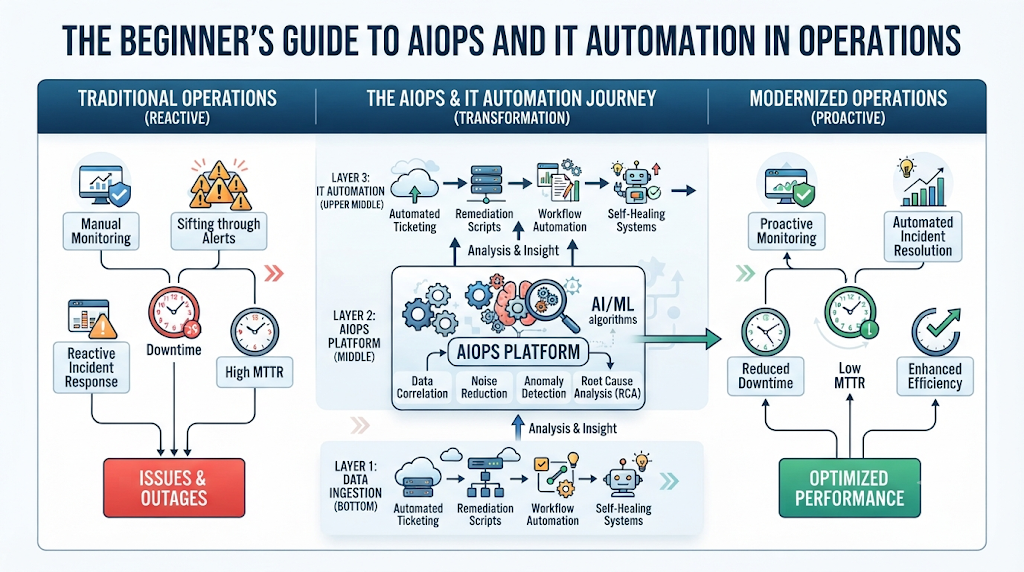
While AIOps and IT automation are incredibly helpful on their own, combining them creates a highly efficient system known as intelligent automation. Without automation, AIOps can find a problem but still requires a human engineer to log in and fix it. Without AIOps, automation can execute tasks quickly but cannot decide when or why to run those tasks on its own. When you connect them, you create a seamless loop of intelligent action.
[System Data] ➔ (AIOps: Analyzes & Identifies Root Cause) ➔ (Automation: Triggers Fix) ➔ [Restored System]
Automated Monitoring and Intelligent Alerting
Traditional monitoring systems are notorious for triggering “alert fatigue.” They sound the alarm for every minor issue, causing engineers to eventually ignore the notifications altogether. AIOps solves this by acting as an intelligent filter. It analyzes all system behaviors and combines multiple related alerts into a single, comprehensive notification.
Event Correlation and Root Cause Analysis
When a major database crashes, it usually causes a domino effect. The website slows down, payment processing fails, and user login pages throw errors. A traditional system will generate hundreds of separate alerts for each of these failures. AIOps uses event correlation to view all these incidents as a single story. It traces the domino line back to the first fallen piece—the database crash—and instantly tells the team the exact root cause.
Automated Incident Response
Once AIOps identifies the root cause of an issue, it can immediately pass that information to an IT automation tool. For instance, if AIOps determines that an application is slowing down because a specific software service has frozen, it doesn’t just send an email to a sleeping engineer. Instead, it instructs the workflow automation tool to safely restart that specific service. The problem is resolved in seconds, often before a human even realizes an issue occurred.
Predictive Maintenance and Continuous Improvement
AIOps does not just look at what is happening right now; it uses predictive analytics to look into the future. By studying historical data trends, it can predict when a hard drive is likely to fail or when a server will run out of memory next week. It can then trigger an automation script to provision extra resources or schedule maintenance during non-business hours, completely preventing a future outage.
5. Common Use Cases
To see how this perfect match plays out in the real world, let us look at several common scenarios across different technical departments.
Cloud Infrastructure
- The Operational Challenge: Cloud environments expand and contract constantly. During a major holiday sale, an online retailer might experience ten times its normal traffic, causing servers to crash from the heavy load.
- How AIOps Contributes: AIOps monitors incoming user traffic trends in real time, recognizing that a massive surge is starting to overwhelm the current cloud servers.
- How Automation Improves Efficiency: It instantly triggers infrastructure monitoring workflows to launch additional cloud servers to distribute the heavy load.
- Business Benefits: The website remains fast and functional, preventing lost revenue during critical sales events.
Network Operations
- The Operational Challenge: A critical network link between two corporate offices goes down, disrupting communication and stopping work.
- How AIOps Contributes: The system instantly analyzes network data and isolates the exact broken router causing the disruption.
- How Automation Improves Efficiency: Automation software immediately changes the network pathways, rerouting data traffic through a backup line.
- Business Benefits: Employees experience zero downtime, and business operations continue without interruption.
Application Monitoring
- The Operational Challenge: A new update to a mobile banking app causes the login screen to freeze for a small percentage of users.
- How AIOps Contributes: AIOps detects the subtle increase in login error rates immediately after the new software version is launched.
- How Automation Improves Efficiency: The system triggers an automated rollback, instantly replacing the flawed update with the previous, stable version of the app.
- Business Benefits: Customer trust is preserved, and the development team has time to fix the software bug safely behind the scenes.
Server Management
- The Operational Challenge: Corporate storage servers slowly fill up with old temporary logs and system garbage files, threatening to crash the main database.
- How AIOps Contributes: Predictive analytics notices the storage space steadily dropping and estimates the drive will be full in twenty-four hours.
- How Automation Improves Efficiency: An automated script is launched to safely wipe out old temporary files and compress archived records.
- Business Benefits: Avoids costly system crashes without requiring manual digital housekeeping from administrators.
Database Administration
- The Operational Challenge: A database becomes sluggish because too many complicated data requests are hitting it at the exact same moment.
- How AIOps Contributes: Identifies the specific, poorly written query that is hogging all the database’s processing power.
- How Automation Improves Efficiency: Automatically moves that specific query to a separate, isolated backup database environment.
- Business Benefits: Keeps the main system running fast for everyday transactions and customer requests.
Security Operations
- The Operational Challenge: A hacker tries to gain unauthorized entry into a corporate system by guessing employee passwords thousands of times a minute.
- How AIOps Contributes: AIOps identifies this unusual, aggressive login behavior as a cyberattack rather than a forgotten password.
- How Automation Improves Efficiency: Instantly updates the firewall rules to block the attacker’s specific digital address completely.
- Business Benefits: Sensitive corporate and customer data remains safe from digital break-ins.
Help Desk Automation
- The Operational Challenge: Hundreds of employees open technical support tickets every Monday morning to reset passwords they forgot over the weekend, overwhelming the IT help desk.
- How AIOps Contributes: Analyzes the written text in incoming support tickets to categorize them as simple password reset requests.
- How Automation Improves Efficiency: Sends a secure, automated reset link directly to the employee’s verified phone or alternative email.
- Business Benefits: Employees get back to work in minutes, and help desk staff can focus on complex, high-priority issues.
Capacity Planning
- The Operational Challenge: A company is overspending thousands of dollars every month by purchasing more cloud data storage than it actually uses.
- How AIOps Contributes: Reviews usage data over the past six months to map out exactly how much storage the company actually needs.
- How Automation Improves Efficiency: Automatically scales down unused, expensive digital infrastructure during quiet periods.
- Business Benefits: Significantly lowers operational costs and prevents technology waste.
6. Benefits for Organizations
Implementing AIOps alongside automated workflows provides profound, long-lasting advantages for modern digital operations.
- Reduced Downtime: By predicting problems before they explode and resolving them instantly, businesses keep their digital storefronts open around the clock.
- Faster Incident Resolution: Problems that used to take engineering teams hours of painful investigation are identified and resolved in mere seconds.
- Better Service Availability: Applications run more smoothly, creating a highly reliable experience for the end user.
- Improved Operational Efficiency: Technology teams break free from routine, repetitive tasks, allowing them to focus on building new, innovative features.
- Reduced Alert Fatigue: Engineers no longer have to sift through hundreds of false alarms, meaning they are alert and focused when a genuine emergency arises.
- Lower Operational Costs: Preventing outages and optimizing resource usage directly saves companies money.
- Better Customer Experience: Fast, responsive, and reliable applications lead to happier, more loyal customers.
- Increased Scalability: As a business grows, its digital systems can scale up smoothly without requiring the company to hire an army of new IT staff.
7. Common Challenges
While the combination of AIOps and IT automation is highly effective, the journey to implementing them does come with real-world hurdles that teams must navigate.
- Poor Data Quality: Machine learning systems require clean, accurate data to learn properly. If your systems provide messy or incomplete logs, the AIOps brain will make incorrect assumptions.
- Tool Integration: Many organizations use a mix of legacy software and modern cloud tools. Getting these disparate tools to speak to each other smoothly can be difficult.
- Automation Complexity: Designing automated workflows requires careful planning. A poorly configured automation routine can accidentally spread a technical error across thousands of systems in a fraction of a second.
- Change Management: Shifting an organization’s operational style takes time. Teams must learn to trust the guidance of an artificial intelligence engine.
- Skills Gap: Operating an environment driven by AI and advanced automation requires new skills that traditional IT workers may need time to learn.
- Security Considerations: Giving automation tools the power to make changes to your system means those tools must be highly secured against unauthorized access.
- Resistance to Organizational Change: Some team members may worry that automation will replace their jobs, making them hesitant to embrace the new technology.
8. Best Practices
To successfully implement AIOps and automation without stumbling into common pitfalls, organizations should follow a structured, careful strategy.
Start with Repetitive Tasks
Do not try to automate your entire infrastructure on day one. Start small by choosing simple, highly predictable tasks that take up a lot of time, such as clearing out full disk drives or resetting user passwords. Once these basic tasks work flawlessly, you can move on to more complex workflows.
Improve Observability and Monitoring
You cannot automate what you cannot see. Before deploying AI tools, ensure your systems have robust observability. This means tracking logs, metrics, and user traces comprehensively so your AIOps system has a steady supply of high-quality data to analyze.
Validate Automated Workflows and Keep Humans Involved
Never completely take the human out of the loop for high-risk decisions. Implement safeguards where the AIOps system discovers the problem and suggests the fix, but requires a human engineer to click an “Approve” button before the automated fix runs. As trust builds over time, you can open the door to fully autonomous actions.
Measure Performance Regularly
Continuously track your progress. Are incidents being resolved faster? Are engineers getting fewer false alarms? Use these metrics to refine your AI models and perfect your automated scripts over time.
9. Future Trends
The world of digital operations is evolving rapidly. As technology advances, the link between AIOps and automation will become even deeper.
- Autonomous IT Operations: We are moving toward systems that require very little human management, operating quietly in the background like self-driving cars.
- Self-Healing Systems: Future software will be completely resilient, capable of detecting its own internal bugs and rewriting its code pathways to fix itself instantly.
- Generative AI in Operations: Engineers will soon be able to chat with their AIOps platforms using everyday conversational English, asking questions like, “Why is the app slow right now?” and receiving instant, clear explanations.
- Hyperautomation: The practice of automating absolutely every possible operational task within an organization, creating highly streamlined, modern digital operations.
- Intelligent Observability: Monitoring systems that don’t just collect data, but actively change what they are tracking based on the current risk levels of the network.
10. Comparison Tables
Comparison Table 1: Traditional IT Operations vs. AIOps with IT Automation
| Feature | Traditional IT Operations | AIOps with IT Automation | Business Benefit |
| Problem Detection | Manual monitoring and user complaints. | Automated AI analysis of system data. | Issues found before users notice. |
| Incident Response | Engineers log in manually to troubleshoot. | Instant, automated scripts deploy fixes. | Drastically reduced system downtime. |
| Alert Management | Thousands of isolated, noisy alerts. | Smart event correlation into one story. | Eliminated engineer alert fatigue. |
| Resource Scaling | Human manually purchases/sets up servers. | Predictive analytics adjusts size automatically. | Lower infrastructure costs. |
Comparison Table 2: Common IT Tasks and Automation Opportunities
| IT Task | Manual Approach | Automated Approach | Expected Benefit |
| Password Resets | Engineer reads email, resets it manually. | Self-service portal verifies user instantly. | Support staff saves hours of time. |
| Server Provisioning | Admin spends hours configuring settings. | Code template builds server in seconds. | Faster deployment of new software. |
| Disk Space Cleanup | Tech logs in to delete logs when drive is full. | System clears space when threshold hits 80%. | Prevented unexpected server crashes. |
| System Patching | Worker manually installs updates on PCs. | Central tool schedules overnight deployments. | Consistently high digital security. |
12. FAQs
Q: Does AIOps replace human IT engineers?
A: No. AIOps is designed to eliminate tedious, repetitive tasks and filter out noisy false alarms. This actually frees up human engineers to focus on creative problem-solving, architectural design, and system improvements rather than basic troubleshooting.
Q: What is the difference between monitoring and observability?
A: Monitoring tells you when a system has failed by tracking specific metrics. Observability goes deeper by analyzing all the internal data of an environment, helping you understand why a complex, unpredictable failure happened in the first place.
Q: Can small businesses benefit from AIOps and IT automation?
A: Absolutely. While large enterprises have massive systems, small businesses often have limited IT staff. Using basic automation and intelligent alerting allows a small team to manage their infrastructure effectively without burning out.
Q: What is alert fatigue?
A: Alert fatigue occurs when IT teams are continuously flooded with hundreds of low-priority or false alarms every day. Over time, engineers become desensitized to these notifications, which can lead to them accidentally missing a genuine, high-priority system failure.
Q: How does machine learning help in IT operations?
A: Machine learning algorithms analyze historical system data to learn what normal activity looks like. This allows the system to accurately detect unusual anomalies, predict future resource shortages, and ignore expected traffic spikes.
Q: What does “root cause analysis” mean?
A: Root cause analysis is the process of digging through a chain of technical failures to find the initial, fundamental source of the problem. AIOps automates this by linking related events together to find the exact origin of a crash.
Q: Is it safe to let automation fix systems without human approval?
A: For simple, low-risk tasks like clearing out temporary files, fully automated fixes are highly safe. However, for critical infrastructure changes, it is best practice to design workflows that require a human engineer to review and approve the action.
Q: What is event correlation?
A: Event correlation is an AIOps feature that takes thousands of seemingly isolated system alerts happening across a network at the same time and groups them together into a single, cohesive incident report.
Q: What is predictive maintenance in IT?
A: Predictive maintenance uses historical data and trend analysis to spot signs of system degradation early. This allows technology teams to replace failing components or upgrade software before an actual failure occurs.
Q: How do we start implementing automation if our team is completely new to it?
A: The best approach is to start small. Identify the single most repetitive, time-consuming manual task your team performs every week, document its steps perfectly, and automate just that one task before moving on to larger workflows.
13. Conclusion
Modern technology environments have become far too massive and complex for human engineering teams to manage using outdated, manual practices alone. Fortunately, AIOps and IT automation offer a perfect, complementary partnership to tackle this challenge. By working hand-in-hand, AIOps provides the deep, data-driven intelligence needed to understand system behavior, while IT automation provides the swift, reliable execution required to take immediate action.
Embracing this combination allows organizations to transition from a stressful, reactive state of firefighting to a smooth, proactive model of digital management. Systems become more reliable, applications stay fast, and operational costs drop. However, as these platforms grow more capable and autonomous, human expertise remains irreplaceable. Technology professionals are vital for setting governance rules, designing strategic workflows, and making the final high-level decisions. By combining the analytical speed of artificial intelligence with the creative ingenuity of human engineers, businesses can build a highly resilient digital foundation ready for the future.