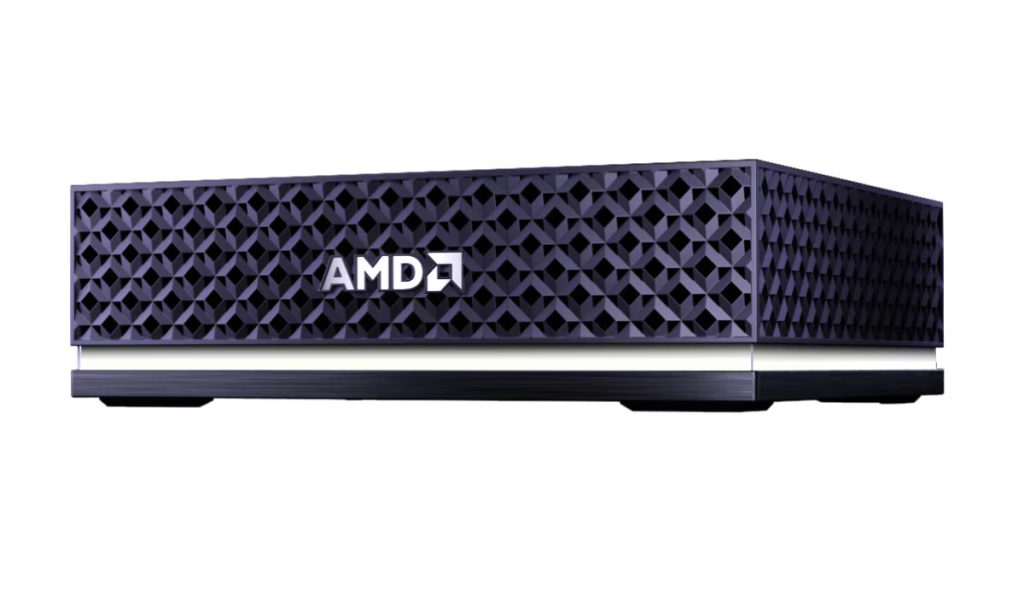
As of June 18, 2026, the AMD Ryzen AI Halo Developer Platform is one of the most interesting “local AI workstation” machines on the market. It is not just another mini PC. It is AMD’s compact, first-party developer box built around the Ryzen AI Max+ 395, also known by the codename Strix Halo.
My blunt take:
Ryzen AI Halo is best understood as a compact local AI inference + software development workstation with unusually large unified memory. It is excellent for local LLMs, coding agents, test automation, design workflows, private code analysis, and AI prototyping. It is not a universal replacement for Nvidia CUDA workstations, cloud GPUs, or frontier models like Claude/GPT/Gemini.
1. What exactly is AMD Ryzen AI Halo?
The AMD Ryzen AI Halo Developer Platform is a small-form-factor AI development desktop designed by AMD for running AI workloads locally. AMD positions it for developers building generative AI apps, agentic workflows, local inference systems, image/video generation workflows, coding assistants, and edge AI prototypes. AMD’s product page says it is built for local AI workloads with 128GB unified memory and support for models up to 200B parameters, with ROCm support for both Linux and Windows. (AMD)
The platform uses the AMD Ryzen AI Max+ 395 processor. That chip combines a high-end Zen 5 CPU, a large integrated Radeon GPU, an XDNA 2 NPU, and a large shared memory pool in one package. AMD’s official specs list 16 cores / 32 threads, Radeon 8060S integrated graphics with 40 RDNA 3.5 compute units, XDNA 2 NPU, 128GB LPDDR5x-8000 memory, 256GB/s memory bandwidth, 2TB M.2 SSD, 10GbE, Wi-Fi 7, Bluetooth 5.4, HDMI 2.1b, 3 USB-C ports plus USB-C power, 120W TDP, and Linux or Windows 11 support. (AMD)
2. Executive summary
| Question | Practical answer |
|---|---|
| Is it good for coding? | Yes. Excellent. 16 Zen 5 cores, 128GB memory, fast SSD, local LLM support. |
| Is it good for local AI? | Yes, especially inference. The 128GB unified memory is the star. |
| Can it replace Claude Max? | Partially. It can replace many daily coding assistant tasks, not all deep reasoning tasks. |
| Can it run 70B models? | Yes, with quantization. Speed depends heavily on runtime/backend/model. |
| Can it run 200B models? | AMD says up to 200B locally, but this should be treated as workload/model/quantization-dependent, not “all 200B models run fast.” |
| Is it good for training large models? | No, not as a primary training machine. It is mostly an inference/prototyping box. |
| Is it better than Nvidia? | For unified memory capacity per compact box, maybe. For CUDA ecosystem maturity, no. |
| Best user | AI developer, local LLM builder, coding-agent developer, privacy-conscious team, edge AI prototyper, heavy software engineer. |
| Worst user | CUDA-first ML engineer, large-scale trainer, heavy 3D renderer, password-cracking/security GPU specialist. |
3. Hardware deep dive
CPU: 16-core Zen 5 engine
The Ryzen AI Max+ 395 gives you 16 Zen 5 CPU cores and 32 threads, which makes the machine genuinely useful as a serious software development workstation. This matters because local AI development is not just GPU inference. You also run containers, vector databases, IDEs, build systems, test suites, browsers, local APIs, emulators, model servers, and automation tools. AMD’s own materials describe the chip as a high-end APU for demanding GenAI and client-PC workloads. (AMD)
For programming, the CPU side is strong enough for:
| Workload | Expected experience |
|---|---|
| VS Code / Cursor / JetBrains | Smooth |
| Docker Compose stacks | Smooth |
| Local databases | Smooth |
| Kafka/Redis/Postgres/Elasticsearch dev setups | Good |
| Local Kubernetes / kind / k3d | Good |
| Unit/integration testing | Very good |
| Rust/Go/Java/Node/Python builds | Very good |
| Android Studio / emulators | Good, depending on OS and graphics stack |
GPU: Radeon 8060S integrated graphics
The Radeon 8060S is not a tiny “display only” iGPU. It has 40 RDNA 3.5 compute units, which puts it in a very different category from normal laptop integrated graphics. AMD describes Ryzen AI Max+ 395 as having a large integrated GPU driven by 40 RDNA 3.5 CUs, and AMD’s official platform spec page lists Radeon 8060S integrated graphics for the Developer Platform. (AMD)
That GPU is important for:
| Use | Why it matters |
|---|---|
| Local LLM inference | GPU acceleration through ROCm/Vulkan/llama.cpp-style backends |
| Image generation | ComfyUI, Stable Diffusion-style workloads, FLUX-class workflows |
| UX/design | GPU-accelerated browsers, design tools, multi-display workflows |
| Video/media | Hardware encode/decode support helps creator workflows |
| Local agents | Can keep local inference running continuously |
But it is still not the same thing as a high-end discrete GPU like an RTX 4090, RTX 5090, RTX 6000, Radeon Pro, or MI300-class accelerator. The Halo advantage is memory capacity and compactness, not absolute GPU brute force.
NPU: XDNA 2, useful but not the main story
The platform includes an AMD XDNA 2 NPU, listed by AMD and retail material as roughly 50 TOPS class. (AMD)
For day-to-day local LLM work, the NPU is not the main engine. The more important components are:
Unified memory + Radeon GPU + ROCm/Vulkan runtime + CPU cores.
The NPU is more relevant for low-power AI features, Windows AI features, certain optimized inference paths, and future edge/agent workloads. For large LLMs, most users should expect to care more about GPU-accelerated runtimes than the NPU.
4. The real magic: 128GB unified memory
This is the reason Ryzen AI Halo is interesting.
Normal AI developers often hit a memory wall. A consumer GPU may be very fast but only have 12GB, 16GB, or 24GB of VRAM. That is fine for small models, but painful for larger LLMs, long context, multi-model workflows, image generation, and local agents.
Ryzen AI Halo has 128GB LPDDR5x unified memory at 8000 MT/s with 256GB/s bandwidth, shared across CPU and GPU. AMD’s Developer Platform spec page confirms those values. (AMD)
AMD has also discussed Variable Graphics Memory, where Ryzen AI Max+ 395 systems with 128GB memory can allocate a very large portion of memory to graphics/AI workloads. AMD previously stated that up to 96GB can be converted to VRAM through AMD Variable Graphics Memory, and a separate AMD technical article says Ryzen AI Max+ 395 with 128GB unified memory can provide up to 112GB allocatable by the GPU in some generative AI contexts. (AMD)
That is why this box can attempt model sizes that normal consumer desktops cannot, even if its GPU compute is not as fast as a high-end Nvidia GPU.
5. Official platform specs
| Category | AMD Ryzen AI Halo Developer Platform |
|---|---|
| CPU | AMD Ryzen AI Max+ 395 |
| CPU cores / threads | 16 cores / 32 threads |
| CPU architecture | Zen 5 |
| GPU | AMD Radeon 8060S integrated graphics |
| GPU architecture | RDNA 3.5 |
| GPU compute units | 40 CUs |
| NPU | AMD XDNA 2 |
| Memory | 128GB LPDDR5x |
| Memory speed | 8000 MT/s |
| Memory bandwidth | 256GB/s |
| Storage | 2TB M.2 SSD |
| Networking | 10GbE, Wi-Fi 7, Bluetooth 5.4 |
| Display | HDMI 2.1b |
| Ports | 3 USB-C ports, 1 USB-C power input |
| TDP | 120W |
| OS | Linux or Windows 11 |
| Size | 150 × 150 × 45.4 mm |
| Weight | Under 1.2 kg |
AMD’s official product page lists these specifications, including the compact dimensions and under-1.2kg weight. (AMD)
6. Price and availability
The platform is currently positioned as a U.S. product. AMD says it is available for purchase and use in the United States and designed/tested for U.S. regulatory requirements. (AMD)
Micro Center opened preorders for the AMD Ryzen AI Halo Developer Platform in June 2026. Micro Center’s page describes it as a compact box for serious on-device AI workloads and lists the same core spec profile: Ryzen AI Max+ 395, 128GB LPDDR5x-8000, 2TB SSD, Radeon 8060S, Wi-Fi 7, Bluetooth 5.4, and 10GbE. (Micro Center)
Current reporting lists the price around $3,999, with separate Linux and Windows 11 Pro variants using effectively the same hardware. Tom’s Hardware reported U.S. preorder availability through Micro Center at $3,999, with pickup dates beginning in July 2026. (Tom’s Hardware)
7. What models can it run?
AMD says Ryzen AI Halo supports models up to 200B parameters locally. That claim is real, but you need to read it carefully. “Supports up to 200B” does not mean every 200B dense model will run fast, or that you can run huge context lengths with no tradeoff. It means that with the right model format, quantization, runtime, and memory allocation, the platform can run very large models locally. (AMD)
A practical model-size guide:
| Model class | Practical experience | Recommendation |
|---|---|---|
| 7B | Very fast | Great for autocomplete, quick helpers, lightweight agents |
| 14B | Fast | Good daily local coding assistant |
| 24B–32B dense | Comfortable to moderate | Best balance for serious local coding |
| 30B MoE | Very attractive | Excellent sweet spot if active parameters are low |
| 70B dense Q4/Q5 | Usable but slower | Good for deeper reviews, not instant autocomplete |
| 100B–128B | Possible, depends heavily on model/runtime | Useful for experiments and high-quality local reasoning |
| 200B | Technically in AMD’s target range | Not what I’d call “no performance issues” for daily coding |
AMD has separately stated that Ryzen AI Max+ 395 systems can run 70B-class LLMs on device, and AMD’s Windows/VGM material discusses enabling up to 128B-parameter LLMs using Vulkan llama.cpp and LM Studio with 96GB VGM on 128GB Ryzen AI Max+ 395 systems. (AMD)
Best model size for daily coding
For your coding/testing/security/design workflow, I would target:
14B for speed, 30B–32B for quality, 70B for difficult reviews.
The “daily driver” sweet spot is probably 30B-class, especially MoE coding models where only part of the model is active per token. That gives you better reasoning than small models without making every response painfully slow.
8. Performance expectations
Independent/community testing is still evolving, and results vary wildly depending on backend, driver, model format, quantization, prompt length, context length, and thermal settings. But the public benchmark direction is useful: Strix Halo can run a wide range of local LLMs, including 70B-class models, and backend choice matters a lot. Community benchmark projects have tested Ryzen AI Max+ 395 / Radeon 8060S / 128GB UMA systems across llama.cpp, Vulkan, ROCm, RADV, AMDVLK, and model suites for coding and creative tasks. (slb350.github.io)
Realistic expectations:
| Task | Expected feel |
|---|---|
| 7B–14B coding assistant | Fast and responsive |
| 30B MoE local assistant | Very usable |
| 32B dense model | Usable, sometimes slower depending on quantization |
| 70B Q4 model | Good quality, but slower; not ideal for instant autocomplete |
| Image generation | Good for local experimentation; not RTX 4090-class |
| Long-context analysis | Memory helps, but speed drops with context size |
| Multi-user local model server | Possible for light team usage, not high-concurrency production |
The correct mental model is:
Ryzen AI Halo gives you local model capacity more than cloud-grade throughput.
It lets you run bigger models locally than most consumer hardware can. It does not magically make all huge models fast.
9. Software stack
ROCm
AMD is pushing ROCm as the main software stack for AI development on Ryzen AI Halo. AMD’s Halo product page says the platform uses AMD ROCm for Linux and Windows AI workflows, and AMD’s ROCm documentation says ROCm 7.2.1 introduces support for Ryzen APUs, enabling local development and inference using PyTorch. (AMD)
ROCm matters for:
| Tool/workload | Why ROCm matters |
|---|---|
| PyTorch | GPU acceleration for ML workflows |
| ComfyUI | AI image workflows |
| llama.cpp/HIP paths | Local LLM acceleration |
| vLLM-style workflows | Potential server-side inference, depending on support |
| Developer experiments | Moving code between local AMD and larger AMD accelerators |
ROCm is much better than it used to be, but Nvidia CUDA is still the smoother path in many AI projects. That is the central software tradeoff.
Vulkan / llama.cpp / LM Studio
AMD has explicitly discussed Vulkan llama.cpp on Windows, LM Studio, and large local LLMs on Ryzen AI Max+ 395 systems. AMD says its VGM upgrade enables up to 128B parameter models in Vulkan llama.cpp on Windows using 96GB VGM. (AMD)
For a practical developer, this means you should expect the best first experience from tools like:
| Tool | Use |
|---|---|
| LM Studio | Easy local model download/run UI |
| Ollama | Local model serving and CLI workflows |
| llama.cpp | Efficient local inference, quantized GGUF models |
| Open WebUI | Browser interface for local models |
| Continue.dev | Local coding assistant inside IDE |
| Roo Code / Cline-style tools | Agentic coding workflows |
| ComfyUI | Image generation and visual AI workflows |
| PyTorch ROCm | ML experimentation and custom workloads |
AMD Playbooks
AMD also offers AI Playbooks: step-by-step guides for building and running AI workloads on AMD hardware, including Ryzen AI APUs and Radeon GPUs. AMD says these playbooks provide reproducible workflows from environment setup to running local models and building real applications. (AMD Developer Portal)
That is useful because the hardest part of AMD local AI has historically been not the silicon — it has been getting the software stack right.
10. Best use cases
A. Local AI coding workstation
This is one of the strongest use cases.
You can run:
- Local coding LLMs.
- Code explanation and refactoring.
- Test generation.
- Repo Q&A.
- Local documentation generation.
- Private code review.
- Local AI agents.
- Vector search over your codebase.
- Local RAG over internal docs.
- AI-assisted debugging.
This is where Ryzen AI Halo can reduce your dependence on expensive cloud AI subscriptions. For routine coding, local models can handle a large share of daily work. For deep reasoning, large refactors, and “understand my whole messy production system” problems, Claude/GPT/Gemini-class frontier models may still be better.
B. Testing and CI simulation
The 16-core CPU and 128GB RAM make it strong for local testing. It should be very comfortable running local services, databases, browser tests, backend stacks, and containerized test environments.
Good examples:
| Workload | Fit |
|---|---|
| Unit tests | Excellent |
| Integration tests | Excellent |
| Browser testing | Good |
| Docker Compose microservices | Excellent |
| Local Kubernetes | Good |
| API load testing | Good for dev-scale |
| Full enterprise CI replacement | No |
C. UX and product design
For UX/product work, Ryzen AI Halo is strong because it is both a fast desktop and an AI box.
Good workflows:
- Figma/design systems.
- Browser dev tools.
- Storybook.
- Local front-end builds.
- Image generation for ideation.
- Product copy and UI text generation.
- Accessibility review with local models.
- Design critique assistants.
- Screenshot-to-code or design-to-code experiments.
It is not necessarily the best machine for heavy 3D rendering, Unreal production, or 8K video effects, but for UX/product/front-end work it is more than enough.
D. Security analysis
This is a very good local security workstation, especially for private/offline analysis.
Good fits:
| Security task | Fit |
|---|---|
| Static code analysis | Very good |
| Dependency/SBOM review | Very good |
| Local AI security review | Very good |
| Container security labs | Very good |
| Reverse engineering tools | Good |
| Malware sandboxing | Good, with careful isolation |
| Fuzzing | Good, especially CPU-heavy targets |
| Threat modeling assistant | Very good |
| Password cracking | Not ideal |
| CUDA-specific security tooling | Not ideal |
For GPU-heavy Hashcat-style workloads, Nvidia discrete GPUs are still usually the better choice because of CUDA maturity and raw GPU throughput.
E. Local agent computer
AMD is explicitly positioning Ryzen AI Halo for agentic AI. AMD’s blog describes it as a compact developer platform for building, testing, and running agent-based and generative AI applications locally without depending on the cloud. (AMD)
This means workflows like:
- A local coding agent running over your repo.
- A browser automation agent.
- A documentation agent.
- A security triage agent.
- A local customer-support simulator.
- A design review agent.
- A background research/RAG assistant.
- A local task planner using private company docs.
The key benefit is predictable cost and privacy. The key limitation is model quality and tool reliability.
11. Ryzen AI Halo vs Claude subscription
This is the part most buyers actually care about.
A $200/month Claude Max-style subscription gives you access to a frontier cloud model. Ryzen AI Halo gives you hardware to run open/local models. They overlap, but they are not the same product.
| Task | Local Ryzen AI Halo | Claude/GPT/Gemini cloud model |
|---|---|---|
| Routine code generation | Good | Excellent |
| Private code review | Excellent privacy | Depends on vendor/privacy plan |
| Large architecture reasoning | Good to mixed | Usually better |
| Local/offline work | Excellent | No |
| Cost predictability | Excellent after hardware purchase | Monthly recurring |
| Model quality | Depends on open model | Frontier quality |
| Setup effort | Higher | Low |
| Long-term experimentation | Excellent | Subscription/API cost |
| Agent workflows | Good, but tinkering needed | Often easier |
My recommendation:
Do not buy Ryzen AI Halo expecting it to “be Claude.” Buy it to run a large share of daily coding, testing, analysis, RAG, and local AI workflows privately. Keep a smaller cloud AI plan for the hardest reasoning tasks.
A realistic target is to move 60–85% of routine AI coding work local, then use frontier cloud models only when the local model struggles.
12. Ryzen AI Halo vs Nvidia DGX Spark
Nvidia DGX Spark is the obvious comparison. Nvidia describes DGX Spark as a compact local AI platform powered by the GB10 Grace Blackwell Superchip, with large local memory and Nvidia’s AI software stack for local agents and large models. (NVIDIA)
Nvidia’s official/developer materials list a price change for DGX Spark Founders Edition from $3,999 to $4,699 due to memory supply constraints. (NVIDIA Developer Forums)
| Category | Ryzen AI Halo | Nvidia DGX Spark |
|---|---|---|
| Main ecosystem | AMD ROCm / Vulkan / open local AI stack | Nvidia CUDA / DGX OS / Nvidia AI stack |
| Memory | 128GB unified | 128GB unified |
| CPU architecture | x86 Zen 5 | Arm Grace-class CPU |
| GPU | Radeon 8060S integrated RDNA 3.5 | Blackwell GPU |
| OS | Linux or Windows 11 | Linux/DGX OS focus |
| Price | Reported around $3,999 | Current Founders Edition MSRP $4,699 |
| Best advantage | x86 compatibility, Windows option, local developer desktop flexibility | CUDA ecosystem, Nvidia AI tooling, stronger AI software maturity |
The simple version:
Choose Ryzen AI Halo if you want x86, Windows/Linux flexibility, and a compact local AI + general dev workstation. Choose DGX Spark if your work is heavily Nvidia/CUDA-first.
13. Ryzen AI Halo vs RTX workstation
A desktop with a Ryzen/Threadripper CPU and RTX 4090/5090/6000-class GPU can be faster for many AI workloads. But it may have less memory available to the GPU unless you buy very expensive professional cards.
| Category | Ryzen AI Halo | RTX workstation |
|---|---|---|
| Physical size | Tiny | Larger |
| Power | Lower | Higher |
| GPU memory | Huge shared memory pool | Limited by GPU VRAM |
| CUDA support | No | Yes |
| Raw GPU speed | Lower than high-end RTX | Higher |
| Local huge models | Strong because of memory | Depends on VRAM |
| Training | Limited | Better |
| Ease of AI tooling | Improving | Usually easiest |
Ryzen AI Halo is attractive when model size/memory matters more than raw GPU speed. RTX workstation wins when CUDA throughput matters more than memory capacity.
14. Ryzen AI Halo vs Mac Studio / Apple Silicon
Apple Silicon also has a strong unified-memory story. The difference is ecosystem and workload preference.
| Category | Ryzen AI Halo | Apple Silicon |
|---|---|---|
| OS | Windows/Linux | macOS |
| AI stack | ROCm/Vulkan/llama.cpp/PyTorch ROCm | MLX/Metal/llama.cpp |
| CPU ISA | x86 | Arm |
| Dev compatibility | Strong for Linux/x86 stacks | Strong for Apple/macOS workflows |
| Local LLM memory | Excellent | Excellent on high-memory configs |
| Enterprise Linux AI dev | Better fit | Less native |
| Creative ecosystem | Good | Excellent for macOS users |
For someone building Linux-based AI services, backend tools, Docker-heavy stacks, and local agents, Ryzen AI Halo may feel more natural than Mac. For a macOS-heavy designer/developer, Apple Silicon can still be smoother.
15. Recommended setup
Best OS choice
For AI development, I would choose:
Linux first, Windows second.
Linux is usually better for ROCm, PyTorch, containers, automation, and reproducible AI environments. Windows is useful if your workflow depends on Windows apps, LM Studio, design tools, or a Windows-first development environment.
A strong setup would be:
| Layer | Recommendation |
|---|---|
| OS | Ubuntu or AMD-supported Linux image if provided |
| Driver stack | Latest supported AMD ROCm stack |
| Model runtime | llama.cpp, Ollama, LM Studio |
| UI | Open WebUI |
| Coding assistant | Continue.dev, Roo Code, Cline-style tooling |
| Image generation | ComfyUI |
| Python ML | PyTorch ROCm |
| Containers | Docker/Podman |
| Vector DB | Qdrant, Chroma, LanceDB, or PostgreSQL pgvector |
| Monitoring | Prometheus/Grafana if running always-on local services |
Suggested local model stack
| Purpose | Model size target |
|---|---|
| Fast autocomplete | 7B–14B coding model |
| Main coding assistant | 14B–32B coding model |
| Strong local reasoning | 30B MoE or 32B dense |
| Heavy code/security review | 70B quantized |
| Experimentation | 100B+ quantized/MoE |
Suggested workflow
Use the machine like this:
- Run a fast 7B–14B model for autocomplete and quick edits.
- Run a 30B-class coding model for most code generation, tests, and explanations.
- Keep a 70B model for harder reviews and architecture questions.
- Use a frontier cloud model occasionally for the tasks where local models fail.
- Build local RAG over your codebase, docs, runbooks, and design specs.
- Use containers to isolate AI apps, security tools, and test environments.
16. What “200B model support” really means
This deserves its own section because it is easy to misunderstand.
A model’s memory requirement depends on:
- Parameter count.
- Quantization level.
- KV cache size.
- Context length.
- Runtime overhead.
- GPU/CPU split.
- Dense vs MoE architecture.
- Batch size and concurrency.
Approximate weight memory only:
| Model | FP16 weights | 8-bit weights | 4-bit weights |
|---|---|---|---|
| 7B | ~14GB | ~7GB | ~3.5GB |
| 14B | ~28GB | ~14GB | ~7GB |
| 32B | ~64GB | ~32GB | ~16GB |
| 70B | ~140GB | ~70GB | ~35GB |
| 128B | ~256GB | ~128GB | ~64GB |
| 200B | ~400GB | ~200GB | ~100GB |
But that table is only model weights. You still need memory for KV cache, runtime overhead, OS, GPU allocation, context window, and application processes.
So when AMD says up to 200B, I interpret that as:
Large quantized models can be made to run locally, especially with careful memory allocation. But “200B” is not the same as “fast, comfortable, daily-driver coding assistant.”
For your daily work, 30B–70B is the realistic serious range.
17. Where it is genuinely excellent
Ryzen AI Halo is excellent for:
- Local coding assistants.
- Private source-code analysis.
- Local RAG over company documents.
- AI agent development.
- LLM app prototyping.
- AI workflow demos.
- Edge AI experiments.
- Local image generation.
- Design/product ideation.
- Test generation and test automation.
- Running multiple dev services at once.
- Learning ROCm and AMD AI development.
- Reducing cloud inference/API costs.
- Working with sensitive data that cannot go to cloud tools.
18. Where it is not ideal
It is not ideal for:
- Large model training.
- CUDA-first AI research workflows.
- Heavy multi-GPU distributed training.
- High-concurrency inference serving.
- GPU password cracking.
- Large-scale video rendering.
- Unreal/3D production workloads needing discrete workstation GPUs.
- Teams standardized on Nvidia CUDA/TensorRT.
- Users who want “zero setup, everything just works.”
The worst mistake would be buying it as a “mini H100” or “Claude replacement box.” It is neither. It is a compact local AI workstation with a special memory advantage.
19. Buying decision
Buy it if:
- You want to run local LLMs seriously.
- You care about privacy and local code analysis.
- You want to reduce recurring cloud AI costs.
- You build AI agents or local AI applications.
- You want one compact machine for coding + AI + testing.
- You prefer x86 and Linux/Windows flexibility.
- You want 128GB memory in a tiny box.
- You are comfortable tuning software.
Do not buy it if:
- You need CUDA above all else.
- You train large models professionally.
- You need maximum tokens/sec.
- You hate troubleshooting drivers and runtimes.
- Your entire AI stack assumes Nvidia.
- You only need normal coding and can use cloud AI.
- You expect local models to equal Claude/GPT frontier models.
20. My practical recommendation for you
Given your interest in coding, testing, UX/design, security analysis, and replacing expensive coding subscriptions, I would treat Ryzen AI Halo as a serious candidate.
The best setup for you would be:
| Use | Tool/model strategy |
|---|---|
| Daily coding | 14B–32B coding model locally |
| Test generation | 14B/30B model with repo context |
| Security review | 30B/70B model plus static scanners |
| UX/design | Figma + local image/text models |
| Documentation | Local RAG + 30B model |
| Hard architecture | Keep Claude/GPT available occasionally |
| Private code | Run local only |
My final verdict:
AMD Ryzen AI Halo Developer Platform is one of the best compact machines right now for serious local AI development, coding agents, and private inference. It can reduce your need for expensive cloud AI subscriptions, but it should be paired with occasional frontier-model access if your work involves difficult architecture, complex debugging, or deep reasoning.
The sweet spot is not “run the biggest model possible.” The sweet spot is:
Run a fast 14B model for quick coding, a 30B-class model for serious work, and a 70B quantized model for deeper reviews. Use cloud AI only when local AI hits its limit.
That is the balanced, professional way to use this platform.
One interesting consideration is hardware refresh planning. AI models are evolving so rapidly that developers may need to evaluate not only current performance requirements but also whether today’s platform can efficiently support next-generation multimodal and agentic workloads without significant architectural changes.
A practical consideration for AI developers is portability across hardware ecosystems. Optimizations that perform exceptionally well on a specific AI platform may not translate seamlessly to other environments, creating challenges when applications move from development to broader deployment. Evaluating portability early can help avoid costly re-engineering later.