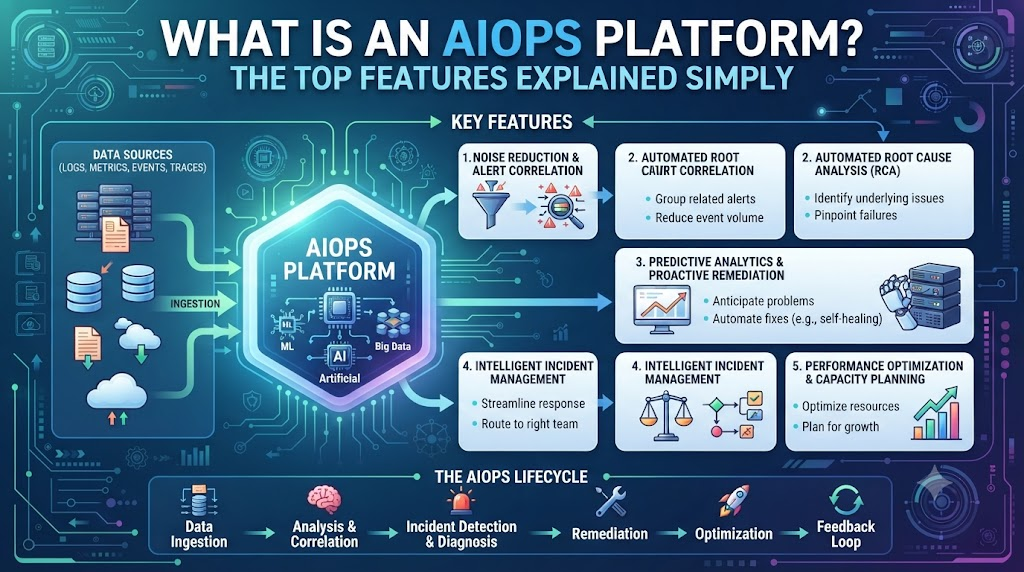
Almost every business today runs on computers. Whether it is an online store, a local bank, or a global shipping company, all of them rely on massive networks of servers, databases, and software to keep things moving. However, as these digital setups grow larger and more complicated, the amount of data they produce is exploding. Human IT teams are trying their hardest to keep up, but it is physically impossible for a person to read through millions of logs and error messages every single day. The sheer volume of information is just too much for a normal tech team to handle manually. This is exactly why AIOps platforms were invented. Think of AIOps (Artificial Intelligence for IT Operations) as a super-smart control room for a company’s computer systems. Instead of just giving IT workers more screens to watch, an AIOps platform actively thinks, analyzes, and acts on its own. It acts like a highly trained assistant that never sleeps, constantly monitoring the health of the entire business network. It connects all the dots, points directly to the root cause of a broken wire, and helps keep the business running smoothly without relying on human guesswork. If you are just starting to learn about this technology and want to understand how it can transform a chaotic tech department into a well-oiled machine, you can find excellent resources and guides at Aiopsschool. In this article, we will look closely at why these systems are so necessary right now, what core features make them work, and how they actually save the day in real-life situations.
Why IT Teams Are Drowning in Data
To understand why AIOps is necessary, you first have to understand the daily nightmare that many IT workers face. In a modern business, every single piece of technology generates data. Your work laptop, the company’s website, the payment processing software, and the physical servers sitting in a back room are all constantly sending out status updates. Every time a customer clicks a button, a log file is created. This means a mid-sized company might generate gigabytes of complex machine data every few hours.
Because of this constant stream of information, IT teams use monitoring tools that are designed to alert them when something goes wrong. But there is a massive flaw in this old way of doing things. These older tools are not very smart. If a server gets slightly warmer than usual, the tool sends an alert. If a network connection slows down for two seconds, it sends an alert. The result is a phenomenon known as “alert fatigue,” where a system blasts out thousands of warning emails and text messages to the IT team every single day.
When you receive a thousand urgent alerts a day, everything feels like an emergency, which means nothing actually is. Exhausted IT workers start to ignore the alarms. It becomes a classic case of the boy who cried wolf. They might set up email filters to send these warnings straight to the trash folder just so they can focus on their actual work. They simply do not have the time to investigate every single notification to see if it is a false alarm or a real crisis.
Unfortunately, this is how real disasters happen. While the team is ignoring the endless stream of fake alarms, a genuine critical failure slips through unnoticed. By the time the IT team realizes that a main server has actually crashed and the website is totally offline, customers are already angry and the company is actively losing money. The human team is quite literally drowning in data, unable to tell the difference between background noise and a massive system failure.
The Core Features Every AIOps Platform Must Have
An AIOps platform is built to stop that exact nightmare from happening. By using artificial intelligence, these tools take the burden off human shoulders. But what exactly does the software do? Here is a deep dive into the top features that make these platforms so powerful, explained in plain English.
Noise Reduction: Silencing the Fake Alarms
The absolute best thing an AIOps platform does is quiet down the IT department. As we mentioned earlier, older tools will send hundreds of alerts for one single problem. If a main network router loses power, all 50 servers connected to it might send their own individual “I am offline!” panic alerts. A human would have to read 50 alerts and try to guess what they all have in common.
An AIOps platform looks at all 50 of those alerts, groups them together using artificial intelligence, and realizes they are all caused by the exact same power issue. Instead of sending the IT team 50 separate emails, the platform sends just one single, clear message: “The main router lost power, which disconnected 50 servers. Go fix the router.” This is called noise reduction. It silences the fake alarms and points the human workers directly to the actual problem.
Predictive Analytics: Seeing the Future
Another incredible feature is the ability to predict the future. Traditional IT work is entirely reactive. The IT team only knows a server is broken after it actually breaks. Then, they have to scramble to fix it while customers complain. This leads to downtime, stress, and lost revenue.
AIOps changes the game by being proactive. The software constantly watches how the systems behave on a normal day. It learns the normal patterns. If it notices that a specific hard drive is slowly filling up with data, or that a server’s memory is slowly leaking over the course of a week, it does the math. The AI can warn the team, saying, “Based on current trends, this server will completely crash at 2:00 PM tomorrow.” This allows the IT team to go fix the issue on Tuesday afternoon, completely preventing the Wednesday outage before it even happens.
Automated Fixing (Self-Healing)
Knowing about a problem is great, but actually fixing it is even better. The most advanced AIOps platforms feature automated remediation, which is a fancy way of saying the system can fix itself without a human ever getting involved.
For example, if a background software program suddenly freezes, a human would normally have to log in and restart it. An AIOps platform can be given permission to handle basic tasks like this on its own. If it sees the program freeze, the AI can automatically hit the restart button, clear out a full temporary folder, or add more digital storage space instantly. The problem is solved in seconds, in the middle of the night, while the human IT staff stays fast asleep.
Comparing Traditional IT Tools vs. Modern AIOps Platforms
To really see the difference, it helps to put the old way of doing things side-by-side with the new way. Here is a simple comparison between a legacy monitoring tool and a modern AIOps platform.
| Feature | Legacy Monitoring Tool | Modern AIOps Platform |
| How They Handle Alerts | Sends hundreds of separate, confusing alerts for every minor glitch. | Groups related alerts together and sends one clear message pointing to the root cause. |
| Ability to Predict Outages | None. Only alerts the team after the system has already crashed. | Analyzes trends to warn the team that a system is going to crash hours or days in advance. |
| Who Fixes the Problem | A human IT worker must log in, read the logs, find the issue, and fix it manually. | The AI can automatically trigger scripts to fix simple problems without human help. |
Looking at the table, it is easy to see why businesses are upgrading. Legacy tools are essentially just dumb alarms. They do not understand what they are looking at; they just know how to ring a bell when a number crosses a certain line. This leaves all the heavy lifting, thinking, and investigating to the human workers, who are already stretched too thin.
A modern AIOps platform acts as an intelligent bridge. It doesn’t just watch; it understands the context of what is happening. By grouping alerts, predicting future issues, and taking action, the software actually does the investigating for the team.
This completely changes the daily life of an IT worker. Instead of spending eight hours a day putting out digital fires and reacting to emergencies, the team can spend their time building new, helpful software for the company. The AIOps platform takes care of the busywork so humans can do the creative work.
Real-World Scenario: A Day in the Life with AIOps
Let’s look at a highly realistic example of how this software works in the real world. Imagine a large, popular bank that has a mobile app. It is Friday morning, which happens to be payday for millions of people. Customers are waking up and logging into the banking app all at the same exact time to check their direct deposits.
Without AIOps, this massive, sudden spike in internet traffic would overwhelm the bank’s main servers. The servers would get too hot, run out of memory, and eventually crash under the weight of so many people logging in. The app would go offline, customers would take to social media to complain, and the bank’s IT team would be running around in a total panic trying to manually turn on backup servers to handle the load.
With an AIOps platform installed, the story is incredibly boring—in the best way possible. At 6:00 AM, the AI notices the internet traffic starting to rise much faster than a normal Tuesday. It compares this data to past payday Fridays and realizes the servers are going to hit their maximum limit in exactly 45 minutes.
Because the platform has automated fixing enabled, it doesn’t even wake up the human IT director. The AI automatically connects to the bank’s cloud provider, turns on ten extra backup servers, and spreads the incoming customer traffic evenly across all of them. The mobile app stays fast and responsive. At 9:00 AM, the IT manager arrives at the office, opens their email, and sees a simple, plain-English report from the AI: “Traffic spiked at 6:45 AM. Added ten servers to prevent a crash. System is healthy.” A total disaster was avoided, and the customers never knew a thing.
How to Choose the Right Platform for Your Business
If you are a manager or a business owner looking to buy an AIOps platform, the choices can be overwhelming. Every tech company claims their software is the smartest and the best. But you should not just buy a tool because it uses fancy buzzwords. The first thing you need to look for is ease of use. The entire point of this software is to make your team’s life easier. If the platform takes a PhD to set up and the dashboards are confusing to look at, your team will simply refuse to use it. Look for platforms that offer clean, simple visual maps of your network.
Secondly, you need to check its integration capabilities. This simply means asking, “Will this new software play nicely with the tools my team already uses?” Your IT department likely already has tools for chatting, tracking support tickets, and hosting servers. A good AIOps platform should plug right into those existing tools seamlessly. It should be able to read data from your current setup and automatically send messages to your team’s chat app when it finds a problem.
Finally, you need to test if the platform’s “brain” is actually smart. Some companies sell basic rule-engines disguised as artificial intelligence. A basic rule-engine just follows strict instructions (e.g., “If server heat reaches 90 degrees, send an email”). Real AIOps uses machine learning, meaning it studies your specific business over time and learns what is normal and what is dangerous without you having to write the rules yourself.
The best advice is to start small. Ask the vendor for a test run. Plug the platform into a small, non-critical part of your business network. Let it run for a few weeks to see if it actually reduces the noise and predicts issues accurately. If it proves its worth and makes your team’s day better, then you can scale it up to cover the whole company.
FAQs
Q1: What does AIOps stand for?
AIOps stands for Artificial Intelligence for IT Operations. It basically means using smart AI software to help run and maintain a company’s computer network.
Q2: Is AIOps going to replace human IT workers?
No, AIOps is not meant to replace humans. It is designed to act as a highly capable assistant that handles boring, repetitive tasks and data sorting so human workers can focus on more important, creative projects.
Q3: Do I need to be a programmer to use an AIOps platform?
Not usually. Modern AIOps platforms are built with visual dashboards that are meant to be user-friendly. While setting it up might require some tech skills, day-to-day use is generally designed to be easy for any IT manager to understand.
Q4: What is alert fatigue?
Alert fatigue happens when computer systems send so many false alarms and warning emails every day that the IT staff becomes exhausted and starts ignoring them, which can lead to real problems being missed.
Q5: How does the system know when a server is going to crash?
The AI studies how the server normally acts over time. If it sees a slow, steady negative change—like a hard drive slowly filling up over a week—it uses math to predict exactly when that drive will hit 100% and crash.
Q6: Can the platform really fix problems on its own?
Yes, through a feature called automated remediation. You can give the AI permission to automatically run simple fixes, like restarting a frozen program or clearing temporary files, without needing a human to click the buttons.
Q7: Will AIOps work with older computer systems?
Most top-tier AIOps platforms are designed to connect with both brand new cloud technology and older, legacy hardware. As long as your older systems can generate data logs, the AI can usually read them.
Q8: How long does it take to set up an AIOps platform?
It depends on the size of the business. For a smaller company, it might take a few weeks to connect everything. The AI also needs a bit of time to “listen” to the network so it can learn what a normal day looks like before it starts making predictions.
Q9: What is the main difference between regular monitoring and AIOps?
Regular monitoring just watches numbers and sends a dumb alarm when a limit is reached. AIOps actually thinks about the data, groups related alarms together, and figures out the root cause of the problem for you.
Q10: Is AIOps only for massive tech companies?
While large tech companies adopted it first, AIOps is now widely used by mid-sized businesses, banks, hospitals, and retail stores. Any business that relies heavily on keeping its computer systems online can benefit from it.
Conclusion
Managing a modern computer network has simply grown beyond human limits. With thousands of devices generating endless streams of data, expecting a human IT team to manually spot every single error is unfair and unsafe for the business. The volume of data creates overwhelming alert fatigue, turning highly trained professionals into stressed-out firefighters who can only react to things after they are already broken.
AIOps platforms offer a much-needed lifeline. By bringing in artificial intelligence to read the data, silence the false alarms, and predict outages before they happen, companies can finally get ahead of their technology problems. These platforms transform chaotic IT departments into calm, proactive teams. When the software takes care of the background noise and the late-night quick fixes, human workers are finally free to focus on building a better, faster, and more reliable business.