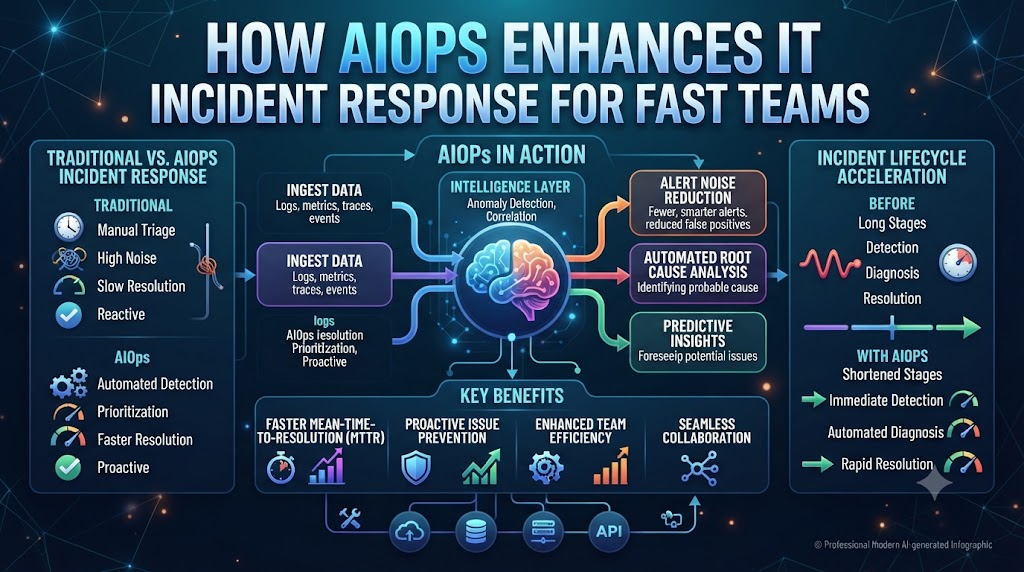
Your phone buzzes at 3 AM. Another server crash alert lights up your screen. You wake up tired, open twenty dashboard tabs, and hunt through thousands of logs. You feel stressed.
Old monitoring tools create too much noise. They send alerts for every small glitch. Your team wastes hours chasing false alarms while real problems sit hidden.
Modern teams need a better way to work. By using smart step-by-step rules and machine learning, you can spot real issues before users notice. You can check out AIOpsSchool to learn more about smart IT tools. Let us explore how smart tech fixes your daily stress.
Why Old Monitoring Tools Fail Your Team
Old tools dump raw data on your desk. They do not know what matters. A high CPU spike might be a normal backup. But old tools still wake you up.
Your team suffers from alert fatigue. When everything is an emergency, nothing is an emergency. Engineers start ignoring alerts. Then a real crash happens, and no one reacts in time.
Smart software looks at the big picture. It groups related alerts into one clean ticket. You see the root cause right away. This saves you precious time during a midnight outage.
Cutting Through Alert Fatigue With Smart Filters
Alert noise is the enemy of fast fixes. When you get fifty alerts for one downed switch, your brain slows down. Smart rules group those fifty alerts into one clear event.
Think of it like a smart email inbox. It puts junk mail away and keeps important messages on top. Your monitoring system should do the same thing.
When your team sees only real problems, stress drops. People focus on fixing code instead of closing useless tickets. Your mean time to resolution drops fast.
Spotting Hidden Server Issues Early
Small problems always lead to big crashes. Memory leaks grow slowly over weeks. Network latency creeps up day by day.
Human eyes miss these slow changes. We look at dashboards only when things break. Smart software watches every metric all day and night.
It learns what normal looks like for your app. If traffic patterns change or memory usage looks weird, it flags the shift early. You fix the bug before users see an error page.
Real-World Story About Server Crasches / Case Studies
- The Midnight Memory Leak: A retail app crashed every Friday night. Old tools only reported the final crash. Smart logs showed a tiny memory leak starting every Thursday afternoon. The team patched the code and stopped the weekly crashes.
- The Ghost Alarm Storm: A network switch failed during a holiday weekend. Old tools sent four hundred individual alerts. A smart grouping rule combined them into one alert. The on-call engineer fixed the switch in ten minutes.
- The Database Slowdown: Users complained about slow checkouts. Dashboards showed normal CPU usage. Smart anomaly detection spotted a locked database table. The team killed the bad query and saved sales.
- The False Positive Trap: A backup job triggered high disk usage alerts every night. Engineers woke up for nothing. Smart correlation learned the backup schedule and silenced the fake alerts.
- The Cloud Billing Spike: An orphaned test script ran wild in the cloud. Old tools ignored the cost change. Smart tracking noticed the unusual resource jump and alerted the lead developer.
- The Load Balancer Failure: Traffic stopped flowing to three web nodes. Traditional checks missed it because the nodes pinged green. Smart endpoint tracing found the routing loop instantly.
- The Certificate Expiry: An SSL certificate expired on a secondary API. Users saw scary warning screens. Smart asset tracking flagged the expiring cert thirty days early.
- The Third-Party API Outage: Payment processing slowed down globally. Your servers looked fine. Smart dependency mapping traced the fault to an external payment vendor.
- The Container Crash Loop: A microservice kept restarting in a loop. Logs scrolled too fast to read. Smart pattern analysis caught the missing config file right away.
- The Storage Disk Fill-Up: Log files filled up a production disk silently. Old thresholds only yelled at 95 percent full. Smart predictive models warned the team at 70 percent.
| Feature | Old Monitoring Tools | Modern AIOps Systems |
| Alert Volume | Thousands of raw alerts | Grouped into single incidents |
| Root Cause | Manual log searching | Automated path finding |
| Prediction | Reactive after crashes | Proactive before failures |
| Noise Level | High fatigue and stress | Low noise and high clarity |
| Setup Time | Weeks of manual rules | Fast auto-baseline setup |
Speeding Up Root Cause Analysis
Finding the bug takes longer than fixing it. You jump from server logs to network traces. You ask five different team members for help.
Smart systems connect the dots for you. They map dependencies across all your cloud services. When an API fails, the system points straight to the bad deployment.
You spend zero time guessing. You read the smart recommendation, test the fix, and close the ticket. Your day runs smoothly.
Common Mistakes and Pitfalls
- Mistake: Turning on every default alert rule in your tool. Fix: Start with critical user journeys and add rules slowly.
- Mistake: Ignoring false positives instead of tuning the baseline. Fix: Train the machine learning model weekly with feedback on bad alerts.
- Mistake: Buying complex tools without training the engineering team. Fix: Run short workshops so everyone knows how to read smart dashboards.
- Mistake: Relying only on AI without checking basic system logs. Fix: Use smart insights as a guide while keeping core debugging skills sharp.
- Mistake: Collecting too much metric data that has no business value. Fix: Audit your metrics monthly and delete unused data streams.
- Mistake: Failing to update system dependencies when cloud apps change. Fix: Automate topology mapping so your dependency graphs stay fresh.
- Mistake: Keeping alert ownership unclear across different shift teams. Fix: Assign clear on-call rotas tied to specific smart alert groups.
- Mistake: Expecting AI to fix code without human review. Fix: Always require human approval before running automated remediation scripts.
- Mistake: Ignoring team feedback about noisy alerts. Fix: Hold weekly review chats to clear out annoying notification triggers.
- Mistake: Setting thresholds too tight for normal traffic waves. Fix: Use dynamic baselines that adjust for weekend and holiday traffic drops.
Step-by-Step Implementation Roadmap
- Audit current alerts: Count how many alerts your team gets every week and list the top ten noisy sources.
- Define core metrics: Pick five key business metrics that matter most to your users, like checkout speed or login success.
- Clean your data sources: Remove duplicate monitoring agents and consolidate your log streams into one place.
- Choose your AIOps platform: Select a tool that fits your cloud stack and offers clear root-cause analysis features.
- Set up auto-baselines: Let the smart system run for one week to learn normal user traffic patterns without sending alerts.
- Group your alert rules: Turn on event correlation to combine noisy alerts into single clean incident tickets.
- Train your team: Teach your engineers how to read smart dashboards and trust the root-cause recommendations.
- Run game days: Simulate a server crash to test if your new smart alerts reduce your team response time.
- Review weekly feedback: Ask your on-call engineers what worked well and adjust your alert thresholds based on their notes.
- Expand automation: Add safe auto-remediation scripts for common issues like restarting stuck worker nodes.
Frequently Asked Questions
1. What does AIOps mean in simple terms?
AIOps uses smart step-by-step rules and machine learning to help IT teams find and fix computer bugs fast.
2. How does AIOps stop alert fatigue?
It groups hundreds of noisy system warnings into one single clean incident ticket for your team.
3. Will AIOps replace human engineers?
No, it helps engineers work faster by doing boring log searches so humans can focus on creative coding fixes.
4. How long does it take to set up smart monitoring?
Most teams get basic smart grouping running within two to four weeks of clean data collection.
5. Is AIOps hard to learn for junior staff?
Not at all, because modern tools use simple English dashboards and clear visual guides instead of complex code.
6. Can small businesses use AIOps tools?
Yes, many cloud platforms offer scalable smart monitoring options that fit tight startup budgets.
7. How does machine learning find hidden bugs?
It learns what normal server traffic looks like and flags any weird spikes before a crash happens.
8. What is the main benefit of automated root-cause analysis?
It cuts down the time spent hunting for bugs from hours down to just a few minutes.
9. How often should we review our alert rules?
You should review your alert rules once a month to remove noisy triggers and keep your team happy.
10. Do I need special coding skills to use these tools?
No special coding skills are needed, as modern dashboards let you set up rules using simple visual clicks.
Final Recommendation and Next Steps
Stop letting alert noise burn out your engineering team. Start small by auditing your current notification lists this week. Pick one noisy service and set up smart alert grouping. Watch how fast your team solves problems when they focus only on real issues. Take action today, clean up your dashboards, and enjoy calm, stress-free on-call shifts.