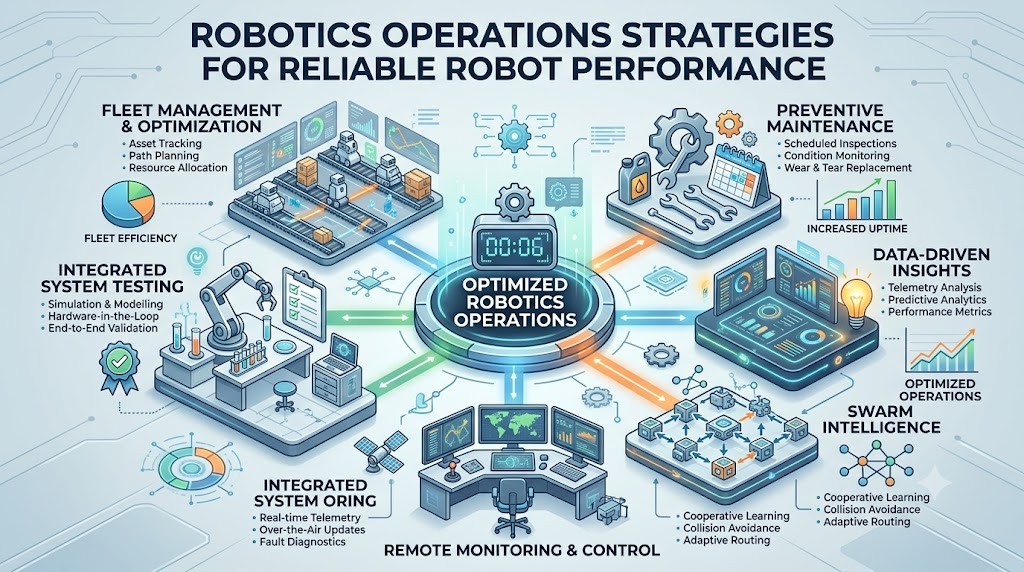
Imagine managing 50 warehouse robots. One robot suddenly loses its connection, another stops because of a navigation issue, and a third needs a software update. Your team must identify each problem, check the robot’s condition, and restore operations without disrupting the entire warehouse. Now imagine handling these tasks manually across hundreds of robots. It becomes difficult to track performance, respond to failures, and keep every robot running safely. This is where RobotOps becomes useful. It brings software engineering, automation, monitoring, and lifecycle management practices into robotics. Instead of treating each robot as a separate machine, RobotOps helps teams manage robotic systems as a connected operational environment. Let’s understand what RobotOps means, why Robot Fleet Management matters, and how you can start building reliable robotics operations.
What Is RobotOps?
RobotOps is the practice of applying software engineering, DevOps, automation, and monitoring methods to the development and operation of robotic systems.
It helps teams manage robots throughout their lifecycle, from simulation and deployment to monitoring, maintenance, and updates.
Traditional robotics often focuses on building and programming a robot. RobotOps also focuses on what happens after the robot starts working in a real environment.
For example, a robotics engineer may develop a warehouse robot that moves packages. A RobotOps team helps ensure the robot receives updates, reports its status, and can be diagnosed when something goes wrong.
Why Is RobotOps Becoming Important?
Robotic systems now operate in different environments, including:
- Manufacturing facilities
- Warehouses
- Hospitals
- Agriculture
- Logistics centers
- Research laboratories
These environments have different operating conditions and risks. A software problem, network failure, or sensor issue can affect operations.
RobotOps provides a structured approach to handling these challenges.
You can explore the broader concepts through RobotOps learning resources to understand how robotics and modern operations practices connect.
Why Does RobotOps Matter?
Running a robot successfully in a laboratory is different from operating it every day in a factory or warehouse.
A robot may work correctly during testing but face unexpected conditions after deployment. Its sensors can become dirty, network connections can fail, or software changes can introduce new problems.
RobotOps helps teams prepare for these situations.
1. Reducing Unplanned Downtime
Downtime means a robot or system is unavailable for its intended work.
For example, a warehouse robot stops in the middle of a delivery route. If the team cannot identify the cause quickly, other robots may face delays.
Monitoring and remote diagnostics can help engineers identify problems and decide on the next action.
RobotOps does not guarantee that downtime will disappear. It provides better ways to detect and respond to operational issues.
2. Managing Software Deployments
Robots depend on software for navigation, movement, communication, and decision-making.
Updating software on one robot may be simple. Updating hundreds of robots requires more planning.
Teams need to consider:
- Which robots should receive the update?
- Has the software been tested?
- Can the update be rolled back?
- Is the robot operating in a safe condition?
- How will the team detect update failures?
Automation and controlled deployment processes help reduce avoidable mistakes.
3. Reducing Manual Monitoring
Checking every robot individually takes time.
A centralized monitoring system can show information about multiple robots in one place. Engineers can review connection status, errors, battery information, and other available data.
Think of it as a control room for a fleet of robots rather than a separate screen for every machine.
4. Supporting Safer Operations
Robots interact with people, equipment, and physical spaces.
A software issue or incorrect sensor reading can create operational and safety concerns. RobotOps supports safety checks, controlled deployments, and incident procedures.
However, monitoring software alone cannot guarantee physical safety. Teams must also follow appropriate hardware safeguards, risk assessments, and safety standards.
What Is Robot Fleet Management?
Robot Fleet Management is the process of monitoring, coordinating, maintaining, and managing multiple robots from a structured system.
A fleet can include warehouse robots, delivery robots, inspection machines, or industrial mobile platforms.
Without fleet management, engineers may need to connect to robots individually. This approach becomes harder as the number of robots grows.
What Does Fleet Management Include?
Common responsibilities include:
- Robot registration and identification
- Status and health monitoring
- Software and configuration management
- Remote diagnostics
- Task and mission coordination
- Battery and charging information
- Maintenance tracking
- Access control
- Incident handling
The exact features depend on the type of robot and the platform being used.
Example: A Warehouse Fleet
Suppose a warehouse has 30 autonomous mobile robots (AMRs).
An AMR is a robot that moves through an environment without requiring continuous manual driving.
The fleet management system may help the team see:
- Which robots are online
- Which robots are charging
- Which robots have reported errors
- Which robots are available for tasks
- Which robots require inspection
Instead of searching for individual robots, the team gets a broader view of the fleet.
Robot Fleet Management is one part of RobotOps. RobotOps covers the wider operational lifecycle, while fleet management focuses on coordinating and maintaining multiple robots.
Key Concepts in Robotics Operations
RobotOps combines several technical areas. You do not need to master everything immediately, but understanding the main concepts helps you build a practical foundation.
1. Telemetry
Telemetry is data collected from a robot and sent to another system for monitoring or analysis.
Examples include battery level, motor temperature, position, speed, and error information.
Imagine a car dashboard showing fuel level and engine warnings. Robot telemetry provides similar operational information, although the data depends on the robot.
Telemetry helps engineers understand what is happening without physically inspecting every machine.
2. Observability
Observability is the ability to understand a system’s internal condition by examining the information it produces.
In robotics, this may include logs, metrics, sensor information, and events.
For example, a robot stops moving. Its logs may show a navigation error, while telemetry may indicate a low battery.
Together, these signals can help engineers investigate the issue.
Monitoring shows that something may be wrong. Observability helps teams investigate why.
3. Robot Lifecycle Management
Robot lifecycle management covers the different stages of a robot’s operational life.
These stages may include:
- Design and development
- Simulation and testing
- Deployment
- Monitoring
- Maintenance
- Software updates
- Retirement or replacement
A robot is not finished when it leaves the development lab. Its software, hardware, and operating environment may change over time.
Lifecycle management helps teams plan for those changes.
4. Predictive Maintenance
Predictive maintenance uses equipment data and analysis to identify signs of possible future failures.
For example, repeated temperature increases in a motor may lead engineers to inspect it.
Predictive maintenance depends on data quality, suitable models, and an appropriate maintenance process. It cannot accurately predict every failure.
5. Incident Management for Robots
Incident management is the process of identifying, responding to, and documenting operational problems.
A robotic incident might involve:
- Loss of network connectivity
- Navigation failure
- Unexpected sensor readings
- Software crashes
- Communication errors
A clear response process helps teams decide who investigates the issue and how operations should resume.
Skills Needed for RobotOps
RobotOps sits between robotics engineering and modern IT operations. The skills you need depend on your role and the type of robots you manage.
1. ROS 2
ROS 2 (Robot Operating System 2) is a robotics software framework that provides tools and communication features for building robotic applications.
It is not a traditional operating system like Windows or Linux.
ROS 2 helps different software components communicate. For example, a navigation component may exchange information with sensors and motion controllers.
Learning ROS 2 topics, nodes, services, and actions provides a useful foundation for robotics software.
2. Robotics Middleware
Middleware is software that helps different components communicate and work together.
In robotics, middleware supports communication between sensors, controllers, navigation systems, and other software components.
Understanding communication patterns, message delivery, and system dependencies helps when diagnosing robotics problems.
3. Simulation Tools
Robot simulation creates a virtual environment where you can test robotic behavior without using a physical robot for every experiment.
Simulation can help you test navigation, obstacle avoidance, and software changes.
It has limits. A simulated environment may not perfectly represent real sensor noise, hardware failures, or physical conditions.
4. Navigation and Perception
Navigation helps a robot determine how to move through an environment.
Perception involves interpreting information from sensors, such as cameras or lidar.
For example, a mobile robot may use lidar to detect obstacles and navigation software to plan a route.
5. DevOps and Automation
Basic DevOps skills can help with:
- Version control
- Automated testing
- Deployment workflows
- Configuration management
- Monitoring
- Incident response
You do not need to become an expert in every DevOps tool. Start with the practices that match your robotics project.
How to Build a RobotOps Workflow
You can begin with a small robotics project and gradually introduce operational practices.
Step 1: Understand the Robot and Its Environment
Start by identifying the robot’s purpose.
Ask:
- What tasks does it perform?
- Which sensors does it use?
- How does it communicate?
- What can cause it to stop?
- What information does the team need to monitor?
For example, an inspection robot may need reliable navigation and camera data, while a warehouse AMR may require route planning and fleet coordination.
Step 2: Simulate Before Physical Deployment
Create a simulated environment and test basic robot behavior.
Try scenarios such as:
- Obstacles appearing in a route
- Loss of communication
- Changes in the environment
- Software configuration changes
Simulation helps identify certain problems earlier, but physical testing remains necessary.
Step 3: Add Monitoring
Identify the signals your team needs to track.
These may include:
- Robot connectivity
- Battery status
- Navigation errors
- Software health
- Sensor warnings
Start with a few useful signals instead of collecting everything without a clear purpose.
Step 4: Introduce Centralized Fleet Management
If you manage multiple robots, use a system that provides a shared operational view.
The system should help you identify individual robots, review their status, and investigate issues.
The right design depends on the robot type, network setup, and operational requirements.
Step 5: Plan Updates and Maintenance
Create a process for testing and deploying software changes.
Use a limited rollout when practical. Monitor the results before expanding the update to additional robots.
Keep maintenance records and document important changes.
Step 6: Prepare an Incident Response Process
Define what happens when a robot fails.
For example:
- Detect the issue.
- Confirm the affected robot.
- Assess operational and safety risks.
- Investigate the cause.
- Apply an approved response.
- Verify recovery.
- Document the incident.
This process gives your team a consistent way to respond.
Tools Used in RobotOps
RobotOps uses different tools for development, testing, monitoring, and operations. The best tool depends on your use case, budget, and team skills.
| Purpose | Example Tools or Technologies | What They Help With |
|---|---|---|
| Simulation | Gazebo, Webots | Testing robot behavior in virtual environments |
| Middleware | ROS 2 | Communication between robotics software components |
| Navigation | Nav2 | Navigation capabilities for supported ROS 2 robots |
| Fleet management | Robot-specific fleet platforms and custom systems | Coordinating and monitoring multiple robots |
| Telemetry | ROS 2 data pipelines and monitoring systems | Collecting and analyzing robot information |
| Automation | CI/CD tools and scripting | Testing and deploying software changes |
These examples are not a complete tool list. Compatibility, hardware support, integration effort, and maintenance requirements should guide your selection.
You can use Robotics Operations resources to explore topics related to robot software, simulation, fleet management, and operational practices.
Best Practices for Robot Fleet Management
A growing robot fleet needs consistent processes. The following practices can help your team manage operations more systematically.
Centralized Monitoring
Use a shared view of robot health and operational status.
This makes it easier to identify affected robots and prioritize investigations.
Remote Diagnostics
When supported by the robot’s design and security controls, remote diagnostics can reduce the need for immediate physical inspection.
Remote access should follow appropriate authentication, authorization, and safety procedures.
Scheduled Software Updates
Plan software updates instead of making uncontrolled changes during active operations.
Test updates first and keep a recovery plan for failed deployments.
Safety Checks
Include safety checks before deployment, maintenance, and operational changes.
Software monitoring should complement, not replace, physical safety systems and established procedures.
Incident Response Plans
Document common failure scenarios and response steps.
For example, define how the team handles communication loss, repeated navigation failures, and software deployment errors.
Common RobotOps Mistakes and How to Avoid Them
Even technically strong teams can face operational problems when they overlook basic practices.
Mistake 1: Skipping Simulation
Some teams move directly from development to physical testing.
How to avoid it: Use simulation where appropriate, then validate important behavior on real hardware.
Mistake 2: No Centralized Monitoring
When each robot has separate monitoring tools, engineers may struggle to identify fleet-wide problems.
How to avoid it: Create a shared monitoring approach with consistent robot identification and useful status information.
Mistake 3: Ignoring Software Update Cycles
Robots may continue running old software because updates are handled manually or without a clear schedule.
How to avoid it: Maintain software versions, test updates, and plan controlled rollouts.
Mistake 4: Collecting Data Without a Purpose
More telemetry does not automatically mean better troubleshooting.
How to avoid it: Decide which information supports specific operational questions. Review data quality and storage needs.
Mistake 5: Treating Every Failure as a Software Problem
A robot’s issue may come from hardware, networking, sensors, the environment, or software.
How to avoid it: Use a structured troubleshooting process that considers the full system.
Real-World Example: A Warehouse Robot Loses Connection
Consider a warehouse where several AMRs move products between storage and packing areas.
One robot suddenly loses its connection to the fleet management system.
Without a centralized operational view, a technician may need to locate the robot, inspect its status, and investigate the network manually.
With an appropriate RobotOps workflow, the team may receive a connectivity alert and identify the affected robot remotely.
The team can then:
- Confirm whether the issue affects one robot or multiple robots.
- Check available connection and system information.
- Assess whether the robot is in a safe condition.
- Investigate network or software-related causes.
- Follow approved recovery procedures.
- Record the incident for future analysis.
The monitoring system does not automatically solve every network problem. Its value comes from helping the team identify issues and respond through a defined process.
This example also shows why fleet management and incident management work together.
Simulation vs. Real-World Testing
Both simulation and physical testing have a role in robotics development and operations.
| Simulation | Real-World Testing |
|---|---|
| Uses a virtual environment | Uses physical hardware |
| Helps test scenarios repeatedly | Reveals physical and environmental behavior |
| Can reduce the need for early physical experiments | Validates actual hardware and surroundings |
| May not fully represent real-world conditions | Requires suitable safety controls |
| Useful before selected deployments | Necessary for appropriate physical validation |
A practical workflow uses simulation to identify certain issues early and physical testing to validate behavior under real conditions.
FAQs
1. What is RobotOps in simple words?
RobotOps means managing robots using software engineering, automation, monitoring, and maintenance practices.
It helps teams manage robotic systems throughout their operational lifecycle.
2. How is RobotOps different from traditional robotics?
Traditional robotics often focuses on designing, programming, and testing robots.
RobotOps also focuses on deployment, monitoring, software updates, troubleshooting, and ongoing operations.
3. What is Robot Fleet Management?
Robot Fleet Management involves managing multiple robots through a coordinated system.
It can include monitoring, software updates, task coordination, diagnostics, and maintenance tracking.
4. Why is fleet management important for warehouses?
Warehouses may use several robots that work in shared spaces.
Fleet management helps teams monitor robot status, coordinate operations, and investigate problems across the fleet.
5. Is ROS 2 required to learn RobotOps?
ROS 2 is useful for many robotics projects, especially those built around its ecosystem.
However, the required skills depend on the robot platform, software architecture, and operational environment.
6. Can RobotOps help reduce robot downtime?
RobotOps can support earlier issue detection, structured troubleshooting, and maintenance planning.
It cannot guarantee that robots will never experience downtime or failures.
7. What is telemetry in robotics?
Telemetry is information collected from a robot and sent to another system.
Examples include battery readings, temperatures, position data, and error information.
8. Why should robots be tested in simulation?
Simulation lets teams test selected robot behaviors in a virtual environment.
It can help identify certain problems before physical deployment, but it does not replace real-world testing.
9. What skills should beginners learn for RobotOps?
Start with robotics fundamentals, ROS 2 where relevant, simulation, basic monitoring, and automation.
Understanding networking, troubleshooting, and software deployment can also support your learning.
10. How can I start learning RobotOps?
Begin with a small robotics project and learn how to develop, simulate, monitor, and maintain it.
Look for tutorials with practical exercises, clear explanations, and projects that connect robotics development with operations.
Conclusion
RobotOps brings robotics development and operational management together. It helps teams think beyond building a robot and focus on monitoring, maintenance, software updates, and reliable day-to-day operations. Robot Fleet Management supports the coordination of multiple robots, while tools such as ROS 2, simulation platforms, and monitoring systems help build a practical workflow. If you want to explore more robotics operations concepts, visit RobotsOps.com and continue learning through relevant technical