Introduction
Alibaba Cloud Model Studio gives access to Qwen models through multiple API modes. At first glance, it looks simple: create an API key, copy the Base URL, export a few environment variables, and start using Qwen inside Claude Code or another AI coding tool.
But there is one very important catch.
Alibaba Cloud has different types of API keys and different base URLs for different billing modes. If you use the wrong key or wrong endpoint, you may face one of these problems:
- Your API bill keeps increasing even after buying the $30 Token Plan.
- Claude Code shows
401 Invalid API-key provided. - The model does not respond even though the subscription is active.
- Usage is charged under normal Model Studio pay-as-you-go instead of Token Plan quota.
- You use a
sk-ws-...workspace key instead of the requiredsk-sp-...Token Plan key. - You use the workspace endpoint instead of the Token Plan endpoint.
- You use the OpenAI-compatible endpoint for Claude Code instead of the Anthropic-compatible endpoint.
This tutorial explains the complete setup, the common mistakes, the correct export commands, and how to verify that Alibaba’s $30 Token Plan is actually being used.
1. Understand the Three Different Alibaba API Modes
Before fixing the issue, understand the difference between the main API modes.
1.1 Normal Model Studio / Pay-as-you-go API
This is the standard Model Studio API usage. You usually get this from:
Dashboard → API Key
The API key may look like:
sk-ws-xxxxx
or a general Model Studio API key.
The workspace API host may look like:
https://ws-xxxxxxxx.ap-southeast-1.maas.aliyuncs.com
Example workspace endpoints:
OpenAI-compatible endpoint:
https://ws-xxxxxxxx.ap-southeast-1.maas.aliyuncs.com/compatible-mode/v1

DashScope endpoint:
https://ws-xxxxxxxx.ap-southeast-1.maas.aliyuncs.com/api/v1
This is not the $30 Token Plan endpoint. If you use this key and this URL, your usage may be billed as normal API usage.
1.2 Token Plan Team Edition
This is the $30 subscription-style plan. Token Plan has its own:
- Dedicated API key
- Dedicated Base URL
- Seat assignment system
- Usage quota
- Team management page
The Token Plan dedicated key must start with:
sk-sp-
For Singapore / International region, the important Token Plan URLs are:
OpenAI-compatible endpoint:
https://token-plan.ap-southeast-1.maas.aliyuncs.com/compatible-mode/v1

Anthropic-compatible endpoint:
https://token-plan.ap-southeast-1.maas.aliyuncs.com/apps/anthropic
Claude Code needs the Anthropic-compatible endpoint.
1.3 Coding Plan
Alibaba also has a separate Coding Plan. This is different from Token Plan.
Coding Plan endpoint for Claude Code usually looks like:
https://coding-intl.dashscope.aliyuncs.com/apps/anthropic
Coding Plan is aimed specifically at AI coding tools such as Claude Code and Qwen Code. Token Plan and Coding Plan are separate. Do not mix their keys and base URLs.
2. The Most Common Problem: You Bought Token Plan but Still Get API Bills
This happens when you bought the Token Plan but your tool is still using the normal workspace key or normal workspace base URL.
Wrong example:
export ANTHROPIC_BASE_URL="https://ws-xxxxxxxx.ap-southeast-1.maas.aliyuncs.com/apps/anthropic"
export ANTHROPIC_API_KEY="sk-ws-xxxxx"
export ANTHROPIC_MODEL="qwen3.7-max"
Why this is wrong:
ws-xxxxxxxx...is the workspace host.sk-ws-...is the workspace key.- This may go through normal Model Studio billing.
- Token Plan credits may not be used.
Correct Token Plan setup:
export ANTHROPIC_BASE_URL="https://token-plan.ap-southeast-1.maas.aliyuncs.com/apps/anthropic"
export ANTHROPIC_API_KEY="sk-sp-xxxxx"
export ANTHROPIC_MODEL="qwen3.7-max"
The key point is simple:
Token Plan = sk-sp key + token-plan endpoint
Workspace API = sk-ws key + workspace endpoint
3. Correct Page to Access Token Plan Team Edition
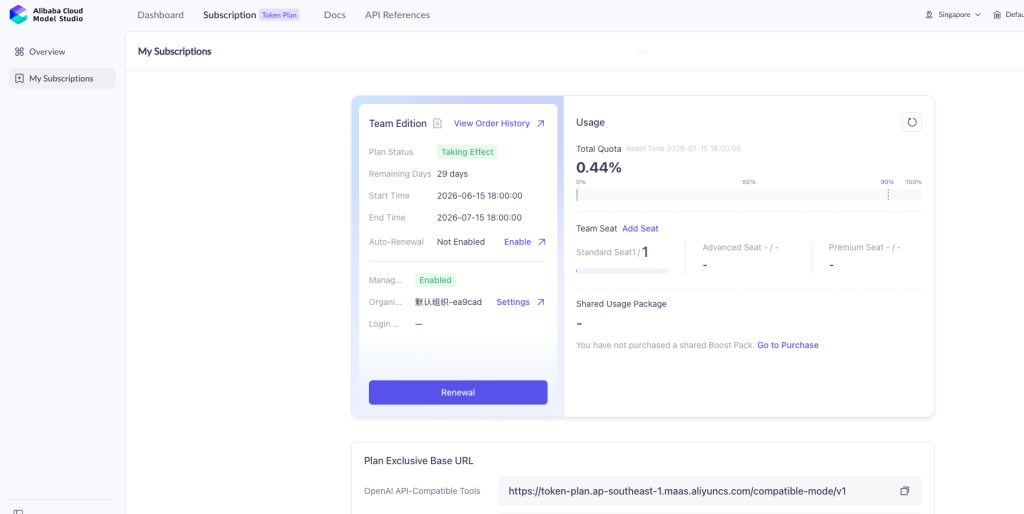
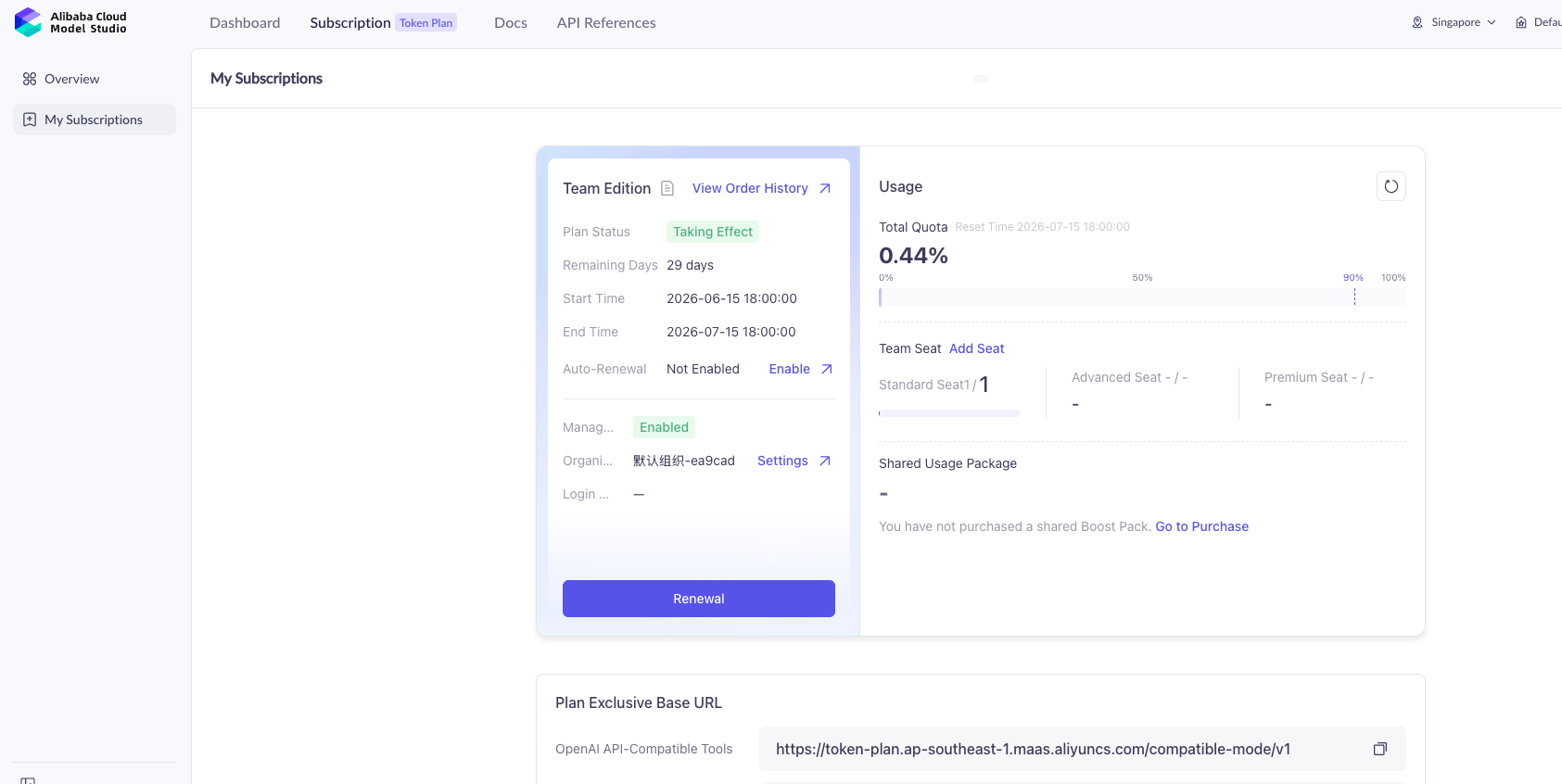
To access the Token Plan Team Edition page, open Alibaba Cloud Model Studio in Singapore region:
https://modelstudio.console.alibabacloud.com/ap-southeast-1?tab=plan#/efm/subscription/token-plan
Make sure the region is:
Singapore / ap-southeast-1
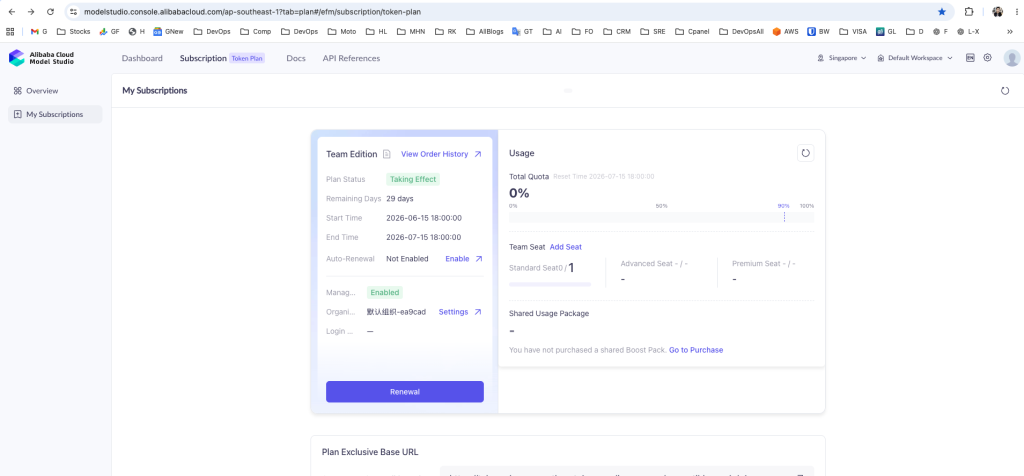
You should see:
Subscription → Token Plan → My Subscriptions
On this page, you should see your Team Edition subscription, remaining days, total quota, seat count, and plan usage.
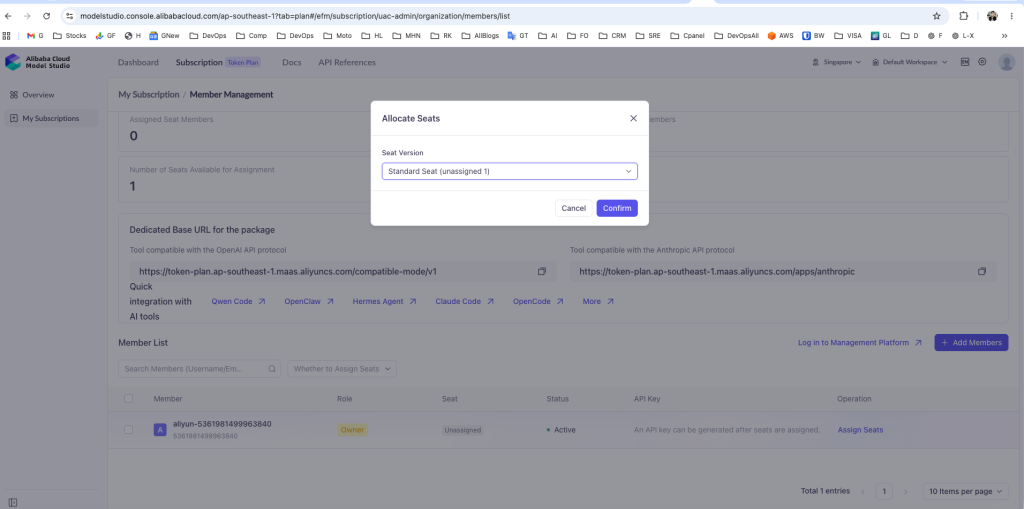
4. Assign the Token Plan Seat First
Buying the Token Plan is not enough. You must assign the seat.
You may see something like:
Standard Seat 0/1
This means:
You purchased 1 seat, but 0 seats are assigned.
Click:
Add Seat
or go to:
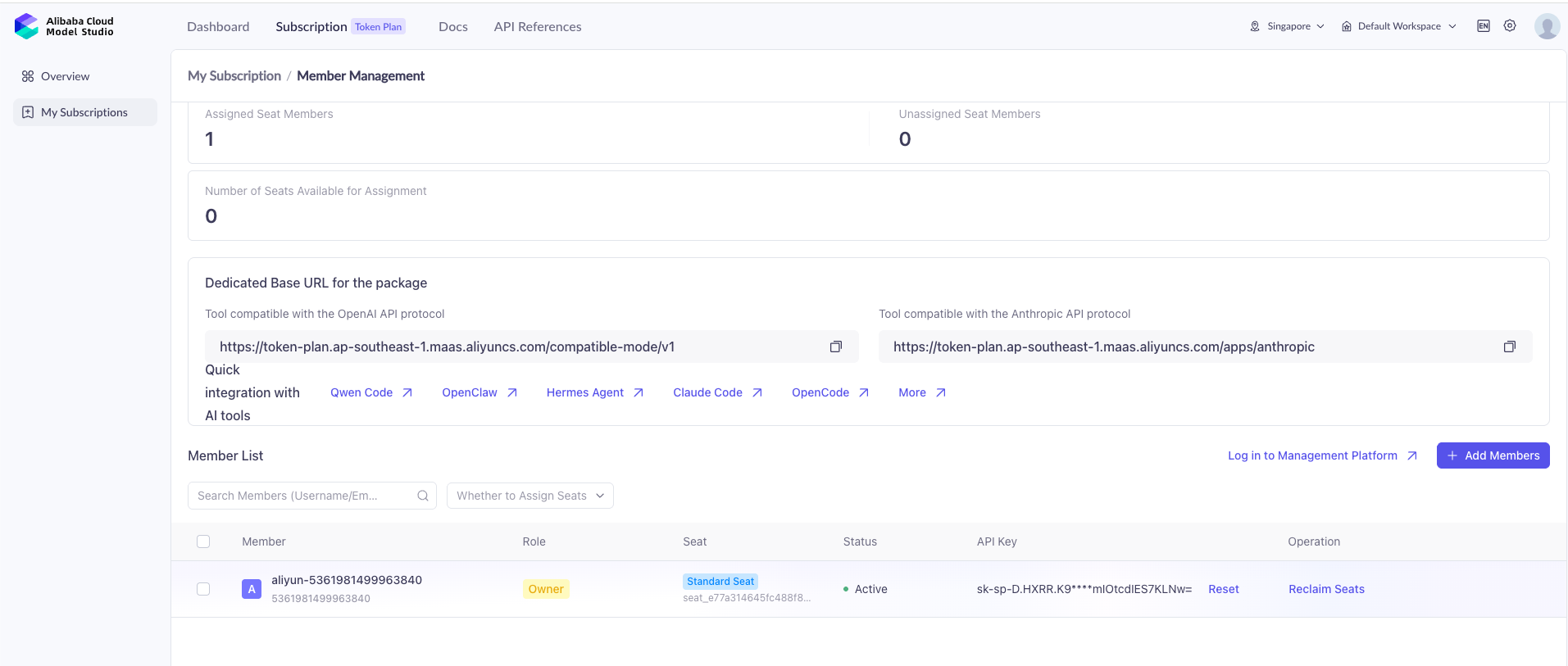
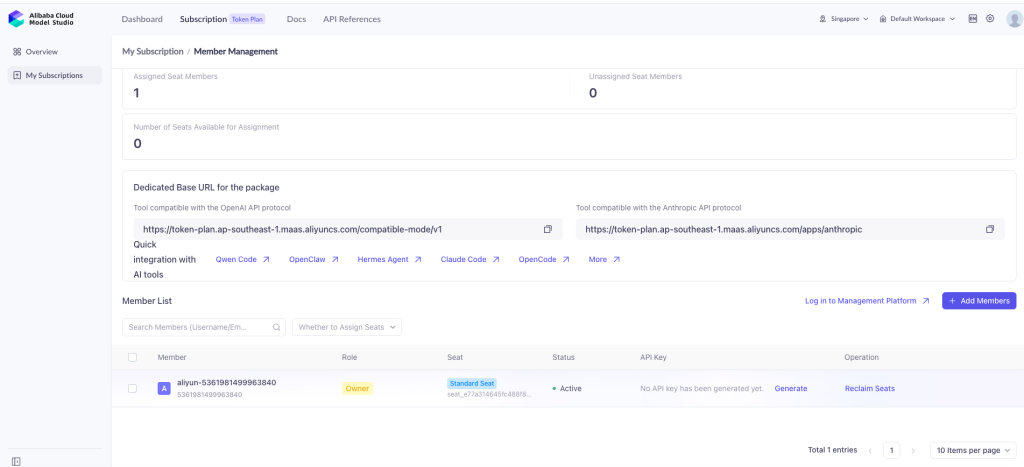
Member Management
Then assign the Standard Seat to your Alibaba account/member.
After assigning, it should change to:
Standard Seat 1/1
Now the member row should show something like:
Seat: Standard Seat
API Key: Generate
5. Generate the Correct Token Plan API Key
After assigning the seat, click:
Generate
This generates the Token Plan dedicated API key.
The correct key format is:
sk-sp-xxxxx
This is the only key you should use for Token Plan.
Do not use:
sk-ws-xxxxx
That is a workspace key and can cause wrong billing or 401 errors with the Token Plan endpoint.
Important: when the key is generated, copy it immediately and store it securely. Many cloud platforms show the full key only once. If you did not copy it, click Reset and create a new key.
6. Correct Base URLs for Token Plan
For OpenAI-compatible tools, use:
https://token-plan.ap-southeast-1.maas.aliyuncs.com/compatible-mode/v1
Use this for tools that ask for:
OpenAI Base URL
OpenAI API Key
Model Name
For Claude Code or Anthropic-compatible tools, use:
https://token-plan.ap-southeast-1.maas.aliyuncs.com/apps/anthropic
Use this for tools that ask for:
ANTHROPIC_BASE_URL
ANTHROPIC_API_KEY
ANTHROPIC_MODEL
Do not confuse these two endpoints.
7. Correct Claude Code Export Commands for Token Plan
For Claude Code, use this setup:
unset ANTHROPIC_API_KEY
unset ANTHROPIC_AUTH_TOKEN
unset ANTHROPIC_BASE_URL
unset ANTHROPIC_MODEL
unset ANTHROPIC_SMALL_FAST_MODEL
unset AI_PROVIDER

export AI_PROVIDER="qwen"
export ANTHROPIC_BASE_URL="https://token-plan.ap-southeast-1.maas.aliyuncs.com/apps/anthropic"
export ANTHROPIC_API_KEY="PASTE_YOUR_SK_SP_KEY_HERE"
export ANTHROPIC_MODEL="qwen3.7-max"

claude
If your Claude Code version expects ANTHROPIC_AUTH_TOKEN, use this instead:
unset ANTHROPIC_API_KEY
unset ANTHROPIC_AUTH_TOKEN
unset ANTHROPIC_BASE_URL
unset ANTHROPIC_MODEL
unset ANTHROPIC_SMALL_FAST_MODEL
unset AI_PROVIDER

export AI_PROVIDER="qwen"
export ANTHROPIC_BASE_URL="https://token-plan.ap-southeast-1.maas.aliyuncs.com/apps/anthropic"
export ANTHROPIC_AUTH_TOKEN="PASTE_YOUR_SK_SP_KEY_HERE"
export ANTHROPIC_MODEL="qwen3.7-max"

claude
Do not set both ANTHROPIC_API_KEY and ANTHROPIC_AUTH_TOKEN unless you know your tool needs it. In most cases, set only one.
8. Verify Your Environment Before Running Claude Code
Before running Claude Code, verify the environment without printing the full key:
echo "BASE=$ANTHROPIC_BASE_URL"
echo "MODEL=$ANTHROPIC_MODEL"
echo "KEY_PREFIX=$(echo "$ANTHROPIC_API_KEY" | cut -c1-6)"
echo "KEY_LENGTH=${#ANTHROPIC_API_KEY}"
Expected output:
BASE=https://token-plan.ap-southeast-1.maas.aliyuncs.com/apps/anthropic
MODEL=qwen3.7-max
KEY_PREFIX=sk-sp-
KEY_LENGTH=greater than 0
If you use ANTHROPIC_AUTH_TOKEN, verify with:
echo "BASE=$ANTHROPIC_BASE_URL"
echo "MODEL=$ANTHROPIC_MODEL"
echo "AUTH_TOKEN_PREFIX=$(echo "$ANTHROPIC_AUTH_TOKEN" | cut -c1-6)"
echo "AUTH_TOKEN_LENGTH=${#ANTHROPIC_AUTH_TOKEN}"
echo "API_KEY_LENGTH=${#ANTHROPIC_API_KEY}"
Expected output:
AUTH_TOKEN_PREFIX=sk-sp-
AUTH_TOKEN_LENGTH=greater than 0
API_KEY_LENGTH=0
9. Common Error: 401 Invalid API-key Provided
Error message:
API Error: 401 Invalid API-key provided.
For details, see:
https://www.alibabacloud.com/help/en/model-studio/error-code#apikey-error
This error usually means one of the following:
Cause 1: Empty key
Wrong:
export ANTHROPIC_AUTH_TOKEN=""
This sends an empty API key.
Fix:
export ANTHROPIC_API_KEY="PASTE_REAL_SK_SP_KEY_HERE"
Then verify:
echo "KEY_LENGTH=${#ANTHROPIC_API_KEY}"
The length must be greater than 0.
Cause 2: Wrong key type
Wrong:
sk-ws-xxxxx
Correct:
sk-sp-xxxxx
For Token Plan, the key must start with sk-sp-.
Cause 3: Wrong base URL
Wrong for Token Plan:
https://ws-xxxxxxxx.ap-southeast-1.maas.aliyuncs.com/apps/anthropic
Correct for Token Plan + Claude Code:
https://token-plan.ap-southeast-1.maas.aliyuncs.com/apps/anthropic
Cause 4: Seat not assigned
If your Token Plan page shows:
Standard Seat 0/1
then the seat is not assigned. Assign the seat first.
Correct status:
Standard Seat 1/1
Cause 5: API key not generated after seat assignment
After assigning the seat, the member row may show:
API Key: No API key has been generated yet.
Click:
Generate
Then copy the generated sk-sp-... key.
Cause 6: Old shell config is overriding your new setup
Check old configuration files:
grep -R "ANTHROPIC\|sk-ws\|ws-ez\|dashscope\|token-plan\|qwen" \
~/.claude ~/.claude.json ~/.zshrc ~/.bashrc ~/.bash_profile 2>/dev/null
Remove old values that point to workspace endpoints such as:
ws-xxxxxxxx.ap-southeast-1.maas.aliyuncs.com
Cause 7: Claude Code was already running before you changed exports
Environment variables are loaded when the process starts. If Claude Code is already running, new exports will not affect it.
Fix:
Press Ctrl + C
Start a new terminal
Set exports again
Run claude again
10. Common Error: “Please run /login”
Error message:
Please run /login · API Error: 401 Invalid API-key provided.
This may look like a login issue, but in this case it is usually still an API key issue.
If you are using Alibaba Qwen through Claude Code, /login is not the real fix. The real fix is usually:
- Correct
ANTHROPIC_BASE_URL - Correct
sk-sp-...Token Plan API key - Correct model name
- Correct environment variable
- Restart Claude Code
You can also mark Claude onboarding complete if needed:
python3 - <<'PY'
import json, pathlib

p = pathlib.Path.home() / ".claude.json"
data = {}

if p.exists():
    try:
        data = json.loads(p.read_text())
    except Exception:
        data = {}

data["hasCompletedOnboarding"] = True
p.write_text(json.dumps(data, indent=2))
print("Claude onboarding marked complete")
PY
Then restart Claude Code:
claude
11. Which Model Should You Use?
For the best Qwen 3.7 model:
qwen3.7-max
Use this when you want:
- Strong reasoning
- Better planning
- Complex debugging
- Architecture suggestions
- Larger code understanding
- High-quality technical writing
- Deep analysis
For coding-specific usage, also test Qwen Coder models if your plan supports them:
qwen3-coder-next
qwen3-coder-plus
qwen3-coder-flash
General suggestion:
Best Qwen 3.7 model: qwen3.7-max
Best coding-specialized model: qwen3-coder-next or qwen3-coder-plus
Fast/cheap coding model: qwen3-coder-flash
Balanced general model: qwen3.5-plus
If qwen3.7-max gives a model-not-supported error under your plan, test:
export ANTHROPIC_MODEL="qwen3.5-plus"
claude
Then test the other available models from your Alibaba Model Studio plan.
12. Direct Qwen API vs Claude Code Setup
There are two common ways to use Qwen.
Approach A: Use Qwen directly through OpenAI-compatible API
Use this if your tool supports OpenAI-compatible endpoints.
Base URL:
https://token-plan.ap-southeast-1.maas.aliyuncs.com/compatible-mode/v1
API key:
sk-sp-xxxxx
Example curl:
curl -sS https://token-plan.ap-southeast-1.maas.aliyuncs.com/compatible-mode/v1/chat/completions \
  -H "Content-Type: application/json" \
  -H "Authorization: Bearer $QWEN_API_KEY" \
  -d '{
    "model": "qwen3.7-max",
    "messages": [
      {"role": "user", "content": "Say ok"}
    ]
  }'
Use this for:
- OpenAI-compatible tools
- API testing
- Some IDE extensions
- Custom integrations, if allowed by your plan terms
Approach B: Use Qwen through Claude Code
Use this if you are running Claude Code and want Alibaba Qwen as the backend.
Base URL:
https://token-plan.ap-southeast-1.maas.aliyuncs.com/apps/anthropic
API key:
sk-sp-xxxxx
Example:
export AI_PROVIDER="qwen"
export ANTHROPIC_BASE_URL="https://token-plan.ap-southeast-1.maas.aliyuncs.com/apps/anthropic"
export ANTHROPIC_API_KEY="PASTE_SK_SP_KEY_HERE"
export ANTHROPIC_MODEL="qwen3.7-max"

claude
Use this for:
- Claude Code
- Anthropic-compatible tools
- Agent-style coding workflows
13. How to Confirm Token Plan Is Actually Being Used
After running Claude Code with the correct sk-sp-... key and Token Plan endpoint, go back to:
Model Studio → Subscription → Token Plan → My Subscriptions
Check the Usage section.
If it shows usage such as:
Usage: 0.44%
then your Token Plan quota is being consumed.
That is the confirmation you want.
Also check your normal Alibaba billing area. If you are using the Token Plan correctly, regular pay-as-you-go charges should not increase for the same Claude Code usage.
14. Permanent Setup on Linux or macOS
If the setup works, save it permanently in your shell config.
For Bash:
cat >> ~/.bashrc <<'EOF'

# Alibaba Qwen Token Plan for Claude Code
export AI_PROVIDER="qwen"
export ANTHROPIC_BASE_URL="https://token-plan.ap-southeast-1.maas.aliyuncs.com/apps/anthropic"
export ANTHROPIC_API_KEY="PASTE_SK_SP_KEY_HERE"
export ANTHROPIC_MODEL="qwen3.7-max"
EOF

source ~/.bashrc
For Zsh:
cat >> ~/.zshrc <<'EOF'

# Alibaba Qwen Token Plan for Claude Code
export AI_PROVIDER="qwen"
export ANTHROPIC_BASE_URL="https://token-plan.ap-southeast-1.maas.aliyuncs.com/apps/anthropic"
export ANTHROPIC_API_KEY="PASTE_SK_SP_KEY_HERE"
export ANTHROPIC_MODEL="qwen3.7-max"
EOF

source ~/.zshrc
Security note: saving API keys in shell files is convenient but not the most secure method. For production or shared servers, use a secrets manager or restricted environment file.
15. Safer Setup Using a Separate Environment File
Create a separate file:
nano ~/.qwen-token-plan.env
Add:
export AI_PROVIDER="qwen"
export ANTHROPIC_BASE_URL="https://token-plan.ap-southeast-1.maas.aliyuncs.com/apps/anthropic"
export ANTHROPIC_API_KEY="PASTE_SK_SP_KEY_HERE"
export ANTHROPIC_MODEL="qwen3.7-max"
Restrict permissions:
chmod 600 ~/.qwen-token-plan.env
Load it when needed:
source ~/.qwen-token-plan.env
claude
This is cleaner than putting the key directly into every shell profile.
16. Important Security Warning
Never paste your API key into:
- Chat messages
- Public GitHub repositories
- Screenshots
- Blog posts
- Terminal recordings
- Shared documents
If you accidentally expose a key, reset it immediately.
For Token Plan:
Subscription → Token Plan → My Subscriptions → Member Management → Reset
Then copy the new sk-sp-... key.
17. Quick Troubleshooting Checklist
Use this checklist if Claude Code fails.
Check 1: Is the seat assigned?
Correct:
Standard Seat 1/1
Wrong:
Standard Seat 0/1
Check 2: Is the key generated?
Correct:
API Key: sk-sp-...
Wrong:
No API key has been generated yet.
Check 3: Is the key prefix correct?
Correct:
sk-sp-
Wrong:
sk-ws-
Check 4: Is the Base URL correct for Claude Code?
Correct:
https://token-plan.ap-southeast-1.maas.aliyuncs.com/apps/anthropic
Wrong:
https://token-plan.ap-southeast-1.maas.aliyuncs.com/compatible-mode/v1
The OpenAI-compatible URL is not for Claude Code.
Check 5: Is the key empty?
Run:
echo "KEY_LENGTH=${#ANTHROPIC_API_KEY}"
If output is:
KEY_LENGTH=0
the key is empty.
Check 6: Is old config overriding the new one?
Run:
grep -R "ANTHROPIC\|sk-ws\|ws-ez\|dashscope\|token-plan\|qwen" \
~/.claude ~/.claude.json ~/.zshrc ~/.bashrc ~/.bash_profile 2>/dev/null
Remove old workspace URLs and old keys.
Check 7: Did you restart Claude Code?
After changing environment variables, stop and restart Claude Code:
Ctrl + C
claude
18. Final Working Configuration
This is the final recommended Claude Code configuration for Alibaba Qwen with the $30 Token Plan in Singapore region:
unset ANTHROPIC_API_KEY
unset ANTHROPIC_AUTH_TOKEN
unset ANTHROPIC_BASE_URL
unset ANTHROPIC_MODEL
unset ANTHROPIC_SMALL_FAST_MODEL
unset AI_PROVIDER

export AI_PROVIDER="qwen"
export ANTHROPIC_BASE_URL="https://token-plan.ap-southeast-1.maas.aliyuncs.com/apps/anthropic"
export ANTHROPIC_API_KEY="PASTE_SK_SP_KEY_HERE"
export ANTHROPIC_MODEL="qwen3.7-max"

echo "BASE=$ANTHROPIC_BASE_URL"
echo "MODEL=$ANTHROPIC_MODEL"
echo "KEY_PREFIX=$(echo "$ANTHROPIC_API_KEY" | cut -c1-6)"
echo "KEY_LENGTH=${#ANTHROPIC_API_KEY}"

claude
Expected verification:
BASE=https://token-plan.ap-southeast-1.maas.aliyuncs.com/apps/anthropic
MODEL=qwen3.7-max
KEY_PREFIX=sk-sp-
KEY_LENGTH=greater than 0
Conclusion
The main mistake many users make is assuming that after purchasing the Alibaba Cloud $30 Token Plan, their existing API key will automatically start using the subscription quota. That is not how it works.
To use Token Plan correctly, you need four things:
1. Singapore region / ap-southeast-1
2. Assigned Token Plan seat
3. Dedicated sk-sp-... API key
4. Token Plan Base URL
For Claude Code, the correct Base URL is:
https://token-plan.ap-southeast-1.maas.aliyuncs.com/apps/anthropic
For OpenAI-compatible tools, the correct Base URL is:
https://token-plan.ap-southeast-1.maas.aliyuncs.com/compatible-mode/v1
If you use a workspace key like sk-ws-... or a workspace URL like ws-xxxxxxxx.ap-southeast-1.maas.aliyuncs.com, your Token Plan quota may not be used and normal API billing may continue.
The clean formula is:
Token Plan = sk-sp key + token-plan endpoint
Claude Code = /apps/anthropic
OpenAI-compatible tools = /compatible-mode/v1
Once configured correctly, usage should appear under the Token Plan usage dashboard, and Claude Code should work with Qwen models through Alibaba Cloud.
The guide focuses on fixing setup issues, but a useful next step would be comparing response quality before and after resolving the billing and authentication problems. Understanding whether configuration changes affect coding performance would be valuable for developers evaluating the platform.
A useful addition would be discussing operational safeguards for API credential management. As teams integrate multiple AI providers, managing key rotation, environment segregation, and access auditing becomes increasingly important. Many authentication issues stem not from the API itself but from inconsistencies in credential handling across development and production environments.