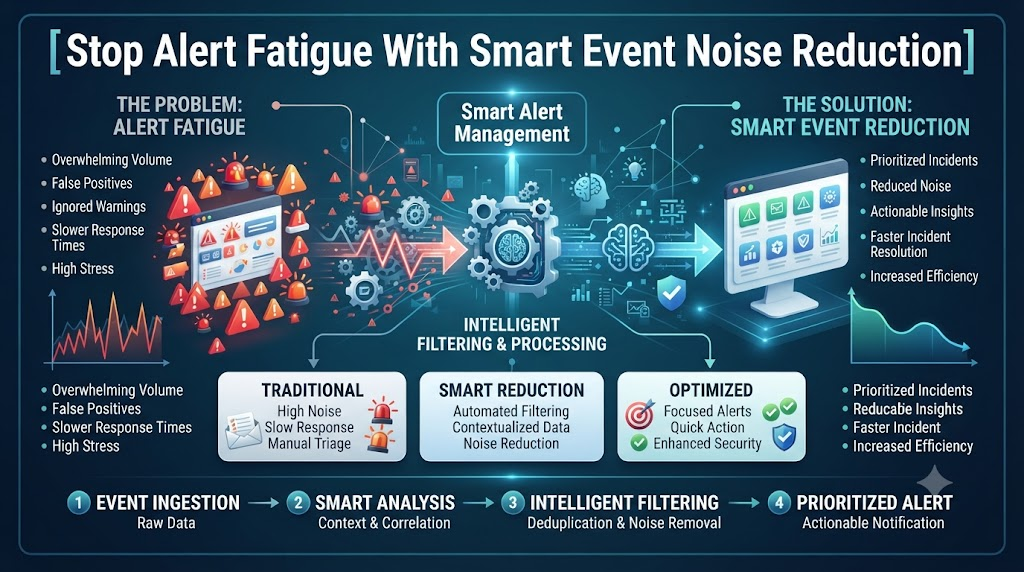
Your phone buzzes at two in the morning. You wake up with a jolt, roll out of bed, and open your laptop. You expect to find a massive server crash. Instead, you see a minor warning about a slow disk cache that fixed itself ten minutes ago. You sigh, close your laptop, and try to go back to sleep. This happens three more times before sunrise. By morning, you feel exhausted, cranky, and completely burned out.
This nightmare is the daily reality for millions of system administrators and tech workers around the world. Traditional monitoring tools scream at you for every tiny blip. They send thousands of raw alerts straight to your inbox and pager. Most of these alerts are false alarms or duplicate warnings. When everything is marked as urgent, nothing is truly urgent. Your team drowns in a flood of digital noise, which makes it easy to miss the one real fire that matters.
You need a better way to handle this chaos. Smart event noise reduction changes how you deal with system monitoring. It uses advanced automation and pattern matching to group related alerts together. It filters out the meaningless chatter and sends only real problems to your screen. To master these modern methods and keep your server room calm, check out expert guides and training resources at AIOpsSchool. Let us look at how you can clean up your alert pipeline and bring peace back to your workday.
What Is Event Noise and Why Does It Hurt?
Event noise is the endless stream of useless messages that your servers and apps spit out all day long. Every time a CPU spikes for a second or a network packet drops, your tools panic. They generate an alert and throw it right at you.
When you get too many alerts, your brain starts to shut down. This problem is called alert fatigue. You stop reading the messages closely. You just click delete or dismiss without checking what is going wrong.
Bad monitoring hurts your company culture, too. Good engineers get tired of waking up for fake emergencies. They update their resumes and quit. Fixing your alert noise keeps your best team members happy and keeps your systems safe.
The Hidden Costs of Constant Server Alarms
You might think that a noisy pager is just an annoying part of the job. But bad alerts cost your company real money and hurt your product.
When your team spends all night chasing false alarms, they have no energy left for actual product work. Features ship late, bugs stay in the code longer, and customers get frustrated. Your business growth slows down to a crawl.
Constant stress leads to poor choices during real crises. If an engineer is half-asleep from five fake pages, they might make a mistake when a real database failure hits. Cutting down the noise protects your revenue and your mental health.
How Smart Filtering Cuts Through the Clutter
Smart filtering acts like a bouncer for your server room. It stands at the door and checks every alert before it reaches your phone.
If ten servers fail because the main power switch tripped, the old tools send ten separate pages. Smart filtering sees the root cause and sends just one master alert. It tells you the power switch is dead, and hides the rest.
This simple grouping saves your sanity. You see the big picture instantly without scrolling through a wall of text. You can focus on fixing the main issue right away.
Moving From Reactive Firefighting to Proactive Care
Most tech teams live in a constant state of panic. Something breaks, they fix it, and they wait for the next break. This is reactive work, and it burns people out fast.
Smart event reduction helps you move to proactive care. When your alert list is clean, you can spot slow trends before they turn into crashes. You can see that a hard drive is filling up over three weeks, instead of finding out when it hits one hundred percent.
Fixing problems before they hurt users feels amazing. Your customers enjoy better uptime, and your boss sees fewer sudden outages. You become a hero instead of a firefighter.
Real-World Story About Server Crashes and Alert Floods
- Scenario 1: A massive cloud database lost connection during a routine network update, triggering over five thousand distinct alert tickets within a single minute across forty different support queues.
- Scenario 2: An overactive monitoring script flagged every minor memory blip on a web cluster, waking up three junior engineers at midnight for issues that resolved themselves in seconds.
- Scenario 3: A forgotten test script flooded the staging environment with fake error logs, masking a real security breach that was happening on the payment gateway server.
- Scenario 4: A retail website crashed on Black Friday because the team ignored a quiet warning about expired SSL certificates hidden underneath thousands of useless disk space alerts.
- Scenario 5: A banking app suffered a two-hour outage because the primary log aggregator crashed from data overload, leaving the operations team completely blind to incoming transactions.
- Scenario 6: A faulty temperature sensor in a server rack sent twenty thousand spam emails to the management team, causing their corporate mail server to crash from the volume.
- Scenario 7: A software update changed a log format, causing every microservice to throw syntax warnings that looked like critical failures to the automated alert dispatchers.
- Scenario 8: A tired night-shift engineer silenced a noisy pager channel just as a real memory leak started, missing the exact moment the main production cluster ran out of RAM.
- Scenario 9: A misconfigured load balancer rejected valid user traffic while generating billions of silent debug events that filled up the local hard drive storage completely.
- Scenario 10: A telecom provider failed to spot a fiber cut because the network management system got stuck processing a massive backlog of redundant interface status changes.
Comparing Traditional Monitoring vs Modern AIOps
| Feature | Traditional Monitoring | Modern AIOps Systems |
| Alert Volume | Thousands of raw, unlinked messages | Clean streams grouped by root cause |
| Noise Control | Manual rules that break constantly | Self-learning filters that adapt over time |
| Response Speed | Slow because humans must sort the chaos | Fast because the real issue is highlighted |
| Team Burnout | High due to constant false alarms | Low due to calm, meaningful pages |
| Setup Effort | Simple at first, but hard to maintain later | Takes planning, but saves time down the road |
Common Mistakes and Pitfalls in Alert Management
- Mistake: Setting every single warning to page the on-call engineer immediately. Solution: Categorize alerts by actual business impact and reserve pages for true customer-facing outages only.
- Mistake: Copying alert rules from another company without checking your own system needs. Solution: Build your monitoring rules based on your unique app architecture and past incident data.
- Mistake: Ignoring alert hygiene and letting old rules pile up for years. Solution: Run a monthly review to delete unused alert rules and update stale thresholds.
- Mistake: Relying on a single threshold for all servers regardless of their workload. Solution: Tune your thresholds based on normal usage patterns for each specific machine.
- Mistake: Failing to document what an alert actually means or how to fix it. Solution: Add a direct runbook link to every single alert message your team receives.
- Mistake: Treating symptoms instead of fixing the root cause of recurring alerts. Solution: Invest time in patching the underlying code or hardware issue causing the repeating warning.
- Mistake: Giving too many people permission to create new alert rules without review. Solution: Set up a central approval process for adding new alerts to the production pager.
- Mistake: Not testing your alert pipeline to see if it works under heavy loads. Solution: Run regular game days where you simulate failures to test your alert quality.
- Mistake: Keeping alert channels loud across all team communication tools. Solution: Use quiet channels for low-priority logs and reserve direct pings for critical blocks.
- Mistake: Forgetting to measure your alert accuracy over time. Solution: Track your false positive rate every month and adjust your filters to drive that number down.
Step-by-Step Implementation Roadmap
- Step 1: Audit your current alert volume by counting how many emails, texts, and pages your team receives each week.
- Step 2: Categorize every existing alert into three clear buckets: critical outages, minor warnings, and useless noise.
- Step 3: Turn off or downgrade any alert that falls into the useless noise bucket without hesitation.
- Step 4: Group related infrastructure components together so your tools know which servers belong to the same application stack.
- Step 5: Choose a modern machine learning or rule-based grouping tool to bundle duplicate alerts into single incidents.
- Step 6: Write clear, short runbook guides that tell an engineer exactly what steps to take when a specific alert fires.
- Step 7: Train your entire operations team on the new filtered alert workflow and explain why the changes matter.
- Step 8: Monitor your on-call team’s sleep quality and ticket resolution speed for the first thirty days after rollout.
- Step 9: Adjust your alert thresholds based on real feedback from the engineers who carry the pager each week.
- Step 10: Schedule a quarterly review meeting to keep your alert pipeline clean, fast, and free of useless chatter.
Frequently Asked Questions
1. What is alert fatigue and how does it happen?
Alert fatigue happens when your team receives too many fake or minor warnings every day. After a while, people stop paying attention, which makes them miss real emergencies.
2. How do I convince my boss to let us clean up our alerts?
Show them how much wasted time and money your team spends chasing false alarms. Point out that clean alerts lead to faster bug fixes and happier customers.
3. Should I delete all warning-level alerts right away?
No, do not delete them blindly. Move them out of your direct pager channel and into a daily review dashboard or an email digest instead.
4. How long does it take to set up event noise reduction?
A basic cleanup takes a few days. Setting up smart automated grouping across a large cloud setup can take a few weeks of careful tuning.
5. Can small teams use these advanced filtering methods?
Yes, absolutely. Even a two-person startup benefits from grouping duplicate server errors so they can sleep through the night.
6. What tools should I look at for reducing alert noise?
Look for modern monitoring platforms that offer automatic alert correlation, machine learning grouping, and easy integration with your chat apps.
7. How do I know if an alert rule is actually useful?
Check if the alert ever led to a real fix. If an alert has fired fifty times and never required human action, you should delete or adjust it.
8. What is the difference between a warning and a critical alert?
A warning means something looks unusual but users can still use the system. A critical alert means your service is broken and users are blocked.
9. How often should we review our active alert rules?
Set a calendar reminder to review your alert rules once every three months to catch new noise and remove dead rules.
10. Where can I learn more advanced AIOps strategies?
You can explore deep technical guides, practical frameworks, and expert tutorials by visiting AIOpsSchool to sharpen your system reliability skills.
Final Recommendation and Next Steps
You do not have to live your life chained to a noisy, screaming phone. Taking control of your monitoring pipeline is one of the best investments you can make in your career and your company. Start small today by pulling a report of your top ten loudest alerts. Turn off the ones that never matter, and group the rest logically. Protect your sleep, empower your team, and build systems that run smoothly and quietly in the background.