Introduction
AI Robotics Cell Programming Assistants are software tools and AI-enabled platforms that help engineers, robot programmers, integrators, and manufacturing teams create, optimize, troubleshoot, and maintain industrial robot programs. Instead of manually writing every motion, configuring every waypoint, or repeatedly debugging robot-cell behavior, these tools can assist with programming, simulation, code generation, documentation, and workflow optimization.Modern robotic cells can involve industrial robots, grippers, conveyors, PLCs, vision systems, safety equipment, welding systems, machining tools, and other peripherals. AI can help reduce the complexity of working across these components by turning engineering requirements into programming suggestions, identifying potential issues, and accelerating simulation and deployment workflows.When evaluating these tools, manufacturers should consider robot-brand compatibility, programming-language support, simulation capabilities, AI model flexibility, offline programming, digital-twin functionality, vision integration, PLC connectivity, safety controls, deployment architecture, cybersecurity, explainability, cost, and vendor lock-in.
What’s Changed in AI Robotics Cell Programming Assistants
AI is changing robot programming from a purely manual coding activity toward more interactive engineering workflows.
- Natural-language programming assistance: Engineers can increasingly describe desired robot behavior using natural language and receive programming suggestions.
- AI-assisted code generation: Large language models can help generate programming structures, syntax, comments, and troubleshooting suggestions.
- Simulation-first development: AI-generated robot programs can be tested in simulation before physical deployment.
- Digital twins are becoming more useful: Virtual representations of robotic cells can help validate reachability, collisions, trajectories, and production workflows.
- Multimodal AI is emerging: Future workflows can combine text instructions, robot programs, CAD models, images, videos, and sensor information.
- Vision and robotics are converging: Vision models can help robots understand parts, workspaces, objects, and changing production conditions.
- Agentic engineering workflows: AI agents can potentially handle multiple steps such as generating code, running simulations, identifying failures, and suggesting corrections.
- Human approval remains essential: AI-generated robot programs should be reviewed and validated before deployment.
- Simulation and testing are increasingly important: Generated code needs to be evaluated under different positions, payloads, speeds, and cell conditions.
- Model choice is becoming more flexible: Some engineering teams may use hosted AI models, private models, or internally controlled models.
- Cybersecurity is increasingly important: Connecting AI systems to robot controllers and factory networks creates additional security considerations.
- Cycle-time optimization can benefit from AI: AI can help explore motion alternatives and identify inefficient robot sequences.
- Programming knowledge remains valuable: AI can accelerate experienced engineers but does not eliminate the need for robotics, safety, PLC, and process expertise.
Quick Buyer Checklist
Before selecting an AI robotics programming assistant, check:
- Support for your robot manufacturers.
- Support for relevant robot programming languages.
- Offline programming capabilities.
- Simulation support.
- Digital-twin functionality.
- CAD import.
- Collision detection.
- Reachability analysis.
- Path planning.
- Cycle-time optimization.
- Vision-system integration.
- PLC integration.
- Gripper and peripheral support.
- Natural-language programming assistance.
- AI code-generation capabilities.
- Custom AI model or BYO-model support where relevant.
- Evaluation and testing workflows.
- Human approval before deployment.
- Version control.
- Program rollback.
- Auditability.
- Role-based access.
- Data privacy.
- Data-retention controls.
- Cloud, local, or hybrid deployment.
- Industrial cybersecurity.
- API and SDK availability.
- Vendor lock-in risk.
- Licensing and implementation costs.
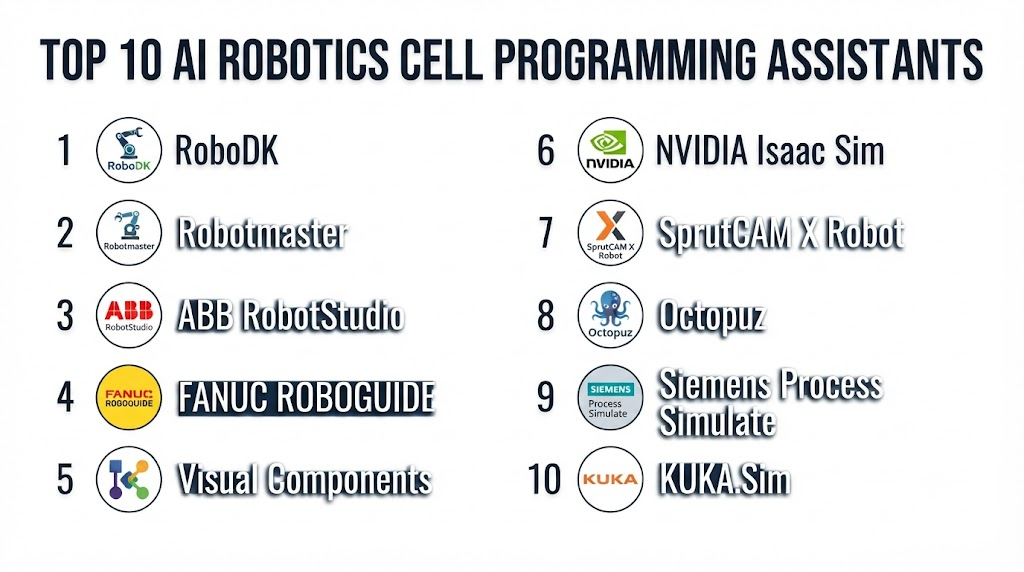
Top 10 AI Robotics Cell Programming Assistants
1. NVIDIA Isaac Sim
One-line verdict: Best for advanced robotics teams building AI-powered robot simulation, programming, perception, and testing workflows.
Short description:
NVIDIA Isaac Sim is a robotics simulation environment designed for developing and testing robots in physically simulated environments. It is particularly useful for teams working on AI robotics, perception, manipulation, digital twins, and simulation-based programming workflows.
Standout Capabilities
- Robotics simulation.
- Physics-based environments.
- Robot manipulation testing.
- Synthetic data generation.
- AI perception workflows.
- Digital-twin development.
- Sensor simulation.
- Integration with robotics development frameworks.
AI-Specific Depth
- Model support: Strong AI/ML ecosystem with support for multiple model-development workflows.
- RAG / knowledge integration: N/A as a primary robotics function.
- Evaluation: Simulation-based testing and robotics evaluation workflows.
- Guardrails: Safety depends on the simulation and deployment architecture.
- Observability: Simulation and robotics telemetry; LLM-specific observability varies.
Pros
- Powerful simulation capabilities.
- Strong AI and computer-vision ecosystem.
- Useful for complex robotic systems.
Cons
- Can require significant technical expertise.
- Hardware and compute requirements may be substantial.
- More suitable for advanced teams than basic robot programming.
Security & Compliance
Security depends on deployment architecture and connected systems. Specific certifications should be verified for the selected environment.
Deployment & Platforms
- Workstation environments.
- Linux-focused robotics workflows.
- Local development.
- Cloud deployment options may vary.
Integrations & Ecosystem
NVIDIA’s robotics ecosystem provides broad support for simulation and AI development.
- ROS/ROS 2.
- Robotics frameworks.
- NVIDIA accelerated computing.
- Vision systems.
- Robot models.
- Synthetic data pipelines.
- AI development tools.
Pricing Model
Pricing varies according to software, enterprise arrangements, and infrastructure requirements. Not publicly stated for a universal robotics-cell programming package.
Best-Fit Scenarios
- AI robotics research.
- Complex robotic-cell simulation.
- Vision-guided robotics development.
2. Siemens Tecnomatix Process Simulate
One-line verdict: Best for industrial manufacturers requiring sophisticated offline robot programming, simulation, and virtual commissioning.
Short description:
Siemens Tecnomatix Process Simulate is an industrial simulation environment used to design and validate manufacturing processes, including robotic operations. It can help engineers test robot motions, manufacturing processes, and production-cell behavior before physical deployment.
Standout Capabilities
- Robot simulation.
- Offline programming.
- Manufacturing-process simulation.
- Virtual commissioning.
- Robot reachability analysis.
- Collision checking.
- Cycle-time analysis.
- Factory-process validation.
AI-Specific Depth
- Model support: AI capabilities depend on connected Siemens and external technologies.
- RAG / knowledge integration: N/A as a primary capability.
- Evaluation: Simulation-based validation.
- Guardrails: Engineering validation and controlled deployment workflows.
- Observability: Simulation metrics and process analysis.
Pros
- Strong manufacturing engineering capabilities.
- Excellent for complex production cells.
- Useful for virtual commissioning.
Cons
- Enterprise-oriented.
- Requires trained engineering users.
- AI-specific capabilities vary by implementation.
Security & Compliance
Enterprise security depends on the selected Siemens environment and deployment. Specific certifications should be verified for the implementation.
Deployment & Platforms
- Enterprise desktop environments.
- Local engineering environments.
- Enterprise manufacturing infrastructure.
Integrations & Ecosystem
Tecnomatix works within Siemens’ broader digital-manufacturing ecosystem.
- CAD systems.
- PLC environments.
- Robot controllers.
- Manufacturing systems.
- Digital-twin technologies.
- Factory automation platforms.
Pricing Model
Enterprise/custom licensing; exact pricing is Not publicly stated.
Best-Fit Scenarios
- Automotive manufacturing.
- Large assembly lines.
- Complex robotic-cell engineering.
3. RoboDK
One-line verdict: Best for engineers seeking accessible offline robot programming, simulation, and multi-brand industrial robot support.
Short description:
RoboDK provides simulation and offline programming capabilities for industrial robots from multiple manufacturers. It is widely useful for creating and testing robot programs without requiring physical access to the robot for every development step.
Standout Capabilities
- Offline programming.
- Robot simulation.
- Multi-brand robot support.
- Post-processors.
- Collision detection.
- Robot path planning.
- CAD integration.
- Python programming.
AI-Specific Depth
- Model support: AI integration can be developed through external APIs and programming workflows.
- RAG / knowledge integration: N/A natively as a core feature.
- Evaluation: Simulation provides a useful validation environment.
- Guardrails: Programming validation and simulation are available; AI-specific guardrails vary.
- Observability: Simulation and program execution information.
Pros
- Broad robot compatibility.
- Accessible compared with some enterprise platforms.
- Strong offline-programming workflow.
Cons
- AI capabilities may require external tools.
- Complex cells can require considerable configuration.
- Advanced industrial integrations may require specialist expertise.
Security & Compliance
Security depends on deployment and connected systems. Specific certifications are Not publicly stated.
Deployment & Platforms
- Windows.
- Desktop environments.
- Local/offline programming.
Integrations & Ecosystem
RoboDK supports a broad industrial robotics ecosystem.
- Industrial robots.
- Python.
- CAD systems.
- Robot controllers.
- PLC-related workflows.
- External APIs.
- Manufacturing software.
Pricing Model
Commercial licensing; exact pricing varies by license type and is subject to change.
Best-Fit Scenarios
- Multi-brand robotics environments.
- Offline programming.
- Small and mid-sized integrators.
4. ABB RobotStudio
One-line verdict: Best for ABB robot users combining offline programming, simulation, virtual commissioning, and production-cell optimization.
Short description:
ABB RobotStudio provides tools for programming and simulating ABB robots in virtual environments. It allows engineers to create and validate robotic applications before deploying programs to physical equipment.
Standout Capabilities
- Robot simulation.
- Offline programming.
- Virtual commissioning.
- RobotStudio environments.
- Robot trajectory development.
- Collision detection.
- Cycle-time analysis.
- ABB robot integration.
AI-Specific Depth
- Model support: AI integration depends on connected applications.
- RAG / knowledge integration: N/A as a core capability.
- Evaluation: Simulation-based testing.
- Guardrails: Engineering validation and controlled program deployment.
- Observability: Simulation and robot-performance information.
Pros
- Strong ABB ecosystem.
- Mature robot simulation.
- Useful for virtual commissioning.
Cons
- Primarily focused on ABB robots.
- AI functionality is not the sole focus.
- Requires robotics expertise for advanced applications.
Security & Compliance
Security depends on the deployment architecture and ABB ecosystem. Specific certifications should be verified for the selected environment.
Deployment & Platforms
- Desktop.
- Windows-based engineering workflows.
- Local and enterprise environments.
Integrations & Ecosystem
RobotStudio integrates closely with ABB robotics.
- ABB robot controllers.
- RobotStudio simulation.
- CAD.
- PLC systems.
- Vision systems.
- Manufacturing applications.
Pricing Model
Licensing varies by product and configuration; exact pricing is Not publicly stated.
Best-Fit Scenarios
- ABB robot installations.
- Automotive and industrial automation.
- Virtual commissioning projects.
5. FANUC ROBOGUIDE
One-line verdict: Best for FANUC-focused manufacturers requiring offline programming and simulation of industrial robotic cells.
Short description:
FANUC ROBOGUIDE is an offline programming and simulation environment for FANUC robots. It helps engineers model robot cells, test programs, examine motion sequences, and reduce reliance on physical-cell programming.
Standout Capabilities
- Robot simulation.
- Offline programming.
- Cell layout.
- Motion simulation.
- Cycle-time evaluation.
- Robot reachability.
- Collision checking.
- Manufacturing process simulation.
AI-Specific Depth
- Model support: External AI integration varies.
- RAG / knowledge integration: N/A.
- Evaluation: Simulation-based program validation.
- Guardrails: Engineering validation and controlled deployment.
- Observability: Simulation and robot-program analysis.
Pros
- Strong FANUC integration.
- Useful for cell development.
- Reduces physical programming time.
Cons
- Primarily designed for FANUC environments.
- AI functionality depends on additional technologies.
- Licensing and configuration can be complex.
Security & Compliance
Specific enterprise security controls and certifications should be verified for the relevant implementation.
Deployment & Platforms
- Windows desktop environment.
- Local engineering systems.
- Manufacturing environments.
Integrations & Ecosystem
ROBOGUIDE is designed around the FANUC ecosystem.
- FANUC robots.
- FANUC controllers.
- CAD.
- PLCs.
- Vision.
- Manufacturing equipment.
Pricing Model
Commercial licensing; exact pricing is Not publicly stated.
Best-Fit Scenarios
- FANUC production cells.
- Automotive manufacturing.
- High-volume industrial automation.
6. KUKA.Sim
One-line verdict: Best for KUKA users requiring simulation, offline programming, and validation of complex robotic manufacturing processes.
Short description:
KUKA.Sim provides simulation and offline programming capabilities for KUKA robotic applications. It can help engineers design robot cells, validate movement, analyze processes, and prepare programs before deployment.
Standout Capabilities
- Robot simulation.
- Offline programming.
- Cell design.
- Collision detection.
- Reachability analysis.
- Process simulation.
- Virtual commissioning.
- KUKA robot integration.
AI-Specific Depth
- Model support: AI integration varies.
- RAG / knowledge integration: N/A.
- Evaluation: Simulation-based testing.
- Guardrails: Engineering validation and controlled deployment.
- Observability: Simulation data and process metrics.
Pros
- Strong KUKA integration.
- Useful for complex robotic cells.
- Supports virtual development.
Cons
- KUKA-centered ecosystem.
- Requires engineering knowledge.
- AI features are not the primary purpose.
Security & Compliance
Security and compliance depend on the specific deployment and organization. Certifications should be verified directly for the applicable product configuration.
Deployment & Platforms
- Desktop engineering environments.
- Enterprise manufacturing environments.
- Local deployment.
Integrations & Ecosystem
KUKA.Sim integrates with KUKA robotics and related manufacturing systems.
- KUKA robots.
- Controllers.
- CAD.
- PLC systems.
- Factory equipment.
- Simulation environments.
Pricing Model
Commercial/enterprise licensing; Not publicly stated.
Best-Fit Scenarios
- KUKA robotic cells.
- Complex automation projects.
- Virtual commissioning.
7. Universal Robots PolyScope
One-line verdict: Best for teams using collaborative robots that want accessible programming and faster deployment of automation applications.
Short description:
Universal Robots’ programming environment is designed to simplify programming collaborative robots. Its graphical and application-oriented approach can reduce programming complexity for common automation tasks.
Standout Capabilities
- Graphical robot programming.
- Collaborative robot workflows.
- Reusable programs.
- Application templates.
- End-effector integration.
- Vision integration through supported solutions.
- Robot configuration.
- Simplified programming workflows.
AI-Specific Depth
- Model support: AI capabilities depend on external integrations and applications.
- RAG / knowledge integration: N/A.
- Evaluation: Program testing and physical validation.
- Guardrails: Robot safety functions and controlled programming workflows.
- Observability: Robot status and application-level information.
Pros
- Relatively accessible programming.
- Strong collaborative-robot ecosystem.
- Suitable for smaller automation teams.
Cons
- Primarily focused on Universal Robots.
- Complex AI workflows may require external software.
- Advanced cell simulation may require additional tools.
Security & Compliance
Robot safety and cybersecurity should be evaluated according to the specific application, network configuration, and deployment.
Deployment & Platforms
- Robot controller.
- Teach pendant.
- Connected engineering environments.
Integrations & Ecosystem
The ecosystem supports collaborative robot applications and third-party peripherals.
- Grippers.
- Vision systems.
- Force/torque sensors.
- PLCs.
- End effectors.
- External automation software.
Pricing Model
Robot and software costs vary by configuration; exact AI-assistant pricing is Not publicly stated.
Best-Fit Scenarios
- Collaborative robot applications.
- Small and mid-sized manufacturers.
- Flexible production environments.
8. Visual Components
One-line verdict: Best for manufacturers and integrators creating detailed 3D factory simulations and robot-programming workflows.
Short description:
Visual Components provides 3D manufacturing simulation and robotics programming tools. It can help users model factories, simulate automation processes, test robot movements, and evaluate production scenarios before implementation.
Standout Capabilities
- 3D factory simulation.
- Robot simulation.
- Offline programming.
- Production-line modeling.
- Layout planning.
- Process simulation.
- Digital manufacturing.
- Robot-cell optimization.
AI-Specific Depth
- Model support: AI integration varies by workflow.
- RAG / knowledge integration: N/A as a core function.
- Evaluation: Simulation-based validation.
- Guardrails: Engineering review and simulation validation.
- Observability: Production and simulation metrics.
Pros
- Strong visualization.
- Useful for factory planning.
- Supports complex automation scenarios.
Cons
- AI programming capabilities may require additional integration.
- Advanced simulations can require expertise.
- Implementation complexity varies.
Security & Compliance
Security capabilities depend on deployment and connected systems. Certifications are Not publicly stated unless verified for the specific product.
Deployment & Platforms
- Desktop.
- Windows.
- Enterprise engineering environments.
Integrations & Ecosystem
Visual Components connects simulation with manufacturing and robotics workflows.
- Industrial robots.
- CAD.
- PLCs.
- Factory layouts.
- Manufacturing equipment.
- External software.
Pricing Model
Commercial licensing; exact pricing varies by configuration.
Best-Fit Scenarios
- Factory simulation.
- Robotics integrators.
- Production-cell optimization.
9. RoboDK + External AI Coding Workflows
One-line verdict: Best for developers combining robot simulation with AI-assisted programming and custom automation logic.
Short description:
Robot engineers can combine robotics simulation environments with general-purpose AI coding assistants to accelerate program development. This approach is particularly useful when teams need custom programming rather than a fully integrated vendor-specific assistant.
Standout Capabilities
- AI-assisted code generation.
- Robot-program explanation.
- Debugging assistance.
- Simulation-based testing.
- Custom scripting.
- API-based automation.
- Program documentation.
- Rapid prototyping.
AI-Specific Depth
- Model support: Can use different external AI models depending on the selected assistant.
- RAG / knowledge integration: Can be built using robotics documentation and internal programming references.
- Evaluation: Simulation can serve as part of the validation loop.
- Guardrails: Must be designed by the engineering team.
- Observability: Depends on the AI assistant and robotics environment.
Pros
- Highly flexible.
- Can combine different AI models.
- Useful for custom robot programming.
Cons
- Requires engineering expertise.
- Safety validation remains the user’s responsibility.
- More integration work than a dedicated platform.
Security & Compliance
Security depends on the AI provider, robotics environment, data flows, and deployment architecture. Specific certifications are Not publicly stated for the combined workflow.
Deployment & Platforms
- Local.
- Cloud AI services.
- Desktop robotics software.
- Hybrid architectures.
Integrations & Ecosystem
Possible integrations include:
- Robot APIs.
- Python.
- Simulation software.
- Git.
- CAD.
- PLC systems.
- AI model APIs.
Pricing Model
Depends on the selected robotics platform and AI provider.
Best-Fit Scenarios
- Robotics developers.
- Custom automation.
- Experimental AI-assisted programming.
10. Microsoft Copilot + Industrial Robotics Development Stack
One-line verdict: Best for enterprises using Microsoft development tools that want AI assistance across robotics software engineering workflows.
Short description:
General-purpose AI coding assistants can help robotics developers generate code, explain programming syntax, document programs, troubleshoot errors, and create supporting software. When combined with robotics simulation and established validation tools, they can become useful programming assistants.
Standout Capabilities
- AI-assisted code generation.
- Code explanation.
- Debugging assistance.
- Documentation generation.
- Programming-language assistance.
- Software-development integration.
- API development.
- Developer productivity workflows.
AI-Specific Depth
- Model support: Depends on the selected Microsoft AI service and product configuration.
- RAG / knowledge integration: Can be implemented using enterprise knowledge and documentation services.
- Evaluation: Software testing and external robotics simulation are required for robust validation.
- Guardrails: Enterprise AI controls vary by configuration.
- Observability: Software-development telemetry and AI-service monitoring vary.
Pros
- Familiar developer workflow.
- Useful for software-heavy robotics projects.
- Can accelerate repetitive programming tasks.
Cons
- Not a dedicated industrial robot-cell programming system.
- Generated code must be validated.
- Physical robot safety cannot be delegated to an AI assistant.
Security & Compliance
Enterprise security features depend on the specific Microsoft services and tenant configuration. Applicable certifications and data-handling policies should be verified before deployment.
Deployment & Platforms
- Windows.
- Cloud.
- Enterprise development environments.
- Hybrid development architectures.
Integrations & Ecosystem
Microsoft’s developer ecosystem can connect AI assistance with broader software workflows.
- Git repositories.
- IDEs.
- APIs.
- Cloud services.
- DevOps tools.
- Simulation platforms.
- Enterprise systems.
Pricing Model
Pricing depends on the specific Microsoft product and licensing configuration.
Best-Fit Scenarios
- Enterprise robotics software teams.
- Microsoft-centric organizations.
- Developers building custom robotic applications.
Comparison Table
| Tool | Best For | Deployment | Model Flexibility | Strength | Watch-Out | Public Rating |
|---|---|---|---|---|---|---|
| NVIDIA Isaac Sim | AI robotics simulation | Local / Cloud | Multi-model / AI ecosystem | Advanced simulation | High technical complexity | N/A |
| Siemens Tecnomatix | Industrial manufacturing | Enterprise / Local | Varies | Virtual commissioning | Enterprise complexity | N/A |
| RoboDK | Multi-brand robot programming | Desktop / Local | External AI integration | Broad robot support | AI may require integration | N/A |
| ABB RobotStudio | ABB robotics | Desktop / Enterprise | Varies | ABB integration | ABB-focused | N/A |
| FANUC ROBOGUIDE | FANUC robotics | Desktop / Local | Varies | FANUC simulation | FANUC-focused | N/A |
| KUKA.Sim | KUKA robotics | Desktop / Enterprise | Varies | KUKA simulation | KUKA-focused | N/A |
| Universal Robots PolyScope | Collaborative robots | Robot controller / Local | External AI | Accessible programming | UR-focused | N/A |
| Visual Components | Factory simulation | Desktop | Varies | 3D manufacturing simulation | Advanced configuration | N/A |
| RoboDK + External AI | Custom AI workflows | Local / Cloud / Hybrid | Multi-model | Flexibility | Engineering required | N/A |
| Microsoft Copilot + Robotics Stack | Software-heavy robotics | Cloud / Local / Hybrid | Multi-model / Hosted | Developer productivity | Not dedicated RCA | N/A |
Scoring & Evaluation
The following scores are comparative editorial estimates rather than vendor-issued benchmarks. They are intended to help buyers structure an evaluation rather than represent absolute product quality.
The rubric uses:
- Core features – 20%
- AI reliability & evaluation – 15%
- Guardrails & safety – 10%
- Integrations & ecosystem – 15%
- Ease of use – 10%
- Performance & cost controls – 15%
- Security & admin – 10%
- Support & community – 5%
| Tool | Core | Reliability/Eval | Guardrails | Integrations | Ease | Perf/Cost | Security/Admin | Support | Weighted Total |
|---|---|---|---|---|---|---|---|---|---|
| NVIDIA Isaac Sim | 9 | 9 | 8 | 10 | 7 | 7 | 9 | 9 | 8.45 |
| Siemens Tecnomatix | 10 | 9 | 10 | 10 | 6 | 8 | 10 | 9 | 9.00 |
| RoboDK | 9 | 8 | 8 | 10 | 9 | 9 | 8 | 9 | 8.75 |
| ABB RobotStudio | 9 | 8 | 9 | 10 | 8 | 8 | 9 | 9 | 8.75 |
| FANUC ROBOGUIDE | 9 | 8 | 9 | 9 | 8 | 8 | 9 | 9 | 8.60 |
| KUKA.Sim | 9 | 8 | 9 | 9 | 7 | 8 | 9 | 9 | 8.50 |
| Universal Robots PolyScope | 8 | 7 | 9 | 9 | 10 | 9 | 8 | 9 | 8.55 |
| Visual Components | 9 | 8 | 8 | 9 | 8 | 8 | 8 | 8 | 8.35 |
| RoboDK + External AI | 8 | 8 | 7 | 10 | 7 | 8 | 7 | 8 | 7.90 |
| Microsoft Copilot + Robotics Stack | 8 | 9 | 8 | 10 | 9 | 8 | 9 | 10 | 8.85 |
Top 3 for Enterprise
- Siemens Tecnomatix — Strong manufacturing simulation and virtual commissioning.
- NVIDIA Isaac Sim — Excellent for AI-intensive robotics development and simulation.
- ABB RobotStudio — Strong choice for ABB-centered enterprise robotics.
Top 3 for SMB
- RoboDK — Flexible multi-brand robot programming.
- Universal Robots PolyScope — Accessible collaborative robot programming.
- Visual Components — Practical factory and automation simulation.
Top 3 for Developers
- NVIDIA Isaac Sim — Strong AI robotics development environment.
- RoboDK — Excellent scripting and API flexibility.
- Microsoft Copilot + Robotics Stack — Useful for software-development assistance.
Which AI Robotics Cell Programming Assistant Is Right for You?
Solo / Freelancer
Independent robotics developers should prioritize:
- Affordable licensing.
- Multi-brand support.
- APIs.
- Python or other scripting support.
- Simulation.
- Documentation.
- Easy program export.
RoboDK can be particularly attractive for independent developers because of its broad robot support and programming capabilities.
SMB
Small manufacturers should avoid buying an unnecessarily complex enterprise platform.
Focus on:
- Your existing robot brand.
- Ease of programming.
- Offline programming.
- Simulation.
- Fast deployment.
- Local engineering support.
If the facility uses collaborative robots, a simplified programming environment may provide more practical value than an advanced AI development platform.
Mid-Market
Mid-sized manufacturers should evaluate the entire robotic cell rather than the robot alone.
Consider integration with:
- PLCs.
- Vision systems.
- Conveyors.
- Safety systems.
- Grippers.
- MES.
- CAD.
- Quality systems.
Simulation and virtual commissioning can provide significant value when cells are complex or production downtime is expensive.
Enterprise
Large manufacturers should evaluate:
- Multi-site deployment.
- Standardization.
- Digital twins.
- Robot-brand diversity.
- Simulation.
- Version management.
- Cybersecurity.
- Governance.
- API access.
- Engineering collaboration.
- AI model management.
Siemens, NVIDIA, ABB, FANUC, and other enterprise-focused ecosystems may be appropriate depending on the factory’s robotics architecture.
Regulated and Safety-Critical Manufacturing
AI-generated robot code should never bypass safety engineering.
Manufacturers should require:
- Human code review.
- Simulation.
- Collision testing.
- Reachability validation.
- Safety-system validation.
- Controlled deployment.
- Program versioning.
- Rollback.
- Change approval.
- Physical commissioning procedures.
AI should assist engineering—not independently authorize safety-critical machine behavior.
Budget vs Premium
Budget-conscious teams should focus on solving a specific programming problem.
For example:
- Faster offline programming.
- Easier robot-cell simulation.
- Automatic code documentation.
- Faster debugging.
Premium enterprise solutions make more sense when the company needs:
- Multi-site standardization.
- Virtual commissioning.
- Digital twins.
- Complex cell simulation.
- Enterprise lifecycle management.
- Extensive integrations.
Build vs Buy
Build your own AI programming assistant when:
- Your robot programming requirements are highly specialized.
- You have internal AI and robotics expertise.
- You need proprietary programming workflows.
- Your company requires tight control over models and data.
Buy an established platform when:
- You need validated robotics workflows.
- You require mature simulation.
- You need vendor-supported robot integrations.
- Your team wants faster implementation.
A hybrid approach is often practical: use established robotics simulation and programming software while adding AI assistants for code generation, documentation, troubleshooting, and engineering support.
Implementation Playbook: 30 / 60 / 90 Days
First 30 Days: Pilot + Success Metrics
Choose one robotic application.
Examples include:
- Pick-and-place.
- Welding.
- Assembly.
- Palletizing.
- Machine tending.
- Material handling.
Establish baseline metrics such as:
- Programming hours.
- Commissioning time.
- Number of programming errors.
- Robot cycle time.
- Simulation accuracy.
- Number of physical iterations.
- Engineering troubleshooting time.
Then test AI-assisted programming on historical or simulated applications.
Days 31–60: Harden Security + Evaluation + Rollout
Create an AI robotics evaluation process.
Test:
- Generated code correctness.
- Robot syntax.
- Motion safety.
- Reachability.
- Collision behavior.
- Tool-center-point accuracy.
- Payload assumptions.
- Speed and acceleration settings.
- Error handling.
- Simulation performance.
Introduce:
- Code review.
- Version control.
- Prompt/version control.
- AI output logging.
- Program approval workflows.
- Red-team testing for unsafe instructions.
- Access controls.
Days 61–90: Optimize Cost, Latency + Governance + Scale
Once the workflow is proven:
- Expand to additional robot cells.
- Create reusable programming templates.
- Build internal robot-programming knowledge bases.
- Optimize AI inference costs.
- Establish model-selection policies.
- Create standardized validation procedures.
- Monitor AI-generated code quality.
- Track engineering productivity.
- Integrate with PLM, MES, Git, and engineering systems where appropriate.
The goal should be a controlled engineering workflow rather than unrestricted AI-generated robot deployment.
Common Mistakes & How to Avoid Them
- Deploying AI-generated code directly to a robot: Always simulate and review first.
- Ignoring robot-specific syntax: Different manufacturers use different programming environments.
- Skipping collision testing: A syntactically correct program can still be physically unsafe.
- Ignoring payload data: Incorrect payload assumptions can affect motion and safety.
- Trusting natural-language instructions blindly: AI can misunderstand ambiguous engineering requirements.
- Skipping simulation: Physical testing should not be the first validation step.
- Ignoring coordinate systems: Frames, tool-center points, and work-object definitions must be verified.
- Failing to version programs: Every AI-assisted modification should be traceable.
- Using cloud AI without reviewing sensitive data: Robot programs and production information may contain proprietary information.
- Ignoring prompt injection: AI assistants connected to external documentation or tools should be protected against malicious instructions.
- No evaluation harness: Test AI-generated programs against predefined robotics tasks.
- No human approval: Safety-critical robot programming requires engineering oversight.
- Ignoring vendor lock-in: Maintain portable program assets where practical.
- Over-automating commissioning: AI should not replace physical safety validation and commissioning procedures.
FAQs
1. What are AI Robotics Cell Programming Assistants?
They are AI-enabled software tools that help engineers create, modify, explain, simulate, debug, and optimize industrial robot programs and related automation workflows.
2. Can AI automatically program an industrial robot?
AI can assist with generating programming logic and robot instructions, but generated programs should be simulated, reviewed, and validated before physical deployment.
3. Can AI program robots using natural language?
Natural-language interfaces can help translate engineering requirements into programming suggestions, but the quality depends on the AI system, robot platform, application complexity, and clarity of the instructions.
4. Does AI eliminate the need for robot programmers?
No. Robotics expertise remains important for cell design, safety, coordinate systems, tooling, payloads, PLC integration, process knowledge, commissioning, and validation.
5. Can these tools work with multiple robot brands?
Some platforms, such as multi-brand offline-programming environments, support many robot manufacturers. Vendor-specific platforms are usually optimized for their own robot ecosystem.
6. What is offline robot programming?
Offline programming allows engineers to create and test robot programs in software rather than programming everything directly on the physical robot.
7. Why is simulation important for AI-generated robot programs?
Simulation provides an opportunity to test movements, reachability, collisions, cycle times, and cell behavior before the generated program is introduced to physical equipment.
8. Can AI optimize robot cycle time?
AI and optimization algorithms can potentially evaluate motion sequences and identify opportunities to reduce unnecessary movement, but results should be validated against physical constraints and process requirements.
9. Can AI work with robot vision systems?
Yes. AI vision models can be integrated with robotics workflows for object detection, localization, inspection, classification, and adaptive manipulation.
10. Can these tools integrate with PLCs?
Many industrial robotics environments can work with PLC systems, although the exact integration method depends on the robot platform, PLC manufacturer, communication protocol, and cell architecture.
11. Is cloud AI suitable for robot programming?
Cloud AI can be useful for development assistance, documentation, and code generation, but organizations should carefully evaluate data privacy, latency, connectivity, and cybersecurity before using cloud services with sensitive industrial information.
12. Can AI-generated robot code be trusted?
It should be treated as engineering assistance rather than automatically trusted code. Simulation, static checks, code review, safety validation, and physical testing remain essential.
13. What is the best AI robotics programming tool?
There is no universal winner. NVIDIA Isaac Sim is strong for AI robotics simulation, RoboDK for multi-brand offline programming, Siemens Tecnomatix for industrial virtual commissioning, and vendor-specific platforms such as RobotStudio for ABB environments.
14. Can small manufacturers benefit from AI robotics assistants?
Yes. Small manufacturers can use AI assistance to reduce programming and troubleshooting effort, particularly when they already operate collaborative robots or standard industrial automation cells.
15. Do AI robotics assistants support open-source models?
Some workflows can incorporate open-source or externally hosted models, but native BYO-model capabilities vary significantly between platforms.
16. How should an organization evaluate an AI robot-programming assistant?
Evaluate it using real programming tasks and measure code correctness, simulation success, programming time, debugging effort, safety issues, cycle time, and engineering acceptance.
17. What data should be protected?
Organizations should consider robot programs, CAD files, production layouts, machine configurations, proprietary process information, customer-specific manufacturing data, credentials, and other sensitive engineering information.
18. Can AI assistants troubleshoot robot errors?
Yes. AI can help interpret error messages, programming syntax, documentation, and logs. Physical faults still require appropriate engineering and maintenance investigation.
19. Should AI have direct access to robot controllers?
Direct access should be approached cautiously. A safer architecture generally separates AI recommendations from deployment and requires controlled human approval before programs reach production controllers.
20. Is it better to build an AI robotics assistant or buy one?
Buying is usually faster when established simulation and programming capabilities are required. Building can make sense when the manufacturer has unique robotics workflows, strong internal AI expertise, and requirements that commercial platforms cannot satisfy.
Conclusion
AI Robotics Cell Programming Assistants are changing how manufacturers approach robot programming, simulation, troubleshooting, and automation engineering. The biggest opportunity is not simply asking AI to write robot code. The greater value comes from connecting AI assistance with simulation, digital twins, robot APIs, engineering documentation, vision systems, PLCs, and structured validation workflows.For advanced AI robotics development, NVIDIA Isaac Sim provides a powerful simulation foundation. Siemens Tecnomatix is particularly relevant to industrial virtual commissioning, while RoboDK offers broad multi-brand offline programming capabilities. ABB RobotStudio, FANUC ROBOGUIDE, and KUKA.Sim are strong choices when the factory is centered on their respective robot ecosystems. Visual Components can help with broader factory simulation, while AI coding assistants can add a flexible software-development layer.