Introduction
AI Invoice OCR & Coding Systems are transforming how organizations capture, process, classify, and record invoice information. Accounts payable teams traditionally spend considerable time opening invoices, extracting supplier details, entering invoice numbers, checking dates, identifying line items, assigning accounting codes, validating tax information, and preparing documents for approval.When invoice volumes increase, manual processing becomes increasingly difficult to manage. Data-entry mistakes can lead to incorrect accounting records, delayed payments, duplicate invoices, reconciliation problems, and unnecessary administrative work. Scanned invoices and PDFs can make the process even more complicated because information may be presented in different layouts and formats.AI-powered invoice OCR systems address these challenges by combining optical character recognition, machine learning, document understanding, natural-language processing, and accounting automation. Instead of simply converting an image into text, modern systems can identify important invoice fields and understand the relationship between different pieces of information.
What Are AI Invoice OCR & Coding Systems?
AI Invoice OCR & Coding Systems use OCR, machine learning, and intelligent document processing to extract information from invoices and automatically prepare that information for accounting workflows.
They can process:
- PDF invoices
- Scanned invoices
- Digital invoices
- Email attachments
- Supplier documents
- Credit notes
- Purchase-order invoices
- Non-purchase-order invoices
- Line-item information
Typical extracted information includes:
- Supplier name
- Supplier address
- Invoice number
- Invoice date
- Due date
- Purchase order number
- Currency
- Subtotal
- Tax
- Total amount
- Payment terms
- Line items
- Accounting codes
Why AI Invoice OCR & Coding Matters
Accounts payable departments can receive invoices from hundreds or thousands of suppliers, each using different formats.
AI invoice processing helps organizations:
- Reduce manual data entry
- Accelerate invoice processing
- Improve data accuracy
- Automate invoice coding
- Reduce processing costs
- Improve approval workflows
- Detect duplicate invoices
- Improve supplier visibility
- Support faster reconciliation
- Strengthen auditability
Key Features
Intelligent OCR
Extract information from scanned and digital invoices.
Document Classification
Determine whether an uploaded document is an invoice, credit note, receipt, or another document type.
Field Extraction
Identify invoice numbers, dates, amounts, supplier information, tax values, and other fields.
Line-Item Extraction
Capture individual products or services rather than only invoice totals.
AI Invoice Coding
Recommend general ledger accounts, departments, cost centers, projects, and other accounting dimensions.
Purchase Order Matching
Match invoices against purchase orders.
Three-Way Matching
Compare invoices with purchase orders and goods receipts where supported.
Duplicate Detection
Identify potentially duplicated invoices.
Supplier Recognition
Recognize suppliers and apply historical processing rules.
Approval Workflows
Route invoices to appropriate approvers.
Exception Management
Send unusual or incomplete invoices for manual review.
Accounting Integration
Synchronize approved invoices with ERP and accounting systems.
Audit Trails
Maintain records of invoice processing and approval activity.
Common Use Cases
Accounts Payable Automation
Automate invoice capture and processing.
Invoice Data Entry
Reduce manual entry of invoice fields.
Invoice Coding
Assign accounting classifications automatically.
Purchase Order Processing
Connect invoice data with purchasing records.
Supplier Management
Improve supplier invoice visibility.
Month-End Closing
Reduce processing delays before financial close.
Global Invoice Processing
Handle invoices across multiple currencies and formats.
Shared Service Centers
Standardize invoice processing across business units.
Exception Management
Route unusual invoices to finance teams.
Benefits
Faster Processing
AI can extract invoice data significantly faster than manual entry.
Lower Administrative Workload
AP teams spend less time entering repetitive invoice information.
Better Data Consistency
Automated extraction and coding can reduce inconsistent data entry.
Improved Visibility
Organizations can track invoices and processing status more effectively.
Fewer Duplicate Payments
Duplicate-detection capabilities can help identify repeated invoices.
Better Auditability
Digital workflows can provide clearer processing and approval histories.
Scalability
Organizations can process higher invoice volumes without increasing manual workload proportionally.
Challenges and Risks
Complex Invoice Layouts
Suppliers use different templates and document structures.
Poor Scan Quality
Low-resolution documents can reduce extraction accuracy.
Ambiguous Coding
The same supplier can provide products or services belonging to different accounting categories.
Tax Complexity
Tax treatment may vary by jurisdiction and transaction type.
Missing Purchase Orders
Non-PO invoices may require additional review.
Incorrect Supplier Data
AI may need to distinguish between supplier names, legal entities, and billing entities.
Integration Complexity
ERP and accounting integrations can require substantial configuration.
Human Review
Unusual or high-value invoices should generally have appropriate review processes.
Responsible AI Practices
Organizations should establish strong controls for automated invoice processing.
Recommended practices include:
- Use confidence thresholds
- Route uncertain invoices to human reviewers
- Maintain approval controls
- Keep detailed audit trails
- Validate supplier information
- Monitor extraction accuracy
- Review automated coding rules
- Protect financial information
- Maintain segregation of duties
- Validate tax classifications
- Monitor duplicate-detection performance
- Regularly review AI-generated accounting codes
Key Trends
Intelligent Document Processing
Invoice OCR is evolving into broader document-understanding systems capable of processing complex financial documents.
AI-Powered Coding
Machine learning is increasingly being used to recommend accounting classifications based on historical transactions.
Automated Three-Way Matching
Invoice processing is becoming increasingly connected to purchasing and receiving workflows.
Straight-Through Processing
High-confidence invoices can increasingly move through automated workflows without manual intervention.
Supplier-Specific Learning
Systems can learn recurring invoice formats and supplier-specific patterns.
Continuous AP Automation
Invoice capture, coding, approval, payment, reconciliation, and reporting are increasingly being connected into a single workflow.
Exception-Based Processing
Finance teams increasingly focus their attention on invoices that require judgment instead of manually processing every invoice.
Methodology
The platforms below were selected based on their relevance to invoice OCR, intelligent document processing, invoice coding, accounts payable automation, purchase-order matching, approval workflows, accounting integration, and financial automation.
The evaluation considers:
- OCR and data extraction
- AI invoice coding
- Line-item recognition
- Purchase-order matching
- Workflow automation
- Accounting integrations
- Exception handling
- Security and governance
- Ease of use
- Enterprise scalability
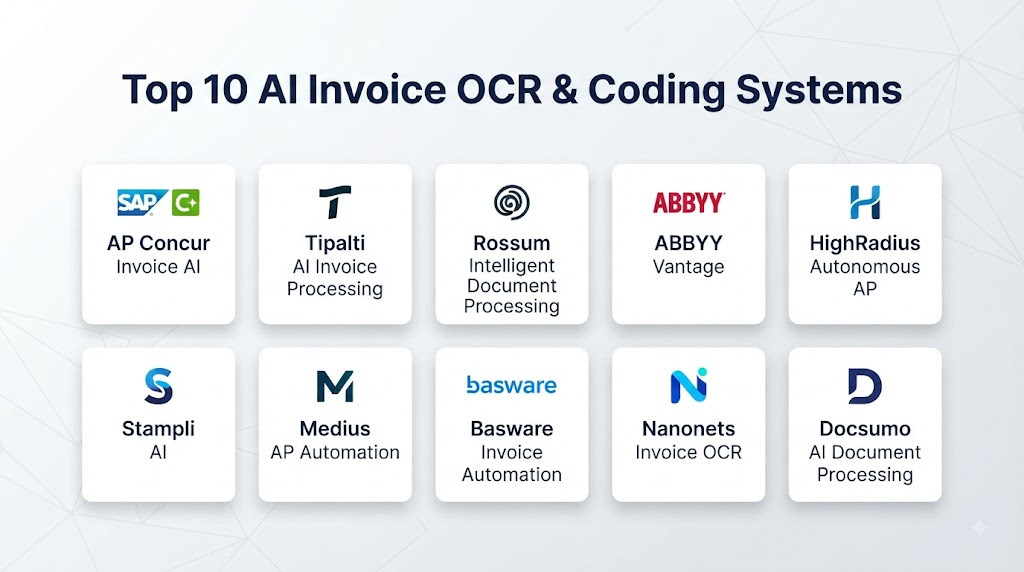
Top 10 AI Invoice OCR & Coding Systems
1. Rossum
Rossum provides intelligent document processing and accounts payable automation with a strong focus on automated document understanding.
Key Features
- AI invoice extraction
- Intelligent document processing
- Invoice validation
- Data extraction
- Workflow automation
- ERP integrations
- Exception handling
Pros
- Strong AI document processing
- Handles varied invoice formats
- Useful automation capabilities
- Strong enterprise workflow potential
Cons
- Complex workflows may require configuration
- Organizations need to validate extracted accounting data
2. ABBYY Vantage
ABBYY Vantage provides intelligent document processing capabilities for extracting structured information from documents, including financial documents and invoices.
Key Features
- Intelligent OCR
- Document classification
- Data extraction
- Invoice processing
- Document understanding
- Workflow integration
- Enterprise deployment
Pros
- Mature document-processing technology
- Strong OCR capabilities
- Broad document support
- Useful enterprise integration options
Cons
- Implementation can require technical expertise
- Advanced automation may require configuration
3. Hypatos
Hypatos focuses on intelligent accounts payable automation and document processing for finance teams.
Key Features
- Invoice extraction
- AI-powered document processing
- Invoice coding
- Accounts payable automation
- Workflow management
- ERP integration
Pros
- Strong finance automation focus
- Useful invoice-processing capabilities
- Supports automated coding
- Enterprise-oriented functionality
Cons
- Implementation requirements vary
- Organizations should validate accounting automation rules carefully
4. UiPath Document Understanding
UiPath Document Understanding combines document processing, OCR, AI, automation, and robotic process automation capabilities.
Key Features
- Intelligent OCR
- Invoice extraction
- Document classification
- AI document understanding
- Workflow automation
- RPA integration
- Human-in-the-loop processing
Pros
- Strong automation ecosystem
- Broad document-processing capabilities
- Useful human-review workflows
- Strong integration with RPA
Cons
- Can require specialized implementation skills
- Large-scale automation projects may become complex
5. Tipalti
Tipalti provides accounts payable, supplier management, invoice processing, and payment automation capabilities.
Key Features
- Invoice capture
- Invoice processing
- Supplier management
- Approval workflows
- Payment automation
- Accounting integrations
Pros
- Broad AP automation
- Strong supplier-management capabilities
- Integrated payment workflows
- Useful finance controls
Cons
- More than an OCR platform, so organizations may be adopting a broader AP ecosystem
- Advanced workflows can require configuration
6. Basware
Basware provides accounts payable and spend-management technology, including invoice automation and intelligent processing.
Key Features
- Invoice capture
- OCR
- Invoice automation
- Purchase-order matching
- Accounts payable
- Spend management
- Analytics
Pros
- Strong enterprise AP capabilities
- Broad invoice-management functionality
- Useful matching workflows
- Strong procurement connection
Cons
- Enterprise implementation can be complex
- Advanced configurations may require specialist support
7. Stampli
Stampli focuses on accounts payable automation and invoice management, with AI capabilities designed to support invoice processing and AP collaboration.
Key Features
- Invoice processing
- AI invoice coding
- Approval workflows
- PO matching
- AP automation
- Supplier communication
- Accounting integrations
Pros
- Strong AP focus
- Useful invoice-coding capabilities
- Collaboration features
- Good approval workflows
Cons
- Primarily focused on AP workflows
- Complex enterprise requirements may require integration work
8. Coupa
Coupa provides spend-management and business-spend solutions that include procurement, invoicing, accounts payable, and financial workflows.
Key Features
- Invoice automation
- Supplier management
- Procurement integration
- Invoice matching
- Spend management
- Approval workflows
- Financial integrations
Pros
- Broad spend-management ecosystem
- Strong procurement integration
- Enterprise capabilities
- Useful invoice workflows
Cons
- Broad platform implementation can be complex
- Best suited to organizations seeking a larger spend-management ecosystem
9. Yooz
Yooz provides accounts payable automation and invoice processing capabilities for organizations looking to digitize AP workflows.
Key Features
- Invoice OCR
- Invoice capture
- Automated coding
- Approval workflows
- Purchase-order matching
- Accounting integrations
- AP reporting
Pros
- Strong AP automation
- Useful OCR capabilities
- Straightforward workflow automation
- Good accounting integrations
Cons
- Complex enterprise requirements may require additional configuration
- Coding accuracy depends on available transaction context
10. Medius
Medius provides accounts payable automation, invoice management, procurement, and spend-management capabilities.
Key Features
- Invoice OCR
- Invoice automation
- AI-powered processing
- PO matching
- Approval workflows
- AP automation
- ERP integrations
Pros
- Strong AP automation
- Useful invoice-matching capabilities
- Good enterprise functionality
- Broad finance workflow support
Cons
- Enterprise deployment can require planning
- Broader platform capabilities may be more than smaller organizations need
Comparison Table
| No. | Platform | Best For | AI OCR | Invoice Coding | PO Matching | Workflow Automation | ERP Integration |
|---|---|---|---|---|---|---|---|
| 1 | Rossum | Intelligent document processing | Strong | Strong | Strong | Strong | Strong |
| 2 | ABBYY Vantage | Enterprise OCR & IDP | Strong | Strong | Moderate | Strong | Strong |
| 3 | Hypatos | AP automation | Strong | Strong | Strong | Strong | Strong |
| 4 | UiPath Document Understanding | Intelligent automation | Strong | Strong | Strong | Strong | Strong |
| 5 | Tipalti | AP & payments | Strong | Strong | Strong | Strong | Strong |
| 6 | Basware | Enterprise AP | Strong | Strong | Strong | Strong | Strong |
| 7 | Stampli | Invoice management | Strong | Strong | Strong | Strong | Strong |
| 8 | Coupa | Spend management | Strong | Strong | Strong | Strong | Strong |
| 9 | Yooz | AP automation | Strong | Strong | Strong | Strong | Strong |
| 10 | Medius | Enterprise AP automation | Strong | Strong | Strong | Strong | Strong |
Weighted Evaluation Table
| No. | Platform | OCR & Extraction 20% | AI Coding 15% | AP Automation 15% | PO Matching 15% | Integrations 10% | Security & Governance 10% | Ease of Use 5% | Scalability 10% | Total Score |
|---|---|---|---|---|---|---|---|---|---|---|
| 1 | Rossum | 20 | 15 | 15 | 14 | 10 | 9 | 4 | 10 | 97 |
| 2 | ABBYY Vantage | 20 | 14 | 14 | 13 | 10 | 10 | 4 | 10 | 95 |
| 3 | Hypatos | 19 | 15 | 15 | 14 | 9 | 9 | 4 | 10 | 95 |
| 4 | UiPath Document Understanding | 20 | 14 | 15 | 14 | 10 | 10 | 3 | 10 | 96 |
| 5 | Tipalti | 18 | 14 | 15 | 14 | 10 | 10 | 4 | 10 | 95 |
| 6 | Basware | 19 | 14 | 15 | 15 | 10 | 10 | 3 | 10 | 96 |
| 7 | Stampli | 18 | 15 | 15 | 14 | 9 | 9 | 5 | 9 | 94 |
| 8 | Coupa | 18 | 14 | 15 | 15 | 10 | 10 | 3 | 10 | 95 |
| 9 | Yooz | 18 | 14 | 14 | 14 | 9 | 9 | 5 | 9 | 92 |
| 10 | Medius | 18 | 14 | 15 | 15 | 10 | 9 | 4 | 10 | 95 |
How to Choose the Right AI Invoice OCR & Coding System
Choose Rossum if intelligent document processing and flexible AI-based invoice extraction are your primary priorities.
Choose ABBYY Vantage if you need mature OCR and enterprise-grade intelligent document processing.
Choose Hypatos if accounts payable automation and AI-powered invoice coding are central requirements.
Choose UiPath Document Understanding if invoice processing needs to be part of a broader RPA and business-process automation strategy.
Choose Tipalti if invoice processing needs to work alongside supplier management and payment automation.
Choose Basware if you need enterprise accounts payable capabilities closely connected with procurement and spend management.
Choose Stampli if invoice management, AP collaboration, coding, and approval workflows are your main requirements.
Choose Coupa if invoice processing is part of a broader procurement and spend-management transformation.
Choose Yooz if you need a dedicated AP automation platform with OCR, coding, and approval capabilities.
Choose Medius if your organization needs broader enterprise AP automation and invoice-management capabilities.
Common Mistakes
- Assuming OCR automatically guarantees accounting accuracy
- Failing to validate extracted totals
- Ignoring line-item coding
- Allowing AI to approve high-value invoices without appropriate controls
- Failing to maintain supplier records
- Ignoring duplicate invoices
- Not validating tax information
- Using outdated accounting codes
- Failing to establish exception workflows
- Neglecting three-way matching
- Not maintaining audit trails
- Giving automated systems excessive financial permissions
FAQs
1. What is AI invoice OCR?
AI invoice OCR uses optical character recognition and document intelligence to extract structured information from invoices.
2. What is invoice coding?
Invoice coding is the process of assigning accounting information such as general ledger accounts, cost centers, departments, projects, and tax codes to an invoice.
3. Can AI automatically code invoices?
Yes. AI systems can recommend or automatically assign accounting codes using historical transactions, supplier information, invoice content, and organizational rules.
4. Can AI process scanned invoices?
Yes. OCR technology allows systems to extract information from scanned documents and images.
5. Can these systems extract line items?
Many modern invoice-processing systems can identify individual line items, quantities, prices, taxes, and related information.
6. Can invoice OCR integrate with ERP systems?
Yes. Many platforms provide integrations with accounting and ERP systems to transfer invoice information and processing results.
7. Can AI detect duplicate invoices?
Many invoice automation platforms provide duplicate-detection capabilities using invoice numbers, suppliers, amounts, dates, and other transaction information.
8. What happens when AI cannot understand an invoice?
The invoice can typically be routed to a human reviewer for correction or additional information.
9. Does AI invoice processing eliminate accounts payable teams?
No. It reduces repetitive manual processing while allowing AP professionals to focus more on exceptions, supplier relationships, controls, reconciliation, and financial analysis.
10. What is the future of AI invoice OCR and coding?
The market is moving toward end-to-end autonomous accounts payable, where AI can capture documents, extract information, code invoices, match purchase orders, identify exceptions, route approvals, and support payment and reconciliation workflows.
Conclusion
AI Invoice OCR & Coding Systems can significantly improve the speed and consistency of accounts payable operations. Instead of manually entering information from every invoice, finance teams can use intelligent document processing to extract invoice fields and automatically prepare them for accounting workflows.Rossum, ABBYY Vantage, Hypatos, UiPath Document Understanding, Tipalti, Basware, Stampli, Coupa, Yooz, and Medius provide different approaches to invoice automation and intelligent accounts payable processing.The best choice depends on invoice volume, accounting complexity, ERP environment, purchase-order usage, supplier diversity, approval requirements, and desired automation level.