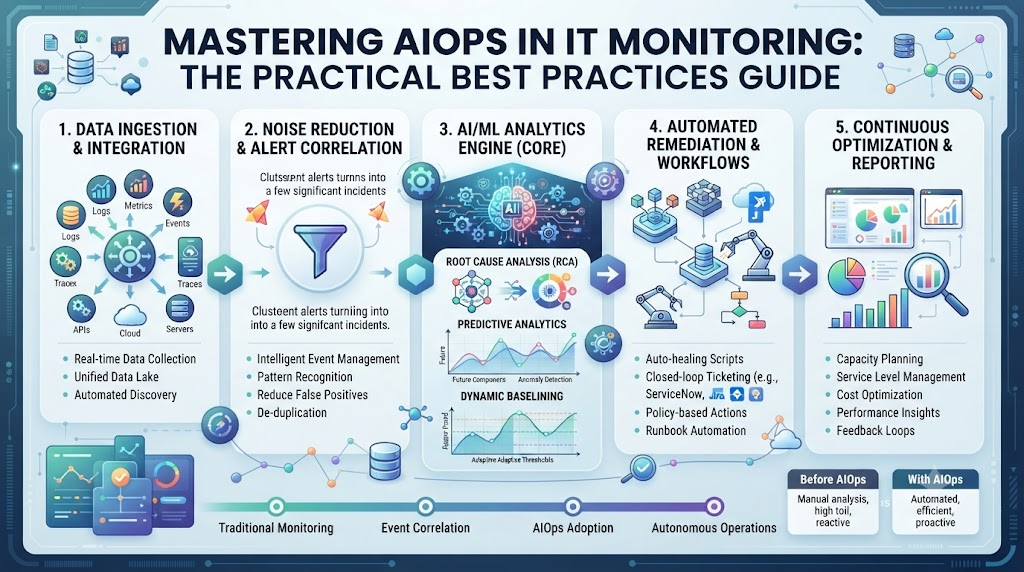
IT monitoring used to be simple. You watched a CPU chart and set a static threshold. When the line hit eighty percent, a loud alarm rang out. Today, systems are massive, distributed, and complex. Static rules fail because cloud apps change every second. You drown in alert fatigue while real problems hide in the noise.
This is where Artificial Intelligence for IT Operations steps in to save your sleep. It uses smart, step-by-step rules and machine learning to make sense of billions of data points. Instead of chasing false alarms, you find root causes instantly. To master these modern techniques, professionals rely on expert training platforms like AIOpsSchool.com for real-world guidance.
Modern IT monitoring requires a shift from reactive firefighting to predictive health tracking. You stop waiting for things to break. You let machine learning spot weird patterns before users notice downtime. This guide walks you through the exact best practices you need to build a bulletproof monitoring setup today.
Understanding the Core Pillars of Modern AIOps
AIOps is not magic. It relies on solid data collection, pattern recognition, and automated action. You must feed clean metrics, logs, and traces into your central engine. Bad data in means bad predictions out. Clean your data pipelines before turning on machine learning models.
Next comes pattern recognition. Your system looks at historical data to learn what normal behavior looks like. It understands that Friday night traffic spikes are fine, but Tuesday morning CPU surges are risky. This context separates real emergencies from harmless noise.
Automation completes the core puzzle. When an issue occurs, the system runs predefined runbooks or triggers alerts with exact fix instructions. Your engineers spend less time hunting for clues and more time building features.
Tackling Alert Fatigue Head-On
Alert fatigue burns out your best engineers. When pagers ring twenty times a night for fake issues, people ignore them. AIOps helps you group related alerts into a single incident ticket. You see one root cause instead of fifty scattered warning lights.
Silence unnecessary alerts immediately. Tune your thresholds dynamically based on real workload trends. Your team will wake up rested and ready to solve real engineering problems. Less noise means higher focus and faster response times.
Encourage your team to review silenced alerts weekly. This habit ensures valid warnings do not slip through the cracks. Continuous tuning keeps your notification system clean and reliable.
Data Ingestion and Quality Control
Your monitoring tools can only be as good as the data you collect. You must gather metrics, logs, and traces from every layer of your stack. Store this information in a unified data store for easy searching. Siloed data breaks machine learning accuracy.
Standardize your timestamp formats across all servers. Remove duplicate log entries to save storage space and speed up analysis. Quality control ensures your models learn accurate patterns. Spend time cleaning your data streams before launching advanced automation.
Validate your data pipelines regularly. Broken collector agents cause blind spots in your observability view. Healthy data inputs guarantee trustworthy automated insights.
Implementing Dynamic Thresholds
Static thresholds cause constant headaches. If you set CPU usage at ninety percent, a sudden traffic jump triggers a false alarm. Dynamic thresholds change automatically based on time of day and historical trends.
Machine learning calculates expected ranges for every metric. If usage goes outside that smart range, an alert fires. This approach cuts false positives by up to seventy percent. You get fewer alerts and much higher accuracy.
Review dynamic baselines after major software releases. Significant architecture changes require models to relearn normal behavior patterns. Keeping baselines fresh prevents unexpected monitoring gaps.
Automated Root Cause Analysis
Finding the needle in a haystack takes too long during an outage. Automated root cause analysis traces failures across microservices in seconds. It points directly to the broken database or slow API call.
Your engineers stop guessing and start fixing immediately. Resolution times drop from hours to minutes. Automation handles the detective work while your team focuses on recovery. This keeps your customers happy and your services online.
Build dependency maps to help your analysis engine understand service links. Clear topology maps make automated tracing fast and accurate.
Bridging Silos Between Dev and Ops
Monitoring tools often live in operational silos. Developers write code, and operators watch dashboards. AIOps bridges this gap by giving everyone a shared view of system health.
Developers see how their code changes impact production performance instantly. Operations teams understand the underlying application architecture better. Collaboration improves because everyone shares the same clear data insights.
Establish shared dashboards for development and operations squads. Common metrics eliminate finger-pointing during major system incidents.
Comparative Overview of Monitoring Approaches
| Feature | Traditional IT Monitoring | Modern AIOps Monitoring |
| Thresholds | Static rules that cause false alarms | Dynamic baselines driven by machine learning |
| Alert Volume | Thousands of noisy, unlinked alerts | Grouped incidents pointing to single root causes |
| Data Sources | Isolated silos of logs and metrics | Unified ingestion of logs, metrics, and traces |
| Problem Solving | Reactive firefighting after user complaints | Proactive anomaly detection before outages happen |
| Resolution Speed | Slow manual investigation across dashboards | Automated root cause analysis in seconds |
Real-World Stories About Server Crashes
- Scenario 1: The Midnight Database Lockup. A sudden spike in user signups locked the primary SQL database. Traditional alerts fired two hundred notifications. AIOps grouped them into a single incident, letting the on-call engineer fix the connection pool in five minutes.
- Scenario 2: The Memory Leak Mystery. A microservice slowly leaked memory over three days. Static thresholds missed it because usage stayed under ninety percent. Machine learning spotted the slow upward drift and warned the team before the crash.
- Scenario 3: The Bad Code Release. A deployment pushed a bad API configuration into production. Latency spiked across all dependent services. Automated anomaly detection flagged the unusual behavior within thirty seconds of rollout.
- Scenario 4: The Network Switch Flap. A faulty core switch caused intermittent packet drops. Traditional monitoring saw it as random noise. Event correlation mapped the drops to a single hardware port, saving hours of debugging.
- Scenario 5: The Third-Party API Failure. An external payment gateway slowed down unexpectedly. Customer checkouts started failing silently. Dynamic baselines caught the drop in transaction success rates immediately, alerting support staff.
- Scenario 6: The Storage Capacity Crunch. Log files filled up a critical partition faster than expected. Historic trends predicted disk full errors for next week. The system triggered an early cleanup warning, preventing an unexpected crash.
- Scenario 7: The Cascading Timeout Issue. A slow Redis cache caused web servers to queue requests. Thread pools exhausted quickly. Root cause analysis pinpointed the Redis latency instantly, bypassing the web tier noise.
- Scenario 8: The Security Certificate Expiration. An internal TLS certificate expired without warning. Services failed to communicate securely. Automated log analysis identified the SSL handshake failures right away, directing engineers to renew the cert.
- Scenario 9: The Garbage Collection Pause. A Java application suffered from long garbage collection pauses. Response times lagged. Anomaly detection isolated the JVM memory pressure from normal network traffic spikes.
- Scenario 10: The Multi-Cloud Latency Spike. Traffic shifted between cloud regions due to a peering failure. End-user latency increased. The monitoring platform mapped the geographic performance drop, triggering an automated traffic reroute.
Common Mistakes and Pitfalls
- Mistake 1: Feeding Garbage Data into Models. Problem: Sending unformatted, noisy logs directly to machine learning engines leads to false predictions. Solution: Clean, parse, and structure your data streams before ingestion.
- Mistake 2: Ignoring Team Training and Culture. Problem: Buying expensive tools without training staff leads to low adoption rates. Solution: Invest in proper team education and build a culture of shared accountability.
- Mistake 3: Setting Unrealistic Expectations. Problem: Expecting AI to fix broken application architecture on day one. Solution: Treat AIOps as an analytical assistant, not a replacement for good software design.
- Mistake 4: Over-Customizing Out-of-the-Box Rules. Problem: Writing thousands of custom rules creates unmaintainable technical debt. Solution: Rely on built-in machine learning baselines and adjust only when necessary.
- Mistake 5: Failing to Update Baselines Regularly. Problem: Static machine learning models fail when business models shift rapidly. Solution: Retrain models continuously using fresh historical data.
- Mistake 6: Creating Isolated Monitoring Silos. Problem: Different departments using separate tools block complete system visibility. Solution: Consolidate telemetry data into a single, unified observability platform.
- Mistake 7: Neglecting Security and Access Control. Problem: Granting unrestricted access to monitoring data exposes sensitive system logs. Solution: Implement strict role-based access controls across all log views.
- Mistake 8: Trusting Automation Without Guardrails. Problem: Allowing automated scripts to restart production services without verification causes outages. Solution: Start with human-in-the-loop approvals before enabling full auto-remediation.
- Mistake 9: Overlooking Cost and Resource Usage. Problem: Storing petabytes of raw logs drives cloud monitoring bills through the roof. Solution: Implement smart log sampling and retention policies to control expenses.
- Mistake 10: Treating AIOps as a One-Time Project. Problem: Launching a tool and forgetting about it leads to degraded performance over time. Solution: Schedule regular reviews to tune rules, check model accuracy, and update workflows.
Step-by-Step Implementation Roadmap
- Step 1: Audit Current Monitoring Setup. Review your existing tools, alerts, and dashboards. Identify where false alarms waste the most team time.
- Step 2: Define Clear Business Goals. Decide what you want to achieve first, such as cutting alert volume by half or speeding up incident resolution.
- Step 3: Centralize Your Telemetry Data. Connect metrics, logs, and traces into a single repository to break down data silos.
- Step 4: Clean and Standardize Data Feeds. Remove duplicate log entries and standardize timestamps to ensure high data quality for machine learning.
- Step 5: Establish Baseline Metrics. Let your system run for two weeks to learn normal operational patterns and workload cycles.
- Step 6: Pilot Dynamic Thresholds. Turn on machine learning baselines for a single non-critical service to test accuracy and reduce noise.
- Step 7: Implement Event Correlation. Group related alerts into single incidents to eliminate alert fatigue for your on-call team.
- Step 8: Automate Root Cause Analysis. Configure automated topology mapping to trace failures across microservices instantly.
- Step 9: Introduce Controlled Auto-Remediation. Set up automated runbooks for simple fixes, requiring human approval for major actions.
- Step 10: Review and Refine Continuously. Hold monthly team reviews to check model performance, update thresholds, and expand automation.
Final Recommendation and Next Steps
Modern IT monitoring requires a shift from noisy manual checks to intelligent automation. You now have the roadmap to cut alert fatigue and spot problems early. Pick one critical service today and audit its log collection pipeline. Implement dynamic thresholds on your staging environment first. Train your team on root cause analysis tools to build confidence. Small, steady improvements lead to a robust, self-healing IT infrastructure.
Frequently Asked Questions
1. What is AIOps in IT monitoring?
AIOps uses machine learning and step-by-step rules to analyze large volumes of operational data, helping teams spot anomalies and solve issues faster.
2. How does AIOps reduce alert fatigue?
It groups hundreds of related warning lights into a single incident ticket, so your engineers see the root cause instead of constant noise.
3. Do I need to replace my existing monitoring tools?
No, AIOps platforms sit on top of your current tools, collecting and analyzing data from your existing metrics, logs, and traces.
4. What is the difference between static and dynamic thresholds?
Static thresholds use fixed numbers that trigger false alarms, while dynamic thresholds adjust automatically based on time of day and historical trends.
5. How long does it take for machine learning models to learn normal behavior?
Most platforms need about one to two weeks of clean historical data to build accurate baselines for normal system performance.
6. Can AIOps fix system failures automatically?
Yes, through auto-remediation, systems can run automated runbooks to fix known issues, though human approval is recommended for major changes.
7. What data do I need to feed into an AIOps platform?
You need to feed structured metrics, application logs, and distributed traces into a unified data store for accurate analysis.
8. Is AIOps suitable for small IT teams?
Yes, small teams benefit the most because automated root cause analysis saves precious time and prevents overnight burnout.
9. How do I start implementing AIOps in my company?
Start by auditing your current alerts, centralizing your log data, and testing dynamic thresholds on a single non-critical service.
10. Does AIOps eliminate the need for human engineers?
No, AIOps acts as an intelligent assistant that handles repetitive detective work, leaving complex problem-solving to human experts.