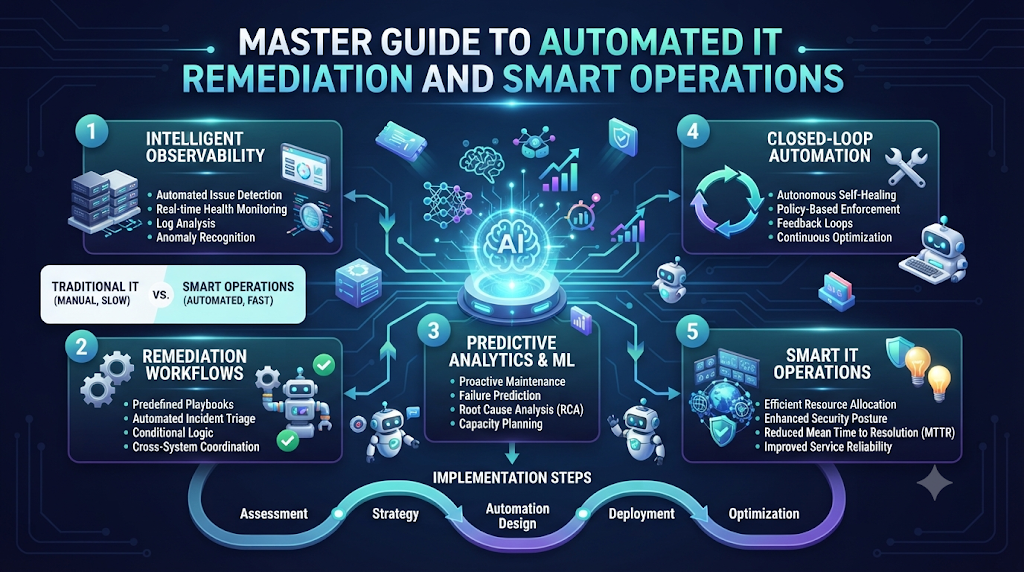
Welcome to AIOpsSchool.com. Do you run computer systems for your job? If so, you know that computer servers break down sometimes. These unexpected crashes cause big business problems. But modern software tools fix these issues fast. This smart process is called automated IT remediation. It means computers fix themselves when things go wrong.
Computers run our modern world today. They power websites, games, and online stores. But these machines need constant care. Traditional teams work hard to watch every server. Humans get tired and miss small warning signs. Next, machines crash because nobody noticed the red lights.
Automated IT remediation changes this broken routine. Smart software watches your servers all day and all night. When a server gets sick, the software acts instantly. It fixes the bug before humans even wake up. So, your business stays online without stressful midnight phone calls.
What Is Automated IT Remediation?
Computers run our modern world today. They power websites, games, and online stores. But these machines need constant care. Traditional teams work hard to watch every server. Humans get tired and miss small warning signs. Next, machines crash because nobody noticed the red lights.
Automated IT remediation changes this broken routine. Smart software watches your servers all day and all night. When a server gets sick, the software acts instantly. It fixes the bug before humans even wake up. So, your business stays online without stressful midnight phone calls.
Why Traditional IT Support Falls Short
Old ways of fixing computers rely entirely on humans. Engineers sit in front of giant screens all day. They wait for alarms to ring in the office. But people move slowly compared to fast computers. Because of this delay, websites stay broken for hours. Customers get mad and leave your store.
Also, manual fixes cause human errors. An exhausted engineer types the wrong command by mistake. Suddenly, a tiny bug turns into a massive outage. Automated systems never get tired or distracted. They follow exact rules to keep your digital home safe.
Traditional IT vs. Automated Remediation
| Feature | Traditional IT Support | Automated IT Remediation |
| Response Speed | Takes hours or days | Takes seconds or minutes |
| Human Stress | High burnout and midnight calls | Low stress because software helps |
| Error Rate | Higher risk of human typos | Consistent and safe execution |
| Cost | Very high labor costs | Lower long-term operational costs |
How Smart Telemetry Powers Fast Fixes
Telemetry is just a fancy word for computer health signals. Servers constantly shout out their current temperature and memory use. Good software listens to these shouts very closely. Next, it spots weird patterns early.
Imagine a car engine making a strange rattling sound. A smart car tells the mechanic before the engine explodes. Automated IT remediation works just like that smart car. It reads server telemetry to stop disasters before they happen.
A Real-World Story About Server Crashes
Let us look at a true story from a busy web hosting company. Their main database crashed right on a busy shopping holiday. Here is how the team survived using automated tools.
- The busy online store opened its digital doors at midnight.
- Thousands of eager shoppers rushed onto the website at once.
- The main database server ran out of memory because of heavy traffic.
- The system threw a critical error and stopped working completely.
- Traditional monitoring tools sent an automated alert to the on-call engineer.
- The engineer woke up from a deep sleep and logged into the computer.
- But the automated remediation platform acted much faster than the human.
- The smart software spun up a brand-new backup database server in seconds.
- Traffic shifted smoothly to the new server without losing any customer orders.
- The website stayed online, and the business made millions of dollars safely.
Common Mistakes and Pitfalls
Many companies try to build automated systems and fail. They make avoidable errors along the way. Here are ten common mistakes and how you can fix them.
- Mistake: Automating broken processes without cleaning them up first.Fix: Map out your clean workflow on paper before writing any automation code.
- Mistake: Setting up alert triggers that are way too sensitive.Fix: Adjust your thresholds so software only reacts to real emergencies, not small blips.
- Mistake: Forgetting to test your automated fix scripts in a safe sandbox.Fix: Run dry-run tests in a test environment to prove your code works safely.
- Mistake: Giving automated tools too much power over production databases.Fix: Keep human approval steps for major database deletions or money transfers.
- Mistake: Ignoring security rules when connecting automation scripts together.Fix: Encrypt all API keys and use strict password permissions for your tools.
- Mistake: Failing to write clear documentation for your automated workflows.Fix: Keep a shared wiki page explaining what each automation script does.
- Mistake: Relying on a single tool to handle every single problem.Fix: Build a modular toolkit using best-of-breed software components.
- Mistake: Not monitoring the performance of the automation software itself.Fix: Set up secondary watchdogs to make sure your remediation tools stay healthy.
- Mistake: Skipping team training sessions on new automated processes.Fix: Hold weekly workshops so every engineer understands the new system.
- Mistake: Expecting zero errors on day one of your new setup.Fix: Start with small, low-risk automated tasks and grow your system slowly.
The Role of Artificial Intelligence in Operations
Artificial intelligence makes automated tools much smarter. Old automation only followed rigid, hard-coded rules. If a weird problem happened, the old script failed instantly. But modern AI learns from past computer crashes.
AI models look at millions of data points every second. They predict future server failures before the hardware breaks down. At AIOpsSchool.com, we teach engineers how to build these smart models. You do not need a math degree to learn these fun concepts.
Step-by-Step Implementation Roadmap
Building an automated IT system takes careful planning. Follow these ten steps to set up your own remediation platform.
- Audit your current server infrastructure to find your biggest pain points.
- Choose a reliable monitoring tool to collect your server telemetry data.
- Define clear, simple rules for what constitutes a server emergency.
- Write small automation scripts to fix your most common repetitive problems.
- Test your scripts thoroughly in a safe, isolated development environment.
- Deploy your tested scripts to production servers with low-risk tasks first.
- Monitor how well your automated scripts perform during real incidents.
- Collect feedback from your engineering team to improve your scripts.
- Expand your automation rules to cover more complex system failures over time.
- Train your entire staff on how to maintain and update the automation platform.
Frequently Asked Questions
1. What is automated IT remediation?
It is modern software that detects server problems and fixes them instantly without human help. This process keeps websites online and prevents costly downtime for growing businesses.
2. Why do companies need AIOps?
AIOps helps businesses handle massive amounts of computer data quickly and safely. It uses machine learning to spot hidden patterns that human eyes usually miss entirely.
3. Is setting up automation hard?
You do not need to build everything on day one. You can start small with basic scripts and grow your automated system over time as your team gains confidence.
4. Will automation replace IT engineers?
No, automation helps engineers focus on fun creative tasks instead of boring chores. It removes tedious manual work so technical teams can build better products for users.
5. How do I choose the right monitoring tool?
Look for tools that offer clear data dashboards and easy alert settings. Your team needs software that provides instant visibility into server health without confusing clutter.
6. Can small businesses use these tools?
Yes, many cloud platforms offer affordable automation tools for small teams. You do not need a massive enterprise budget to start benefiting from automated server care.
7. What is telemetry data?
It is the health signal that servers send out about their temperature and speed. This constant stream of data tells engineers exactly how well the computer hardware is running.
8. How do I stop automation scripts from making mistakes?
Always test your scripts in a safe sandbox environment before running them live. Proper testing ensures your automated fixes solve the problem without creating new bugs.
9. Where can I learn more about this topic?
You can explore helpful guides and tutorials right here on AIOpsSchool.com. We break down complex technical topics into simple lessons that anyone can master quickly.
10. What is the first step to get started?
Audit your current server setup to find your most annoying daily problems. Once you identify those repetitive tasks, you can write your very first automated fix script.
Final Recommendation and Next Steps
Automated IT remediation saves your business a lot of time and money. Do not try to fix your whole system on day one. Start small today by automating one simple, repetitive task on your servers. Build your confidence step by step before tackling massive company projects.
Talk with your team members about your new automation goals. Share what you learn so everyone stays on the same page. Visit AIOpsSchool.com often to explore more expert guides and tutorials. Take total control of your digital infrastructure right now. Enjoy peaceful nights of uninterrupted sleep because your smart software handles the late-night alerts for you.