What is Google Code Wiki?
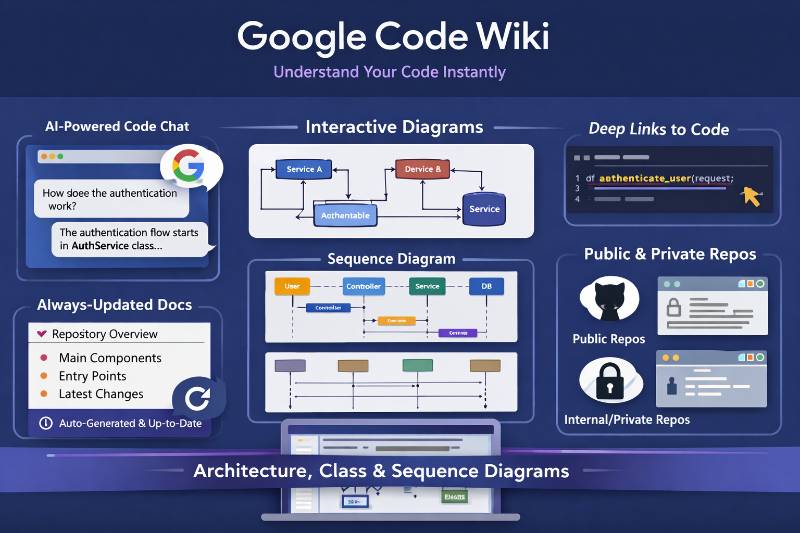
Code Wiki is a platform that creates and maintains a continuously updated, structured wiki for a code repository—so documentation stays “alive” instead of going stale. (Google Developers Blog)
Google describes it as solving a common bottleneck: understanding existing code. The key idea is that Code Wiki scans the full codebase and regenerates documentation after each change. (Google Developers Blog)
What Code Wiki does (core capabilities)
1) Automatically generates “living” repository documentation
- Scans the full codebase
- Regenerates docs after each change
- Produces a structured wiki (not just a README) (Google Developers Blog)
Google also references Code Wiki as “Gemini-generated documentation” that is “automatically refreshed” (example: Coral NPU docs). (Google for Developers)
2) Provides a repo-aware, Gemini-powered chat
Code Wiki’s “always-current wiki” acts as the knowledge base for an integrated chat, so you can ask repository-specific questions grounded in the generated wiki. (Google Developers Blog)
3) Deep-links explanations to real code
Google says wiki sections and chat answers are hyperlinked directly to relevant code files and definitions—so you can jump from explanation → implementation. (Google Developers Blog)
4) Generates always-current diagrams
Code Wiki automatically generates:
- Architecture diagrams
- Class diagrams
- Sequence diagrams (Google Developers Blog)
5) Hosts an interactive website for public repositories (Public Preview)
Google launched the Code Wiki website in public preview. It ingests public repositories and “generates, hosts, and maintains” interactive documentation for them. (Google Developers Blog)
What you can do with Code Wiki (practical tasks)
These are direct “what it enables,” based on the official capabilities above:
- Get a high-level understanding of a repo via the structured wiki and diagrams. (Google Developers Blog)
- Ask targeted questions (via chat) and then verify by following deep links into code. (Google Developers Blog)
- Explore architecture and flows visually using auto-generated architecture/class/sequence diagrams. (Google Developers Blog)
- Avoid stale docs because the documentation is regenerated after changes. (Google Developers Blog)
How to use Code Wiki (Website / Public Preview)
Google’s post doesn’t publish a click-by-click UI manual, but it does describe the workflow at a high level:
- Go to the Code Wiki website (public preview). (Google Developers Blog)
- Open a wiki for a public repository (the site ingests public repos and hosts docs for each one). (Google Developers Blog)
- Navigate the wiki interactively, moving from high-level explanations to referenced files/classes/functions. (Google Developers Blog)
- Use the Gemini-powered chat when a module is confusing; use the hyperlinks in answers to jump into source. (Google Developers Blog)
- Use the auto-generated architecture / class / sequence diagrams to visualize relationships and flows. (Google Developers Blog)
Tip (workflow, not a product claim): treat Code Wiki as your “map,” and the deep links as your “proof.” If an answer seems off, follow the links and confirm in code.
How to use Code Wiki for private/internal repositories (Coming soon)
Google says they are building a Gemini CLI extension for Code Wiki so teams can run the same system locally and securely on internal repositories. (Google Developers Blog)
How to join the waitlist (official steps)
Google’s waitlist page says:
- Click “Earn badge”
- On the next page, find “Code Wiki Early Access”
- Click “Become a member” to reach the sign-up form (Google for Developers)
(As of now, Google does not publish in that post a full installation/configuration guide for the extension—only that it’s coming and has a waitlist.) (Google Developers Blog)
Common use cases (how teams typically apply these capabilities)
These are recommended ways to use the confirmed features (not claims about special modes/integrations):
Onboarding / ramp-up
- Start with the wiki’s high-level overview
- Use diagrams to learn components and flows
- Ask chat: “Where should I start reading?” then follow links into entry points
Understanding a complex module
- Ask chat to explain a module at a high level
- Ask for the related sequence diagram (where applicable)
- Click through to the referenced functions/classes
Architecture comprehension
- Use architecture diagram(s) to identify major components
- Use chat to clarify boundaries/responsibilities, then verify by navigating linked code
Legacy code exploration
- Use wiki + chat to get an overview of unfamiliar areas
- Use deep links to quickly locate the real implementation
Prompt library (safe, high-signal questions to ask)
You can paste these into Code Wiki’s chat and adapt names:
Repo overview
- “Give me a high-level overview of this repository’s main components and how they relate.”
- “What are the main entry points or top-level modules to start reading first?”
Find the right code
- “Where is
<feature>implemented? Link me to the key files/classes/functions.” - “Which components interact with
<module/service>?”
Flow understanding
- “Explain the end-to-end flow for
<scenario>and point to the relevant code.” - “Show the sequence of calls involved when
<event>happens.”
Change impact
- “If I change
<file/class/function>, what other areas are likely affected? Point to references.”
Supported platforms (what’s known from the official sources)
Code Wiki website
- Public preview website that ingests public repositories (Google Developers Blog)
Code Wiki via CLI extension
- Coming soon, designed for running locally on internal repos (Google Developers Blog)
- Waitlist available (Google for Developers)
Google’s announcement does not (in the cited references) enumerate specific SCM providers (e.g., “GitHub/GitLab”) or languages; it stays at the level of “public repositories” and “code repositories.” (Google Developers Blog)
One-minute recap
- Code Wiki creates a structured, continuously updated wiki for a repository by scanning the whole codebase and regenerating docs after changes. (Google Developers Blog)
- It includes Gemini-powered chat grounded in that always-current wiki, and deep links into the exact code. (Google Developers Blog)
- It generates architecture/class/sequence diagrams that remain current. (Google Developers Blog)
- Web experience is public preview for public repos; a Gemini CLI extension for internal repos is coming soon (waitlist available). (Google Developers Blog)
This blog explains Google Code Wiki in a clear and simple way, and I liked how it shows why a structured wiki is useful for a code project. It feels helpful for teams who want to keep notes, updates, and guides in one place without confusion. The idea of keeping the wiki updated along with the repository makes the work easier for both new and old team members. Thanks for sharing this, it made the topic easy to understand.